

Archiving important data requires media that holds files securely for years without power or constant maintenance. Many users wonder about the difference between an HDD and SSD when preserving files offline. Selecting the best hard drives for long term storage ensures your documents, system images, and family photos stay intact over decades.
Recommended by Us

Kosbees 500GB Portable External HDD
- Lightweight design weighing just 0.35 pounds makes it easy to take anywhere
- Instant plug-and-play functionality on Windows systems
- Respectable USB 3.0 transfer rates up to 133MB/s read speed
- Convenient storage expansion for PS4 and Xbox One consoles
- Requires reformatting to ExFAT before it works with Mac computers
- Cannot run current-gen PS5 or Xbox Series X|S games directly from external storage
- Modest 500GB capacity limits how many modern games can be archived at once

Seagate BarraCuda 8TB Internal HDD
- Substantial 8TB storage volume ideal for secondary storage and archives
- Solid sustained transfer performance reaching 190MB/s
- Standard SATA interface enables straightforward installation in desktop PC towers
- Minimalist anti-static packaging cuts down on excess packaging waste
- Does not include SATA data cables or mounting screws in the package
- Mechanical drive speeds are slower than solid-state alternatives for primary boot drives

Tianken 1TB Ultra Slim Portable HDD
- Slim and compact form factor at roughly 0.5 inches thick
- Works immediately out of the box with no extra drivers needed
- Protective anti-scratch casing protects exterior finish
- Broad support across computers, game consoles, and smart displays
- Utilizes traditional mechanical drive storage rather than faster solid-state technology
- Comes with a standard USB-A cable rather than modern native USB-C
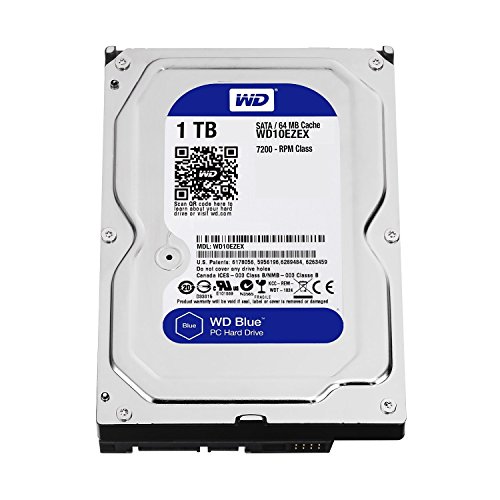
WD Blue 1TB Desktop 3.5" Hard Drive
- IntelliSeek system reduces acoustic noise and unwanted chassis vibration
- Protective head positioning via NoTouch Ramp Load safeguards platter integrity
- Versatile application across desktop computers, DVRs, and NAS setups
- Standard 3.5-inch dimensions mount easily into conventional drive bays
- Ships as a bare drive without mounting screws, SATA cables, or user guides
- Listing specifies rotational speed as a range of 5400 to 7200 RPM rather than a fixed rate
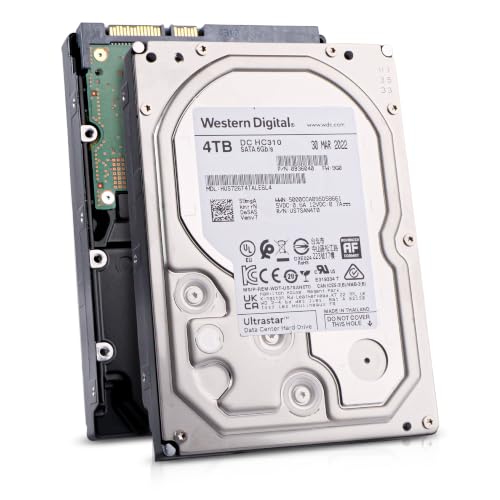
Hitachi Ultrastar 4TB Enterprise HDD
- CMR technology ensures consistent performance during intensive write cycles
- Substantial 550TB/year workload rating built for 24/7 multi-drive arrays
- High-speed 7200 RPM operation combined with a 256MB buffer
- Dual-stage micro actuator provides precision head alignment
- Offered as a renewed drive rather than brand-new retail packaging
- Internal 3.5-inch form factor requires mounting brackets and SATA cables
- Specific sustained megabyte-per-second transfer speeds are not stated in the listing

- CMR technology ensures stable multi-user RAID rebuilding and writing
- Optimized for 1 to 8-bay NAS setups with vibration safeguards
- Generous 256MB cache and 7200 RPM spindle speed
- Long-term reliability with a 1 million hours MTBF rating
- Internal 3.5-inch form factor requires a compatible desktop chassis or NAS enclosure
- Exact sequential read and write transfer rates are not stated in the listing specifications
- Operating power consumption figures are not specified

- Enormous 20TB storage pool accommodates massive libraries and media archives
- Instant plug-and-play operation for Windows 10 and above
- Reliable USB 3.0 desktop connectivity with no bloatware required
- Small, tidy enclosure profile fits easily on busy workstations
- Requires manual reformatting before it can be used with macOS
- Specific read and write transfer benchmark numbers are not stated in product specs
- Desktop form factor requires dedicated placement rather than portable on-the-go use
Selecting Drives for Cold Storage and Server Backups
Choosing an archive drive comes down to how often you access the hardware and how much capacity you need on hand. For continuous network arrays or dedicated backup enclosures, I would go with the Seagate IronWolf 8TB. It utilizes conventional magnetic recording technology, features integrated vibration management, and carries a high workload rating suited for multi-drive environments. Manufacturers like Seagate build these units specifically to handle constant rotational forces.
If your goal is offline cold backups stored in a closet, I would point toward the WD Elements 20TB. It provides massive standalone volume through a simple USB connection, making bulk system archiving straightforward. For desktop builders who prefer internal drives, the Seagate BarraCuda 8TB delivers substantial space for secondary file preservation. Rather than compressing storage drives to squeeze space, investing in larger physical capacity keeps your file retrieval simple and minimizes data corruption risks.
FAQs
1. Do hard drives lose data if left unpowered for years?
Mechanical hard drives store data magnetically on metallic platters, which hold charges for a long time. While magnetic degradation can occur after many years without power, typical magnetic platters remain readable far longer than unpowered flash cells. Spinning up an archive drive once a year helps keep the mechanical bearings lubricated and functional.
2. Why is conventional magnetic recording preferred for archives?
Conventional magnetic recording writes data tracks side by side without overlapping them. Shingled magnetic recording overlaps tracks to increase density, which causes slower write speeds during heavy updates. For multi-drive arrays and predictable long term stability, drives built with conventional tracks deliver consistent write performance and simpler recovery should problems arise.
3. Should backup drives be kept internal or external?
External drives offer the advantage of complete physical disconnection, protecting archives from electrical surges, malware, and accidental deletion. An internal drive mounts directly inside your system chassis alongside other components, as explained in our guide on where storage drives sit, but remains vulnerable to power fluctuations.
4. How many backup copies should you maintain for safety?
Standard data preservation practices recommend keeping three total copies of important files across two different types of storage media. At least one of those copies should sit in a physically separate location or an offline drive enclosure. This practice ensures that hardware failure, fire, or accidental damage never wipes out your only archival copy.
Editor’s Verdict
For securing valuable archives over many years, the Seagate IronWolf 8TB and the WD Elements 20TB rank among the best hard drives for long term storage. They provide proven magnetic stability, large capacities, and dependable architectures for both network arrays and cold offline preservation.







