Cutting modern multi-camera footage requires high sustained throughput to avoid dropped frames and playback stutter. Finding the best external hard drives for 4K video editing comes down to balancing massive file capacity against drive speeds. Understanding what is the difference between HDD and SSD technology helps creators build a dependable production workflow.
Recommended by Us

Glyph StudioRAID 16TB Desktop Drive
- Flexible hardware RAID switches allow instant configuration without extra software
- Rare combination of modern USB and legacy FireWire 800 connections
- Rugged production-grade aluminum casing with an integrated power supply
- Fast 360 MB/s throughput handles heavy multi-stream creative workloads
- Weighs nearly ten pounds, making it strictly suited for stationary desktop setups
- Requires reformatting out of the box for Windows or Linux environments

SSK 1TB USB 3.2 Gen2x2 Portable SSD
- Transfer rates reach up to 2000MB/s on compatible 20Gbps ports
- Sturdy zinc alloy casing provides a durable and compact enclosure
- Bundled dual cables ensure instant connectivity with USB-C and USB-A devices
- TRIM and S.M.A.R.T. management maintain peak drive efficiency over time
- Reaching maximum 2000MB/s speeds requires a dedicated USB 3.2 Gen2x2 port
- Thunderbolt and standard USB connections are capped at 10Gbps

SanDisk 2TB Extreme PRO Portable SSD
- Rapid read and write performance reaching up to 2000MB/s
- Rugged build with 3-meter drop protection and IP65 water and dust resistance
- Forged aluminum housing provides effective heat dissipation
- Built-in 256-bit AES hardware encryption keeps private data secure
- Requires compatible host hardware to achieve full 2000MB/s speeds
- Designated as an older model version
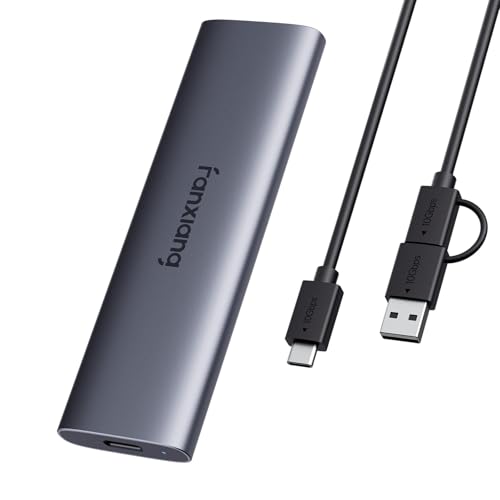
Fanxiang PS1008NEW 1TB External SSD
- Direct 4K ProRes recording capability for compatible USB-C iPhones
- Fast transfer speeds up to 1000MB/s read and 950MB/s write
- Durable, lightweight unibody aluminum casing
- Pocketable footprint weighing under 0.1 pounds
- Metal enclosure warms up noticeably during extended high-speed write sessions
- Full 1000MB/s speed requires host hardware equipped with USB 3.2 Gen2 ports

LaCie Rugged 5TB Portable Hard Drive
- Rugged enclosure protects against shock, dust, and moisture
- High 5TB capacity provides plenty of space for massive media libraries
- Universal USB-C compatibility for Mac and Windows environments
- Lightweight design at just over half a pound for effortless travel
- Speeds capped at 130MB/s cannot match solid-state drive performance
- Thicker form factor than standard non-rugged portable drives
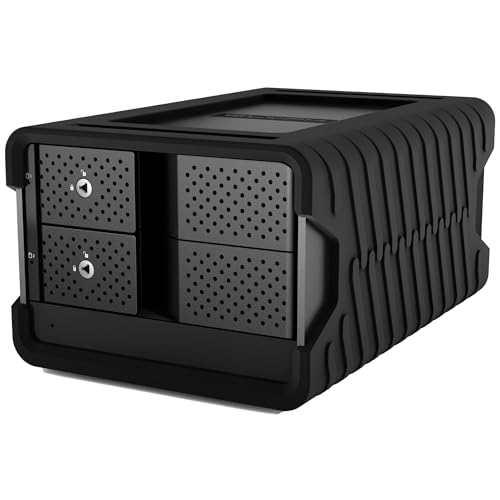
Glyph Blackbox PRO RAID 8TB Drive
- Hardware-based RAID selector requires zero companion software
- Solid 550 MB/s transfer speeds over a 10 Gbps USB-C connection
- Durable aluminum enclosure with active fan cooling for 24/7 uptime
- Ships with cables for both modern USB-C and legacy USB-A ports
- Heavy 10.5-pound chassis is strictly designed for stationary desktop use
- Active cooling fan produces ambient sound in quiet studio environments
Fanxiang 2TB Portable External SSD
- Up to 1000MB/s read speeds for rapid backups and project offloading
- Supports direct plug-and-record 4K ProRes workflows on USB-C iPhones
- Sturdy aluminum chassis provides solid impact resistance
- Broad plug-and-play compatibility across mobile and desktop platforms
- Aluminum casing becomes warm to the touch during intense file transfers
- Direct smartphone recording is restricted to models with USB-C ports
- Reaching maximum throughput requires a host system with USB 3.2 Gen2
Selecting the Right Drive for Your Editing Workflow
When setting up a mobile editing station, I prioritize high transfer rates and rugged casing over raw capacity. For scrubbing through uncompressed footage in the field, I would go with the SanDisk 2TB Extreme PRO. Its aluminum chassis handles heat dissipation while delivering speeds up to 2000MB/s over USB 3.2 Gen 2, and SanDisk builds it with IP65 water resistance and three-meter drop protection.
For editors working at a permanent studio desk handling archived projects, raw capacity becomes the main requirement. In that scenario, I would point you toward the Glyph StudioRAID 16TB. It houses dual enterprise-grade 7,200 RPM drives inside a cooled aluminum enclosure, reaching up to 360 MB/s while giving you hardware RAID 0 and RAID 1 options. Meanwhile, if you travel often and need bulk project backups rather than live timeline scrubbing, the LaCie Rugged 5TB offers rain and shock protection at up to 130MB/s. Some creators wonder whether file compression saves space on media drives, but you should not compress an SSD holding video caches.
FAQs
1. Is an SSD or a traditional hard drive better for 4K video editing?
Solid state drives are far superior for active editing timelines because high-bitrate video demands immediate access times and high sequential throughput. Mechanical hard drives cannot match those read speeds, which often causes dropped frames during real-time preview playback. However, large traditional drives remain useful for long-term project archiving and raw clip storage.
2. Can you edit 4K video directly from an external drive?
Yes, editing directly from an external drive works smoothly as long as the connection interface provides sufficient bandwidth. Drives running over USB 3.2 Gen 2 or Thunderbolt offer more than enough throughput for compressed 4K formats. If you regularly build desktop systems, knowing where the SSD is located in a computer helps when configuring your internal scratch disks.
3. What drive speed is required for smooth 4K timeline playback?
Smooth playback depends on your video codec and bitrate, but compressed formats generally run well at transfer rates above 300 MB/s. Uncompressed 4K or multi-stream editing workflows demand substantially faster storage, often exceeding 1000 MB/s. Dedicated hardware publications like Tom’s Hardware often examine external drive interfaces to clarify these connection limits.
4. Does hardware RAID offer benefits for video editing?
Hardware RAID setups allow two or more drives to work together without burdening your computer processor. A RAID 0 configuration stripes data across drives to boost overall read and write throughput for demanding video streams. Conversely, RAID 1 mirrors data across drives to provide instant hardware redundancy against disk failure.
Editor’s Verdict
For creators chasing speed on location, the SanDisk 2TB Extreme PRO stands out among the best external hard drives for 4K video editing thanks to its rugged build and fast throughput. If you work from a studio desk and need massive project capacity, the Glyph StudioRAID 16TB provides dependable desktop hardware RAID performance.