External storage devices remain an essential bridge between fixed desktop setups and portable computing needs. They provide immediate backup space for important documents, large media collections, and expanding game libraries. Selecting the best external hard drives for pc depends on reliable data transfer rates, physical durability, and daily capacity demands.
Recommended by Us

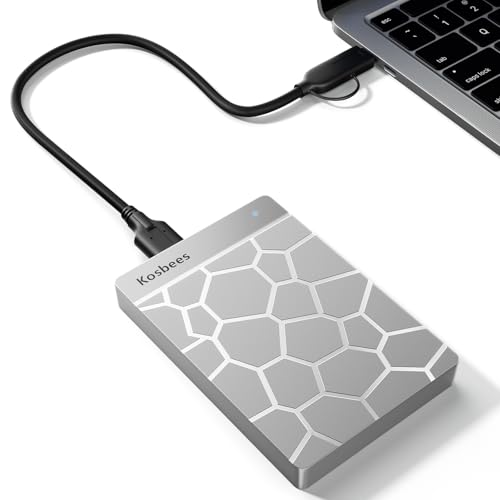
Kosbees 1TB Ultra Slim Portable Hard Drive
- Pocket-friendly, lightweight form factor under 0.55 inches thick
- Immediate plug-and-play operation for Windows devices
- Capable USB 3.0 transfer speeds up to 133MB/s read and 103MB/s write
- Versatile cross-platform support across PC, Mac, Linux, and gaming consoles
- Requires manual formatting to ExFAT for macOS use
- Cannot run current-generation PS5 and Xbox Series X|S games directly

- Enormous 20TB storage pool accommodates massive libraries and media archives
- Instant plug-and-play operation for Windows 10 and above
- Reliable USB 3.0 desktop connectivity with no bloatware required
- Small, tidy enclosure profile fits easily on busy workstations
- Requires manual reformatting before it can be used with macOS
- Specific read and write transfer benchmark numbers are not stated in product specs
- Desktop form factor requires dedicated placement rather than portable on-the-go use

- Simple drag-and-drop file management with automatic system recognition
- Versatile compatibility spanning desktop computers, laptops, and gaming consoles
- Lightweight and compact profile measuring under 0.6 inches thick
- Includes 1-Year Rescue Service for data recovery assistance
- Transfer speed figures are not stated in the official specifications
- Requires reformatting for full compatibility with macOS
- Included 18-inch cable may be short for some desktop configurations

UnionSine 1TB Ultra Slim Portable HDD
- Compact and slim design easily slips into a pocket or bag
- Quiet operation thanks to the JMicron 578 noise-free solution
- True plug-and-play setup requiring zero software installation
- Textured exterior provides a secure grip while handling
- Mechanical HDD transfer speeds are slower than solid-state alternatives
- Comes with a USB-A cable without an included USB-C adapter

SanDisk 1TB Portable SSD
- High-speed read performance up to 1000MB/s reduces transfer waiting times
- Drop protection up to 2 meters adds confidence during travel
- Extremely lightweight at 0.07 pounds with pocket-friendly dimensions
- Instant plug-and-play operation requiring no external drivers
- Manufacturer listing does not state maximum write speeds
- Enclosure lacks an ingress protection rating for water resistance
UnionSine 500GB Ultra Slim Portable HDD
- Ultra-slim and lightweight form factor fits into pockets easily
- Whisper-quiet performance backed by the JMicron 578 controller
- Simple plug-and-play operation with no driver installation required
- Built-in aluminum layer aids passive heat management
- 500GB capacity fills quickly with large modern game installs or 4K media
- Mechanical drive speeds naturally trail behind external solid-state drives
Kosbees 500GB Portable External HDD
- Lightweight design weighing just 0.35 pounds makes it easy to take anywhere
- Instant plug-and-play functionality on Windows systems
- Respectable USB 3.0 transfer rates up to 133MB/s read speed
- Convenient storage expansion for PS4 and Xbox One consoles
- Requires reformatting to ExFAT before it works with Mac computers
- Cannot run current-gen PS5 or Xbox Series X|S games directly from external storage
- Modest 500GB capacity limits how many modern games can be archived at once
Matching the Right Drive to Your Setup
When deciding between the drives below, your physical workflow determines whether mass storage or raw speed matters more. If you keep a massive desktop library of videos or system image backups, WD Elements 20TB is the option I would pick. It delivers enormous capacity on a simple USB 3.0 connection for Windows users. Many creators consult Western Digital documentation to confirm high-capacity drive formatting.
For everyday travel and quick file transfers between workstations, mechanical bulk becomes inconvenient. In that scenario, I would look directly at Sandisk 1TB Portable SSD. Because solid-state hardware features no moving parts and up to two meters of drop protection, it tolerates daily commutes much better than standard platters. Anyone unclear on flash architecture can read about what is the difference between HDD and SSD before choosing. If you simply need an affordable pocket drive for routine text and photo documents, Seagate Portable 1TB gives you drag-and-drop file management with zero software setup required.
FAQs
1. Can you run modern games directly from an external drive?
You can run older titles and last-generation console releases directly from external storage. Newer games designed for modern high-speed storage require installation on an internal drive. To see how motherboard bandwidth impacts speed, check how many M.2 SSD slots does a motherboard have before upgrading your internal library.
2. What causes Windows to show less capacity than the drive package states?
Storage manufacturers calculate drive space using a decimal system where one terabyte equals one trillion bytes. Windows calculates space using a binary format where one gigabyte equals over one billion bytes. Because of this calculation difference, a standard one terabyte drive reports roughly 931 gigabytes inside the operating system.
3. Is a portable solid-state drive safer for travel than a mechanical hard drive?
Solid-state drives withstand physical shocks and vibrations much better because they lack spinning platters and delicate actuator arms. A portable drive with solid-state memory stays safe against minor drops and bumps during daily travel. Mechanical units remain great for desk backups but risk mechanical failure if dropped while writing data.
4. Can you compress an external drive to fit more files?
Windows allows NTFS folder compression on external units, but applying software compression to storage comes with trade-offs. Extra processing overhead can slow down access times on slower drives. You can read whether should you compress an SSD drive to understand how compression impacts drive efficiency and processor usage.
Editor’s Verdict
For high-capacity desk backups among the best external hard drives for pc, WD Elements 20TB offers unmatched storage space. If you need portable durability and up to 1000MB/s read speeds for mobile workflows, I suggest choosing Sandisk 1TB Portable SSD instead.