

Nothing ruins gaming momentum like an annoying storage warning forcing you to delete a beloved title just to install a routine update. Adding one of the best external hard drives for ps5 solves this headache instantly, letting you offload massive game files and protect your primary console drive for active play sessions.
Recommended by Us

- High 4TB capacity accommodates dozens of massive game installs
- Fast 7200RPM enterprise-grade internal drive mechanism
- Plays PS4 games directly from USB storage
- Significantly quicker to copy PS5 games back than re-downloading online
- PS5 games cannot be played directly from external USB storage
- Internal drive mechanism is refurbished rather than brand new
- Bulkier two-pound desktop form factor requires dedicated desk space

- Huge 8TB storage volume eliminates the need to constantly uninstall games
- Quick 7200RPM drive performance with transfer rates up to 250 MB/s
- Active cooling fan prevents thermal throttling during heavy data loads
- Two integrated USB charging ports help declutter desktop charging setups
- Desktop-class footprint and 2.16-pound weight make it bulky for frequent travel
- Host connection interface generation is not explicitly detailed in the specifications

- Enormous 5TB storage capacity eliminates game deletion dilemmas
- Plug-and-play simplicity with officially matched PlayStation firmware
- Plays PS4 games directly from the external drive
- Lightweight and portable 2.5-inch form factor with blue accent LED
- PS5 games must be transferred back to console internal storage to play
- Exact read and write transfer rates are not listed in the manufacturer specs

WD_BLACK 5TB P10 Game Drive
- Substantial 5TB capacity stores dozens of large modern games
- Sturdy design featuring a protective metal top cover
- Versatile cross-platform support for Xbox, PlayStation, and PC
- Up to 130MB/s transfer rate handles large backup transfers reliably
- Connection interface type is not explicitly specified in the listing
- Mechanical HDD transfer speeds are slower compared to solid-state drives
- Current-gen PS5 and Xbox Series X|S games must be copied back to internal storage to play

Seagate 5TB Game Drive for PS4 & PS5
- Officially licensed matching firmware for PlayStation consoles
- Huge 5TB capacity stores a massive game collection
- Play PS4 games directly without taking up internal console storage
- Compact and lightweight build for easy transport
- Cannot play PS5 titles directly from external hard drives due to console architecture
- Specific transfer read and write speeds are not detailed in the manufacturer specifications

GODBPNYMU 500GB Portable External Hard Drive
- Dual USB 3.0 and USB-C connectivity provides flexible plug-and-play capability
- Includes a dedicated carrying pouch to guard against scratches during travel
- Permits direct gameplay execution for PS4 and Xbox One titles
- Extremely thin and lightweight profile at just 0.43 inches thick
- Cannot launch native PS5 or Xbox Series X/S titles directly from the drive
- 500GB capacity fills up quickly if storing multiple modern gaming blockbusters
- Mechanical drive transfer rates are slower than solid-state alternatives
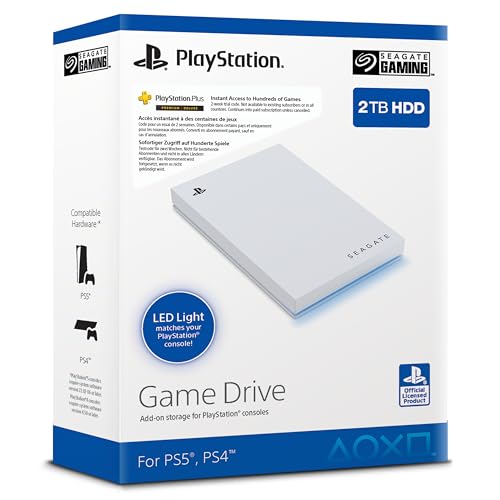
Seagate 2TB Game Drive SSD for PS4/PS5
- Officially licensed with dedicated firmware for PlayStation consoles
- Large 2TB capacity eliminates the need to constantly delete games
- Very lightweight at under 0.37 pounds for easy transport
- Integrated LED lighting adds a stylish console accent
- Specific read and write transfer rates are not stated in manufacturer specifications
- Relies on a standard USB 3.0 interface rather than faster USB-C or Gen 2 connections
Selecting the Right Drive for Your Game Library
Console storage needs differ depending on whether you want massive capacity on a desk or something portable you can toss into a travel backpack. Before deciding, understanding what is the difference between HDD and SSD options helps set realistic expectations for archive transfer times and legacy playback.
- If you have an extensive game library and prefer a permanent desktop hub, the WD_BLACK 8TB D10 is the one I would go for because it offers active cooling technology, speeds up to 250 MB/s at 7200RPM, and two built-in USB ports to charge your accessories.
- For players who want a compact storage solution that travels easily to a friend’s house, I would point toward the WD_BLACK 5TB P10 with its sleek metal top cover and dependable build quality supported by Western Digital.
- If you want external storage tailored directly for console styling, the Seagate 5TB Game Drive is another great option that adds matching blue LED lighting alongside firmware designed for PlayStation hardware.
FAQs
1. Can you play PS5 games directly from an external hard drive?
No, you cannot run native PS5 titles directly from any external USB hard drive. A look at when did SSDs come out highlights how rapidly gaming architecture evolved toward solid-state memory, which is why Sony requires native releases to run from internal storage. However, you can store and archive PS5 titles on the external drive to avoid redownloading them.
2. Can you play PS4 games directly from an external drive on PS5?
Yes, you can install and run backward-compatible PS4 games directly from a connected USB drive. Running legacy titles this way frees up internal console room for newer titles, ensuring you do not run out of space for current releases that demand internal storage.
3. Can you use an external drive alongside an internal M.2 SSD?
Yes, you can expand console storage with an internal drive and still connect a USB drive simultaneously. Knowing how many M.2 SSD slots does a motherboard have shows that modern gaming systems often support multiple drives, and the PS5 similarly pairs its dedicated internal bay with rear USB ports for maximum flexibility.
4. Is an external HDD fast enough for game archiving?
An external hard drive provides plenty of speed for moving and holding games in cold storage. Copying a large title back to the internal console drive takes only a few minutes, which is considerably faster than downloading hundred-gigabyte files over average residential broadband connections.
5. Do external hard drives need external power adapters?
Most compact portable drives draw all necessary power directly through the USB port on the back of your console. However, high-capacity desktop models like the WD_BLACK 8TB D10 include their own power adapters to run larger 7200RPM drives and extra charging ports reliably.
Editor’s Verdict
For players searching for the best external hard drives for ps5, the WD_BLACK 8TB D10 delivers exceptional capacity and active cooling for serious game collectors. If portability and pocket-friendly dimensions are your primary concern, the WD_BLACK 5TB P10 offers a durable metal enclosure with ample room for your growing PlayStation library.








