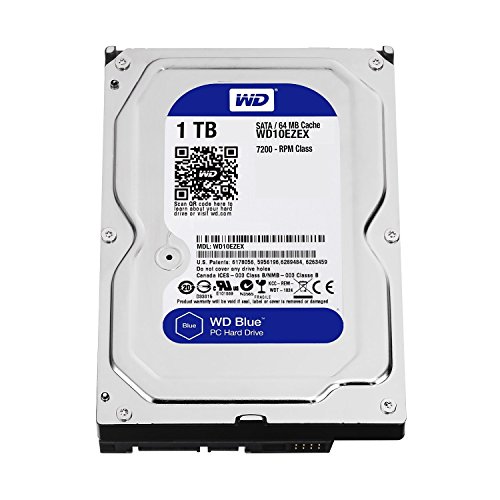
Complex rendering pipelines place immense stress on your workstation storage when caching large simulation data, streaming high-resolution textures, or saving project files. Finding the best hard drives for 3D rendering means balancing raw bandwidth for active scenes with stable endurance for prolonged write sessions so your studio applications never stall during production.
Recommended by Us
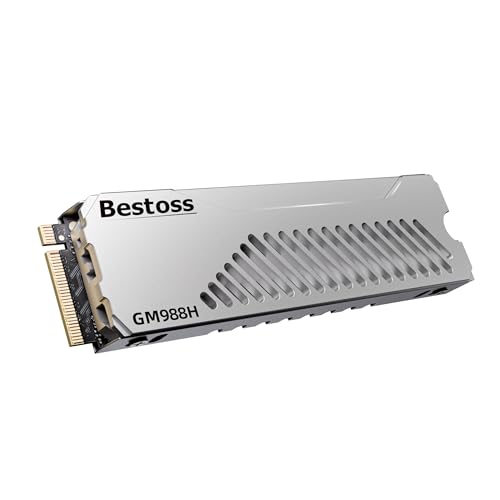
Bestoss 4TB M.2 NVMe PCIe 4.0 SSD
- Incredible sequential speeds up to 7350MB/s read and 6600MB/s write
- Substantial 4TB capacity ideal for expanding PS5 console storage
- Pre-fitted multi-layer metal heatsink delivers effective thermal control
- Utilizes durable 3D NAND TLC flash with dynamic SLC caching
- Lacks onboard DRAM cache, utilizing Host Memory Buffer instead
- Integrated heatsink design is not suitable for thin laptop enclosures
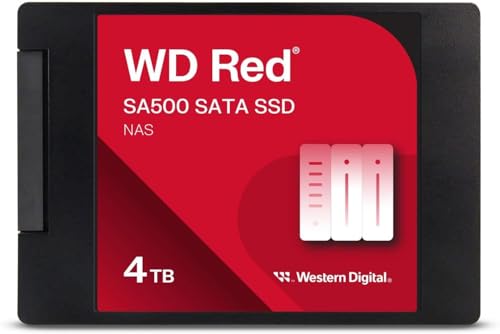
- Substantial 4TB capacity accommodates large media libraries and heavy caching demands
- Engineered specifically for the demanding, continuous operation of NAS enclosures
- Achieves top-tier SATA III performance reaching speeds up to 560 MB/s
- Decreases latency during concurrent multi-user database access and video rendering
- Capped at SATA III bandwidth limits, which is slower than modern NVMe options
- Requires a 2.5-inch drive bay or compatible adapter in your enclosure

Hitachi Ultrastar 3TB SAS Enterprise HDD
- Engineered for nonstop 24x7 enterprise continuous operation
- High 2.0 million hours MTBF rating for long-term durability
- Proven 7200RPM spindle speed with 64MB data cache
- Enterprise-grade 6Gb/s SAS connectivity
- Incompatible with standard consumer SATA ports, requiring a dedicated SAS controller
- Arrives as a bare or OEM drive without SAS cables or mounting screws
- Renewed mechanical drive without detailed prior usage history in the listing

Crucial T710 1TB PCIe Gen5 NVMe SSD
- Massive Gen5 read speeds up to 14,900 MB/s eliminate game load times and file bottlenecks
- State-of-the-art Micron G9 TLC NAND architecture
- Broad support across recent Intel and AMD desktop platforms with Gen5 M.2 slots
- Standard M.2 2280 form factor fits compatible desktops and high-end laptops
- Requires an effective motherboard heatsink or cooler to prevent thermal throttling under heavy loads
- Reaching maximum throughput demands an active PCIe Gen5 M.2 slot

Western Digital 2TB WD Red SA500 SSD
- Engineered for superior endurance in 24/7 multi-user NAS environments
- Maximizes SATA III capability with transfer speeds up to 560 MB/s
- Optimizes caching performance to reduce latency in heavy workflows
- Compact 2.5-inch 7mm form factor fits standard drive bays
- SATA III bandwidth is naturally lower than modern NVMe alternatives
- Designed primarily for NAS caching and storage rather than direct PC gaming

Fanxiang S500 Pro 256GB NVMe SSD
- Fast sequential read speeds up to 3000MB/s
- Graphite thermal sticker provides low-profile heat management
- Solid endurance rating up to 160TBW
- Includes mounting screws and screwdriver in the box
- Compact 256GB capacity limits room for modern gaming libraries
- PCIe 3.0 bandwidth offers lower ceilings than newer PCIe 4.0 drives
- Requires manual partition formatting before initial system use

Bestoss 2TB NVMe M.2 SSD Heatsink
- Blazing read speeds up to 7350MB/s enable rapid 4K game loading
- Pre-installed metal heatsink manages heat dissipation effectively
- Generous 2TB capacity offers abundant room for modern game files
- Combines 3D NAND TLC with HMB and dynamic SLC caching
- Requires a PCIe 4.0 compatible system to achieve rated peak speeds
- Pre-attached heatsink may be too thick for compact notebook slots
Matching Drive Strengths to Your Production Pipeline
Choosing the right drive comes down to where your creative bottlenecks actually occur. If your work involves loading massive geometry libraries and dealing with uncompressed textures, I would go with the Crucial T710 1TB SSD. Its PCIe 5.0 interface and Micron G9 TLC NAND provide exceptional throughput for demanding workloads, though you will want a dedicated motherboard heatsink installed to keep thermal throttling away during continuous asset exports.
For artists who juggle massive project folders and require ample room for local caching, I suggest the Bestoss 4TB NVMe SSD. It combines generous 4TB capacity with a multi-layer heatsink and dynamic SLC caching to maintain strong write performance while saving renders in real time. Meanwhile, if you run a centralized local network server for your studio team, the WD Red SA500 4TB SSD is designed specifically for NAS environments and multi-user access. As Western Digital notes for its Red lineup, higher write endurance is vital for 24/7 network workloads. Before buying high-speed storage, check how many M.2 slots does a motherboard have to ensure your board can support another drive.
FAQs
1. Do hard drives or solid state drives work better for 3D rendering?
Solid state drives are far superior for active project tasks because they eliminate seek times when reading thousands of individual texture maps and asset libraries. Understanding what is the difference between HDD and SSD architecture helps explain why mechanical disks cause viewport stutters, making spinning platters suitable only for cold archival storage.
2. Why does drive temperature matter during long render sessions?
High-speed NVMe drives generate substantial heat when writing multi-gigabyte cache caches or rendering video passes. If an SSD reaches critical operating temperatures without proper cooling, the controller automatically reduces transfer speeds to prevent hardware damage, directly slowing down your rendering pipeline until the drive cools down.
3. Should project scratch disks be separate from the operating system?
Yes, separating your primary operating system drive from your active rendering scratch disk is standard practice among digital artists. Heavy rendering applications frequently create temporary swap files, and keeping that activity isolated preserves system stability while avoiding premature wear on your main boot drive.
4. Can you compress an SSD to fit more 3D assets?
Compressing your storage volume might seem like an easy way to store extra 3D models, but it adds processing overhead whenever files are accessed. If you wonder should you compress an SSD drive for production, the general recommendation is to avoid file system compression on active creative workspaces.
Editor’s Verdict
When assembling a workstation with the best hard drives for 3D rendering, I recommend pairing the Crucial T710 1TB SSD for active project scratch data with the Bestoss 4TB NVMe SSD for expansive scene storage. This combination gives you the rapid throughput needed for real-time saving alongside the large capacity required for intricate 3D assets.