Many users mistakenly assume any portable drive works seamlessly out of the box, only to face frustrating file format conflicts. Selecting the best hard drives for mac requires paying close attention to connection speeds and enclosure durability. Knowing what is the difference between HDD and SSD technology ensures you get reliable storage tailored to your daily workflow.
Recommended by Us

UnionSine 500GB Ultra Slim HDD (Pink)
- Lightweight and ultra-slim construction fits comfortably in pockets or small bags
- No drivers or external power cables needed for quick operation
- Internal aluminum layer aids thermal dissipation and shielding
- Works across a wide variety of platforms including legacy game consoles
- 500GB capacity fills up quickly with modern multimedia files and games
- Traditional mechanical drive transfer rates cannot match solid-state drive speeds

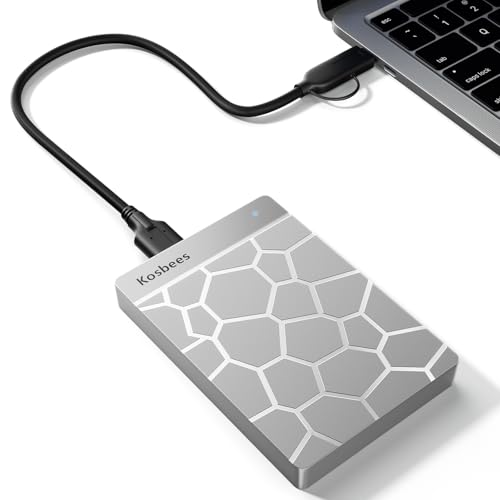
Kosbees 500GB Ultra Slim External HDD
- Pocket-friendly slim profile and lightweight construction
- Ready to use on Windows PCs straight out of the box
- Can store and run last-gen console games directly
- Provides steady USB 3.0 transfer rates for standard backups
- Requires manual reformatting to ExFAT before working with Mac systems
- Cannot run current-generation PS5 or Xbox Series X games directly from the drive
- Mechanical drive transfer speeds are inherently slower than solid state alternatives

SanDisk 1TB Portable Drive
- Fast read speeds up to 600MB/s offer a clear upgrade over mechanical drives
- Extremely lightweight at 0.07 pounds with pocket-friendly dimensions
- Durable architecture protects against drops up to two meters
- Convenient USB-C ready connectivity for straightforward setup
- Dedicated write speed figures are not specified in the product listing
- No stated ingress protection rating against water or dust exposure

WD 5TB Elements Portable Hard Drive
- Massive 5TB storage capacity in a pocket-friendly enclosure
- SuperSpeed USB 3.2 Gen 1 connection rated for up to 5Gbps
- Lightweight construction at approximately 0.52 pounds
- Effortless plug-and-play expandability for PC and Mac
- Specific read and write transfer rates are not specified in the listing
- Slightly thicker 0.82-inch profile compared to lower-capacity portable drives
- Traditional hard drive mechanics transfer slower than external solid-state drives

- Huge 8TB storage volume eliminates the need to constantly uninstall games
- Quick 7200RPM drive performance with transfer rates up to 250 MB/s
- Active cooling fan prevents thermal throttling during heavy data loads
- Two integrated USB charging ports help declutter desktop charging setups
- Desktop-class footprint and 2.16-pound weight make it bulky for frequent travel
- Host connection interface generation is not explicitly detailed in the specifications

Kosbees 500GB Portable External HDD
- Lightweight design weighing just 0.35 pounds makes it easy to take anywhere
- Instant plug-and-play functionality on Windows systems
- Respectable USB 3.0 transfer rates up to 133MB/s read speed
- Convenient storage expansion for PS4 and Xbox One consoles
- Requires reformatting to ExFAT before it works with Mac computers
- Cannot run current-gen PS5 or Xbox Series X|S games directly from external storage
- Modest 500GB capacity limits how many modern games can be archived at once

- Massive 4TB storage capacity in a travel-friendly form factor
- Seamless plug-and-play compatibility with Windows and Mac
- No software installation or external power adapter required
- Includes an 18-inch USB 3.0 cable in the box
- Listing does not state specific read or write transfer speeds
- Utilizes mechanical hard drive storage rather than faster solid-state media
Matching Storage Drives to Your Mac Workflow
If your main goal is simple desktop backup, I would point you toward the Seagate 4TB Portable. It provides plug-and-play simplicity with macOS right out of the box and includes an 18-inch USB 3.0 cable, making it very convenient for routine drag-and-drop file archiving. Both Seagate and competing storage manufacturers deliver dependable magnetic hardware for long-term document safekeeping without complicating setup.
For power users handling heavy multimedia projects or large game libraries, I would go with the WD_BLACK 8TB D10. Its 7200 RPM mechanism hits speeds up to 250 MB/s, and the sturdy enclosure features active cooling technology along with two 7.5W USB Type-A charging ports for accessories. If you travel frequently, the SanDisk 1TB Drive is the option I suggest because it is pocket-sized, offers up to 2-meter drop protection, connects via USB-C, and reaches read speeds up to 600MB/s. When managing portable storage, knowing should you compress an SSD drive helps avoid unnecessary performance headaches on mobile volumes.
FAQs
1. Do external hard drives need special formatting for Mac?
Most external hard drives arrive pre-formatted in NTFS or exFAT. While exFAT works on both macOS and Windows without extra setup, macOS users often prefer APFS or Mac OS Extended for Time Machine backups. You can easily reformat any external disk using the built-in macOS Disk Utility application in just a few clicks.
2. Can I use a standard USB external drive with a modern MacBook?
Yes, but modern MacBooks feature USB-C and Thunderbolt ports rather than standard USB Type-A connections. If your external hard drive uses a Type-A cable, you will need a simple adapter or a compatible cable to connect it. Some portable drives include native USB-C connectivity directly in the box for instant pairing.
3. Is a mechanical hard drive fast enough for Mac backups?
Traditional mechanical drives are fully adequate for routine Time Machine backups and secondary media archiving. While external solid-state drives transfer files much faster, learning when did SSDs come out highlights how conventional hard drives still maintain an advantage in offering massive storage capacity at a reasonable price point.
4. How do I keep an external hard drive safe during travel?
Mechanical drives rely on spinning platters and delicate read heads, so keeping them inside a padded sleeve prevents shock damage during transit. Solid-state options tolerate motion much better since they lack moving mechanical parts, often including built-in drop resistance. Always eject the drive in macOS before unplugging the cable to protect your data.
Editor’s Verdict
Selecting the best hard drives for mac comes down to balancing capacity against speed. For straightforward automated backups at your desk, the Seagate 4TB Portable delivers reliable everyday utility. If your priority is rapid file access on the road, the SanDisk 1TB Drive provides durable solid-state performance inside a lightweight, pocketable frame.