

Modern PlayStation 4 games routinely exceed fifty gigabytes each, leaving standard internal storage cramped after installing only a handful of modern titles. Finding the best hard drives for ps4 lets you retain your entire digital collection without deleting favorites, while understanding what is the difference between HDD and SSD helps balance total capacity against price.
Recommended by Us

Kosbees 500GB Portable External HDD
- Lightweight design weighing just 0.35 pounds makes it easy to take anywhere
- Instant plug-and-play functionality on Windows systems
- Respectable USB 3.0 transfer rates up to 133MB/s read speed
- Convenient storage expansion for PS4 and Xbox One consoles
- Requires reformatting to ExFAT before it works with Mac computers
- Cannot run current-gen PS5 or Xbox Series X|S games directly from external storage
- Modest 500GB capacity limits how many modern games can be archived at once

Kosbees 1TB Ultra Slim External HDD
- Lightweight, pocketable build weighing under 0.5 lbs
- Simple plug-and-play setup out of the box for Windows
- Convenient storage expansion for PS4 and Xbox One titles
- Comes with a USB 3.0 connection cable included
- Requires manual formatting to ExFAT before using on macOS
- Cannot run current-generation PS5 or Xbox Series X|S games directly

GODBPNYMU 500GB Portable External Hard Drive
- Dual USB 3.0 and USB-C connectivity provides flexible plug-and-play capability
- Includes a dedicated carrying pouch to guard against scratches during travel
- Permits direct gameplay execution for PS4 and Xbox One titles
- Extremely thin and lightweight profile at just 0.43 inches thick
- Cannot launch native PS5 or Xbox Series X/S titles directly from the drive
- 500GB capacity fills up quickly if storing multiple modern gaming blockbusters
- Mechanical drive transfer rates are slower than solid-state alternatives

Seagate 5TB Game Drive for PS4 & PS5
- Officially licensed matching firmware for PlayStation consoles
- Huge 5TB capacity stores a massive game collection
- Play PS4 games directly without taking up internal console storage
- Compact and lightweight build for easy transport
- Cannot play PS5 titles directly from external hard drives due to console architecture
- Specific transfer read and write speeds are not detailed in the manufacturer specifications

GODBPNYMU 1TB Portable External Hard Drive
- Dual USB 3.0 and USB-C flexibility suits various devices without specialized hubs
- Transfer speeds up to 5 Gbps speed up local backups
- Plays PS4 and Xbox One games directly on current-generation consoles
- Broad compatibility with Windows, Mac, Linux, and smart TVs
- Cannot launch native PS5 or Xbox Series X/S games directly from external storage
- Internal drive rotational speed and mechanism details are not specified
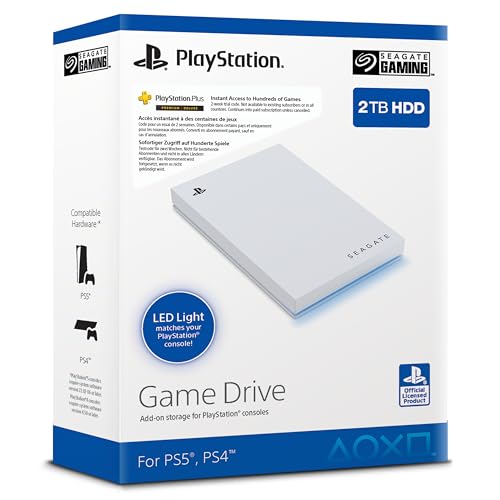
Seagate 2TB Game Drive SSD for PS4/PS5
- Officially licensed with dedicated firmware for PlayStation consoles
- Large 2TB capacity eliminates the need to constantly delete games
- Very lightweight at under 0.37 pounds for easy transport
- Integrated LED lighting adds a stylish console accent
- Specific read and write transfer rates are not stated in manufacturer specifications
- Relies on a standard USB 3.0 interface rather than faster USB-C or Gen 2 connections
Kosbees 1TB Ultra Slim Portable Hard Drive
- Pocket-friendly, lightweight form factor under 0.55 inches thick
- Immediate plug-and-play operation for Windows devices
- Capable USB 3.0 transfer speeds up to 133MB/s read and 103MB/s write
- Versatile cross-platform support across PC, Mac, Linux, and gaming consoles
- Requires manual formatting to ExFAT for macOS use
- Cannot run current-generation PS5 and Xbox Series X|S games directly
Matching Console Storage to Your Play Style
Choosing external storage for a console comes down to how many installations you plan to juggle. If you maintain a sprawling game collection that spans dozens of massive installations, I would go with the Seagate 5TB Game Drive. It provides massive storage headroom, matches Sony firmware natively, and features a clean blue accent light. For reference, Seagate designs these specific enclosures directly for PlayStation consoles, making setup seamless across standard and Pro editions.
Gamers seeking snappy access in a smaller form factor might look at the Seagate 2TB Game Drive instead, which reduces physical bulk while offering ample space for active rotations. If you are on a modest budget and merely need room for save files and a few extra titles, I would point toward the GODBPNYMU 1TB Drive. It bundles both USB-A and USB-C cords alongside a protective carrying pouch, giving you straightforward plug-and-play capability without taking up desk space next to your television setup.
FAQs
1. Can you run games directly from an external hard drive on PS4?
Yes, the PS4 operating system allows you to format an external USB 3.0 drive as extended storage. Once formatted by the console, you can download, install, and launch games directly from the external drive without transferring data back to internal memory.
2. Does an external drive work on both PS4 and PS5?
Yes, drives formatted for PS4 plug directly into next-gen hardware. You can play your legacy PS4 titles straight off the drive on either console, though native PS5 games require high-speed internal installation as covered by Tom’s Hardware.
3. Why does a 1TB drive show less available space on the console?
Drive manufacturers calculate storage using the decimal system where one gigabyte equals one billion bytes, whereas console operating systems calculate storage in binary notation. System partitioning also reserves space for directory tables, meaning a drive shows slightly lower usable space once formatted.
4. Is an external SSD noticeably faster than an HDD on PS4?
Solid-state drives offer improved random read speeds that shave seconds off loading screens, particularly on the PS4 Pro. While an internal drive swap yields similar benefits, you should consider storage history like when did SSDs come out to gauge how older console interfaces bottleneck modern solid-state transfer rates.
Editor’s Verdict
For players needing an effortless storage boost, the Seagate 5TB Game Drive stands out among the best hard drives for ps4 thanks to official PlayStation firmware integration and massive capacity. If you prefer compact portability, the GODBPNYMU 1TB Drive provides a dependable budget-conscious companion.






