

Massive media archives, video projects, and local server backups quickly overwhelm standard mechanical disks and fast solid-state drives. Finding the best 10TB hard drives requires balancing workload endurance, rotational vibration handling, and overall drive noise. Knowing what is the difference between HDD and SSD storage helps clarify why bulk mechanical drives remain the top choice for archival data.
Recommended by Us

- Massive 10TB capacity ideal for bulk data and RAID configurations
- Enterprise-grade 2.5M-hour MTBF rating built for continuous uptime
- Fast 7200 RPM performance with large 256MB cache
- Compatible with standard 3.5-inch desktop and NAS drive bays
- Ships as a bare drive without mounting screws or SATA cables
- Must be partitioned and formatted manually before detection by the operating system

- Heavy-duty 550TB/year workload rating easily outpaces desktop-class drives
- Substantial 10TB capacity reduces total drive bay requirements in servers
- Engineered for dependable 24/7 runtimes with an impressive 2 million hour MTBF
- Generous 256MB cache aids continuous data flow during high-demand multi-user tasks
- Sequential read and write transfer rates are not specified in the manufacturer details
- Enterprise-grade mechanical drives typically generate more noise and heat than desktop drives

- Massive 10TB capacity tailored for extensive video archival
- Firmware tuned specifically for high-stream, write-heavy surveillance workflows
- Equipped with TLER and ATA streaming support to reduce dropped frames
- Substantial 256MB cache manages heavy incoming data buffers
- 5400 RPM rotational class focuses on efficiency rather than peak desktop speeds
- Internal 3.5-inch form factor requires a dedicated drive bay or NVR enclosure
- Specific sustained transfer speeds are not listed in the manufacturer details

Seagate Exos X10 10TB Enterprise HDD
- High-capacity 10TB storage engineered for enterprise-grade workloads
- Heavy-duty workload rating of 550TB per year with 2 million hour MTBF
- Responsive performance with 7200RPM speed and 256MB cache
- Built for continuous 24x7 operation in multi-drive enclosures
- Enterprise 7200RPM drives generate more operational noise and heat than lower-power consumer drives
- Specific sequential transfer rate benchmarks are not specified in the listing
- Arrives as a renewed unit in generic packaging rather than retail boxing

- Spacious 10TB capacity for heavy storage environments
- Impressive 2.5M hours MTBF rating built for enterprise endurance
- 7200 RPM speed combined with a large 256MB cache
- Standard SATA interface for straightforward system integration
- Exact read and write transfer speeds are not specified in the listing
- Standard 3.5-inch profile requires desktop drive bays or powered external enclosures

Seagate Enterprise 10TB HDD (Renewed)
- Massive 10TB storage capacity in a standard 3.5-inch form factor
- Enterprise-grade 24/7 design backed by a 2.5 million hour MTBF rating
- High-performance 7200 RPM rotation speed with 256MB buffer
- Versatile application across desktop PCs, NAS racks, and surveillance systems
- Ships as a bare drive without SATA data cables or mounting screws
- Requires manual drive initialization and formatting before the system detects it
- Supplied in basic brown box packaging rather than retail boxing
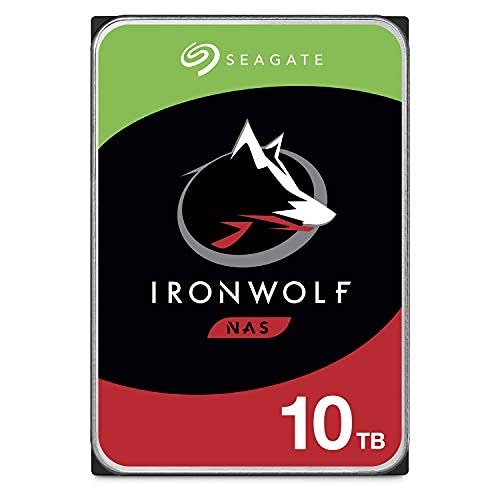
- CMR recording standard delivers stable performance without SMR write penalties
- Purpose-built firmware reduces rotational vibration in multi-bay chassis
- Fast 7200 RPM rotational speed and 256MB cache assist multi-user access
- Compatible with drive health monitoring on supported NAS operating systems
- 7200 RPM operation produces more sound and heat than slower 5400 RPM options
- Continuous read and write transfer rates are not specified in the product data
Matching Drive Capabilities to Specific Storage Tasks
For network-attached storage with multiple drive bays, I would choose the Seagate IronWolf 10TB. It is built for multi-user NAS environments up to eight bays, comes with integrated health management monitoring, and spins at 7200 RPM with a 256MB cache to keep continuous file transfers smooth across local networks. High-capacity spinning drives like this pair well with modern desktop setups where you might wonder where is the SSD located in a computer for running your operating system.
If your workload involves intense round-the-clock server activity, I would point you toward the Seagate Exos X10 10TB. This enterprise model supports annual workloads up to 550TB and features a 2 million hour MTBF rating, which suits heavy corporate databases or constant file sharing arrays. On its official portal, Seagate provides complete enterprise documentation.
For dedicated security setups, I would go with the WD Purple 10TB. It features dedicated firmware tuned for write-intensive video feeds, prioritizing write operations to maintain smooth feeds from multiple surveillance cameras without dropping frames.
FAQs
1. Why choose a 10TB hard drive over multiple smaller drives?
A single 10TB drive conserves physical drive bays, reduces total power consumption, and simplifies volume management. Using fewer high-capacity drives in a desktop or home server leaves expansion space open for future hardware, much like planning how many M.2 SSD slots does a motherboard have for primary operating system drives.
2. What is the difference between NAS drives and surveillance drives?
NAS drives like the IronWolf line focus on multi-user access, vibration tolerance, and continuous read and write operations. Surveillance drives prioritize constant, sustained write cycles to prevent video frame loss, often running at lower RPM classes to manage heat while operating non-stop across numerous connected camera streams.
3. Do 10TB enterprise drives work inside a standard desktop computer?
Yes, enterprise models with SATA interfaces connect to standard desktop motherboards and power supplies without issue. However, they are built for server chassis, meaning they might generate more audible clicking sounds during intense head movement than consumer desktop drives. Tech publications like Tom’s Hardware often discuss enterprise drive acoustic characteristics in standard PC cases.
4. Do high-capacity 10TB drives require special formatting?
Modern 10TB drives require the GUID Partition Table (GPT) format rather than the older MBR standard, which tops out at 2TB per partition. Most modern operating systems default to GPT automatically when initializing a new unformatted drive, ensuring that the full ten terabytes of space show up properly.
Editor’s Verdict
For buyers searching for the best 10TB hard drives, the Seagate IronWolf 10TB offers the ideal combination of vibration resistance and multi-bay NAS support. If you need enterprise endurance for continuous database workloads, the Seagate Exos X10 10TB delivers exceptional reliability with its 550TB annual workload rating and five-year limited warranty support.






