

External storage devices offer a practical way to manage large offline backups alongside your primary system. The best high capacity external hard drives deliver ample room for extensive media collections, while understanding what is the difference between HDD and SSD options helps you choose the right balance of speed and sheer volume.
Recommended by Us
- Fast transfer speeds up to 2000MB/s for quick workflow turnaround
- Strong physical durability with IP65 weather rating and 3-meter drop tolerance
- Substantial 4TB capacity inside an ultra-light 0.1-pound enclosure
- Hardware-based 256-bit AES encryption keeps sensitive files secure
- Cable inclusions and adapter details are not specified in the listing
- Carries a significant price premium compared to standard external drives

Kosbees 1TB Ultra Slim Portable Hard Drive
- Pocket-friendly, lightweight form factor under 0.55 inches thick
- Immediate plug-and-play operation for Windows devices
- Capable USB 3.0 transfer speeds up to 133MB/s read and 103MB/s write
- Versatile cross-platform support across PC, Mac, Linux, and gaming consoles
- Requires manual formatting to ExFAT for macOS use
- Cannot run current-generation PS5 and Xbox Series X|S games directly
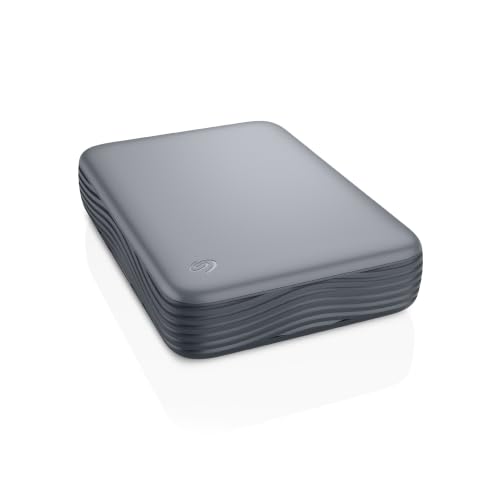
- Huge 8TB capacity for comprehensive long-term data archiving
- Cross-platform support for both Windows and macOS systems
- Simple plug-and-play desktop setup with modern USB-C host support
- Includes Seagate Rescue Data Recovery Services
- Weighs over 2.5 pounds and is designed strictly for stationary desktop use
- Manufacturer does not specify exact data transfer speeds in the technical details
- Uses a Micro-B connector on the drive side rather than a native USB-C port
Kosbees 500GB Portable External HDD
- Lightweight design weighing just 0.35 pounds makes it easy to take anywhere
- Instant plug-and-play functionality on Windows systems
- Respectable USB 3.0 transfer rates up to 133MB/s read speed
- Convenient storage expansion for PS4 and Xbox One consoles
- Requires reformatting to ExFAT before it works with Mac computers
- Cannot run current-gen PS5 or Xbox Series X|S games directly from external storage
- Modest 500GB capacity limits how many modern games can be archived at once

- Enormous 20TB storage pool accommodates massive libraries and media archives
- Instant plug-and-play operation for Windows 10 and above
- Reliable USB 3.0 desktop connectivity with no bloatware required
- Small, tidy enclosure profile fits easily on busy workstations
- Requires manual reformatting before it can be used with macOS
- Specific read and write transfer benchmark numbers are not stated in product specs
- Desktop form factor requires dedicated placement rather than portable on-the-go use

SanDisk 1TB Portable Drive
- Fast read speeds up to 600MB/s offer a clear upgrade over mechanical drives
- Extremely lightweight at 0.07 pounds with pocket-friendly dimensions
- Durable architecture protects against drops up to two meters
- Convenient USB-C ready connectivity for straightforward setup
- Dedicated write speed figures are not specified in the product listing
- No stated ingress protection rating against water or dust exposure

SanDisk 1TB Extreme Portable SSD
- Rapid transfer speeds up to 2000MB/s handle large files quickly
- IP65 water and dust resistance combined with 3-meter drop durability
- 256-bit AES hardware encryption for private data security
- Extremely lightweight and portable at just 0.1 pounds
- Reaching maximum 2000MB/s speeds requires a compatible high-speed USB-C port
- Specific included accessories and cables are not detailed in the listing
Matching Drive Capacity to Your Workstation Needs
Choosing the right external drive comes down to balancing raw storage room against daily mobility. For sheer bulk storage at an office desk, I would pick the WD 20TB Elements. Its twenty-terabyte volume gives creators and collectors unmatched room for cold storage archives and full system images, running on a simple plug-and-play USB 3.0 interface for Windows setups. If you want official hardware utilities, Western Digital maintains dedicated drive software to keep tabs on unit health.
If your budget or space needs are more modest, the Seagate 8TB Expansion is the desktop drive I would go with. It balances a sizable eight terabytes of room with straightforward USB-C connectivity, and it includes Rescue Data Recovery Services for extra peace of mind. Meanwhile, creators who move between editing workstations will prefer the SanDisk 4TB Extreme. It hits read transfer speeds up to 2000MB/s, includes 256-bit AES encryption, and has an IP65 rating for dust and water resistance, which is ideal if you often travel. Knowing should you compress an SSD drive helps preserve steady transfer performance across such solid-state volumes.
FAQs
1. Are large desktop hard drives noisy during heavy operation?
Large external desktop drives house mechanical platters spinning at high speeds, meaning you will hear subtle humming and drive clicking during prolonged read or write sessions. Solid-state models run completely silent since they contain no moving internal parts, making them preferable if you desire a quiet workspace.
2. Can you play modern console games directly from an external hard drive?
Current consoles like the PlayStation 5 and Xbox Series X require games to run from internal solid-state memory. While you can store titles on external mechanical drives to save internal space, you must transfer current-generation titles back to internal storage before playing them.
3. Why does my drive show less capacity in Windows than the label states?
Drive manufacturers calculate storage space using decimal math where one terabyte equals one trillion bytes. Windows calculates storage space using binary math, which counts 1,024 bytes per kilobyte. This mathematical difference causes an eight-terabyte drive to show roughly 7.27 terabytes of usable volume in Windows disk utilities.
4. Do high-capacity external drives require external wall power?
Compact portable drives draw sufficient operating power directly from a computer USB port. In contrast, massive desktop units housing standard 3.5-inch mechanical drives require their own dedicated AC wall adapter to spin the platters reliably, which is something to consider before arranging your desktop cables.
Editor’s Verdict
For most desktop setups, the WD 20TB Elements easily leads the best high capacity external hard drives thanks to its massive archive volume. Those prioritizing field durability and speed should select the rugged SanDisk 4TB Extreme instead.






