

Mechanical storage often generates humming and clicking sounds that disrupt a quiet workspace or home theater setup. Finding the best quiet hard drives means balancing acoustic performance, rotational speed, and reliability. Understanding what is the difference between HDD and SSD helps clarify why mechanical drives still matter for cost-effective capacity.
Recommended by Us

- Consistent 7200 RPM performance for everyday computing tasks
- IntelliSeek feature actively reduces acoustics and operational vibration
- NoTouch Ramp Load technology minimizes mechanical wear on the disk surface
- Standard 3.5-inch form factor fits easily into desktop drive bays
- Ships as a bare drive without SATA cables, mounting screws, or installation guides
- 500GB capacity is relatively modest for modern games and large video libraries
- Specific sustained read and write transfer rates are not specified in the listing

- 7200 RPM class performance provides dependable everyday mechanical responsiveness
- SATA 6Gb/s connection ensures easy integration with common desktop towers
- Useful as a dedicated secondary storage drive when paired with an SSD
- Standard 3.5-inch form factor fits common PC chassis brackets
- 500GB capacity is relatively modest for extensive game installations or large video archives
- Specific sustained transfer speed rates are not detailed in the manufacturer listing

Seagate SkyHawk 6TB Surveillance HDD
- Built specifically for continuous 24x7 surveillance video workloads
- Workload endurance rating is triple that of typical desktop hard drives
- Rotational vibration sensors protect multi-bay RAID installations
- Substantial 256MB onboard cache buffers heavy write streams
- Internal 3.5-inch form factor requires proper bay mounting and power connections
- Listing does not provide specific sequential read or write transfer rates

- Eliminates monthly cloud subscription fees with a private home cloud
- Comes with a 4TB hard drive already installed in the bay
- Enhanced security with SSL file encryption and a closed software ecosystem
- Bundled backup software simplifies automated protection for multiple PCs
- Transfer speeds and network interface standards are not specified in the product listing
- Software compatibility is limited to macOS 15 (Sequoia) and earlier for Mac users
- Single-drive bay format offers no internal drive mirroring redundancy
- Comes with a 6TB internal hard drive pre-installed
- Zero subscription fees compared to recurring public cloud services
- Closed operating environment limits external security threats
- Folder-level access restrictions maintain individual privacy
- Single-bay design provides no internal RAID drive mirroring redundancy
- Mac software compatibility is limited to macOS 15 and earlier versions
- Specific read and write transfer rates are not provided in the listing

- High-bandwidth 12Gb/s SAS interface with dual-port support
- Built specifically for around-the-clock 24/7 enterprise duty
- Solid 7200 RPM spindle speed delivers responsive performance
- Substantial 4TB capacity accommodates large server datasets
- Incompatible with standard consumer desktop SATA ports
- Requires a dedicated SAS controller card or SAS-enabled backplane
- Specific read and write throughput rates are not listed in the specifications
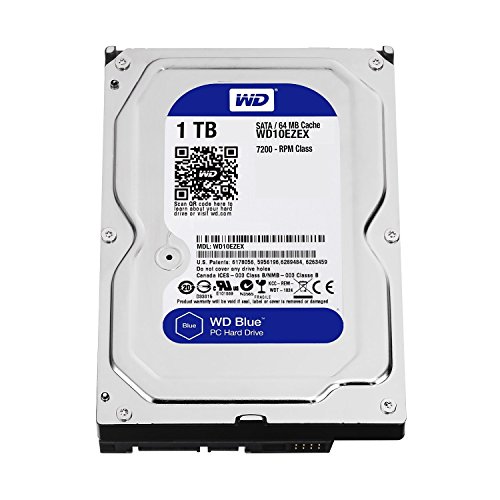
WD Blue 1TB Desktop 3.5" Hard Drive
- IntelliSeek system reduces acoustic noise and unwanted chassis vibration
- Protective head positioning via NoTouch Ramp Load safeguards platter integrity
- Versatile application across desktop computers, DVRs, and NAS setups
- Standard 3.5-inch dimensions mount easily into conventional drive bays
- Ships as a bare drive without mounting screws, SATA cables, or user guides
- Listing specifies rotational speed as a range of 5400 to 7200 RPM rather than a fixed rate
Selecting the Right Acoustic Profile for Your Setup
When assembling a silent desktop or a quiet home media hub, platter speed and seek management play a massive role in acoustic output. Platter hum can turn your entire computer case into an unwanted sounding board. Even if you already know where is the SSD located in a computer, pairing solid-state storage with quiet mechanical disks requires careful attention to seek mechanisms.
- If you need a balanced drive for a quiet desktop workstation, the WD Blue 1TB is what I would choose because its IntelliSeek feature calculates optimum seek speeds to actively reduce noise, power draw, and physical vibration.
- For builders planning a quiet local media pool or continuous security recording, I would go with the Seagate SkyHawk 6TB because its rotational vibration sensors maintain stability in multi-drive systems. You can read about drive specifications directly on Seagate.
- If you want shared storage placed across the room rather than inside your PC tower, the BUFFALO LinkStation 210 4TB serves as a quiet personal cloud setup that organizes all your backups without adding mechanical chatter to your desk.
FAQs
1. Why do some hard drives make more noise than others?
Hard drive noise originates from two primary sources: spinning platters and moving actuator arms. High-speed enterprise drives spinning at 7200 RPM produce more motor whine and airflow resistance than slower or specialized units. Drives equipped with seek-smoothing algorithms move the read heads gently, which noticeably lessens the sharp clicking noises heard during heavy read and write operations.
2. Can mounting hardware reduce hard drive noise in a PC case?
Yes, mechanical drives transfer rotational energy directly into metal drive cages, causing sympathetic case vibrations. Installing rubber isolation grommets or soft silicone washers absorbs these vibrations before they resonate through your chassis panels. If you wonder should you compress an SSD drive to avoid adding another HDD, silencing your mechanical drive mounts is often the simpler remedy.
3. Is a 5400 RPM drive always quieter than a 7200 RPM drive?
Generally, lower rotational speeds generate less friction, less heat, and significantly lower acoustic output. A 5400 RPM motor produces a faint hum that easily blends into background ambient room noise. However, modern drive manufacturers like Western Digital use advanced damping and head-parking technologies that allow certain 7200 RPM drives to operate nearly as quietly as slower models.
4. How does hard drive capacity affect operating volume?
Drives with higher capacities often stack multiple platters and read heads inside a single sealed 3.5-inch casing. More internal components can slightly increase rotational turbulence and seek sound. Choosing models with rotational vibration sensors helps stabilize these multi-platter designs, keeping internal acoustic levels consistent even when the drive works through large media backups or surveillance archives.
Editor’s Verdict
Finding the best quiet hard drives depends on where your storage lives. For an internal PC build, the WD Blue 1TB delivers gentle seeks and minimal hum via IntelliSeek. If you require expansive capacity for continuous recording, the Seagate SkyHawk 6TB provides vibration damping that keeps your workspace tranquil without sacrificing reliability.






