

High-capacity storage remains a necessity for anyone managing extensive game libraries, video archives, or system backups. While solid-state drives handle boot drives effortlessly, the best 7200 rpm hard drives deliver unmatched gigabytes per dollar without slowing down data transfers to sluggish archival speeds. Finding the right balance of capacity and reliability keeps your secondary storage responsive.
Recommended by Us

- Massive 6TB storage capacity for heavy media collections and game installations
- Performance-focused 7200 RPM speed combined with a large 256 MB cache
- StableTrac and Dynamic Cache technologies improve data handling and mechanical stability
- Standard 3.5-inch SATA design fits easily into modern desktop enclosures
- Sequential read and write transfer rates are not specified in the product data
- Requires an available 3.5-inch drive bay and internal SATA connection inside a desktop
- Mechanical drive architecture cannot match the responsiveness of solid-state drives

- Enormous 12TB capacity handles large backups and extensive media collections
- Fast 7200 RPM rotational speed with a large 512 MB cache
- Includes Acronis True Image WD Edition cloning software at no extra cost
- Universal 3.5-inch desktop form factor with standard SATA 6 Gb/s interface
- Specific sequential read and write transfer rates are omitted from the listing data
- Requires a desktop drive bay with SATA connectivity and is unsuitable for portable or laptop use

- 7200 RPM class performance provides dependable everyday mechanical responsiveness
- SATA 6Gb/s connection ensures easy integration with common desktop towers
- Useful as a dedicated secondary storage drive when paired with an SSD
- Standard 3.5-inch form factor fits common PC chassis brackets
- 500GB capacity is relatively modest for extensive game installations or large video archives
- Specific sustained transfer speed rates are not detailed in the manufacturer listing

- Equipped with a fast 7200 RPM spindle speed and 256MB cache buffer
- Free DiscWizard utility makes copying data from an old drive simple
- Generous 2TB capacity is well suited for modern gaming libraries and media storage
- Standard 3.5-inch SATA design offers straightforward desktop installation
- 3.5-inch form factor is strictly for desktop towers, not laptops
- Maximum sustained transfer speeds are not specified in the listing
- Mechanical HDD speeds are inherently lower than solid-state storage

WD Blue 10TB 3.5-inch Internal HDD
- Huge 10TB storage volume for heavy PC storage requirements
- Fast 7200 RPM platter speed combined with a large 512 MB cache buffer
- Free Acronis True Image WD Edition cloning software included
- Standard SATA 6 Gb/s interface ensures wide desktop hardware compatibility
- Specific read and write transfer rates are not listed in the specifications
- Requires a standard 3.5-inch drive bay and desktop power cabling
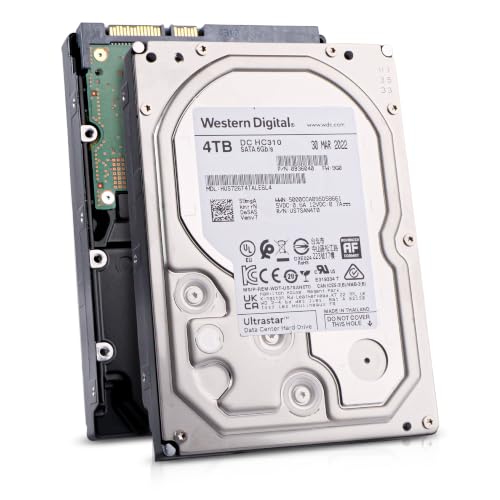
Hitachi Ultrastar 4TB Enterprise HDD
- CMR technology ensures consistent performance during intensive write cycles
- Substantial 550TB/year workload rating built for 24/7 multi-drive arrays
- High-speed 7200 RPM operation combined with a 256MB buffer
- Dual-stage micro actuator provides precision head alignment
- Offered as a renewed drive rather than brand-new retail packaging
- Internal 3.5-inch form factor requires mounting brackets and SATA cables
- Specific sustained megabyte-per-second transfer speeds are not stated in the listing

MFerraz ST6000NM0115 6TB SATA HDD
- Substantial 6TB capacity handles bulk data and surveillance archives easily
- Enterprise-level build tailored for round-the-clock uptime
- Fast 7200 RPM spindle speed paired with a 256MB cache
- Built-in vibration resistance suitable for multi-bay storage arrays
- Product is offered in renewed condition rather than brand new
- Specific sequential transfer rate figures are not provided in the specifications
- Internal 3.5-inch form factor requires a compatible desktop or server bay
Matching Spindle Speed to Your Storage Needs
Choosing mechanical storage today comes down to your workload and overall capacity requirements. If you are building a dedicated gaming station or media workstation, I would point you toward the WD_Black 6TB Performance. It features StableTrac technology and dynamic caching, which helps maintain dependable operation when handling larger file libraries or creative software assets. Western Digital builds this specific line with system builders in mind, making it a reliable workhorse inside modern desktop setups.
For budget-conscious builders who want straightforward secondary storage alongside their primary solid-state boot device, I would go with the Seagate BarraCuda 2TB. It includes a generous 256MB cache and provides access to free DiscWizard cloning tools, which simplifies migrating older volumes. You can explore official storage utilities directly through Seagate. If your priority is massive archival capacity rather than modest footprints, the WD Blue 12TB offers a huge 512MB cache. Understanding what is the difference between HDD and SSD roles helps you pair massive platter drives with fast flash memory effectively.
FAQs
1. Why choose a 7200 RPM drive over a 5400 RPM drive?
A higher spindle speed allows the read/write heads to access data sectors on the platters more quickly. This rotation rate reduces access latency and speeds up sustained sequential file transfers. For daily secondary storage, that difference ensures faster loading for archived games and large video files.
2. Should I run my operating system on a 7200 RPM hard drive?
Modern operating systems run far smoother on flash storage. Learning how many M.2 SSD slots does a motherboard have will help you place your primary OS on an NVMe module, leaving the mechanical drive to handle large archives and bulk storage.
3. What does onboard cache do for an internal hard drive?
The onboard cache serves as high-speed buffer memory between the SATA interface and the physical platters. When you read or write files, the drive temporarily holds frequently requested data in this cache. Larger buffers, such as 256MB or 512MB, improve handling for multi-stream workloads.
4. Can I combine a 7200 RPM hard drive with an SSD in the same system?
Yes, pairing an SSD for Windows and core applications with a high-capacity mechanical drive is standard practice for modern desktops. Check where is the SSD located in a computer before upgrading so your chassis has room for both 3.5-inch and smaller drive formats.
Editor’s Verdict
For overall balance, speed, and proven stability, the WD_Black 6TB Performance stands out among the best 7200 rpm hard drives available today. Builders wanting maximum raw capacity can safely rely on the spacious WD Blue 12TB for long-term storage.








