

Finding the best 7200 rpm external hard drives is crucial when you need massive storage without the agonizingly slow transfer speeds of standard 5400 RPM platters. While solid-state drives dominate compact storage, knowing what is the difference between HDD and SSD options helps explain why high-speed spinning disks still lead in bulk desktop capacity.
Recommended by Us

- Huge 8TB storage volume eliminates the need to constantly uninstall games
- Quick 7200RPM drive performance with transfer rates up to 250 MB/s
- Active cooling fan prevents thermal throttling during heavy data loads
- Two integrated USB charging ports help declutter desktop charging setups
- Desktop-class footprint and 2.16-pound weight make it bulky for frequent travel
- Host connection interface generation is not explicitly detailed in the specifications

WD Blue 10TB 3.5-inch Internal HDD
- Huge 10TB storage volume for heavy PC storage requirements
- Fast 7200 RPM platter speed combined with a large 512 MB cache buffer
- Free Acronis True Image WD Edition cloning software included
- Standard SATA 6 Gb/s interface ensures wide desktop hardware compatibility
- Specific read and write transfer rates are not listed in the specifications
- Requires a standard 3.5-inch drive bay and desktop power cabling

- Equipped with a fast 7200 RPM spindle speed and 256MB cache buffer
- Free DiscWizard utility makes copying data from an old drive simple
- Generous 2TB capacity is well suited for modern gaming libraries and media storage
- Standard 3.5-inch SATA design offers straightforward desktop installation
- 3.5-inch form factor is strictly for desktop towers, not laptops
- Maximum sustained transfer speeds are not specified in the listing
- Mechanical HDD speeds are inherently lower than solid-state storage

- Substantial 16TB capacity built on reliable CMR technology
- High 550TB per year workload rating suited for demanding server tasks
- Equipped with rotational vibration sensors to optimize multi-bay arrays
- Includes three years of complimentary Rescue Data Recovery Services
- Requires compatible NAS or RAID infrastructure for proper installation
- Mechanical 7,200 RPM operation produces audible acoustics during continuous reads and writes
- Listing does not state specific sequential transfer rates

WD Red Pro 16TB NAS Hard Drive
- Immense 16TB storage pool suited for medium-to-large multi-drive arrays
- Substantial 550TB/year workload endurance handles intensive continuous access
- 7200 RPM motor combined with 512 MB cache delivers brisk mechanical performance
- CMR recording method prevents the write bottlenecks common to SMR drives
- Internal 3.5-inch form factor requires a compatible desktop chassis or NAS enclosure
- Specific sustained read and write speed metrics are not specified in the listing
- Higher rotational speed typically produces more acoustic noise than lower-RPM drives

- Enormous 12TB capacity handles large backups and extensive media collections
- Fast 7200 RPM rotational speed with a large 512 MB cache
- Includes Acronis True Image WD Edition cloning software at no extra cost
- Universal 3.5-inch desktop form factor with standard SATA 6 Gb/s interface
- Specific sequential read and write transfer rates are omitted from the listing data
- Requires a desktop drive bay with SATA connectivity and is unsuitable for portable or laptop use
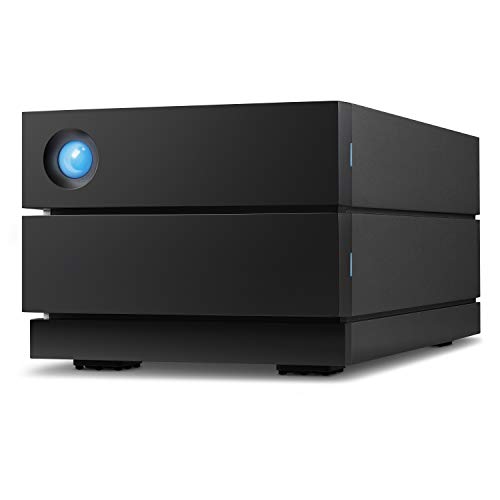
LaCie 2big RAID 16TB Desktop HDD
- Spacious 16TB capacity with high-reliability enterprise drives
- Impressive transfer rates up to 440MB/s for a dual-drive system
- Effortless hardware RAID 0 and RAID 1 management
- Convenient hot-swappable drive trays
- Works seamlessly across Mac and PC platforms
- Substantial 4.65-pound weight confines it to stationary desktop use
- Using RAID 1 for protection halves usable capacity to 8TB
- 7200 RPM mechanical drives produce audible operational hum
Matching Desktop Capacity to Your Workflow
When selecting external desktop storage, your workload dictates whether you need standalone ease or hardware redundancy. For console or PC gaming archives, I would point buyers toward the WD_BLACK 8TB D10. It features active cooling to sustain performance up to 250 MB/s, alongside two 7.5W USB Type-A ports that charge peripheral devices directly at your desk.
Creative professionals handling multi-stream video or photo archives require a different level of data protection. For studio work, I would go with the LaCie 2big RAID 16TB, which houses dual hot-swappable enterprise drives and delivers speeds up to 440 MB/s over USB-C. You can easily configure it in RAID 1 for real-time redundancy or RAID 0 for raw speed. If you prefer to build your own external setup using a dedicated enclosure, paired options like the Seagate IronWolf Pro 16TB offer massive CMR reliability. Major hardware manufacturers like Western Digital offer varied solutions, but pre-built desktop units streamline setup significantly.
FAQs
1. Why should you choose a 7200 RPM external drive over a 5400 RPM model?
A drive spinning at 7200 RPM provides noticeably quicker data transfer rates and faster seek times compared to a 5400 RPM counterpart. This rotational speed advantage makes a real difference when reading large game files or moving video folders. Reliable coverage on Tom’s Hardware often notes that higher platter speeds reduce bottlenecking on sustained reads.
2. Do 7200 RPM external drives require external power?
Yes, desktop-class 7200 RPM external drives require an included external power adapter because USB port power alone cannot spin up 3.5-inch platters. These drives are designed for stationary use on a workstation desk rather than bus-powered travel bags.
3. Can an external 7200 RPM hard drive run games directly?
External 7200 RPM hard drives can run legacy console titles and many modern PC games directly over USB 3.0 or USB-C. However, newer console generations require internal storage or specialized expansion for native titles. Users curious about expansion layouts can learn how many M.2 SSD slots does a motherboard have to plan system drives accordingly.
4. How warm do these high-speed external drives get during operation?
Faster platter rotation generates more operational heat than lower-RPM models. External enclosures address this through aluminum chassis heatsinking or built-in active cooling fans. Keeping the drive in a ventilated workspace ensures steady long-term operation during heavy sequential file writes.
Editor’s Verdict
For those searching for the best 7200 rpm external hard drives, the WD_BLACK 8TB D10 stands out for active cooling and desktop convenience, while the LaCie 2big RAID 16TB remains the superior choice for media professionals needing fast RAID flexibility.








