

Building a dedicated media server requires reliable bulk storage that can stream movies and shows without hiccups. Finding the best external hard drives for jellyfin comes down to balancing high capacity, connection reliability, and continuous read performance. Simple USB connectivity lets your home server access large video libraries quickly without complex drive bays or internal hardware setup.
Recommended by Us

WD 6TB Elements Portable Hard Drive
- Vast 6TB capacity packed into an easily transportable 2.5-inch form factor
- Bus-powered design runs entirely off your computer's USB port
- Plug-and-play readiness ensures immediate use right out of the box
- SuperSpeed USB 3.2 Gen 1 connectivity supporting up to 5Gbps interface bandwidth
- Mechanical drive architecture inherently offers slower transfer speeds than solid state drives
- Specific sequential read and write speeds are not specified in the manufacturer details
- Requires reformatting for use with Apple macOS environments
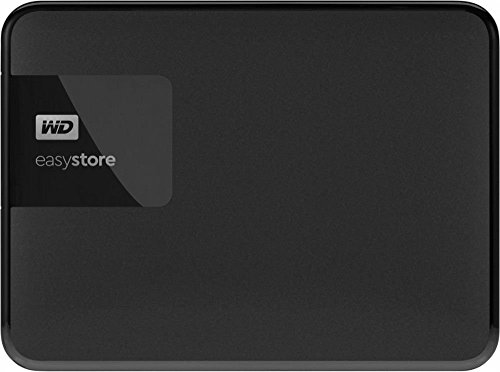
- Substantial 4TB capacity in a pocket-sized form factor
- Lightweight build at half a pound makes it easy to carry
- Standard USB 3.0 connection for simple plug-and-play use
- Clean, low-profile black enclosure
- Transfer speed rates are not stated in the official specifications
- Mechanical hard drive components require careful handling to avoid physical shock
- Modern USB-C laptops will require a separate adapter or hub

- Simple drag-and-drop file management with automatic system recognition
- Versatile compatibility spanning desktop computers, laptops, and gaming consoles
- Lightweight and compact profile measuring under 0.6 inches thick
- Includes 1-Year Rescue Service for data recovery assistance
- Transfer speed figures are not stated in the official specifications
- Requires reformatting for full compatibility with macOS
- Included 18-inch cable may be short for some desktop configurations
- Huge 5TB capacity inside a portable handheld form factor
- Simple drag-and-drop workflow with no software installation required
- Wide compatibility across computers and popular gaming consoles
- Includes an 18-inch USB 3.0 connection cable
- Specific read and write speeds are not provided in the manufacturer data
- Utilizes a standard USB 3.0 cable rather than a modern native USB-C connection
- Mechanical hard drive technology offers slower data access than solid-state drives
- True plug-and-play operation requires no software installation
- Compatible across both Windows and Mac platforms
- Lightweight and compact profile fits easily into laptop bags or pockets
- Generous 2TB capacity in a pocket-sized form factor
- Transfer speed figures are not stated in the official specifications
- Mechanical HDD technology provides standard rather than solid-state transfer speeds
- Includes an 18-inch cable which may feel short for desktop tower setups

- Effortless plug-and-play installation without external power supplies
- Compact, lightweight build tailored for portability
- Versatile connectivity across computers and gaming consoles
- Retains compatibility with older USB 2.0 ports
- Modest 500GB capacity fills quickly with modern gaming titles
- Specific data transfer speeds are not published in official specifications

KingSpec 256GB 2.5" SATA III SSD
- Sequential speeds reach up to 550 MB/s read and 520 MB/s write
- Silent operation with high resistance to shock and vibration
- Advanced firmware features include wear leveling, TRIM, and S.M.A.R.T.
- SATA Rev. 3.0 interface remains backward compatible with SATA 2.0
- 256GB capacity fills quickly if storing extensive media files or modern games
- SATA III speeds are inherently slower than modern NVMe solid-state options
- SATA data cables and mounting brackets are not included in the package
Choosing the Right Drive for Media Streaming
Setting up a home streaming setup requires drives that can handle large libraries while running quietly in the background. If you need maximum storage in a compact form, I would go with the WD 6TB Elements. It provides plenty of room for high-bitrate films and connects over USB 3.2 Gen 1, giving your media server fast plug-and-play access. Western Digital designs these portable units without needing an external wall plug, which keeps your server corner tidy.
For medium-sized collections, the Seagate 5TB Portable is another drive I would point toward. It works reliably over USB 3.0 with Windows and Mac, delivering solid capacity for multi-user streaming. Anyone wondering about performance trade-offs between mechanical drives and solid-state alternatives can explore what is the difference between HDD and SSD storage in media servers. Finally, for a lightweight starter library on a tighter budget, the Seagate 2TB Portable provides a dependable entry point that stays easy to configure.
FAQs
1. Do external hard drives offer enough speed for 4K streaming on Jellyfin?
Yes, standard USB 3.0 external drives provide more than enough bandwidth for streaming high-bitrate 4K content. Most 4K video files require only twenty to eighty megabits per second, which is easily handled by typical mechanical drive read speeds.
2. Can I use an internal solid-state drive instead of an external drive?
You can certainly use an internal solid-state drive if your server chassis has space. Users curious about system drive placement can read about where is the SSD located in a computer before deciding between external portability and internal bays.
3. Should file compression be enabled on a media storage drive?
File compression is rarely useful for video folders because media formats are already heavily compressed. If you want to understand how filesystem settings affect storage drives, review should you compress an SSD drive for a detailed explanation of compression overhead.
4. Does Jellyfin require an external power supply for connected drives?
Jellyfin does not require drives with external power bricks. Bus-powered portable models draw power directly through the USB cable, making them convenient for mini PCs or low-power servers, as tech publication Tom’s Hardware regularly notes in home server coverage.
Editor’s Verdict
Expanding your home media library does not have to be difficult when selecting the best external hard drives for jellyfin. If you want maximum capacity without bulky cords, the WD 6TB Elements is our top suggestion. Those wanting a balanced, dependable alternative can confidently choose the Seagate 5TB Portable to host endless movies and shows.






