

Modern gaming installations routinely exceed one hundred gigabytes, rapidly filling internal console and PC storage. Finding the best hard drives for game storage allows you to keep an extensive gaming library ready without constant re-downloading. Before upgrading, it helps to understand what is the difference between HDD and SSD performance.
Recommended by Us

GODBPNYMU 500GB Portable External Hard Drive
- Dual USB 3.0 and USB-C connectivity provides flexible plug-and-play capability
- Includes a dedicated carrying pouch to guard against scratches during travel
- Permits direct gameplay execution for PS4 and Xbox One titles
- Extremely thin and lightweight profile at just 0.43 inches thick
- Cannot launch native PS5 or Xbox Series X/S titles directly from the drive
- 500GB capacity fills up quickly if storing multiple modern gaming blockbusters
- Mechanical drive transfer rates are slower than solid-state alternatives

- Huge 8TB storage volume eliminates the need to constantly uninstall games
- Quick 7200RPM drive performance with transfer rates up to 250 MB/s
- Active cooling fan prevents thermal throttling during heavy data loads
- Two integrated USB charging ports help declutter desktop charging setups
- Desktop-class footprint and 2.16-pound weight make it bulky for frequent travel
- Host connection interface generation is not explicitly detailed in the specifications

- Officially certified for seamless Xbox integration
- Generous 2TB capacity for storing dozens of titles
- Distinctive illuminated Xbox-green LED accent lighting
- Simple plug-and-play USB 3.0 connectivity
- Xbox Series X and Series S games cannot be played directly from the drive
- Manufacturer does not list specific transfer speed figures

Seagate 5TB Game Drive for PlayStation
- Officially licensed integration ensures smooth compatibility with PS4 and PS5
- Massive 5TB storage space fits dozens of large modern installations
- Plays PS4 titles directly without occupying internal console storage
- Rapid plug-and-play setup requires no extra tools or complex formatting
- PS5 games must be copied back to internal storage before playing
- Exact transfer speeds are not specified in the official product data

- True plug-and-play operation requires no software installation
- Compatible across both Windows and Mac platforms
- Lightweight and compact profile fits easily into laptop bags or pockets
- Generous 2TB capacity in a pocket-sized form factor
- Transfer speed figures are not stated in the official specifications
- Mechanical HDD technology provides standard rather than solid-state transfer speeds
- Includes an 18-inch cable which may feel short for desktop tower setups
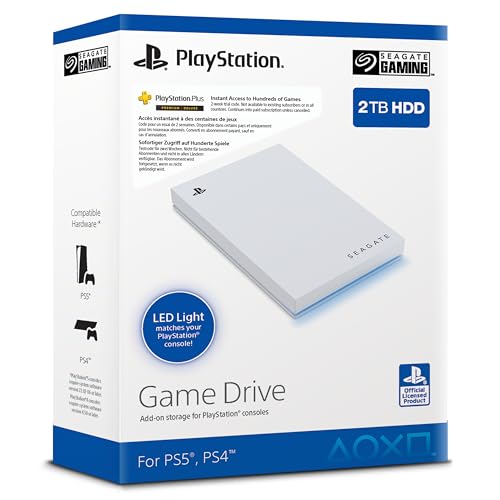
Seagate 2TB Game Drive SSD for PS4/PS5
- Officially licensed with dedicated firmware for PlayStation consoles
- Large 2TB capacity eliminates the need to constantly delete games
- Very lightweight at under 0.37 pounds for easy transport
- Integrated LED lighting adds a stylish console accent
- Specific read and write transfer rates are not stated in manufacturer specifications
- Relies on a standard USB 3.0 interface rather than faster USB-C or Gen 2 connections

Kosbees 500GB Portable External HDD
- Lightweight design weighing just 0.35 pounds makes it easy to take anywhere
- Instant plug-and-play functionality on Windows systems
- Respectable USB 3.0 transfer rates up to 133MB/s read speed
- Convenient storage expansion for PS4 and Xbox One consoles
- Requires reformatting to ExFAT before it works with Mac computers
- Cannot run current-gen PS5 or Xbox Series X|S games directly from external storage
- Modest 500GB capacity limits how many modern games can be archived at once
Matching the Right Drive to Your Gaming Setup
If you manage a massive library across both PC and console, I would go with the WD_BLACK 8TB D10. It spins at 7200 RPM with active cooling and reaches up to 250 MB/s, while providing two USB charging ports for accessories. Brands like Western Digital design these dedicated enclosures specifically to handle high-demand desktop game libraries. That extra cooling helps prevent thermal slowdowns during extended file transfers.
Console players needing portable space have different requirements. For PlayStation consoles, I would point you toward the Seagate 5TB Game Drive, which lets you play older titles directly while archiving current generation installations without redownloading. Xbox owners looking for a compact option should consider the Seagate 2TB Xbox Game Drive. If you build your own rig, you might also wonder how many M.2 slots does a motherboard have before deciding between external expansions and high-speed internal chips.
FAQs
Q: Can external hard drives run current generation console games directly?
A: Native PlayStation 5 and Xbox Series X titles require internal high-speed solid-state memory and cannot launch directly from external mechanical hard drives. However, you can store those files externally to avoid downloading them again later. Older PlayStation 4 and Xbox One games run straight from the external drive without issue.
Q: Is an external hard drive fast enough for PC gaming?
A: External drives connected through USB 3.0 work well for older games, indie releases, and massive archival libraries. Modern titles with heavy asset streaming perform much smoother on solid-state options, so learning where is the SSD located in a computer helps when planning direct system upgrades.
Q: Why does a hard drive show less capacity than advertised?
A: Storage makers calculate drive size using the decimal system, whereas operating systems manage space using binary calculations. Because one gigabyte equals slightly more in binary memory management, a drive will display slightly less usable space inside Windows or console menus. This difference is normal across all storage brands.
Q: How does 7200 RPM compare to standard portable drives?
A: Desktop drives spinning at 7200 RPM transfer data faster than typical 5400 RPM portable drives. While portable models rely on convenience and bus power, powered desktop enclosures maintain higher sustained speeds during massive file moves. Major publications like Tom’s Hardware often discuss how rotational speed impacts mechanical drive access times and file copies.
Editor’s Verdict
Finding the best hard drives for game storage depends on whether you value pure desktop capacity or on-the-go console flexibility. For massive stationary setups, I suggest the WD_BLACK 8TB D10 for its high capacity and cooling. If you simply need a dependable console archive, the Seagate 5TB Game Drive delivers spacious plug-and-play capability.






