

Case cooling should move heat out without turning a carefully planned PC into a noisy distraction. The best 120mm CPU coolers need fresh airflow too, and the Best 120mm RGB Case Fans below balance lighting, control options, and practical installation needs.
Recommended by Us

- Includes five 120mm RGB fans rather than a single replacement fan.
- A fan hub is included with the pack.
- Lists both ARGB lighting and PWM control support.
- Intended for case cooling and liquid-cooling system use.
- The listing does not specify bearing type.
- No airflow rating is provided.
- No noise-level figure is listed for comparison shopping.

upHere RGB123 120mm RGB Fan 3-Pack
- Includes three matching 120mm RGB case fans
- Designed for PC case use
- Listed as a Quiet Edition model
- Marketed with high-airflow positioning
- No airflow figure is listed for direct performance comparisons
- No noise-level measurement is provided
- Bearing type is not specified

Cooler Master MF120 Lite ARGB 3-Pack
- Includes three 120mm PWM ARGB fans in one package.
- PWM speed control reaches up to 1,750 RPM.
- ARGB splitter is included.
- High Air Balance blade design supports an airflow-focused setup.
- Hybrid PBT frame is listed as a construction feature.
- The provided data does not specify bearing type.
- No airflow rating is listed for direct performance comparisons.
- Noise level is not provided, making acoustic expectations harder to judge.

- Includes five matching 120mm ARGB fans.
- Uses 4-pin PWM connectivity.
- Features S-FDB bearings.
- Maximum speed is listed at up to 1550 RPM.
- The provided listing does not state an airflow rating.
- No noise-level specification is provided.
- ARGB connector and control compatibility details are not listed.

- Includes five fans for multi-position case cooling.
- Combines ARGB lighting with 4-pin PWM control.
- Uses the listed S-FDB bearing design.
- 120mm sizing fits a widely used case-fan format.
- Maximum speed of up to 1550 RPM is clearly stated.
- The listing does not specify airflow performance.
- No noise-level rating is provided for direct acoustic comparison.
- ARGB and PWM setup may require sufficient compatible headers or a separate controller.

DARKROCK Black F120 120mm Case Fan
- Eye-catching infinite-mirror lighting design
- Includes 24 LEDs and ARGB effects
- PWM control is listed for adjustable operation
- Hydraulic HDB bearing is specified for low-noise use
- Common 120mm fan size
- No airflow figure is listed
- No measured noise level is provided
- Static-pressure information is not specified
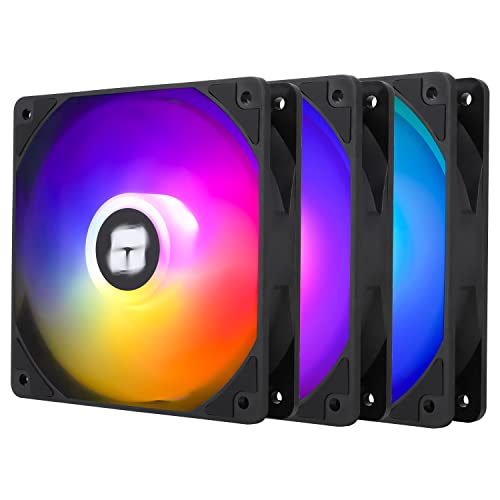
Thermalright TL-C12C-S 120mm ARGB Fans
- Includes three matching 120mm ARGB fans.
- Uses 4-pin PWM connections for compatible speed control.
- S-FDB bearing is specified in the product title.
- Up to 1550RPM maximum speed is listed.
- Airflow rating is not specified in the supplied listing data.
- Noise-level rating is not specified in the supplied listing data.
- Compatibility requirements for ARGB control are not detailed.
Which RGB Fans Fit Your Build
I would start by matching the fan bundle to the number of open mounts in your case, then checking for the right motherboard headers. For radiator-focused systems, this overview of the best 120mm fans for CPU coolers can help separate case airflow priorities from cooler needs.
- For an all-around airflow-focused build, I would go with the Thermalright TL-C12C-S X5. Its PWM control reaches 1550 RPM, while the listed 66.17 CFM airflow, silicone corner pads, and S-FDB bearing make it a sensible choice for filling several case positions at once.
- If motherboard-synced lighting and flexible speed control matter most, I would point to the Cooler Master MF120 Lite. It runs from 650 to 1750 RPM through a four-pin PWM header, and its included ARGB extender supports daisy-chaining. Tom’s Hardware also covers the broader PC cooling considerations worth weighing before a fan upgrade.
- For a display-oriented case, I would choose the DARKROCK F120 Infinite Mirror. Its infinity-mirror lighting appears on the center and sides, while PWM control spans 800 to 1600 RPM and rubber pads help limit vibration.
FAQs
Q: Do I need PWM control on 120mm RGB case fans?
A: PWM lets a compatible motherboard header adjust fan speed according to temperature, which can reduce unnecessary noise at idle while allowing more airflow under load. It is especially useful when several fans share a fan curve. Check whether your board has enough four-pin headers or whether a splitter or hub is needed.
Q: What is the difference between RGB and ARGB case fans?
A: Standard RGB commonly changes the lighting as one group, while ARGB can address LEDs more individually for more detailed effects. ARGB fans typically use a 5V three-pin lighting connection, so confirm the header type before connecting anything. Do not force a lighting plug onto an incompatible header.
Q: Are 120mm RGB fans suitable for radiators?
A: Many 120mm fans can mount to compatible radiators, but airflow through a radiator is only one part of the decision. A fan’s stated pressure capability and your radiator layout matter too. For complete cooler options, see our best 120mm AIO CPU coolers roundup.
Q: How should I set intake and exhaust fan positions?
A: A common starting point is front or bottom intake with rear or top exhaust, allowing cool air to pass across major components before warm air leaves the case. Exact results depend on the chassis and component layout. Keep filters clean and avoid placing intake fans directly against solid obstructions.
Editor’s Verdict
For most builders, the Best 120mm RGB Case Fans here are the Thermalright TL-C12C-S X5, thanks to its PWM control, stated airflow, and five-fan package. Choose the Cooler Master MF120 Lite instead when its wider speed range and straightforward ARGB daisy-chaining better suit the lighting plan.


