

An RTX 4070 sets the ceiling for resolution and detail, and the rest of the PC decides whether you reach it. Among the best RTX 4070 prebuilt gaming PCs, the WIWB RTX 4070 pairs Core i7-14700KF with GeForce RTX 4070 12GB, and the MXZ Ryzen 5 5600X RTX 4070 is the lower-cost pick.
Recommended by Us

WIWB Core i7 RTX 4070 Gaming PC
- Strong Core i7-14700KF and RTX 4070 12GB configuration for demanding gaming and creative workloads.
- DDR5 memory provides a modern platform for multitasking.
- A 1TB SSD offers useful capacity and faster access than mechanical storage.
- WiFi 6 is built in for modern wireless connectivity.
- The listed 16GB of RAM may be limiting for especially memory-heavy creative workloads or extensive multitasking.
- Power supply, cooling system, motherboard, ports, and operating system are not specified.
- The Size field mentions an i9-13900HX and RTX 5060, which conflicts with the i7-14700KF and RTX 4070 configuration described elsewhere.
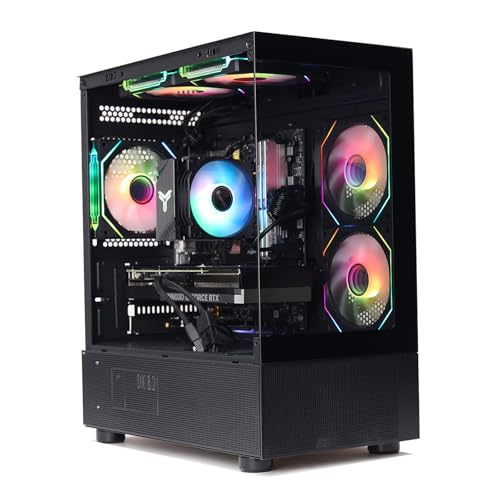
MXZ Core i7-12700F RTX 4070 Gaming PC
- Strong RTX 4070 graphics tier for demanding gaming
- Capable Core i7-12700F processor
- Fast 1TB NVMe storage
- Six RGB fans and a windowed side panel
- Windows 11 Pro included
- 16GB of RAM may be restrictive for heavier creation workloads or extensive multitasking
- Uses DDR4 rather than the newer DDR5 standard
- Wireless connectivity and the available port selection are not specified

MXZ Ryzen 7 9700X RTX 4070 Gaming PC
- Strong Ryzen 7 9700X and GeForce RTX 4070 configuration
- Modern DDR5 memory platform
- Fast NVMe solid-state storage
- 800W 80+ power supply is included
- RGB fans and a windowed side panel add visual appeal
- 16GB of RAM may feel limited during heavier multitasking or memory-intensive workloads
- Wi-Fi support and available ports are not specified
- The listing does not provide the SSD generation or performance ratings

MXZ Ryzen 5 5600X RTX 4070 Gaming PC
- RTX 4070 is a capable graphics card for high-detail gaming.
- Ryzen 5 5600X offers six cores and 12 threads.
- Includes a 1TB NVMe SSD rather than a mechanical hard drive.
- Six RGB fans and a windowed side panel create a gaming-focused presentation.
- Broad connectivity includes PCIe Wi-Fi, Gigabit Ethernet, and multiple USB ports.
- 16GB of RAM may be limiting for heavier multitasking or memory-intensive workloads.
- The DDR4 platform is older than current DDR5-based alternatives.
- The listing does not identify the motherboard model or the specific RTX 4070 manufacturer.
MXZ Core i7-13700F RTX 4070 Gaming PC
- Strong RTX 4070 graphics tier for high-setting gaming
- High-core-count Intel Core i7-13700F processor
- Fast 1T NVMe solid-state storage
- Multiple RGB fans and a windowed side panel
- 16GB of DDR4 RAM may be limiting for heavier multitasking compared with higher-capacity configurations
- The listing does not specify Wi-Fi, Bluetooth, or available ports
- Case dimensions and detailed component brands are not provided
What Matters Most for RTX 4070
The GeForce RTX 4070 is a strong 1440p graphics card aimed at players who want high visual settings, ray tracing, and responsive performance without moving into the most expensive GPU tier. It generally provides more graphics headroom than cards immediately below it, especially when demanding effects are enabled. Cards above it are better suited to heavier 4K workloads and higher refresh targets, but they also raise the system cost. The RTX 4070 therefore occupies a practical middle ground for a modern gaming desktop.
Worth knowing: Check the exact RTX 4070 version in the listing before ordering, since similarly named graphics cards can come with more than one memory size.
The surrounding components determine whether the graphics card can perform consistently. A modern Ryzen 7 or Core i7 provides plenty of CPU capability for gaming, streaming, multitasking, and creative applications, while a Ryzen 5 can make sense when value matters more. Memory type is less important than having enough capacity, though DDR5 offers a newer platform than DDR4. Storage, power delivery, case airflow, warranty coverage, and upgrade access also deserve attention. Our prebuilt comparison explains the broader tradeoffs between ready-made and custom systems.
Quick Answers
How do you confirm the exact GPU?
Read the full specifications rather than relying on the product title or search result. Confirm that the system lists the GeForce RTX 4070, then check its stated video memory. Similar names do not always represent the same graphics configuration.
How powerful should the processor be?
A recent Ryzen 5 can support a value-focused RTX 4070 system, while Ryzen 7 and Core i7 processors offer more room for multitasking and CPU-heavy work. Avoid judging a computer by its graphics card alone, because a weak CPU can limit overall responsiveness.
Why do power and cooling matter?
The power supply must support the system reliably, and airflow helps components maintain stable operating behavior during long sessions. Review the stated wattage, efficiency certification, fan arrangement, and available product documentation. Do not assume every prebuilt uses standardized components. Our proprietary parts guide explains why this matters.
How should you compare total value?
Consider the processor, memory generation, storage capacity, connectivity, operating system, support, and warranty alongside the RTX 4070. A cheaper system is not automatically better if it compromises the parts or features that affect your daily use and future upgrades.
Things That Do Not Matter as Much
- Elaborate RGB lighting changes appearance but does not improve gaming performance, application speed, storage capacity, or network quality.
- A large advertised processor boost clock does not describe complete system performance without architecture, core configuration, cooling, and workload context.
- Brand loyalty matters less than the disclosed component specifications, support terms, connectivity, case design, and practical upgrade options.
- Small differences in included software should not outweigh hardware quality. Our warranty overview covers a more meaningful consideration.
Quick Picks by Situation
- Best overall: MXZ Ryzen 7 9700X RTX 4070 combines a Ryzen 7 9700X, DDR5 memory, NVMe storage, and an RTX 4070.
- Best for the strongest GPU focus: WIWB RTX 4070 explicitly lists an RTX 4070 with 12GB of graphics memory.
- Best value: MXZ Ryzen 5 5600X RTX 4070 pairs the RTX 4070 with a Ryzen 5 5600X and DDR4 memory.
- Best alternative configuration: MXZ RTX 4070 includes DDR4 memory, NVMe storage, and six RGB fans.
- Best runner-up: MXZ i7 13700F RTX 4070 offers a Core i7-13700F, NVMe storage, and Windows 11 Pro.
Final Thoughts
The MXZ Ryzen 7 9700X RTX 4070 is the most balanced option here for shoppers who want an RTX 4070 with a newer Ryzen 7 processor and DDR5 memory. The WIWB RTX 4070 is another compelling choice when CPU capability, Wi-Fi 6, and an explicitly listed 12GB RTX 4070 are priorities.
Before ordering, verify the complete configuration and confirm that its memory, storage, connectivity, support, and case design fit your setup.
More Options to Consider
- The MXZ Ryzen 7 7700 RTX 4070 is an alternative with a Ryzen 7 7700, 16GB of DDR5 memory, a 1TB NVMe SSD, and a 750W 80+ power supply. It suits buyers who want an AMD DDR5 platform without stepping up to the Ryzen 7 9700X configuration.
FAQs
1. Is the RTX 4070 good for gaming?
Yes. The RTX 4070 is a strong graphics card for modern PC gaming, particularly at 1440p with detailed settings. It also supports ray-traced graphics and Nvidia features designed to improve visual quality or perceived smoothness in supported software. Actual performance varies with the application, settings, processor, cooling, and the exact card configuration, so no single result applies to every system.
2. What CPU pairs well with a RTX 4070?
A modern Ryzen 5 can be a reasonable value pairing, particularly when graphics performance is the main priority. Ryzen 7 and Core i7 processors provide more processing headroom for multitasking, streaming, content creation, and demanding background applications. These systems use options ranging from the AMD Ryzen 5 5600X to newer Ryzen 7 and Core i7 chips, giving buyers several balances of CPU capability and platform age.
3. How much RAM does a RTX 4070 gaming PC need?
For most current gaming desktops, 16GB is a practical starting point, and every listed system includes that capacity. Users who keep many applications open or perform memory-heavy creative work may eventually benefit from more. Before buying, check whether the motherboard has free memory slots, which memory type it accepts, and whether an upgrade would require replacing the included modules.
4. What resolution is the RTX 4070 best for?
The RTX 4070 is primarily positioned as a strong 1440p graphics card. It can also handle lighter 4K use when settings are adjusted, but demanding high-resolution workloads are better matched with higher GPU tiers. At lower resolutions, the processor and display refresh rate can become more influential, especially in workloads that emphasize CPU performance rather than detailed graphics.
5. Is a prebuilt RTX 4070 PC worth buying?
It can be worthwhile if you want a complete computer with Windows, support coverage, and compatible components selected for you. Compare the whole configuration rather than treating every RTX 4070 desktop as equal, since processors, memory, storage, power supplies, connectivity, and warranties vary. Our prebuilt value guide examines the convenience and tradeoffs in more detail.









