

Ryzen 7 chips have eight cores, which is enough for gaming with room left for background apps. Among the best prebuilt gaming PCs Ryzen 7, the Skytech King 95 pairs AMD Ryzen 7 9850X3D with NVIDIA GeForce RTX 5070 Ti 16GB GDDR7, and the NINGMEI RTX 5060 is the lower-cost pick.
Recommended by Us

Skytech Azure 3 RTX 5070 Ti Gaming PC
- High-end RTX 5070 Ti graphics with 16GB of GDDR7 VRAM
- Fast Ryzen 7 9700X processor and 32GB of DDR5-6000 RAM
- 360mm AIO liquid CPU cooler with ARGB fans
- Fast 1TB Gen4 NVMe M.2 storage
- Keyboard and mouse are included
- 1TB may feel limited for users maintaining a large modern game library
- The listing specifies Wi-Fi AC rather than a newer Wi-Fi standard
- Graphics card brand and additional display-port availability may vary

Skytech King 95 RTX 5070 Ti Gaming PC
- High-end RTX 5070 Ti graphics with 16GB GDDR7
- Gaming-focused Ryzen 7 9850X3D processor
- Generous 32GB DDR5 memory and 2TB NVMe storage
- 360mm AIO liquid cooling with ARGB fans
- Wi-Fi 6 and keyboard and mouse included
- The graphics card brand may vary between units
- Only one HDMI and one DisplayPort connection are promised
- The listing does not specify the power supply model or wattage

NINGMEI Ryzen 7 RTX 5060 Ti Gaming PC
- Capable Ryzen 7 and GeForce RTX configuration for modern gaming and creative workloads
- Generous 32GB memory capacity
- Fast 1TB M.2 NVMe storage
- Built-in Wi-Fi and Bluetooth
- ARGB fans and a high-airflow chassis are included
- Uses DDR4 memory rather than the newer DDR5 standard
- Power supply wattage and motherboard model are not specified
- The listing does not identify the Wi-Fi or Bluetooth versions
NINGMEI Ryzen 7 5700X RTX 5060 Gaming PC
- Capable Ryzen 7 processor and RTX 5060 graphics configuration
- Generous 32GB RAM capacity for multitasking
- Fast 1TB M.2 NVMe storage
- Integrated Wi-Fi and Bluetooth
- High-airflow chassis with multiple ARGB fans
- Uses DDR4 memory rather than the newer DDR5 standard
- Power supply wattage and motherboard model are not specified
- The operating system is not identified in the provided listing
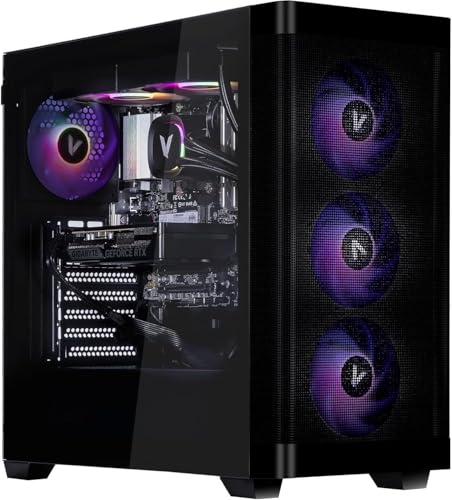
Velztorm Pilum RTX 5060 Gaming Desktop
- Strong RTX 5060 graphics tier for 1080p and 1440p gaming
- 64GB DDR4 RAM offers substantial multitasking capacity
- Eight-core Ryzen 7 processor supports gaming and creative work
- Liquid CPU cooling and four ARGB airflow fans are included
- Windows 11 Pro comes installed
- DDR4 memory belongs to an older platform generation than DDR5
- The listing does not mention built-in Wi-Fi or Bluetooth
- Power-supply efficiency certification and motherboard model are not specified
What Ryzen 7 Really Offers
Ryzen 7 refers to AMD processors generally built with eight CPU cores, making them well suited to gaming, streaming, background applications, and demanding everyday multitasking. That does not mean every Ryzen 7 desktop performs equally. Processor generation, clock behavior, memory platform, cooling, and especially the graphics card all affect the experience. In most graphically demanding games, the GPU has a larger influence on image quality and smoothness than moving between capable Ryzen 7 chips. An RTX 5070 Ti system therefore targets a different performance class than one using an RTX 5060, even when both carry the Ryzen 7 label. Match the GPU to your monitor, preferred settings, and workload instead of buying by processor badge alone. Our PC spending guide explains how to set a sensible overall budget.
Note: Ryzen 7 works best with a graphics card that matches its level, since a weak GPU or CPU on either side holds the other back.
Listing Red Flags to Spot
Prebuilt listings often lead with the Ryzen 7 name because it is familiar, then leave the less flattering details farther down the page. Read the complete specifications rather than assuming that a newer-looking case contains newer hardware. These systems clearly identify their main components, but buyers should still check every current listing before ordering because configurations and included accessories can change. A vague description is not automatically dishonest, though it gives you less information for comparing value, cooling, connectivity, and upgrade options.
Our overview of prebuilt warning signs covers other issues worth checking.
- A listing that says only “Ryzen 7” without the complete processor model hides the generation and makes meaningful performance comparisons difficult.
- An expensive system paired with an entry-level graphics card may waste CPU capability without delivering the gaming performance its headline suggests.
- Missing power-supply information makes upgrade planning harder because wattage, efficiency, connectors, and physical fit can limit a later GPU replacement.
- Unclear warranty terms are a concern because prebuilt support depends on knowing who handles defective parts, labor, shipping, and technical assistance.
Also confirm that the listed memory and storage fit your actual use. A fast processor cannot prevent a small system drive from becoming inconvenient once several large games and creative applications are installed. Likewise, unusually large memory capacity does not compensate for a weaker GPU if gaming is the main purpose. Marketing tends to highlight whichever specification looks most impressive, not necessarily the component that matters most to you.
Practical Ryzen 7 Rules
A Ryzen 7 desktop should be judged as a complete machine rather than as a processor attached to whatever parts reduced the build cost. Graphics capability comes first for most gaming-focused buyers, followed by enough memory, practical storage, adequate cooling, and clearly stated connectivity. Newer CPU and memory platforms can offer advantages, but an older Ryzen 7 system may still make sense when its graphics card and overall configuration are better aligned with your needs.
The choice between a finished system and a parts build also affects pricing, support, and control. Our prebuilt comparison explains those tradeoffs.
- Choose the graphics card for your monitor resolution before comparing small differences between capable Ryzen 7 processors.
- Favor 32GB of memory when gaming, streaming, browsing, and communication apps will regularly run together.
- Plan extra storage early because modern game libraries can fill a single primary SSD surprisingly quickly.
- Check cooling details instead of assuming tempered glass, RGB lighting, or a large case guarantees good airflow.
- Pay for 64GB of memory only when heavy creative workloads can genuinely use the additional capacity.
These rules are deliberately simple. They will not settle every close comparison, but they prevent the processor name from dominating the decision. A balanced desktop usually ages more gracefully than one with an impressive CPU and obvious compromises elsewhere. It also reduces the chance that you will immediately spend more money correcting a weak GPU, cramped drive, or unsuitable memory configuration.
A Sensible Upgrade Path
Ryzen 7 provides enough general processing capability that most owners should not plan an immediate CPU replacement. Start by using the system as delivered and note what actually limits your experience. Storage shortages, graphics settings, memory pressure, and noise are easier to diagnose after real use than before purchase. Upgrading in a logical order also avoids replacing components that were already adequate.
Our guide to prebuilt upgrades explains compatibility checks in more detail.
- Add storage first when the included SSD starts feeling restrictive. A second compatible SSD is often less disruptive than replacing the existing system drive, although available slots must be confirmed.
- Upgrade the graphics card when your preferred resolution or visual settings outgrow the current GPU. Check power capacity, connectors, case clearance, and cooling before choosing a replacement.
- Increase memory only when your games and background applications are genuinely exhausting the installed capacity. Matching supported memory specifications matters more than buying the flashiest kit.
- Consider a platform or CPU change last, once the existing processor meaningfully limits the workloads you actually run. A major platform change can also require a new motherboard and memory.
This order is not absolute. A desktop bought specifically for editing or rendering may benefit from additional memory earlier, while a large game collection could make storage the immediate priority. The point is to solve a measured limitation instead of upgrading because a component has a newer model number. Before opening the case, review the manufacturer’s warranty language and confirm whether user upgrades affect coverage.
Matching Systems to Players
The table includes two distinct approaches. Some systems concentrate spending on graphics performance, while others aim for a more moderate gaming setup with ample memory and solid-state storage. The right choice depends on whether you prioritize higher visual settings, a lower overall cost, unusually large memory capacity, or a particular case and cooling design. Warranty support matters as well, especially if you would rather contact one company than diagnose individual components yourself.
Our warranty overview explains the terms worth reading before purchase.
NINGMEI RTX 5060 TI is the best overall choice, combining an RTX 5060 Ti, 32GB DDR4, and 1TB SSD.
Skytech Azure 3 suits strongest-GPU shoppers with its RTX 5070 Ti, 32GB DDR5, and 360mm AIO.
NINGMEI RTX 5060 is the value option, pairing RTX 5060 graphics with 32GB DDR4 and 1TB storage.
Skytech King 95 offers an alternative Skytech design with 2TB storage, Wi-Fi 6, and liquid cooling.
Velztorm Pilum is the runner-up for memory-heavy use, providing 64GB DDR4, RTX 5060 graphics, and liquid cooling.
None is automatically ideal simply because it carries a Ryzen 7 processor. The Skytech models have stronger GPUs than the RTX 5060 systems, while the NINGMEI configurations offer more restrained combinations. The Velztorm stands apart with considerably more memory, which is useful for certain creative or multitasking workloads but not a substitute for moving to a higher graphics tier.
Other Ryzen 7 Configurations
These alternatives are not part of the ranked table, but they broaden the available combinations. One uses AMD graphics, another pairs a newer Ryzen platform with an AMD GPU, and the third emphasizes a newer Ryzen processor alongside an RTX 5060. As always, compare the whole specification instead of treating the processor family as a complete measure of gaming performance.
HOENGAGER Panorama combines a Ryzen 7 5700X with Radeon RX 9060 XT 16GB graphics, 32GB DDR4, and a 1TB NVMe SSD. Its panoramic case, seven RGB fans, and 240mm AIO suit buyers who want AMD graphics and a display-focused white build.
CyberpowerPC RX 9060 XT pairs the Ryzen 7 8700F with Radeon RX 9060 XT 16GB graphics, 32GB DDR5, and a 2TB PCIe 4.0 NVMe SSD. It also provides Wi-Fi 6, Bluetooth 5.3, liquid CPU cooling, and a one-year parts-and-labor warranty.
KOTIN RTX 5060 uses a Ryzen 7 9700X, GeForce RTX 5060 8GB, 32GB DDR5, and a 1TB PCIe 4.0 NVMe SSD. Its built-in secondary display, 360mm liquid cooler, Wi-Fi 7, and 650W 80+ Gold power supply suit buyers prioritizing system monitoring and newer connectivity.
Each alternative makes a different compromise. The HOENGAGER keeps the established AM4 processor and DDR4 memory while offering a 16GB AMD graphics card. The CyberPowerPC moves to DDR5 and includes more storage. The KOTIN uses a newer Ryzen 7 processor but pairs it with an RTX 5060, so shoppers focused primarily on gaming should decide whether CPU features or stronger graphics matter more.
The Ryzen 7 Verdict
The NINGMEI RTX 5060 TI is the most balanced starting point for typical Ryzen 7 gaming, with capable graphics, ample memory, and practical storage. Choose the Skytech Azure 3 instead when graphics performance is the clear priority and the higher GPU tier fits your needs. In either case, buy the complete configuration rather than the Ryzen 7 badge alone.









