Virtual reality demands freedom of movement that traditional computer seats struggle to accommodate. Tangled headset cables, obstructive armrests, and disorientation often ruin lengthy sessions in simulated environments. Finding the best chairs for VR gaming comes down to balance, smooth rotation, and specialized physical feedback that keeps your body centered while your virtual avatar moves freely.
Recommended by Us

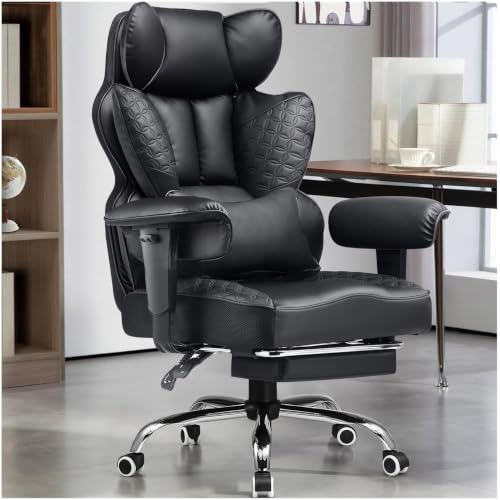
N-GEN GAMING Big & Tall Gaming Chair
- Pocket spring seat cushion provides far better bounce and longevity than basic foam
- High 400-pound load rating backed by an SGS certified Class 3 gas lift and steel base
- Integrated pull-out footrest enhances relaxation when fully reclined
- Wide seating surface suits larger frames without pinching
- Maximum recline tops out at 135 degrees rather than a flat 180 degrees
- Linked armrests do not allow independent height or angle adjustments
- Wide footprint requires a generous amount of desk space

JECQCUPG Ergonomic Gamer Chair
- Wingless cushion gives your thighs freedom without bulky side bolsters digging in.
- Hybrid pocket spring and foam construction provides noticeable bounce and enduring softness.
- Linkage armrests maintain natural arm alignment through every recline angle.
- Straightforward assembly process with included tools and step-by-step illustrations.
- Recline stops at 135 degrees instead of flattening to 180 degrees.
- Armrests follow backrest tilt but lack independent 3D height or swivel customization.

JECQCUPG Ergonomic Gaming Chair
- Wingless flat seat cushion gives thighs plenty of room to shift postures
- Internal pocket springs provide durable, sofa-grade seat bounce and resilience
- Armrests tilt in sync with the backrest to maintain forearm comfort while leaning back
- Easy-to-clean PU leather surface resists marks and liquid spills
- Recline range maxes out at 135 degrees instead of lying completely flat
- Armrests tilt synchronously with recline but do not offer independent 3D or 4D adjustments
- PU leather covering can trap warmth during long sessions in hot rooms

X Rocker Eclipse Floor Gaming Chair
- Built-in headrest audio delivers an engaging gaming soundscape
- Collapsible frame makes storage quick and easy in small bedrooms
- High 300 lbs weight capacity accommodated on a lightweight frame
- Straightforward setup with both wired and wireless audio options
- Sits directly on the floor with no pedestal or height adjustment
- Certain television audio setups may require a separate digital transmitter
- Lacks adjustable recline mechanisms and dedicated lumbar cushions
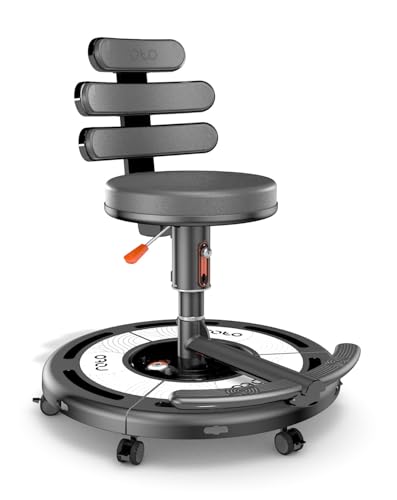
Roto VR Motion Gaming Chair
- Motorized 360-degree rotation actively combats VR-induced nausea and motion sickness
- Intuitive head-tracking movement frees up hands from constant stick-turning
- Integrated haptics dramatically boost realism across games and simulations
- Broad cross-platform headset compatibility
- Standard ergonomic specs like weight limit and recline range are not specified in the listing
- Substantial unit weight at over 66 pounds makes it difficult to move around freely
- Requires space and power access for motorized operation

RESPAWN 900 Gaming Recliner
- Continuous surface between seat and footrest prevents cord snags
- Pedestal base offers solid stability without unwanted caster rolling
- Convenient built-in cupholder and side accessory pouch
- Full 360-degree swivel allows effortless movement
- Lacks caster wheels, making it harder to roll across rooms
- Maximum weight capacity tops out at 275 lbs
- Bulkier footprint than standard desk office chairs

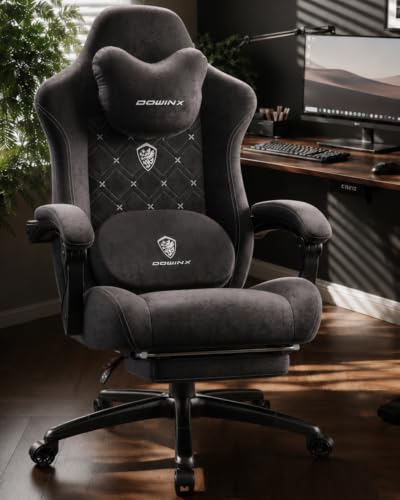
GTPLAYER Gaming Chair with Footrest
- Slide-out footrest enables relaxed sitting positions
- All-metal leg and frame design avoids brittle plastic components
- Removable headrest and lumbar pillows provide targeted posture relief
- Padded armrests offer soft support along the entire forearm
- Maximum weight capacity is not specified in the product data
- Specific recline angles are omitted from the technical details
- Pearl White upholstery requires attentive cleaning to stay pristine
Matching the Right Seat to Your Virtual Reality Setup
For cockpit simulations and dedicated virtual reality setups, the Roto VR Motion Chair is the one I would go with because of its motorized base and built-in haptic feedback. Its head tracking physically turns the seat up to 360 degrees to counter motion sickness, which solves a frequent complaint highlighted by gaming outlets like PC Gamer in their coverage of flight simulations.
If you prefer seated flight simulators or relaxed cockpit games without motorized assistance, I would point you toward the RESPAWN 900 Gaming Recliner. It rests on a stationary pedestal rather than rolling casters, giving you stable 360-degree swivel while preventing unwanted drift during frantic dogfights. The continuous surface between the seat and footrest also prevents loose headset cables from catching on mechanical hinges, and it supports up to 275 pounds.
For smaller bedrooms where floor space is limited, the X Rocker Eclipse Floor Chair makes plenty of sense. It sits directly on the floor with rocking capabilities, handles up to 300 pounds, and integrates headrest speakers that pair via wireless Bluetooth or wired cables for spatial audio without wearing heavy headphones.
FAQs
1. Why are chairs without wheels often preferred for seated VR?
Standard office casters tend to roll unexpectedly whenever you lean or kick during an intense virtual match. Pedestal bases or floor rockers keep you anchored to a single spot in your room boundary. This stationary foundation prevents disorientation, keeps your safety perimeter intact, and stops you from accidentally bumping into furniture while wearing a blindfold headset.
2. How does a 360-degree swivel help prevent motion sickness in VR?
Motion sickness typically happens when your eyes see rotational movement that your inner ear does not physically feel. A rotating seat lets you turn your actual torso toward virtual objects instead of snapping with an analog thumbstick. Aligning real-world rotation with simulated viewpoints minimizes visual lag and provides a much more comfortable experience during extended sessions.
3. What should I look for regarding armrests on a VR gaming chair?
Bulky or static armrests can easily collide with tracked motion controllers when reloading weapons or reaching for in-game tools. Many players favor chairs with low-profile, synchronized, or fully reclining rests that stay out of your arm swing. Having clear space around your hips ensures your hands can move freely without striking plastic edges.
4. How do wired VR headsets interact with reclining chairs?
Exposed recline levers and separated footrest gaps can pinch or sever trailing tether cables during sudden movements. Chairs with continuous seat padding or integrated cable channels eliminate exposed mechanical pinch points. Keeping wires clear of rotating mechanisms prolongs the lifespan of your headset cable and prevents accidental disconnects mid-game.
Editor’s Verdict
If you want the ultimate simulated experience, the motorized Roto VR Motion Chair stands far ahead of standard furniture with its active head tracking and vibration. For most players wanting comfort and stability without electronics, the RESPAWN 900 Gaming Recliner is our favorite among the best chairs for VR gaming thanks to its snag-free pedestal base.