

Compiling code and testing builds rewards a fast multi-core CPU and plenty of memory, with a capable GPU on top. Among the best prebuilt gaming PCs for game development, the HELLOLAND Ocean of Stars RTX 5070 TI pairs AMD Ryzen 7 9700X with RTX 5070 Ti 16GB, and the CyberpowerPC RTX 5060 TI is the lower-cost pick.
Recommended by Us

HELLOLAND Ocean of Stars RTX 5070 Ti PC
- High-end RTX 5070 Ti graphics with 16G of listed video memory
- Modern eight-core AMD Ryzen 7 9700X processor
- Generous 32GB DDR5 memory for demanding multitasking
- 240mm liquid CPU cooling and an 850W 80+ power supply
- Built-in Wi-Fi and Bluetooth 5.3 connectivity
- The 1TB SSD may feel restrictive if many large games, media projects, or AI datasets are stored locally.
- The listing does not identify the motherboard, SSD speed, RAM speed, or specific power supply model.
- Detailed external port availability is not provided.

HELLOLAND Ocean of Stars RTX 5070 Ti PC
- High-end RTX 5070 Ti graphics with 16GB of graphics memory
- Modern Ryzen 7 9700X processor with eight cores and 16 threads
- Generous 32GB DDR5 RAM and 3TB of combined SSD storage
- Includes a 240mm liquid cooler, Wi-Fi, and Bluetooth
- ARGB lighting can be controlled through software
- Only 1TB of the 3TB storage configuration uses the faster PCIe interface
- The listing does not identify the motherboard model or provide port details
- The exact RAM speed and PCIe SSD model are not specified
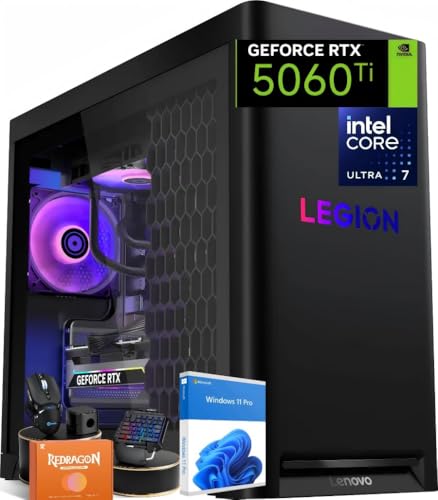
Lenovo Legion Tower 5i RTX 5060 Ti
- Capable RTX 5060 Ti graphics with current-generation GDDR7 memory
- Generous 32GB DDR5 5600MHz configuration
- Liquid cooling is included
- Multiple memory and M.2 slots support future expansion
- Nine USB ports accommodate a broad selection of peripherals
- The graphics card has 8GB of VRAM, which may require adjusted texture settings in especially demanding workloads.
- A 1TB SSD can fill quickly when storing a large modern game library.
- The listing does not specify the power supply wattage or efficiency rating.

CyberPowerPC Gamer Xtreme RTX 5060 Ti
- Capable RTX 5060 Ti graphics with 8GB of video memory
- Modern 10-core Intel Core i5 processor and DDR5 RAM
- Large 2TB PCIe 4.0 NVMe SSD
- Extensive USB connectivity plus WiFi 6 and Bluetooth 5.3
- Keyboard and mouse are included
- 16GB of RAM may be limiting for heavier multitasking or memory-intensive creative work
- The 8GB graphics memory could become restrictive with demanding high-resolution settings
- Power supply specifications and cooling details are not provided in the listing

YEYIAN Mirage S RTX 5080 Gaming PC
- High-end RTX 5080 graphics with 16GB of GDDR7 memory
- Flagship-class 24-core Intel Core Ultra 9 processor
- Fast 32GB DDR5 6000MHz memory and 2TB NVMe Gen4 storage
- Comprehensive cooling setup with a 360mm AIO and seven ARGB fans
- Efficient 850W 80+ Platinum power supply
- Wireless connectivity details are not specified in the listing
- Port selection and exact graphics card manufacturer are not listed
- The 22 x 12 x 21-inch case requires a substantial amount of desk or floor space
What Development Workloads Require
Game development places different demands on a computer at the same time. A fast multi-core CPU handles code compilation, asset processing, simulation, and background tools. Editors can also consume considerable memory, especially when a browser, source-control client, reference material, and communication software remain open beside the main project.
The GPU matters when testing visual effects, lighting, shaders, high-resolution assets, and demanding game scenes. It also determines how comfortably the same computer runs modern games. A gaming desktop can usually handle development well when its CPU and GPU are reasonably balanced instead of concentrating nearly the entire budget on one component.
For many developers, extra spending helps most when it removes a clear bottleneck. More CPU cores can reduce time spent waiting for builds, while additional RAM supports larger projects and heavier multitasking. A stronger GPU makes more sense for graphics-intensive projects and high-resolution testing. Our bottleneck overview explains this balance.
Worth knowing: More CPU cores can shorten build and compile times, particularly on projects that divide compilation work across several threads.
A Sensible Upgrade Order
- Start with memory if active projects regularly cause slowdowns, heavy drive activity, or forced application closures. Moving beyond an entry-level memory configuration can make editors and supporting tools easier to run together.
- Add storage when source files, asset libraries, engine files, and completed builds begin competing for space. Keep active projects on a fast SSD and use additional storage for archives and less frequently accessed material.
- Upgrade the GPU when target visuals, rendering workloads, or test settings exceed the original card’s capabilities. Check power, case clearance, and cooling compatibility before choosing a replacement.
- Plan a platform or CPU upgrade when compiling remains the main delay after simpler upgrades. This can involve replacing several parts, so our PC lifespan guide can help with timing.
Listing Terms Worth Understanding
- CPU cores and threads: These indicate how much parallel work a processor can potentially handle during compilation, asset processing, multitasking, and other development tasks.
- DDR5 RAM: This is the system memory used by the editor, development tools, browser tabs, and background applications rather than dedicated graphics memory.
- GPU VRAM: Dedicated video memory stores graphics data such as textures, geometry, and render targets while games and visual tools are running.
- PCIe NVMe SSD: This is fast solid-state storage suited to the operating system, development applications, active projects, assets, and frequently played games.
- Liquid cooling: An AIO liquid cooler transfers CPU heat through a pump, radiator, and fans, although radiator size and case airflow still matter.
- Memory slots: Available slots can make later RAM expansion simpler. Our DDR4 versus DDR5 comparison explains the broader memory differences.
First-Day Setup and Checks
After unpacking the PC, inspect the exterior and internal area for visible shipping damage or loose components before connecting peripherals. Place the tower where its vents have room to breathe. Complete the Windows setup, run operating-system updates, and obtain current graphics and chipset drivers from the relevant hardware manufacturers.
Next, confirm that Windows recognizes the advertised CPU, GPU, memory capacity, and storage. Check available drive space before downloading an engine, source repositories, asset packs, and games. Organizing active projects separately from archived builds makes storage easier to manage and reduces the chance of filling the system drive unexpectedly.
Finally, open your usual editor and create a small project before transferring important work. Compile it, load a representative scene, and check that the system remains stable during ordinary multitasking. Fast multi-core processing, sufficient RAM, and capable graphics should work together, with extra spending directed toward whichever resource your projects use most heavily.
Priorities for Different Developers
Students and First-Time Developers
Prioritize a balanced CPU and GPU rather than chasing the fastest graphics card available. A modern multi-core processor supports compiling and general coursework, while a capable gaming GPU lets you test projects and play current titles without maintaining a separate computer.
Memory and storage should also be practical from day one. Development tools, project copies, and asset libraries grow quickly, so easy expansion is useful. If you are unsure which performance tier fits your other games, our gaming PC advice provides a broader starting point.
Indie Developers With Larger Projects
Frequent builds make CPU performance especially important. Favor a fast processor with enough cores to handle compilation while keeping the editor, documentation, browser, and source-control tools responsive. Plenty of RAM reduces pressure when large scenes and several supporting applications remain open together.
A strong GPU is still valuable, but it should not come at the expense of inadequate memory or cramped storage. Spend more on graphics when your project relies heavily on complex lighting, detailed assets, high resolutions, or local visual testing. Otherwise, balanced components generally provide a smoother daily workflow.
Artists and Graphics-Focused Creators
Graphics-focused developers should place greater weight on GPU capability and dedicated video memory. Detailed scenes, high-resolution textures, shader work, and rendering can strain a modest graphics card. The CPU still matters for importing assets and compiling, so avoid pairing a premium GPU with an unnecessarily weak processor.
Choose enough system memory to keep the editor and content-creation tools open together, then reserve ample SSD capacity for source assets, exports, caches, and project backups. Cooling also deserves attention because sustained creative workloads may keep the CPU or GPU busy much longer than a short gaming session.
Systems Matched to Developer Needs
- Best overall: Lenovo Legion Tower 5 pairs a 20-core Intel Ultra 7 265F with 32GB DDR5.
- Strongest GPU: HELLOLAND Ocean of Stars includes an RTX 5070 Ti 16G and AMD Ryzen 7 9700X.
- Best value: CyberpowerPC RTX 5060 TI combines an Intel Core i5-14400F, RTX 5060 Ti 8GB, and 2TB SSD.
- Alternative brand: HELLOLAND Ocean of Stars RTX 5070 TI adds 3TB hybrid storage to its RTX 5070 Ti 16G configuration.
- Runner-up: YEYIAN RTX 5080 has an Intel Core Ultra 9 285K, RTX 5080 16GB, and 32GB DDR5.
Other Development-Ready Desktops
- CyberpowerPC RTX 5070 uses a 12-core AMD Ryzen 9 9900X, GeForce RTX 5070 12GB, and 32GB DDR5. It suits developers who want strong multi-core processing with liquid CPU cooling.
- CoolerMaster RTX 5070 combines an AMD Ryzen 7 7800X3D, GeForce RTX 5070, 32GB DDR5, and a 2TB Gen4 M.2 SSD. It is an alternative for gaming-focused developers wanting spacious fast storage.
- ASUS ROG GM700 features an AMD Ryzen 7 9800X3D and AMD Radeon RX 9070 XT Prime OC. Its 32GB DDR5 and 2TB PCIe Gen 4 SSD suit substantial game and project libraries.
The Most Balanced Choices
The Lenovo Legion Tower 5 is the strongest all-around choice for developers who want balanced CPU performance, capable graphics, and practical expansion options. Choose the HELLOLAND Ocean of Stars instead when GPU strength and dedicated graphics memory carry more weight in your projects.
Game Development PC Questions
1. Can a gaming PC also handle game development?
Yes. Gaming and game development share many hardware requirements, including a capable GPU, a fast CPU, sufficient memory, and SSD storage. Development puts more emphasis on compiling, multitasking, and storing source assets, so the most suitable gaming PC is usually a balanced model rather than one built around graphics performance alone.
2. How much RAM should a development PC have?
For general development, 32GB is a practical target because it leaves room for an editor, browser, source-control tools, communication software, and test builds. Smaller configurations can work for learning and lightweight projects, but they provide less headroom. Very large scenes, high-resolution assets, and several creative tools may justify more memory.
3. Is the CPU or GPU more important for making games?
The answer depends on the workload. CPU performance matters heavily for compilation, simulation, asset processing, and multitasking, while the GPU matters for rendering, visual effects, and testing demanding scenes. Developers working primarily with code may prioritize the CPU, whereas artists and graphics-focused creators often benefit more from additional GPU performance.
4. Does game development require a large SSD?
A roomy SSD is highly useful because engines, project files, source assets, caches, builds, and games can consume substantial storage. Fast NVMe storage also helps applications and project files load quickly. Capacity requirements vary by project, but choosing a system with expansion options can prevent storage from becoming an early limitation.
5. Should beginners buy the most powerful system available?
Usually not. Beginners often benefit more from a balanced system with enough memory and storage than from spending heavily on a flagship graphics card. Match the computer to the scale and visual complexity of the projects you expect to make. Our PC budget advice offers additional context.
6. What should I check before ordering a prebuilt development PC?
Check the exact CPU, GPU, graphics memory, system memory, SSD capacity, cooling, connectivity, and warranty information shown in the listing. Consider whether memory and storage can be expanded later. Also compare those specifications with the requirements of your preferred development tools and the types of games you intend to build and play.









