

Big Minecraft mod packs lean on the CPU and on memory, and 32GB of RAM gives the most room. Among the best prebuilt gaming PCs for modded Minecraft, the STORMCRAFT Sirius pairs an RTX 5060 Ti 16GB with 32GB of DDR5, and the HOENGAGER Ryzen 5 9600X RTX 5060 is the lower-cost pick.
Recommended by Us
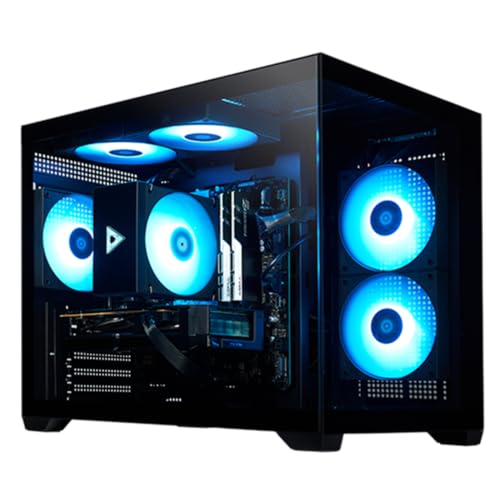
STORMCRAFT Sirius RTX 5060 Ti Gaming PC
- Strong graphics configuration for high-FPS 1080p and 1440p gaming
- Generous 32GB DDR5 6000MHz memory
- Modern Wi-Fi 6E, Bluetooth 5.3, and USB-C connectivity
- Keyboard and mouse are included
- The power supply wattage and model are not specified
- The cooling configuration is not listed
- The operating system is not identified in the provided product data
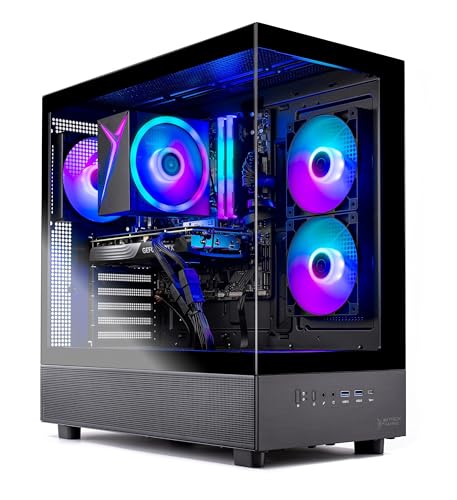
Skytech Azure 3 RTX 5060 Ti Gaming PC
- 16GB RTX 5060 Ti configuration is positioned for high-detail 1440p gaming.
- Ryzen 7 7700 and 32GB of DDR5 memory provide capable core hardware.
- Fast Gen4 NVMe storage is included.
- Tempered-glass case and ARGB fans give the desktop a gaming-focused appearance.
- Keyboard and mouse are supplied in the package.
- Wi-Fi 5 is older than Wi-Fi 6 and Wi-Fi 6E standards.
- The graphics card brand and some additional port details may vary.
- A 1TB drive may require expansion for users with especially large software libraries.

Skytech O11 Vision RTX 5070 Gaming PC
- Strong RTX 5070 and Ryzen 7 9700X configuration for 1440p gaming
- Fast DDR5-6000 memory and NVMe M.2 storage
- Large 360mm AIO liquid CPU cooler
- Showcase-style Lian Li PC-O11 Vision case
- Gaming keyboard and mouse are included
- 16GB of RAM may be modest for heavy content creation or extensive multitasking
- Wi-Fi 5 is older than Wi-Fi 6 and Wi-Fi 6E
- The listing does not specify the power supply capacity or motherboard model

Alienware Aurora RTX 5070 Gaming Desktop
- Current-generation NVIDIA GeForce RTX 5070 graphics
- Capable Intel Core Ultra 7 265F processor
- Customizable AlienFX lighting and gaming profiles
- Command Center software includes performance monitoring and power modes
- 1TB of listed storage capacity
- RAM capacity, type, and speed are not listed
- The listing does not identify whether the 1TB drive is an SSD or HDD
- A weight of 33.894 pounds may make the tower cumbersome to reposition

HOENGAGER Ryzen 5 9600X RTX 5060 Gaming PC
- Modern Ryzen 5 9600X processor with six cores and 12 threads
- RTX 5060 8GB graphics with ray tracing and DLSS support
- Fast DDR5 memory and NVMe solid-state storage
- 240mm AIO cooling and seven customizable ARGB fans
- Windows 11 and required drivers come preinstalled
- 16GB of RAM may be limiting for especially heavy editing or extensive multitasking
- The listing does not specify Wi-Fi, Bluetooth, motherboard model, or available ports
- An 8GB graphics card may require adjusted texture settings in especially demanding future releases
What modded Minecraft Needs From a Gaming PC
Heavily modded Minecraft can place more pressure on the processor than many visually demanding games. Complicated world generation, automation systems, entities, and background calculations all add CPU work. Strong single-core performance is especially useful because not every part of the game can be distributed evenly across many cores. Memory capacity and storage speed also matter. A fast SSD reduces delays when starting the game, loading large worlds, and accessing the many files included in extensive mod packs. Our PC spending guide provides additional budget context.
Note: Modded games often need extra RAM. A system with 32GB of memory gives large mod packs, background programs, and the operating system more room than a 16GB configuration.
The graphics card becomes more important when you add shaders, high-resolution resource packs, or play at a higher display resolution. However, buying an expensive GPU cannot fully compensate for a slow processor or insufficient memory. For a general modded setup, 16GB of system memory should be treated as the practical floor, while 32GB offers more flexibility for demanding packs and multitasking. Storage capacity deserves attention too, since several installations, worlds, screenshots, and other games can fill a smaller drive faster than expected. The most balanced system is usually better than one built around a single headline component.
Key Parts for modded Minecraft
Focus on balanced components rather than choosing a prebuilt solely by its graphics card.
| Part | What to Look For |
|---|---|
| CPU | Fast single-core performance helps heavily modded games process world activity, entities, and complex mod systems. |
| RAM | 32GB gives additional headroom for big mod packs, background applications, and the operating system. |
| GPU | A mid-range graphics card can handle shaders, while demanding visual settings benefit from more graphics power. |
| Storage | A fast SSD helps load large mod packs and worlds while keeping startup and file access responsive. |
The same GPU can appear in multiple listings with very different processors, memory capacities, cooling systems, and power supplies. Compare the complete specification rather than assuming two systems will provide the same experience because their graphics cards match. Warranty coverage and component accessibility can matter after purchase as well. Our warranty guide explains common coverage terms and limitations.
How to Choose a Prebuilt for modded Minecraft
Use the following priorities to narrow these systems to the configuration that fits your mod packs and visual preferences.
CPU First
Mods often stress the processor through world generation, simulations, entity behavior, machinery, and other calculations. A modern CPU with fast individual cores helps the game process this work promptly. Core count still matters for the operating system, background applications, recording, and general multitasking, but a large core count alone does not guarantee better performance. Look at the processor generation and overall architecture rather than comparing CPUs only by the number of cores shown in a listing.
The Ryzen 7 9700X in the Skytech Gaming O11 Vision combines eight cores with a listed boost frequency of up to 5.5GHz. The Ryzen 5 9600X in the HOENGAGER desktop has six cores and a listed boost frequency of up to 5.4GHz. Both are modern processor options, although the Skytech provides additional cores for heavier multitasking. The Intel i5-14400F in the STORMCRAFT Sirius offers ten cores and sixteen threads, making that system another balanced choice.
Plenty of RAM
Memory capacity determines how much working room the game, operating system, and background applications have available. Large mod packs can consume considerably more memory than a lightly modified installation, particularly when shaders or detailed resources are also involved. Although 16GB can serve as a starting point, it leaves less room for launchers, browsers, voice chat, and other software. A 32GB configuration is the safer target for players who expect to use demanding packs or run several applications together.
The STORMCRAFT Sirius and Skytech Gaming Azure 3 each include 32GB of DDR5 memory, giving them more immediate headroom than the 16GB configurations in the Skytech Gaming O11 Vision and HOENGAGER desktop. Memory type and speed matter, but capacity is often the first specification to examine for a heavily modded setup. If you choose a 16GB machine, check whether its design and available slots make a later memory upgrade practical before committing to it.
A Capable GPU for Shaders
Vanilla visuals do not require an extreme graphics card, but shaders can change the equation by adding advanced lighting, shadows, reflections, and atmospheric effects. Higher resolutions also increase the GPU workload. A modern mid-range card is a sensible starting point for shader use, while a stronger option offers more room for demanding visual settings. Video memory can also become relevant when detailed resources and other graphical enhancements are active, so consider both GPU class and VRAM capacity.
The GeForce RTX 5060 8GB in the HOENGAGER desktop targets a more value-conscious configuration. The RTX 5060 Ti 16GB systems from STORMCRAFT and Skytech Gaming provide greater video memory, while the RTX 5070 systems from Skytech Gaming and Alienware occupy a higher graphics tier. Your ideal choice depends on shader complexity, resolution, and whether you play other graphically demanding titles. Avoid overspending on graphics if doing so forces a major compromise in CPU performance or memory.
Fast SSD
Large mod packs contain many files that must be read during startup and world loading. An NVMe SSD helps keep these operations responsive and also improves Windows startup, application launches, and general file access. Every table system includes a 1TB SSD, which provides a useful starting capacity for the operating system, Minecraft installations, worlds, and a broader game library. Storage does not replace a strong CPU or enough RAM, but slow storage can make an otherwise capable computer feel less responsive.
Consider how many separate mod packs and other games you plan to keep available. Worlds, backups, resource packs, screenshots, and recordings can gradually consume substantial space. If you expect your library to grow, look at whether the desktop can accept another SSD later. Prebuilt upgrade options vary by case, motherboard, wiring, and included components, so confirm the details before buying. Our prebuilt upgrade guide covers the main limitations to check.
Who Should Buy Which System
- Best overall: Skytech O11 Vision suits players wanting a Ryzen 7 9700X and RTX 5070.
- Best for a strong GPU configuration: STORMCRAFT Sirius combines an RTX 5060 Ti 16GB with 32GB DDR5.
- Best value: HOENGAGER Ryzen 5 9600X RTX 5060 pairs a modern six-core processor with an RTX 5060.
- Best alternative brand: Skytech Azure 3 includes 32GB DDR5 and an RTX 5060 Ti 16GB.
- Best runner-up: Alienware Aurora offers an RTX 5070, Intel Core Ultra 7 265F, and onsite service.
Final Thoughts
The Skytech O11 Vision is the strongest overall fit because its Ryzen 7 9700X and RTX 5070 create a capable foundation for processor-heavy mods and shaders. Its 16GB memory is the main specification to weigh against the 32GB alternatives.
The STORMCRAFT Sirius is a balanced alternative for players who want 32GB of DDR5 memory and generous GPU memory from the outset.
More Options to Consider
- HOENGAGER Panorama combines a Ryzen 7 5700X, RTX 5060, and 16GB DDR4. It suits buyers who prefer an eight-core processor and panoramic white case but do not require DDR5 memory.
- STORMCRAFT Falcon AI pairs a Ryzen 7 7800X3D with an RX 9070 XT 16GB and 32GB DDR5. It is suited to demanding modded play, higher resolutions, streaming, and broader gaming workloads.
- KOTIN RX 9070 XT includes 32GB DDR5, a 360mm liquid cooler, and an integrated status display. It fits buyers seeking strong graphics hardware and extensive wireless connectivity.
FAQs
1. What PC specs do I need for modded Minecraft?
Start with a recent processor that offers strong single-core performance, since extensive mod packs can generate substantial simulation and world-processing work. Treat 16GB of memory as a practical floor and consider 32GB for larger packs or regular multitasking. A modern mid-range GPU is appropriate if you use shaders, while a fast NVMe SSD helps with startup, world loading, and general responsiveness. Balance matters more than maximizing one component.
2. Is a prebuilt gaming PC good for modded Minecraft?
Yes, a well-specified prebuilt can run modded Minecraft effectively without requiring you to select and assemble every component. It also arrives with Windows and the advertised hardware already configured, although setup details vary among manufacturers. Compare the processor, memory, GPU, storage, cooling, and warranty rather than buying by appearance alone. If you are deciding between assembly routes, our prebuilt comparison explains the practical differences.
3. Is the CPU or GPU more important for modded Minecraft?
The CPU is often the first priority for heavily modded Minecraft because many mods add calculations involving world generation, entities, automation, and simulation. The GPU becomes increasingly important when shaders, detailed resource packs, or higher display resolutions are used. A powerful graphics card cannot completely offset a weak processor in a processor-limited workload. Choose a balanced system, prioritizing CPU speed for complex mods and sufficient GPU capability for your preferred visual settings.
4. How much RAM does a gaming PC need for modded Minecraft?
A computer with 16GB of system memory can provide a reasonable starting point, but that capacity must also accommodate Windows and any background applications. Large mod packs, shaders, browsers, voice chat, and recording software can increase total memory use. A 32GB system offers more breathing room and reduces the likelihood that several active programs will compete for limited capacity. Avoid assigning all available system memory to the game, since the operating system also needs room.
5. How much should I spend on a PC for modded Minecraft?
The right budget depends on the size of your mod packs, whether you use shaders, your display resolution, and the other work you expect the computer to handle. A balanced mid-range system is suitable for many players, while demanding shaders and heavy multitasking justify moving to a higher hardware tier. Spend first on a capable processor and enough memory, then select the GPU around your visual goals. Leave room for storage expansion if you maintain several installations and backups.









