

RTX 3050 systems are built around an entry level card for 1080p, which makes the rest of the specification the real differentiator. Among the best prebuilt gaming PCs with RTX 3050, the HOENGAGER Panorama pairs AMD Ryzen 7 5700X with NVIDIA GeForce RTX 3050 6GB, and the STGAubron RTX 3050 9PH is the lower-cost pick.
Recommended by Us

STGAubron i5-13400F RTX 3050 Gaming PC
- Capable Core i5-13400F processor
- Dedicated GeForce RTX 3050 graphics with 6GB of VRAM
- Wi-Fi 6, Bluetooth 5.2, HDMI, and DisplayPort connectivity
- Includes an RGB keyboard and mouse
- Windows 11 Home is preinstalled
- RTX 3050 graphics are aimed at the entry-level gaming tier rather than high-end performance
- The 512GB SSD may fill quickly with a large game or media library
- The listing does not specify the power supply, motherboard, or memory speed

OKAMUS RTX 3050 Gaming PC
- Dedicated RTX 3050 8GB graphics for entry-level 1080p gaming and creative applications
- 16GB of RAM supports gaming and general multitasking
- Real-time CPU temperature display and four ARGB fans
- WiFi 6, Bluetooth 5.3, and Windows 11 Home included
- SSD storage supports responsive startup and loading
- The RTX 3050 ships separately and must be installed in the PCIe slot before use
- The 512GB SSD may be limiting for users with large game or media libraries
- The listing does not state the RAM type or speed

MLOONG Ryzen 5 5500 RTX 3050 Gaming PC
- Capable entry-level configuration for 1080p gaming
- Useful 16GB RAM and 1TB NVMe SSD combination
- Built-in WiFi and Windows 11 are included
- Mesh chassis is designed to improve airflow
- RAM and storage can be upgraded later
- RTX 3050 6GB is an entry-level graphics card rather than a high-end option
- DDR4 memory is from an older generation than DDR5
- The listing does not detail the motherboard model or port selection
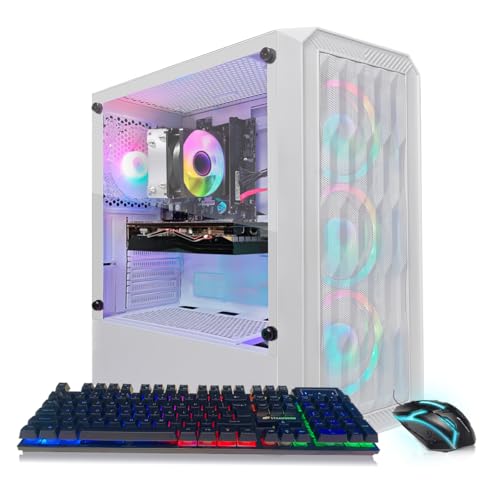
STGAubron RTX 3050 Gaming PC
- Dedicated GeForce RTX 3050 6G graphics
- Useful 16GB DDR4 and 1TB SSD configuration
- Wi-Fi 6 and Bluetooth 5.2 are included
- Comes with an RGB keyboard and mouse
- RTX 3050 graphics are entry-level and may require reduced settings in demanding modern games
- Ryzen 5 2600 is an older processor generation
- The listing does not specify the motherboard, power supply, or SSD interface

HOENGAGER Ryzen 7 5700X Gaming PC
- Eight-core Ryzen 7 processor is capable of gaming and productivity workloads.
- RTX 3050 includes ray-tracing hardware and DLSS support.
- Generous 1TB NVMe SSD for a system in the entry-level gaming tier.
- Seven RGB fans and panoramic glass provide a distinctive visual presentation.
- 240mm liquid cooler is included rather than a basic CPU air cooler.
- RTX 3050 6GB is an entry-level graphics card and may require reduced settings in more demanding games.
- 16GB DDR4 is adequate for mainstream use but offers less memory headroom than a 32GB configuration.
- The listing does not identify the motherboard model, Wi-Fi support, or available ports.
Choose by Situation
An RTX 3050 desktop makes the most sense when its processor, memory, storage, and upgrade options match how you plan to use the system.
If you want the lowest sensible cost
The RTX 3050 sits in the entry-level portion of NVIDIA’s gaming graphics range and is mainly intended for 1080p. It is a sensible starting point for esports, lighter games, and more demanding releases played with adjusted graphics settings. Compared with graphics cards below it, the RTX 3050 offers more useful gaming features and stronger visual performance without pushing the entire computer into a substantially higher hardware class.
Keep the supporting specification practical rather than paying for decorative extras or an unusually powerful processor that the graphics card cannot fully use in most games. A system with 16GB of RAM and solid-state storage provides a sound baseline. Check the exact CPU model, storage capacity, wireless support, and power supply before deciding. Our PC spending guide explains how to divide a budget.
If you want the most performance for the money
A balanced processor is more useful than simply choosing the desktop with the most impressive CPU label. Processors such as the AMD Ryzen 5 5500 and Intel Core i5-13400F can support gaming, background applications, and everyday work without making the RTX 3050 feel misplaced. A faster CPU can still help in processor-heavy workloads, but the graphics card usually establishes the practical resolution and visual-quality target.
Compared with the next graphics tier above it, the RTX 3050 generally requires more compromise with demanding visual settings, especially when ray tracing is enabled. DLSS can improve playability in supported software, but it does not make this an upper-tier graphics card. Look for enough SSD capacity for your library and reliable airflow. Our gaming PC overview covers the wider component choices.
Worth knowing: Check the RTX 3050 version stated in each listing because cards can come with more than one video-memory capacity. These systems include both 6GB and 8GB configurations.
If you plan to upgrade later
Upgrade plans change what counts as a good RTX 3050 desktop. Standard components, accessible storage slots, available memory capacity, and a suitable power supply can make later changes easier. The MLOONG listing specifically mentions standard components, a tool-less side panel, and support for future RAM or storage upgrades. Other systems should be checked carefully because their listings do not provide the same level of internal expansion detail.
The RTX 3050 can serve as a starting point while you use a 1080p monitor, then become the first major component you replace. A stronger graphics card above this tier may improve higher-resolution and high-detail gaming, but it can also require more power and cooling. Confirm case clearance, motherboard connections, and PSU capability before purchasing upgrades. Our prebuilt upgrade guide explains the usual limitations.
What to Spend Where
| Part | Priority | Why |
|---|---|---|
| GPU | Highest | The RTX 3050 sets the practical resolution and detail level for gaming. |
| CPU | High | Pair the graphics card with a balanced modern processor that can support games and background tasks. |
| RAM | High | 16GB is the sensible minimum, while 32GB provides headroom for heavier multitasking and creation work. |
| Power and cooling | Essential | The power supply and case airflow must suit the graphics card and the rest of the system. |
Spend first on the graphics card and a suitable supporting platform, then consider appearance and accessories. Large coolers and extensive RGB lighting can be attractive, but they should not replace adequate memory, SSD space, or a clearly specified processor. Our prebuilt comparison discusses where assembled systems offer convenience.
Quick Specs Cheat Sheet
- Treat the RTX 3050 as an entry-level 1080p graphics card rather than a high-resolution performance option.
- Choose 16GB of system RAM as a minimum, with 32GB offering more multitasking headroom.
- Prefer a balanced modern processor instead of overspending on CPU performance the graphics card rarely uses.
- Check whether the listed RTX 3050 has 6GB or 8GB of dedicated video memory.
- Prioritize SSD capacity, suitable power delivery, and clear case airflow before paying extra for lighting.
Which One Fits You
- Best overall: MLOONG RTX 3050 combines a Ryzen 5 5500, 16GB RAM, 1TB NVMe SSD, and 650W PSU.
- Best for the strongest GPU: STGAubron RTX 3050 pairs an RTX 3050 6G with an Intel Core i5-13400F.
- Best value: STGAubron RTX 3050 9PH includes 16GB DDR4, a 1TB SSD, Wi-Fi 6, and Bluetooth 5.2.
- Best alternative brand: OKAMUS RTX 3050 provides 8GB graphics memory and a CPU temperature display.
- Best runner-up: HOENGAGER Panorama has a Ryzen 7 5700X, 240mm liquid cooling, and seven RGB fans.
Final Thoughts
The MLOONG RTX 3050 is the most balanced choice because it combines suitable 1080p graphics, a Ryzen 5 5500, 16GB of memory, and roomy solid-state storage. Its standard components also make it appealing to buyers considering later upgrades.
Choose the STGAubron RTX 3050 instead if you prefer its Intel Core i5-13400F and included wireless connectivity.
More Options to Consider
- STGAubron RTX 3050 Z16 combines the RTX 3050 6G with an AMD Ryzen 7 5700X, 16GB DDR4, and a 1TB SSD. It suits buyers who also expect to stream, edit, or handle CPU-heavy work.
- STGAubron RTX 3050 SNG offers 16GB of memory, a 512GB SSD, Wi-Fi 6, Bluetooth 5.0, and six RGB fans. It is an alternative for buyers prioritizing a lower-cost configuration and included keyboard and mouse.
- STGAubron RTX 3050 HL7 is a similar Core i7 and RTX 3050 6G option with Windows 11 Home. It suits a straightforward home setup that benefits from Wi-Fi 6 and included RGB peripherals.
FAQs
1. Is the RTX 3050 good for gaming?
Yes, the RTX 3050 is a reasonable entry-level gaming GPU for people primarily using a 1080p monitor. It is best approached with realistic expectations, particularly in visually demanding releases where reduced detail settings may be appropriate. It also supports NVIDIA features such as hardware ray tracing and DLSS, although enabling demanding effects can increase the need to adjust other settings.
2. What CPU pairs well with a RTX 3050?
A balanced mainstream processor is the right match. The systems on this page include options such as the AMD Ryzen 5 5500, AMD Ryzen 7 5700X, Intel Core i5-13400F, Ryzen 5 2600, and i7-7700. A newer or higher-core processor can help with multitasking, streaming, editing, and CPU-heavy applications, but gaming value still depends heavily on the graphics card.
3. How much RAM does a RTX 3050 gaming PC need?
Choose at least 16GB of system RAM for a current RTX 3050 desktop. That amount is a practical baseline for gaming alongside a browser, chat software, launchers, and ordinary background applications. Moving to 32GB can provide more room for heavy multitasking, content creation, or long-term use, but it does not directly increase the RTX 3050’s dedicated video memory.
4. What resolution is the RTX 3050 best for?
The RTX 3050 is best suited to 1080p gaming. Less demanding software may leave room for higher settings, while graphically intensive releases can require medium or lower options for consistently smooth play. Higher resolutions increase the workload substantially, so buyers focused on high-detail 1440p or 4K gaming should generally consider a more powerful graphics-card tier.
5. Is a prebuilt RTX 3050 PC worth buying?
It can be worthwhile if you want a complete Windows desktop without selecting and assembling every component yourself. Compare the CPU, RAM, SSD capacity, power supply, cooling, wireless features, warranty, and upgrade access instead of judging the system by the RTX label alone. Our prebuilt value guide covers the broader tradeoffs between convenience and component choice.









