Expanding the local capacity of an Apple workstation has become essential as large creative media files and system backups grow. Finding the best 4TB external hard drives for Mac requires balancing port compatibility, durability, and file management efficiency, especially when selecting between different formats and understanding what is the difference between HDD and SSD technology.
Recommended by Us

SanDisk 4TB Extreme Portable SSD
- Blazing read speeds up to 1050MB/s and write speeds up to 1000MB/s
- Exceptional IP65 dust and water resistance with 3-meter drop durability
- Ultra-lightweight design weighing only 0.11 pounds
- Hardware-based 256-bit AES encryption keeps sensitive files secure
- High-capacity fast NVMe storage carries a premium investment
- Sustained speeds may vary depending on host device capabilities

- Massive 4TB storage capacity in a travel-friendly form factor
- Seamless plug-and-play compatibility with Windows and Mac
- No software installation or external power adapter required
- Includes an 18-inch USB 3.0 cable in the box
- Listing does not state specific read or write transfer speeds
- Utilizes mechanical hard drive storage rather than faster solid-state media
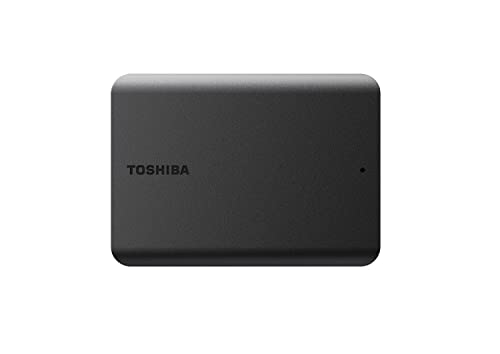
- Massive 4TB storage space in a compact and lightweight shell
- Convenient bus-powered operation without an extra power cord
- Smudge-resistant matte finish stays clean during transport
- True plug-and-play functionality on Windows systems
- Requires reformatting before it can be used with Mac systems
- Specific transfer speed figures are not stated in the official details

Samsung T7 2TB Portable SSD
- Fast transfer speeds up to 1,050MB/s for smooth file handling
- Pocket-sized aluminum body provides solid drop protection up to 6 feet
- Direct-to-drive 4K ProRes 60fps recording capability
- Extremely lightweight at approximately 0.13 pounds
- Chassis can warm up noticeably during sustained, high-speed write tasks
- Standard model lacks an IP-certified water and dust resistance rating

- Ready to use with macOS straight out of the box
- Attractive metal cover complements Apple laptop designs
- Hardware-based 256-bit AES encryption keeps sensitive files secure
- USB-C and USB 3.1 compatibility provides easy plug-in connectivity
- Specific data transfer rates are not stated in the technical specifications
- Requires reformatting if you plan to use it with Windows systems

SSK 4TB Portable External SSD
- Fast USB 3.2 Gen2 transfer rates reaching up to 1050MB/s
- Direct 4K at 60Hz ProRes HDR recording capability on supported iPhones
- Both USB-C and USB-A connection cables supplied in the box
- Pocket-friendly aluminum build with integrated LED activity indicator
- Displays as approximately 3725GB on Windows systems due to binary conversion
- No official water, dust, or drop resistance ratings are specified in product details

- Generous 4TB capacity accommodates extensive file collections
- Effortless setup with drag-and-drop capability and no software required
- Native cross-platform recognition across Windows and Mac computers
- Includes data recovery support via Rescue Data Recovery Services
- Requires a dedicated wall outlet for external power, limiting portability
- Requires reformatting to work with Apple Time Machine
- Listing does not provide specific sequential read and write transfer rates
Matching Drives to Your Workflow and Setup
When selecting external storage for macOS, I look closely at native file system formatting and interface compatibility. For general everyday Time Machine backups, the Western Digital 4TB My Passport is the one I would go with because it arrives formatted specifically for Mac right out of the box. It features a refined metal cover alongside password protection with hardware encryption. The company Western Digital provides direct USB-C connectivity, making it convenient to plug straight into modern Apple hardware without using third-party dongles.
If you require rugged portability and rapid data transfers in creative field workflows, I would point you toward the SanDisk 4TB Extreme. This solid state drive offers up to 1050MB/s read speeds, three-meter drop protection, and IP65 water and dust resistance with a carabiner loop. When managing massive project libraries, users often ask should you compress an SSD drive to reclaim room, but this vast capacity eliminates that chore. For basic archive duties on a desk, the Seagate 4TB Portable provides straightforward drag-and-drop storage with effortless plug-and-play recognition across operating systems.
FAQs
1. Do 4TB external hard drives work with macOS without reformatting?
Some drives arrive pre-formatted for Mac, while others use the Windows NTFS file system out of the box. Drives formatted in NTFS allow macOS to read stored files, but writing new data requires formatting the disk to APFS or Mac OS Extended using Apple Disk Utility.
2. Can a 4TB external drive run Apple Time Machine backups?
Yes, a 4TB drive provides abundant space for automated Time Machine backups and file history versions. When you connect a drive, macOS prompts to configure it as a backup destination, though certain desktop hard drives may require initial reformatting before Time Machine can begin saving snapshots.
3. Why might a 4TB drive display less storage on a Mac?
Apple macOS calculates storage capacity using decimal gigabytes where 1GB equals 1,000 megabytes, meaning a 4TB drive typically reports full capacity accurately. Historical computing standards often create confusion, much like curious users asking when did SSDs come out, but macOS display algorithms align closely with drive packaging.
4. Is an external SSD or mechanical HDD better for Mac users?
Choosing between solid state and mechanical storage depends on your daily workflow. High-speed SSDs excel at direct 4K video editing, whereas mechanical drives offer economical bulk capacity for cold storage archives. As storage authority Tom’s Hardware often highlights, flash drives deliver greater shock resistance than mechanical platters.
Editor’s Verdict
When selecting the best 4TB external hard drives for Mac, your choice comes down to speed versus bulk backup value. For high-speed transfers and active creative workflows, the SanDisk 4TB Extreme is our standout recommendation. If you simply need plug-and-play Time Machine backups in a sleek package, the Western Digital 4TB My Passport delivers dependable everyday security.