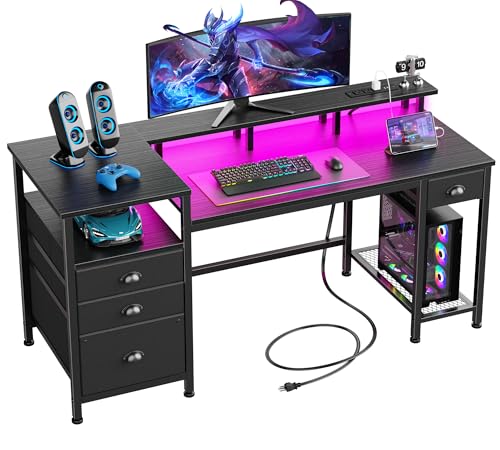
Cluttered cables, wobbling monitors, and cramped mouse space quickly ruin an otherwise great gaming session. Building an organized battle station starts with a sturdy surface that accommodates your tower, displays, and daily accessories without crowding your elbows. Planning the best gaming desk setups requires balancing usable desktop area against built-in power outlets and dedicated storage shelves.
Recommended by Us

Korfile 40-Inch L-Shaped Gaming Desk
- Reversible corner setup fits tight rooms flexibly
- Built-in power station with 3 AC outlets and 2 USB ports
- Solid 220 lb load capacity on double Z-shaped legs
- Bundled monitor riser, headphone hook, and cup holder
- Compact 40-inch surface limits space for oversized desktop setups
- Fixed desk height lacks sit-to-stand adjustment

- Raised monitor platform improves posture by elevating screens naturally
- Customizable ambient LED strip built directly into the desk frame
- Dedicated bottom compartment safely isolates PC towers from carpet
- Integrated side shelving keeps desktop clutter to a minimum
- Requires manual self-assembly out of the box
- Static desk design without motorized height adjustment
- Weight capacity specifications are not detailed in the product listing

ODK 53-Inch L-Shaped Gaming Desk
- Reversible configuration easily fits various room layouts
- Centralized desktop power station eliminates need for separate surge strips
- Dedicated spots for PC tower, headphones, and office accessories
- Integrated LED strip provides customizable accent lighting
- Maximum weight capacity is not provided in official specifications
- Specific desktop surface material is not specified by the manufacturer
- Height is fixed at 29.8 inches with no mechanical adjustment options

PRAISUN 51.2" L-Shaped Gaming Desk
- Built-in power station with 4 AC outlets, 2 USB ports, and a Type-C port
- Vibrant LED strip with app control and dynamic music sync modes
- Reversible L-shape orientation fits easily into any corner
- Multi-position pegboard keeps accessories off the main desk surface
- Total desk weight capacity is not stated in the official specifications
- Desktop surface material is not specified by the manufacturer

Korfile 48" Gaming Desk
- Built-in desktop power strip eliminates the need for separate extension cords
- Reversible PC tower shelf provides flexible placement for different room orientations
- Extensive atmospheric lighting customizable via a mobile app
- Plentiful accessory organization with four hanging hooks and three pull-out drawers
- Drawers are made of lightweight fabric rather than solid wood or metal
- Overall weight capacity is not stated in the official specifications
- Desk height is fixed with no mechanical or motorized adjustment

AODK 53-Inch Reversible L-Shaped Desk
- Reversible orientation accommodates varied room corners easily
- Built-in power station provides ample plugs for gaming peripherals
- Includes dedicated cable and accessory organizers like the side bag and hook
- Multi-mode LED strip creates immersive ambient lighting
- Maximum desktop weight capacity is not stated in the manufacturer specifications
- Surface and frame materials are not explicitly detailed
- Desktop depth of 18.9 inches offers limited depth for extra-deep monitor stands

AODK 59" Reversible PC Showcase Gaming Desk
- Dedicated eye-level showcase platform designed for panoramic tempered-glass PC cases
- Three fabric drawers provide out-of-sight storage for cords and desk clutter
- Built-in RGB lighting strip enhances room ambiance without separate installations
- Extra side tiers provide vertical display space for figures and audio monitors
- Drawers are constructed from fabric rather than solid wood or metal
- Desktop surface material and maximum weight limits are not stated in the listing
- Fixed desk frame does not offer adjustable height functionality
Matching Your Space and Hardware to the Right Desk
Every room layout presents different constraints, so selecting the right workstation depends heavily on how you position your equipment. If you own a panoramic glass case and want your components visible, the AODK Gaming Desk w/PC Showcase Stand is the one I would go with. Its elevated desktop stand lifts your rig to eye level to highlight internal hardware, while three fabric drawers tuck away loose cables and controllers. Many custom builders featured on PC Gamer prioritize chassis visibility, and an elevated platform prevents your desktop from feeling cramped.
For corner installations with multiple displays, I would point toward the PRAISUN L Shaped Gaming Desk with LED Lights. It provides seven integrated charging ports, including four AC outlets, two USB ports, and a Type-C connection, keeping high-draw peripherals organized in one central hub. It also includes an adjustable pegboard to hang headsets within arm reach. If you prefer a traditional straight desk with generous width, the ODK 55 Inch Gaming Desk with LED Lights & Storage offers a 55-inch surface, an X-shaped crossbar frame, and a dedicated monitor riser to keep neck strain down during extended gaming marathons.
FAQs
1. How much desktop width is necessary for a dual-monitor setup?
A dual-monitor configuration typically requires at least 48 to 55 inches of width to comfortably position two standard screens side by side. Desks equipped with an elevated monitor riser help elevate displays to eye level while freeing up lower surface area for your keyboard and large mousepad.
2. Should I place my PC tower on the desktop or the floor?
Keeping your computer tower off carpeted floors reduces dust buildup inside fans and radiators. Desks with an integrated CPU stand or an elevated showcase shelf protect internal fans from floor lint while ensuring intake vents receive clean airflow. Well-known furniture makers like IKEA frequently recommend dedicated risers for improved desktop air circulation.
3. Are built-in power outlets safe for gaming equipment?
Integrated power strips on modern desks are designed to handle routine low-voltage electronics like phones, controllers, desk lamps, and external audio gear. High-draw appliances and full PC power supplies are still best routed through dedicated wall outlets or certified surge protectors to ensure continuous electrical protection.
4. How do reversible L-shaped desks fit into smaller rooms?
Reversible L-shaped desks allow you to install the longer extension and storage shelves on either the left or right side during initial assembly. This adaptability lets you tuck the frame directly into tight corners without blocking doorways, windows, or existing bedroom furniture.
Editor’s Verdict
Creating the best gaming desk setups comes down to managing clutter while securing ample space for displays and peripherals. For corner rooms requiring maximum connectivity, the PRAISUN L Shaped Gaming Desk with LED Lights delivers exceptional versatility with its built-in charging hub and modular pegboard, while the straight ODK 55 Inch Gaming Desk with LED Lights & Storage remains a dependable choice for standard dual-screen layouts.