

Core Ultra 5 is Intel’s newer mid range line, so check which generation and model the listing names. Among the best prebuilt gaming PCs with Intel Core Ultra 5, the Thermaltake LCGS pairs Intel Core Ultra 5 245KF with NVIDIA GeForce RTX 5060 Ti, and the CyberpowerPC RTX 5060 TI is the lower-cost pick.
Recommended by Us
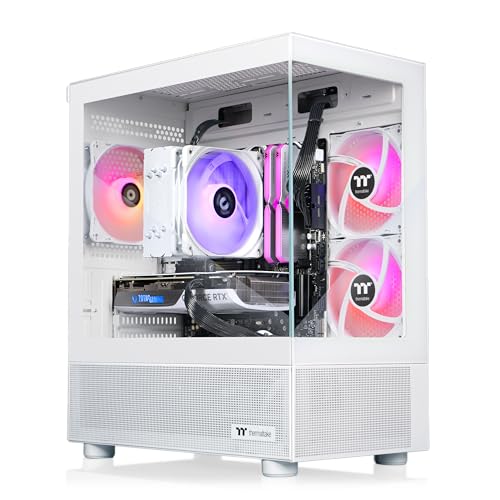
Thermaltake LCGS View u2460TS RTX 5060 Ti
- RTX 5060 Ti graphics and a Core Ultra 5 245KF create a capable mainstream gaming configuration
- Generous 32GB DDR5 memory runs at a listed 6000MT/s speed
- Fast 1TB NVMe M.2 storage is included
- Wi-Fi, Windows 11 and front audio connections are built in
- White tower and RGB components provide a distinctive appearance
- The listing does not state the graphics card's VRAM capacity
- Power supply wattage is not specified
- Only two front USB 3.0 ports are listed, and no front USB-C port is mentioned

CyberPowerPC Gamer Xtreme RTX 5060 Ti
- Modern NVIDIA GeForce RTX 5060 Ti 8GB graphics
- 18-core Intel Core Ultra processor and DDR5 memory
- Fast 1TB PCIe 4.0 NVMe SSD
- Liquid CPU cooling with custom RGB lighting
- Wi-Fi 6, Bluetooth 5.3, USB-C, and included peripherals
- 16GB of RAM may feel limited for especially heavy multitasking or memory-intensive creative workloads.
- The graphics card has 8GB of VRAM, which can require reduced settings in particularly demanding workloads.
- The listing does not specify the power supply wattage or DDR5 memory speed.

CyberPowerPC Core Ultra 5 RTX 5070 PC
- RTX 5070 graphics with 12GB of video memory
- Generous 32GB DDR5 memory configuration
- Fast 1TB PCIe 4.0 NVMe storage
- Liquid CPU cooling and custom RGB lighting
- Strong selection of wireless, display, and USB connections
- The listing does not specify the power supply wattage or efficiency rating.
- A 1TB drive may fill quickly with a large collection of modern applications and media.
- Four of the listed USB-A ports use the older USB 2.0 standard.

Acer Nitro 60 RTX 5060 Gaming Desktop
- RTX 5060 GPU includes 8GB of newer GDDR7 video memory.
- 64GB of DDR5 RAM is generous for gaming and heavy multitasking.
- Broad connectivity includes Wi-Fi 6E, Ethernet, DisplayPort, HDMI, and seven USB-A ports.
- Windows 11 Pro comes installed.
- The 1TB SSD may require supplemental storage for especially large game or media libraries.
- Power supply specifications and detailed cooling information are not provided.
- The listing does not mention USB-C connectivity.

Gigatech Gaming Titan 5 RTX 5060 Desktop
- Capable RTX 5060 graphics card
- Fast 14-core Intel Core Ultra processor
- Generous 32GB of high-speed DDR5 memory
- Wi-Fi, keyboard, and mouse are included
- 512GB storage capacity may be restrictive for large game and media libraries
- Power supply specifications are not listed
- Cooling hardware and included port selection are not detailed
Understanding Intel Core Ultra 5
Intel Core Ultra 5 desktop processors occupy the current-generation mid-range of Intel’s lineup. They provide enough processing performance for gaming, background applications, everyday productivity, and general creative work without requiring a flagship CPU budget. In a gaming PC, however, the graphics card normally has a greater effect on visual settings and resolution than the processor does. That makes the GPU pairing especially important. An RTX 5060-class card makes sense for mainstream gaming, while an RTX 5060 Ti or RTX 5070 gives the system more graphics headroom. Memory, storage, cooling, and component quality still matter, but they should not distract from an unbalanced CPU and GPU combination. Our prebuilt comparison explains the broader trade-offs between buying a completed system and choosing every component yourself.
Note: Intel Core Ultra 5 works best with a graphics card that matches its level, since a weak GPU or CPU on either side can hold the other component back.
Five Rules for Choosing Well
Prioritize the graphics card after confirming the processor. Intel Core Ultra 5 is a capable gaming foundation, but an RTX 5070 offers more graphics potential than an RTX 5060 when the rest of the system is reasonably balanced. Spend according to the resolution and visual settings you expect to use.
Choose enough memory for your actual workload. A gaming-focused machine can start with 16GB DDR5, while 32GB offers more room for multitasking and heavier applications. Configurations with 64GB mainly appeal to buyers who also run memory-intensive creative, engineering, or professional software.
Look beyond the headline storage capacity. An NVMe or PCIe 4.0 SSD provides responsive startup and loading, but capacity determines how quickly a game library fills it. A smaller SSD may require an early upgrade. Our upgrade overview covers what to check before adding parts.
Match cooling to the processor and your expectations. These systems include a mixture of tower air cooling, liquid cooling, and listings that do not identify the cooler. Better cooling can help control temperatures during sustained workloads, but case airflow and fan behavior also affect the overall experience.
Check support and connectivity before ordering. Wi-Fi standards, Bluetooth, USB-C, display outputs, and warranty coverage vary between listings. These details are easy to overlook yet can affect daily use. Our warranty overview explains the coverage language commonly attached to prebuilt computers.
How the Systems Compare
The CyberPowerPC Gaming PC with Intel Core Ultra 5 pairs an Intel Core Ultra 5 250KF Plus with an NVIDIA GeForce RTX 5070 12GB, 32GB DDR5, and a 1TB PCIe 4.0 NVMe SSD. It also lists liquid CPU cooling. Among the table systems, its RTX 5070 is the highest-positioned graphics tier, making this configuration the strongest gaming-oriented pairing.
The Thermaltake LCGS View uses an Intel Core Ultra 5 245KF, NVIDIA GeForce RTX 5060 Ti, 32GB DDR5 6000MT/s RGB memory, and a 1TB NVMe M.2 drive. Its processor is cooled by an ARGB tower air cooler. The CyberPowerPC Gamer Xtreme combines an Intel Core Ultra 5 250KF Plus with an NVIDIA GeForce RTX 5060 Ti 8GB, 16GB DDR5, a 1TB PCIe 4.0 NVMe SSD, and liquid CPU cooling.
The Acer Nitro 60 combines an Intel Core Ultra 5 225F and NVIDIA GeForce RTX 5060 with 64GB DDR5 and a 1TB SSD. The Gigatech Gaming Titan 5 uses an Intel Core Ultra 5 245K, NVIDIA RTX 5060, 32GB DDR5 6000MHz RAM, and a smaller 512GB SSD. For gaming, the GPU difference matters most, followed by memory and storage capacity. Our proprietary parts guide can help you evaluate less obvious ownership concerns.
Other Core Ultra 5 Systems
- CLX RTX 4060 combines an Intel Ultra 5 245KF with an NVIDIA GeForce RTX 4060, 32GB DDR5, a 2TB NVMe M.2 SSD, and a 4TB HDD. Its large combined storage suits buyers with extensive game and media libraries.
- CyberpowerPC Core Ultra 5 225F RTX 5060 TI pairs an Intel Core Ultra 5 225F with an NVIDIA GeForce RTX 5060 Ti 8GB. It has 16GB DDR5, a 2TB PCIe 4.0 NVMe SSD, WiFi 6, Bluetooth 5.3, and included keyboard and mouse.
- CyberpowerPC RTX 5060 uses an Intel Core Ultra 5 225F and NVIDIA GeForce RTX 5060 8GB but stands out with 64GB DDR5 and a 2TB PCIe 4.0 NVMe SSD. It suits gaming buyers who also need substantial memory for demanding non-gaming applications.
Parts That Shape Performance
Graphics Card Pairing
A current-generation mid-range Intel Core Ultra 5 gives the graphics card room to handle most of the gaming workload. An RTX 5060 is the entry point among these configurations, while an RTX 5060 Ti provides a stronger balance and an RTX 5070 offers the most graphics headroom. Higher resolutions and more demanding visual settings increase the importance of the GPU, so choose that component before paying extra for unusually large memory capacity.
Memory and Storage
DDR5 memory is standard across the listed systems, but capacity ranges from 16GB to 64GB. For a gaming-first desktop, 16GB is workable and 32GB provides more breathing room for background tasks. Storage affects convenience rather than raw graphics performance. A roomy NVMe SSD reduces the need to uninstall large games, while a 512GB drive may fill quickly. Our prebuilt cost guide explains where system budgets commonly go.
Cooling and Component Balance
Cooling supports consistent processor behavior during long gaming sessions and demanding applications. Some systems here specify liquid cooling, while the Thermaltake lists an ARGB tower air cooler. Either cooling style can suit a mid-range Intel Core Ultra 5 when implemented properly. The better purchase is not automatically the machine with liquid cooling. Consider the complete balance of GPU, memory, storage, case design, and the cooling information the manufacturer actually provides.
First Steps After Delivery
After connecting the desktop, complete Windows setup and run operating system updates. Then obtain current graphics drivers through the appropriate NVIDIA software. Check Device Manager and Windows settings to confirm that the listed processor, graphics card, memory capacity, storage, Wi-Fi, and Bluetooth hardware appear correctly.
Connect the monitor to the graphics card outputs rather than a motherboard video port. This is particularly relevant because several processors listed here carry an F suffix, and the product data does not list integrated graphics for them. Set the monitor to its intended resolution and refresh rate, then adjust game settings around the installed GPU.
During the first few sessions, listen for unusual fan noise and watch for unexpected shutdowns, display problems, or connectivity issues. Intel Core Ultra 5 is the mid-range processing foundation, but the graphics card still determines much of the gaming experience. Confirming both components early makes it easier to identify shipping damage or configuration errors within the seller’s return period.
Core Ultra 5 Buyer Questions
1. Is Intel Core Ultra 5 powerful enough for gaming?
Yes. Intel Core Ultra 5 is a current-generation mid-range processor family suited to gaming and everyday multitasking. Gaming results depend heavily on the graphics card, so an RTX 5060, RTX 5060 Ti, or RTX 5070 pairing matters more than simply choosing the fastest Core Ultra 5 model available.
2. Is an RTX 5070 worth pairing with Core Ultra 5?
An RTX 5070 can be a sensible match when graphics performance is the main priority. The Core Ultra 5 250KF Plus configuration listed here pairs the two directly, showing that buyers do not need a flagship processor to select a stronger GPU tier. Your monitor resolution and preferred settings should guide whether the added graphics capability is worthwhile.
3. Should I pay more for 32GB or 64GB of RAM?
For a dedicated gaming desktop, 32GB provides comfortable capacity for games, launchers, voice chat, and browser tabs. A 64GB configuration is more relevant when gaming shares the system with demanding content creation, engineering applications, or other memory-heavy tasks. Avoid sacrificing GPU capability just to obtain memory capacity you may not use.
4. Does an Intel Core Ultra 5 prebuilt offer good value?
It can, especially when the system combines the processor with a balanced GPU, adequate DDR5 memory, useful SSD capacity, and clear support terms. Convenience and included warranty service also carry value for buyers who do not want to build. Our prebuilt value guide covers the wider cost and convenience trade-offs.
The Best Match Overall
The CyberpowerPC RTX 5070 is the strongest overall choice for gaming because it combines Intel Core Ultra 5 with the highest graphics tier among the table systems. For a balanced alternative with 32GB DDR5 and an RTX 5060 Ti, the Thermaltake LCGS is the better fit.









