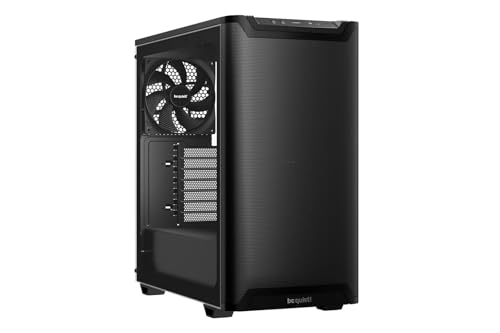
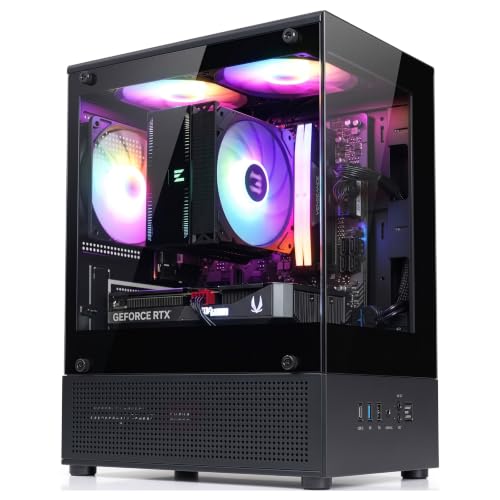
Building a clean-looking system becomes easier when the power supply, drives, and excess wiring sit behind the main hardware area. The best dual-chamber PC cases combine that tidy layout with flexible cooling support and room for large components. Builders prioritizing ventilation can also compare our favorite airflow-focused PC cases.
Recommended by Us

AeroCool P300C Dual-Chamber Mid-Tower
- Includes three pre-installed 12cm ARGB fans
- Supports graphics cards up to 450mm long
- Panoramic front and side tempered-glass panels
- Supports up to nine fans and two 360mm radiator positions
- Dual-chamber design supports a visually organized build
- Tempered glass at the front offers less direct intake exposure than a mesh front panel
- Motherboard and power supply compatibility are not listed in the provided product data
- No included fan or lighting controller is specified

Antec C8 E-ATX Dual-Chamber PC Case
- Extensive radiator placement options for advanced cooling configurations
- Dual-chamber design supports organized component placement
- Tempered-glass front and side panels suit display-focused builds
- Supports E-ATX motherboards and RTX 40 Series graphics cards
- Large-fan mounting options are available on both the top and bottom
- No fans are included
- Exact maximum GPU length is not listed
- Glass front panel may provide less direct intake than a fully mesh front

HYXN H2 Dual-Chamber ATX PC Case
- Includes six 140mm reverse fans and two 120mm forward fans.
- Generous 455mm GPU clearance suits long graphics cards.
- Extensive radiator compatibility supports large liquid-cooling builds.
- Dual-chamber layout provides dedicated space for cable management and power components.
- Tempered glass showcases internal hardware.
- The included fans have no LED or ARGB lighting.
- The listing does not specify a mesh front panel or clearly describe the external ventilation layout.
- The listed dimensions conflict, with the feature section stating 500 x 285 x 485mm while the specifications show 16.5 x 11.2 x 17.3 inches.

- Large integrated 2.5K touchscreen with extensive customization through HYTE Nexus software
- High-capacity cooling layout with room for up to 10 fans
- Included PCIe 4.0 x16 riser adds value for vertical GPU builds
- Panoramic glass and Snow White finish create a distinctive showcase appearance
- Dual-chamber design supports a visually organized component layout
- Maximum GPU length is not specified in the listing
- Front-panel airflow design is not identified
- Large 20.47-inch dimensions and 24.4-pound weight require substantial desk or floor space

NZXT H9 Flow Dual-Chamber ATX Case
- High fan capacity with four case fans already installed
- Dual 420mm radiator mounting locations
- Wide cable channels, Velcro straps, and tie-down points simplify routing
- Panoramic tempered-glass design showcases internal components
- Compatible with rear-connecting motherboard designs
- Included fans are non-RGB, 3-pin DC case versions
- Exact maximum graphics card length is not specified
- Large 20.08 x 19.29 x 12.6-inch chassis requires substantial space

NZXT H9 Flow RGB+ Dual-Chamber ATX Case
- Includes seven RGB fans and an NZXT Control Hub
- High fan capacity and support for large 420mm radiators
- Dual-chamber design provides dedicated space for cables, the PSU, and drives
- Extra-wide channels, Velcro straps, and tie-down points aid cable management
- Panoramic tempered-glass presentation suits showcase builds
- Large chassis requires substantial desk or floor space
- Exact maximum GPU length is not provided in the listing
- Rear case-version fan uses a 3-pin DC connection
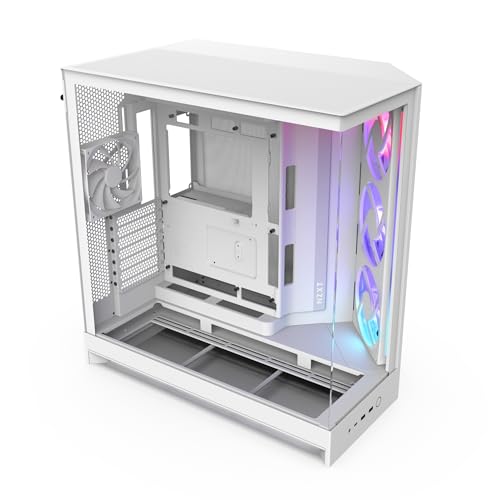
NZXT H9 Flow RGB Dual-Chamber ATX Case
- Spacious dual-chamber design for cleaner component and cable separation
- Strong cooling flexibility with extensive fan and 420mm radiator support
- Includes a large RGB fan unit and a rear case fan
- Panoramic tempered-glass presentation
- Compatible with rear-connecting motherboard designs
- Exact maximum GPU length is not provided in the listing
- Rear F120Q case-version fan uses a basic 3-pin DC connection
- Large 27.78-pound chassis requires substantial desk or floor space
Which Case Fits Your Build
I would choose according to cooling plans, included fans, and how prominently the finished computer will be displayed. Before committing to a larger chassis, check your desk space and review how PC case sizes compare. For additional case-planning resources and software details, NZXT maintains information about its current ecosystem.
- For a balanced high-end build, the NZXT H9 Flow is the model I would go with. It includes four fans, accepts radiators up to 420mm at the top and front-right, and provides wide cable channels with built-in straps. Compatibility with rear-connecting motherboards also helps builders pursuing an especially uncluttered interior.
- If an integrated display is central to the design, I would point toward the HYTE Y70 Touch Infinite. Its 14.9-inch touchscreen supports extensive customization, while the panoramic glass and included PCIe 4.0 riser emphasize vertically mounted graphics cards. It also accommodates up to ten fans and 360mm radiators at the top and side.
- For buyers who want extensive cooling hardware included from the start, the HYXN H2 is worth considering. It comes with eight non-RGB fans, supports 420mm radiators, and has clearance for graphics cards up to 455mm. The rear compartment includes straps and mounting points for organizing cables.
FAQs
1. What is the advantage of a dual-chamber PC case?
A dual-chamber layout places the power supply, storage, and much of the cabling away from the motherboard and graphics card. This arrangement can simplify cable routing and create a cleaner presentation. Cooling still depends on panel ventilation, fan placement, radiator configuration, and sensible component selection.
2. Are dual-chamber cases good for airflow?
They can provide strong airflow when they include ventilated panels and suitable fan mounts around the main chamber. The second chamber does not automatically guarantee effective cooling, so consider the available intake and exhaust positions. Included fans are useful, but their quantity should not be the only deciding factor.
3. Can a dual-chamber case support liquid cooling?
Many models support large radiators at the top, side, front-right, or bottom, although each layout differs. Check radiator length, thickness, and potential conflicts with fans or motherboard components before buying. Our overview of PC cases for water cooling covers additional options for radiator-heavy systems.
4. How should I check graphics card compatibility?
Compare the case’s stated GPU clearance with the complete length and thickness of your graphics card. Allow extra room for front-mounted cooling hardware and power connectors where necessary. If you plan to mount the card vertically, confirm that the case includes or supports the correct riser cable and mounting arrangement.
5. Do included fans make a case a better choice?
Included fans can reduce the number of parts needed for the initial build, but placement and size matter as much as quantity. Decide whether you want RGB lighting, standard fans, or your own matched cooling set. A fanless case may still be attractive when you already have suitable fans available.
Editor’s Verdict
Among the best dual-chamber PC cases, the NZXT H9 Flow is my preferred all-around choice because it combines included fans, extensive radiator support, and practical cable-routing features. Builders who specifically want an integrated touchscreen and vertical GPU presentation should instead consider the HYTE Y70 Touch Infinite.