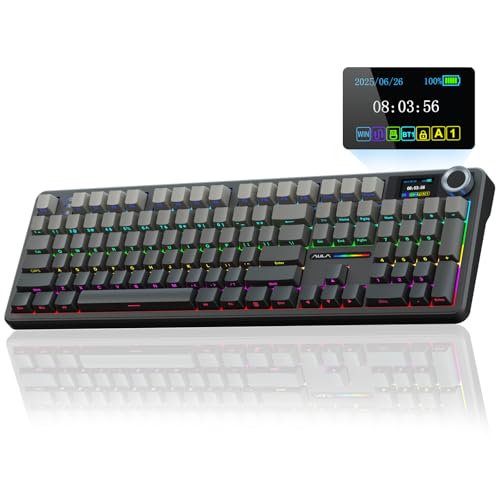
A sluggish office deck can ruin competitive matches by dropping key combinations or introducing unwanted keystroke lag. Upgrading your desk space does not require spending half your rig budget on boutique hardware. Finding the best cheap gaming keyboards comes down to prioritizing reliable inputs, smooth switch action, and a compact layout that leaves ample room for wide mouse swipes.
Recommended by Us

- Space-saving 68-key layout preserves separate arrow keys
- Quiet keystrokes suitable for shared workspaces and late-night sessions
- Convenient detachable Type-C cable simplifies transport and cable management
- Transparent shine-through key legends enhance visibility in dim lighting
- Features membrane dome actuation rather than true modular mechanical switches
- Lighting customization is limited to built-in static and breathing modes
- No wireless or Bluetooth connectivity options available

Redragon K671 Mechanical Keyboard
- Hot-swappable switch design makes replacement straightforward without soldering
- Smooth linear switch feel reduces finger fatigue during long gaming sessions
- Comes with spare switches and extra accent keycaps out of the box
- Full key anti-ghosting ensures accurate registration of complex combinations
- Backlight color is fixed and cannot be changed despite multiple motion modes
- Product description notes conflicting information regarding ABS versus PBT keycap material

AULA WIN68 HE Gaming Keyboard
- Ultra-fast 8,000Hz polling rate and 0.3ms response time
- Adjustable magnetic switch actuation ranging from 0.02mm to 3.44mm
- No-install web driver configuration for Windows systems
- Compact 60% layout preserves valuable desk space
- Web configuration driver does not support macOS
- Wired connection only, with no wireless connectivity options

Aula WIN60 HE 60% Gaming Keyboard
- Ultra-low 0.02mm rapid trigger step distance for competitive shooters
- 8000Hz polling rate provides rapid input responsiveness
- Contact-free magnetic switches reduce mechanical wear over time
- Compact 60% form factor frees up considerable desk space
- Hot-swappable PCB supports straightforward switch maintenance
- Compact 60% layout lacks dedicated arrow and function keys
- Wired-only configuration provides no wireless flexibility

AULA F75 Pro Wireless Keyboard
- Rich five-layer acoustic dampening creates a pleasant, deep sound profile
- Universal 3-pin and 5-pin hot-swappable PCB allows easy customization
- Flexible tri-mode connectivity links up to five systems across various platforms
- Generous 4000mAh rechargeable battery offers dependable wireless endurance
- Factory-lubed switches and stabilizers eliminate harsh scratchiness immediately
- Side-printed keycap legends can take time to get used to in dim environments
- Substantial 2.25-pound weight makes it less ideal for frequent travel

Redragon S101-3 PRO Keyboard and Mouse
- Inclusive keyboard and mouse combo covers all peripheral essentials at once
- Quiet membrane keystrokes make it ideal for noise-sensitive environments
- Five dedicated macro keys simplify command execution in games and productivity apps
- Hardware memory preserves custom lighting and DPI adjustments across reboots
- Built-in wrist rest provides extra palm comfort during extended use
- Membrane key response lacks the crisp tactile actuation of mechanical switches
- Tethered wired connection cannot be used wirelessly
- Full-size dimensions demand substantial desk space

- Convenient dedicated one-touch button for quick backlight toggling
- Wide compatibility across modern Windows, macOS, and gaming consoles
- Full 104-key layout provides dedicated arrows and a full numpad
- 19-key anti-ghosting supports rapid simultaneous key combinations
- Employs mechanical-feeling keys rather than authentic mechanical switches
- Fixed rainbow color scheme without per-key RGB customization
- Wired-only connection offers no detachable cable or wireless modes
Matching the Right Board to Your Gaming Style
Gamers focus on different features depending on the genres they play most often. If your primary focus is competitive first-person shooters, I would go with the AULA WIN68 HE Mechanical Keyboard. It features magnetic Hall effect switches with adjustable actuation down to 0.02 mm and an 8,000Hz polling rate. This setup lets you halt movement and counter-strafe with pinpoint accuracy, rivaling high-end boards tracked by sites like PC Gamer without carrying an extreme price tag.
For players who prefer a traditional mechanical experience with hot-swappable switches, the Redragon K671 Mechanical Keyboard is an easy recommendation. It includes linear red switches that glide smoothly during intense matches, along with full-key anti-ghosting to ensure every skill press registers accurately. If you ever wonder how long does a mechanical keyboard last, having hot-swap sockets means you can easily swap out worn parts instead of buying a replacement.
If you are working with the tightest desk budget or prefer a quiet workspace, I would steer you toward the GEODMAER 65% Gaming Keyboard. Its membrane layout keeps typing noise muted while offering a clean 68-key format and a detachable USB-C connection.
FAQs
1. Are mechanical switches better than membrane keys for gaming?
Mechanical switches register actuation before you push the key all the way down, providing quicker feedback during competitive play. Membrane boards rely on rubber domes that require a complete bottom-out press. Understanding how does a mechanical keyboard work helps explain why players favor discrete switches for consistent travel and rapid keystroke resets.
2. Why are 60% and 65% keyboard layouts popular for gaming?
Compact layouts eliminate the dedicated number pad and navigation cluster, drastically shrinking the board’s footprint. This compact footprint gives you significantly more mouse pad area, which is vital for low-sensitivity aiming in tactical shooters. Most compact boards still provide access to secondary commands and media controls through simple function key shortcuts.
3. What are Hall effect magnetic switches?
Magnetic switches use electrical sensors to measure the precise depth of a keystroke rather than relying on physical metal contact points. This design allows for rapid trigger functionality and customizable actuation points. Competitive players appreciate the technology because resetting a key happens the instant your finger begins releasing upward pressure.
4. How should you maintain a cheap gaming keyboard?
Dust, crumbs, and oils can build up quickly between keycaps and impede switch travel. Learning how to clean a mechanical keyboard regularly with a keycap puller, compressed air, and a microfiber cloth keeps the switches clicking smoothly and extends the overall life of your peripheral investment.
Editor’s Verdict
Among the best cheap gaming keyboards on the market, the AULA WIN68 HE Mechanical Keyboard stands out for its high-speed magnetic switches and rapid actuation. For players wanting hot-swappable traditional switches, the Redragon K671 Mechanical Keyboard offers great durability and seamless input registration.