

Late night gaming sessions and shared office spaces quickly turn sour when clacky switches echo across the room. Finding the best quiet mechanical keyboards means balancing tactile satisfaction with sound-dampening structures that keep your coworkers or roommates happy. Understanding how does a mechanical keyboard work helps you spot the acoustic layers that silence each keystroke.
Recommended by Us

SOLAKAKA KI99 Pro Wireless Keyboard
- Five sound-dampening layers deliver an exceptionally quiet, creamy acoustic profile.
- Huge 10,000mAh internal battery drastically reduces charging frequency.
- Hot-swap PCB accepts both 3-pin and 5-pin mechanical switches.
- Multi-function control knob provides rapid control over volume and illumination.
- Broad compatibility covering Windows, macOS, PC, laptop, and smartphone setups.
- Larger footprint than 60% or 75% compact alternatives for minimalist desks.
- Software configuration tool is primarily geared toward Windows desktop setups.
- Specific switch manufacturer branding is not detailed in the specifications.

AULA F75 Pro Wireless Keyboard
- Rich five-layer acoustic dampening creates a pleasant, deep sound profile
- Universal 3-pin and 5-pin hot-swappable PCB allows easy customization
- Flexible tri-mode connectivity links up to five systems across various platforms
- Generous 4000mAh rechargeable battery offers dependable wireless endurance
- Factory-lubed switches and stabilizers eliminate harsh scratchiness immediately
- Side-printed keycap legends can take time to get used to in dim environments
- Substantial 2.25-pound weight makes it less ideal for frequent travel
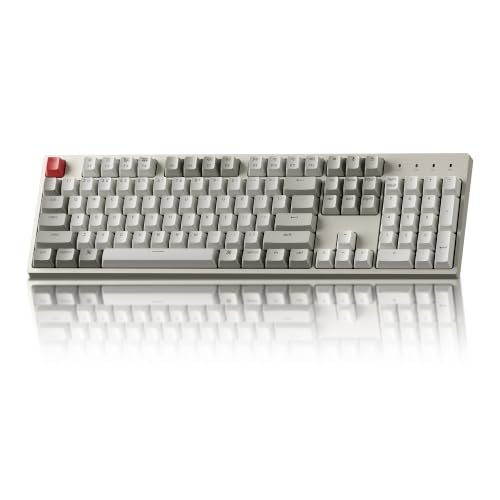
- Full 104-key layout includes a dedicated numeric keypad
- Includes dedicated extra keycaps for both Mac and Windows systems
- Tactile Keychron Brown switches rated for 50 million presses
- Ergonomic typing angle options with dual-level adjustable feet
- Non-backlit design offers no key illumination in dark environments
- Wired-only configuration without wireless connectivity options
- Num Lock functionality is restricted to Windows systems only

Redragon K671 Mechanical Keyboard
- Hot-swappable switch design makes replacement straightforward without soldering
- Smooth linear switch feel reduces finger fatigue during long gaming sessions
- Comes with spare switches and extra accent keycaps out of the box
- Full key anti-ghosting ensures accurate registration of complex combinations
- Backlight color is fixed and cannot be changed despite multiple motion modes
- Product description notes conflicting information regarding ABS versus PBT keycap material

- Connects to up to five devices across Bluetooth, 2.4GHz, and USB-C
- Gasket structure and single-key PCB slotting provide a soft, dampened typing feel
- Hot-swap design supports both 3-pin and 5-pin mechanical switches
- Factory pre-lubed linear switches provide smooth action right from the start
- Weighs over 3.3 pounds, making it relatively heavy for mobile use
- Exact form factor layout percentage is not explicitly stated in the listing details
- Music rhythm backlighting and macro assignments require driver software

RK ROYAL KLUDGE S98 Mechanical Keyboard
- Vibrant built-in screen and tactile knob provide direct hardware control without alt-tabbing
- Pre-lubed switches paired with extensive acoustic foams deliver a satisfying creamy sound
- Full hot-swap flexibility accommodates nearly any standard 3-pin or 5-pin switch
- Reliable wireless freedom through both Bluetooth 5.0 and low-latency 2.4GHz connections
- Solid three-pound build makes it somewhat heavy for frequent mobile use
- Exact battery milliamp-hour capacity is not detailed in the manufacturer specifications

ProtoArc K310 Pro Mechanical Keyboard
- Quiet low-profile linear red switches suitable for shared workspaces
- Rigid, modern aluminum top case gives dependable build quality
- Fast switching between three paired devices across Bluetooth and 2.4G
- Full 108-key layout preserves full numeric and navigation clusters
- Macro recording software only operates when connected via the 2.4G USB receiver
- Configuration utility cannot detect the keyboard through multi-port USB hubs
- Macro programming software does not support Safari
Matching the Board to Your Typing Routine
If you need a full number pad without taking up too much room, I would point you toward the SOLAKAKA KI99 Pro. Its 96 percent layout, five sound-absorbing layers, and pre-lubed silent switches deliver a muted typing sound alongside a massive 10,000mAh battery for extended wireless work. The flex-cut PCB and hot-swap sockets also let you swap out components without soldering if your acoustic preferences change down the road.
For shared desks where space is tight, the AULA F75 Pro is the one I would go for. It pairs pre-lubricated switches with five layers of internal padding and an integrated silicone pad, absorbing bottom-out clatter while offering Bluetooth, 2.4GHz wireless, and a volume dial. If you prefer a simpler wired setup for office tasks, the Keychron C2 offers a full-size retro aesthetic with tactile switches and dedicated Mac keys. Established brands like Keychron build sturdy hardware, and checking how long does a mechanical keyboard last can give you confidence in long-term switch durability.
FAQs
1. What makes a mechanical keyboard quiet?
Typing volume largely depends on switch construction and internal dampening. Boards designed for low noise use pre-lubed linear or silent switches alongside multiple dampening layers, such as IXPE foam, silicone base pads, and gasket mountings. These structural materials absorb internal vibrations and eliminate hollow plastic reverberation inside the keyboard case before the sound can escape into your room.
2. Are linear switches quieter than tactile switches?
Linear switches glide smoothly from top to bottom without an internal bump, making them naturally quieter during quick keystrokes. Tactile switches feature a physical bump during actuation that creates slight mechanical noise, though they are still far softer than clicky switches. Proper maintenance also helps; learning how to clean a mechanical keyboard keeps dust from drying out factory lubricants.
3. Does a gasket mount structure reduce typing sound?
Yes, gasket mounting isolates the plate and circuit board from the rigid outer shell using soft rubber or silicone strips. Instead of hard vibrations reverberating against plastic or metal screw standoffs, the entire assembly flexes slightly under your fingers. This design softens bottom-out impacts and produces a deeper, noticeably softer keystroke profile compared to traditional tray-mount keyboards.
4. Can you replace switches on hot-swappable boards?
Hot-swappable boards feature modular sockets that accept standard three-pin or five-pin mechanical switches without any soldering required. If your board feels too loud in an open space, you can easily pull the keycaps and switches out with a simple extraction tool. Hardware review sites like RTINGS regularly highlight hot-swap sockets for hassle-free customization.
Editor’s Verdict
Among the best quiet mechanical keyboards, the AULA F75 Pro is my top recommendation for compact setups thanks to its five dampening layers and pre-lubed switches. If you need a dedicated numpad for productivity, the SOLAKAKA KI99 Pro provides outstanding sound suppression alongside a massive wireless battery.





