

Tangled cables across a clean desk setup quickly become an annoyance during late-night gaming sessions. Upgrading to the best wireless keyboards for gaming frees up precious mouse space, giving you complete freedom to flick and swipe without snagging wires. Modern connectivity keeps inputs reliable, ensuring every keystroke registers cleanly when you need it most.
Recommended by Us

Redragon S101M-KS Wireless Combo
- Single 2-in-1 wireless receiver connects both peripheral devices
- Flexible tri-mode connectivity covering Bluetooth, 2.4G, and wired modes
- Generous battery capacity delivering up to 300 hours with RGB off
- Dedicated row of 10 independent multimedia keys for fast system controls
- Key switch type is not specified in the official product specifications
- Exact keyboard form factor and profile dimensions are not stated
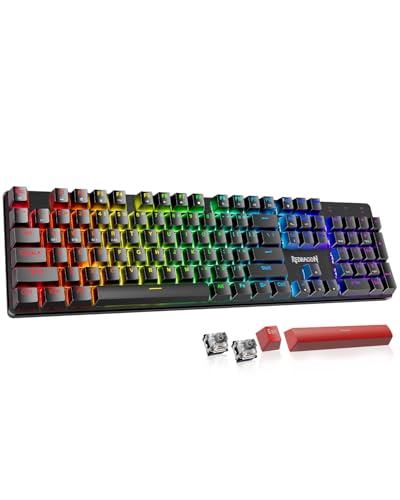
Redragon K671KS Wireless Mechanical Keyboard
- Flexible three-way connectivity supporting up to five devices simultaneously
- Hot-swappable sockets include eight extra switches and two accent keycaps in the box
- Double-shot PBT keycaps provide long-term resistance to shine and fading
- Rigid metal panel design adds structural stability
- Exact keyboard form factor and key count are not stated in the listing
- Built-in battery capacity rating is not specified
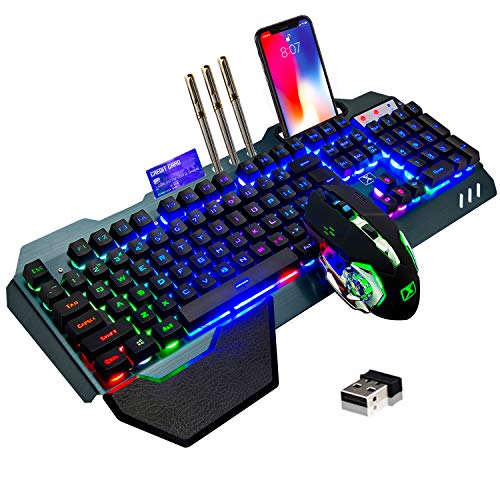
LexonElec Wireless Gaming Keyboard & Mouse
- Unified 2.4GHz receiver operates both mouse and keyboard from one USB port
- Built-in rechargeable batteries remove the need for disposable AA or AAA cells
- Brushed metal top panel provides rigidity and a clean look
- Convenient built-in phone slot and removable wrist rest
- Uses mechanical-feel membrane actuation rather than individual mechanical switches
- Backlighting is limited to fixed rainbow patterns rather than per-key RGB
- Configuration software is not included or specified in the product details

Logitech G515 Lightspeed TKL
- Low-profile design offers ergonomic comfort without needing an external wrist rest
- Premium factory-lubed switches produce smooth keystrokes right out of the packaging
- Convenient onboard hotkeys allow instant switching between wireless modes and Game Mode
- High-grade double-shot PBT keycaps prevent oil buildup and surface wear
- Battery life tops out at 36 continuous hours, which may require frequent recharging with RGB on
- Low-profile keycap stem format limits aftermarket keycap compatibility options

RedThunder K10 Wireless Gaming Combo
- Rechargeable internal batteries eliminate the need for disposable alkaline cells
- Single 2.4G USB receiver links both peripherals to save computer ports
- Multiple backlight modes illuminate key legends, gaps, and surrounding chassis
- Companion 7D mouse features 3200 DPI tracking and smooth 7-color cycling lights
- Continuous battery life caps at 8 hours with lights on, requiring regular charging
- Relies on mechanical-feel membrane actuation rather than genuine mechanical switches
- Mouse scroll wheel illumination only activates while charging

Razer BlackWidow V4 TKL Wireless
- Hot-swap PCB supports both 3-pin and 5-pin mechanical switches
- Superb battery endurance reaching up to 980 hours
- Thoughtful internal acoustic dampening with two foam layers and a tape-enhanced PCB
- Versatile wireless pairing supporting 2.4 GHz dongle sharing and three Bluetooth devices
- TKL layout lacks a dedicated numeric keypad
- Keycap material is not specified in the product listing
- Heavier desktop footprint at over 2.2 pounds for travel

AULA F75 Pro Wireless Keyboard
- Rich five-layer acoustic dampening creates a pleasant, deep sound profile
- Universal 3-pin and 5-pin hot-swappable PCB allows easy customization
- Flexible tri-mode connectivity links up to five systems across various platforms
- Generous 4000mAh rechargeable battery offers dependable wireless endurance
- Factory-lubed switches and stabilizers eliminate harsh scratchiness immediately
- Side-printed keycap legends can take time to get used to in dim environments
- Substantial 2.25-pound weight makes it less ideal for frequent travel
Matching the Right Board to Your Battlestation
If you prioritize a low profile and clean desk aesthetics, I would point you toward the Logitech G515 Lightspeed TKL Wireless. Its slim form factor pairs factory-lubed low-profile switches with double-shot PBT keycaps that resist finger oil. The tri-mode connectivity lets you alternate between Lightspeed wireless, Bluetooth, and wired mode on the fly. You can manage dynamic lighting and key bindings using official software from Logitech G.
For players who love custom tactile feedback and long battery reserves, I would go with the Razer BlackWidow V4 TKL Wireless Gaming Keyboard. It features hot-swappable sockets compatible with 3-pin or 5-pin switches, dedicated media controls, and up to 980 hours of battery life. Knowing how long does a mechanical keyboard last helps put that switch flexibility into perspective.
Budget-conscious players wanting a compact 75 percent layout should look at the AULA F75 Pro Wireless Mechanical Keyboard,75% Hot. It comes equipped with pre-lubricated switches, acoustic sound-dampening layers, and a handy multi-function rotary knob for quick volume or lighting adjustments.
FAQs
Q: Does wireless connection introduce noticeable input delay while gaming?
A: Modern 2.4 GHz wireless connections use dedicated USB receivers designed to match the response speed of standard wired cords. While Bluetooth can introduce slight latency best suited for office typing, dongle-based connections maintain a stable, near-instant transmission suitable for fast-paced competitive shooters.
Q: How do hot-swappable switch sockets benefit gamers?
A: Hot-swappable circuit boards allow you to pull out individual switch modules without soldering iron tools. Understanding how does a mechanical keyboard work makes this modularity clear, allowing you to easily replace a worn switch or try different click mechanisms.
Q: What is the primary advantage of a tenkeyless layout?
A: Tenkeyless and compact 75 percent designs eliminate the right-hand numeric keypad, which shortens the keyboard footprint considerably. This extra desk space gives your mouse arm wider sweeping room, keeping your shoulders at a more natural angle during intense competitive multiplayer rounds.
Q: How should I keep a mechanical keyboard working smoothly?
A: Regular dust removal prevents dirt and grit from interfering with moving switch stems or hot-swap sockets. Reviewing how to clean a mechanical keyboard will guide you on safely pulling keycaps and dusting the top plate without damaging internal electronic components.
Q: Why do most gaming laptops lack full mechanical keyboards?
A: Most portable computers rely on slim membrane scissor switches to keep chassis thickness minimal. Finding out why don’t laptops have mechanical keyboards explains how vertical travel height and battery constraints make standalone wireless boards a much better option for serious play.
Editor’s Verdict
If you want the ideal balance of speed and customizability among the best wireless keyboards for gaming, I would pick the Razer BlackWidow V4 TKL Wireless Gaming Keyboard for its swappable sockets and incredible battery stamina, while the slim Logitech G515 Lightspeed TKL Wireless remains my top suggestion for low-profile comfort.





