

Twin displays take up tremendous desktop real estate, especially when resting on bulky stock stands that limit your viewing angles. Installing the best dual monitor arms for 27 inch displays cleans up your workstation and promotes proper posture. Learning about the types of monitor arms helps you tailor your workstation to your daily ergonomic needs.
Recommended by Us

HUANUO FlowLift Pro Dual Monitor Mount
- Tool-free VESA mount simplifies attaching and removing monitors
- MechaSpring mechanism provides smooth articulation across dual displays
- Supports dynamic orientation adjustments with tilt, swivel, and rotation
- Accommodates screen sizes ranging from 13 to 27 inches
- Base mounting type (such as clamp or grommet) is not specified in the listing
- Specific VESA pattern dimensions (like 75x75mm or 100x100mm) are not detailed
- 15.4 lbs maximum load limit may restrict larger or heavier modern monitors

- Quick setup aided by a tool-free VESA plate attachment mechanism
- Accommodates monitors up to 32 inches and up to 19.8 lbs
- Full articulation for ergonomic dual-display arrangement
- Frees up desk real estate compared to bulky stock monitor stands
- Specific desk attachment style like clamp or grommet is not detailed in the listing
- VESA pattern limit of 100x100mm excludes monitors needing larger mounting patterns
- Specific degree measurements for tilt and swivel are not provided

WALI Dual Monitor Arm GSMP002N
- High 22 lbs capacity per arm supports broad screen sizes up to 32 inches
- Comes with both C-clamp and grommet desktop attachment choices
- Full motion adjustability with tilt, swivel, and orientation rotation
- Compatible with standard VESA 75x75mm and 100x100mm mounting patterns
- Specific degree measurements for tilt and swivel are not detailed in the listing
- Dual-arm setup requires ample rear desk clearance to maneuver arms backwards

VIVO STAND-V002O Dual Monitor Mount
- Supports a wide range of monitor sizes from 17 to 32 inches
- Mechanical articulating arms facilitate custom display arrangements
- Direct compatibility with standard VESA 75x75 and 100x100 brackets
- Neutral classic black aesthetic blends with varied desk styles
- Exact tilt, swivel, and rotation angle ranges are not listed
- Specific desk clamp or grommet thickness measurements are not specified
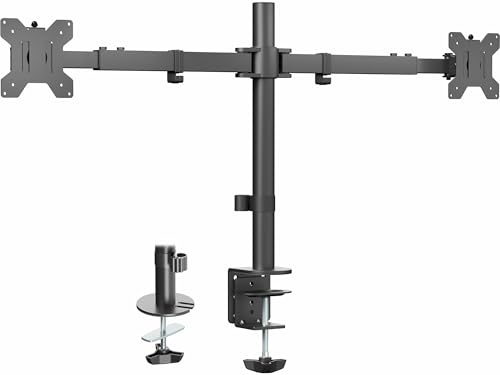
VIVO Dual Ultrawide Desk Mount STAND-TS38C
- Accommodates expansive ultrawide displays up to 38 inches
- Generous 22 lbs per screen load capacity
- Telescoping arm geometry keeps screens close to the rear wall
- Substantially reduces desk clutter
- Specific VESA pattern compatibility is not stated in the listing
- Mounting clamp and grommet dimensions are not specified

MOUNTUP Dual Monitor Desk Mount
- Supports monitors up to 32 inches
- Includes both C-clamp and grommet mounting hardware
- Wide weight support handling 4.4 to 17.6 lbs per screen
- Lifts two displays to free up significant desk workspace
- Exact VESA pattern measurements are not detailed in listing specifications
- Requires manual assembly and desk thickness compatibility verification
- Not suitable for ultra-heavy monitors exceeding 17.6 lbs

Amazon Basics Gas Spring Dual Monitor Arm
- Gas spring counter-balance simplifies screen repositioning
- Adjustable tension matches the exact weight of each individual display
- Frees up valuable desk surface compared to standard factory stands
- Fits standard VESA 75x75 and 100x100 mounting patterns
- Maximum screen size is restricted to 27 inches
- Requires screens weighing at least 4.4 pounds to balance properly against the spring
- Mounting hardware specifics such as clamp thickness ranges are not listed in the data
Matching the Right Arm to Your Workspace
Selecting an articulated mount comes down to your desk clearance, display weight, and how frequently you intend to shift screen angles during the workday. Reviewing different monitor arm designs makes it much easier to balance desk depth against articulation range.
- If you keep your desk pushed right against the wall, VIVO STAND-TS38C Dual Mount is the one I would go with because its telescoping arms span outwards from 24 to 39.5 inches without protruding behind the desk edge, and hardware maker VIVO engineered the brackets to hold up to 22 pounds per screen.
- For setups where rapid adjustments matter, HUANUO FlowLift Pro is what I would choose since its MechaSpring arm features a PrecisionView tension window and a snap-in InstaMount plate that supports screens between 4.4 and 15.4 pounds.
- If your 27-inch screens are heavier or you want extensive range, I would point you toward WALI Dual Monitor Arm, which handles up to 22 pounds per arm and extends forward up to 19.3 inches with C-clamp or grommet mounting.
FAQs
1. Will dual monitor arms hold two 27-inch displays side by side?
Most dual arms easily support two 27-inch screens in landscape mode, provided the total arm span accommodates the display widths. Before buying, verify your screens match the standard 75x75mm or 100x100mm VESA patterns and fall within the per-arm weight limits specified by the manufacturer. Checking desk thickness also ensures the clamp sits flush and secure.
2. What is the difference between mechanical spring and gas spring arms?
Gas spring arms use pressurized cylinders to counterbalance display weight, whereas mechanical spring arms rely on coiled metal tension. As outlined in our guide to monitor arm mounting options, mechanical springs avoid gas leakage over time, while gas cylinders often deliver exceptionally smooth fingertip motion during frequent screen repositioning. Tech reviewers at Tom’s Hardware regularly highlight how spring tension calibration keeps heavy panels from drooping.
3. Can I install a dual monitor mount on a glass desk?
Installing dual arms on tempered glass desktops is generally not recommended due to concentrated pressure from clamps. Most models, including the clamp mechanisms on the monitor arms below, are specifically engineered for solid wood surfaces between roughly half an inch and three inches thick. Grommet mounts can distribute weight better, but wood remains the safest surface choice.
4. How do I stop dual monitor arms from wobbling?
Wobble usually stems from an insecure desk clamp, an uneven desktop edge, or improperly calibrated counterbalance tension. Tighten the base clamp firmly against the underside of the desktop and adjust the tension bolt until the arm stays perfectly balanced without drifting up or sagging down under the weight of your screen.
Editor’s Verdict
For users searching for the best dual monitor arms for 27 inch screens, VIVO STAND-TS38C Dual Mount stands out if you need a flush wall setup with telescoping adjustment, while HUANUO FlowLift Pro is exceptional for effortless tension tuning and swift tool-free VESA installation.


