

1440p gives a sharper picture than 1080p without the cost of 4K hardware. Among the best 1440p prebuilt gaming PCs, the KOTIN RTX 5060 TI pairs Ultra 7 265KF with GeForce RTX 5060Ti 8GB, and the STORMCRAFT RTX 5060 TI is the lower-cost pick.
Recommended by Us
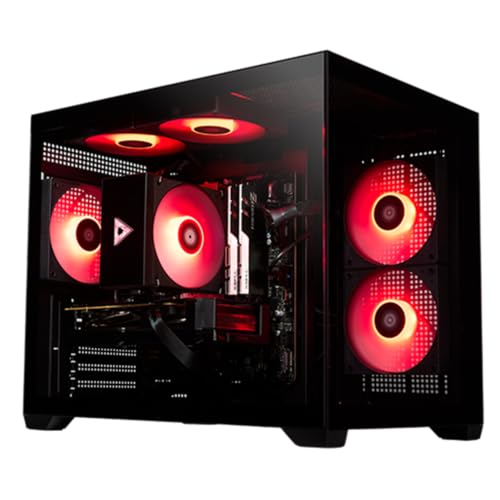
STORMCRAFT Sirius RTX 5060 Ti Gaming PC
- Strong hardware configuration for 1440p gaming and esports
- 16GB GPU memory supports demanding graphics and local AI tasks
- Generous 32GB system memory for gaming, streaming, and multitasking
- Fast 1TB NVMe storage
- B760 platform offers future expansion options
- Power supply wattage and efficiency rating are not specified
- The listing does not identify the DRAM generation or speed
- Built-in Wi-Fi and Bluetooth are not mentioned

KOTIN Ultra 7 RTX 5060 Ti Gaming PC
- Strong configuration for 1080p and 1440p gaming
- Generous 32GB DDR5 memory for multitasking and streaming
- Fast PCIe 4.0 NVMe storage
- Useful cooler display plus Wi-Fi 6E and Bluetooth
- The graphics card has 8GB of VRAM, which may become limiting in especially memory-intensive settings
- A 1TB SSD can fill quickly with a large AAA game library
- VGA and DVI monitors require a separate HDMI or DisplayPort adapter

Skytech Azure RTX 5070 Gaming PC
- RTX 5070 12GB graphics are positioned for smooth 1440p gameplay.
- Fast DDR5 6000 memory and Gen4 NVMe storage are included.
- Tempered-glass Azure case features ARGB fans and maximum-airflow cooling.
- Includes Wi-Fi, Bluetooth, a gaming keyboard, and a mouse.
- Ships with Windows 11 Home and no listed bloatware.
- 16GB of RAM may be limiting for heavy multitasking or memory-intensive creative workloads.
- Wi-Fi 5 is included rather than a newer Wi-Fi standard.
- The graphics card brand and availability of additional display ports may vary.

AVGPC Whirlwind Ryzen 7 RX 9070 XT PC
- High-end Radeon graphics card with 16GB of VRAM
- Modern eight-core AMD Zen 5 processor
- Generous 32GB DDR5 5600MHz memory
- 360mm liquid cooler and 850W Gold-rated power supply
- Wi-Fi, Bluetooth, keyboard, and mouse included
- The 1TB SSD may fill quickly with a large modern game or media library
- Included keyboard and mouse are described only as basic gaming peripherals
- The listing does not provide a detailed port selection
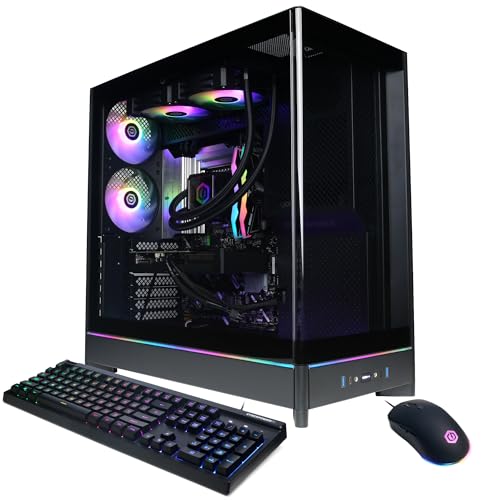
CyberPowerPC SLC9000A4 RX 9070 XT
- High-tier Radeon RX 9070 XT graphics with 16GB of video memory
- Powerful 24-core Intel Core Ultra 9 285 processor
- Generous 32GB DDR5 memory and 2TB NVMe storage
- Liquid CPU cooling and customizable RGB lighting
- Extensive wired and wireless connectivity
- The listing does not specify the DDR5 memory speed.
- Power supply wattage and efficiency rating are not provided.
- Display connectivity is limited to one HDMI and two DisplayPort outputs.
Before You Buy: 1440P Checklist
Check these areas before choosing a system so that its components, display support, and practical features match how you expect to play.
- Match the GPU to the target resolution and refresh rate. Faster displays and higher graphics settings place more demand on the graphics card.
- Do not skimp on the CPU, especially for competitive gaming, streaming, or multitasking. A balanced processor helps the graphics card operate without an avoidable bottleneck.
- Check that your monitor supports 2560 by 1440 resolution and the refresh rate you want. Confirm that it has a compatible HDMI or DisplayPort connection.
- Plan for cooling during sustained gaming loads. The listing should identify the CPU cooler, case fans, or airflow arrangement rather than relying on vague cooling language.
- Look for at least 16GB of memory, with 32GB providing more room for streaming and background applications. Our gaming RAM guide covers this.
- Review storage, power, warranty coverage, and expansion options before ordering. Our prebuilt PC warranty guide explains common coverage terms.
Which Parts Deserve the Money
Gaming at 1440p usually calls for a mid-range to high-end graphics card, a balanced CPU, and 16GB to 32GB of RAM. The graphics card deserves the largest share of the hardware budget because it handles most of the work involved in rendering a higher resolution. A stronger CPU still matters for busy multiplayer scenes, background software, and streaming. Spending heavily on the processor while settling for a weaker GPU often produces an unbalanced gaming system. Our gaming PC specs overview covers the main component priorities.
Heads up: A PC built for 1440p only shows its value on a monitor that supports that resolution and your desired refresh rate. A lower-resolution or slower display can limit what you actually see.
The monitor and graphics card should be chosen together. A higher-refresh 1440p display asks more from the GPU than a basic 1440p panel, particularly when demanding visual settings are enabled. Lowering shadows, reflections, ray tracing, or other intensive options can improve smoothness without making every game look poor. Memory capacity matters too: 16GB is a sensible gaming baseline, while 32GB offers extra breathing room for streaming, voice chat, browser tabs, and creative software. Our prebuilt PC costs article explains how component tiers affect the overall budget.
Common Mistakes With 1440p
- Buying for the GPU name alone and ignoring CPU balance, memory capacity, cooling, storage, and the system’s power supply.
- Using a 1080p monitor with a 1440p-focused computer, then expecting the sharper image that the higher resolution provides.
- Assuming every game should run at maximum settings. Reduce demanding visual options when smoother performance matters more than small image-quality differences.
- Overlooking storage capacity and expansion. Modern game libraries can fill a 1TB drive quickly, so check for practical upgrade options.
- Ignoring warranties and proprietary components. Our proprietary parts guide explains how unusual designs can complicate later upgrades.
Match a System to Your Needs
- Best overall: Skytech RTX 5070 combines an RTX 5070, Ryzen 5 7600, and 1TB SSD.
- Strongest-GPU editorial pick: STORMCRAFT RTX 5060 TI pairs an RTX 5060 Ti 16GB with 32GB of memory.
- Best value: KOTIN RTX 5060 TI includes 32GB DDR5, an RTX 5060Ti 8GB, and WiFi 6E.
- Best alternative brand: AVGPC RX 9070 XT offers an RX 9070 XT 16GB and 360mm liquid cooler.
- Best runner-up: CyberpowerPC RX 9070 XT combines an RX 9070 XT 16GB with a 2TB SSD.
Final Thoughts
The Skytech RTX 5070 is the most balanced starting point for shoppers focused on 1440p gaming. Its processor and graphics card fit the target without pushing into a more elaborate configuration than many players need.
The KOTIN RTX 5060 TI is the value-oriented alternative, with 32GB DDR5 and useful wireless connectivity. Choose according to your monitor, preferred settings, and plans for streaming or multitasking.
More Options to Consider
- Skytech King 95 pairs the Ryzen 7 9800X3D with an RTX 5070 Ti 16GB, 32GB DDR5, and a 360mm liquid cooler. It suits buyers seeking a higher CPU and GPU tier in a white showcase case.
- STORMCRAFT RTX 5070 TI also combines a Ryzen 7 9800X3D and RTX 5070 Ti 16GB, but adds a 2TB SSD, 32GB DDR5 6000MHz memory, and six ARGB system fans. It is appealing for larger game libraries and buyers who value included storage.
- msi Codex Z2 uses a Ryzen 7 8700F, RTX 5070, 32GB DDR5, and 2TB SSD. It fits shoppers who want RTX 5070 graphics with more included storage than the 1TB table configurations.
FAQs
1. What GPU do I need for 1440p gaming?
A current mid-range graphics card is a sensible starting point for 1440p, while a higher-end model provides more room for elevated settings, ray tracing, and high-refresh monitors. Your preferred games and visual settings still matter, so do not choose from the GPU name alone. Look at VRAM, the supporting CPU, cooling, memory, power supply, and monitor capabilities as part of the same purchase.
2. Is a prebuilt gaming PC good for 1440p?
Yes, a properly configured prebuilt can be a convenient way to get a balanced 1440p system without selecting and assembling every component separately. Check the exact GPU, CPU, memory, storage, cooling details, power supply information, connectivity, and warranty before ordering. If later upgrades matter, our prebuilt PC upgrades guide explains what to inspect.
3. How much RAM does 1440p gaming need?
For most gaming-focused systems, 16GB is a reasonable baseline. Choosing 32GB gives additional room for streaming, browser tabs, voice chat, recording software, and other background applications, although memory capacity alone does not determine graphics performance. Also check whether the memory is DDR5, how many slots the motherboard provides when stated, and whether a later capacity upgrade would require replacing the existing modules.
4. Do I need a special monitor for 1440p?
You need a monitor with a native 2560 by 1440 resolution to see the sharper image associated with 1440p. Its refresh rate should suit the performance level you want, and it needs a connection supported by the graphics card, typically HDMI or DisplayPort. Check the monitor and PC port specifications rather than assuming every cable or port supports the same resolution and refresh-rate combination.









