

Gaming at 4K puts the load on the graphics card, so check the GPU first and the rest second. Among the best prebuilt gaming PCs for 4K, the Alienware Aurora pairs Intel Core Ultra 9 285 with NVIDIA GeForce RTX 5070 Ti 16GB, and the STORMCRAFT RTX 5070 is the lower-cost pick.
Recommended by Us

STORMCRAFT Skyhawk RTX 5070 Ti Gaming PC
- High-end RTX 5070 Ti graphics with 16GB of GDDR7 memory
- Fast 32GB DDR5 6000MHz dual-channel configuration
- Large 2TB PCIe 4.0 NVMe SSD
- Extensive cooling setup with a 360mm AIO and ten ARGB fans
- Customizable lighting and tempered-glass styling
- Operating system is not specified in the listing
- Power-supply model and wattage are not provided
- Wi-Fi, Bluetooth, and port details are not listed

Alienware Aurora ACT1250 RTX 5070 Ti
- High-end RTX 5070 Ti graphics with 16GB GDDR7
- Powerful 24-core Intel Core Ultra 9 285 processor
- 32GB DDR5-5200 memory for demanding multitasking
- 240mm liquid cooling with optimized airflow
- Wi-Fi 7, 2.5GbE Ethernet, and a Platinum-rated 1000W power supply
- The 1TB SSD may fill quickly with a large modern game library
- The included security subscription covers only one device
- The high-end hardware may be excessive for casual gaming and everyday tasks

Corsair Vengeance i7500 RTX 5080 Gaming PC
- High-end RTX 5080 graphics with DLSS 4 support
- Fast Core i9-14900KF processor
- Generous 32GB DDR5 memory and 2TB M.2 SSD
- Liquid CPU cooling and multiple listed fan positions
- Tempered-glass case provides a clear view of the RGB components
- Power supply specifications are not provided in the listing
- Operating system and wireless connectivity are not specified
- The 30.78-pound tower may be cumbersome to reposition

Skytech Gaming RTX 5080 Desktop
- High-end RTX 5080 graphics with 16GB GDDR7
- Fast Intel Core Ultra 7 processor
- Generous 32GB DDR5 6000 memory configuration
- 360mm AIO liquid CPU cooler with ARGB fans
- Wi-Fi 6 and included keyboard and mouse
- The 1TB SSD may fill quickly with a large collection of modern games and media.
- Graphics card brand may vary between units.
- Only one HDMI and one DisplayPort connection are promised, with additional display ports varying.
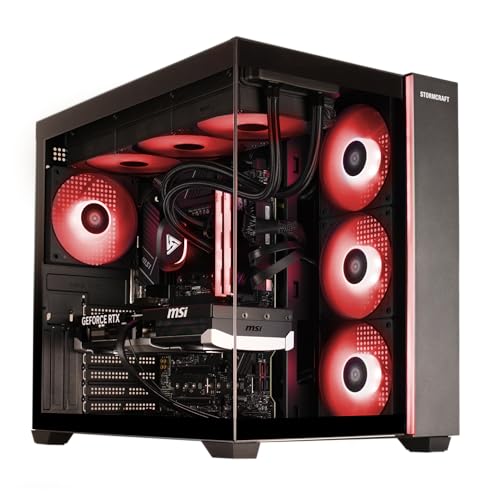
STORMCRAFT Falcon RTX 5070 Gaming PC
- Capable RTX 5070 graphics with 12GB of GDDR7 memory
- Generous 32GB DDR5-6000 system memory
- Modern Wi-Fi 7, Bluetooth 5.4, and USB-C connectivity
- Strong feature set for gaming, streaming, editing, rendering, and VR
- A 1TB SSD may fill quickly with a large modern game library
- The listing does not specify the power supply or cooling configuration
- No operating system is identified in the provided product data
Three Tiers at a Glance
These tiers show how graphics power, processor balance, memory, and storage affect the overall 4K experience.
| Tier | What You Get | Best For |
|---|---|---|
| Value | A capable modern graphics card, a balanced processor, and enough memory for current games and everyday multitasking. This tier can run at 4K, but demanding visual settings may need adjustment. Upscaling can also help improve smoothness without requiring the most expensive hardware. | Players entering 4K gaming who are comfortable changing image-quality settings. It also suits anyone who divides time between 4K single-player gaming and faster 1440p competitive play. |
| Balanced | A stronger graphics card with more video memory, paired with a fast processor and a practical amount of DDR5 memory. It offers more room for detailed settings, ray tracing, background applications, streaming, and large game installations without immediately moving to the highest hardware tier. | Most 4K players who want a strong mix of image quality, responsiveness, component quality, and useful storage. This is usually the most sensible tier when the desktop will be kept for several upgrade cycles. |
| Performance | A high-end graphics card supported by a powerful processor, liquid cooling, and fast DDR5 memory. The extra graphics capacity is useful for demanding effects, higher refresh-rate displays, creative workloads, and gaming while streaming or running other processor-intensive software. | Enthusiasts using premium 4K monitors, demanding visual settings, ray tracing, or mixed gaming and content-creation workloads. It also makes sense for buyers who would rather start with greater graphics headroom. |
Gaming at 4K asks most from the graphics card, especially its processing power and video memory. A fast CPU and enough RAM keep the rest of the system balanced. Your monitor must support the target resolution and refresh rate, while lowering demanding settings remains a practical option. Our gaming PC specs guide explains the broader requirements.
How to Read a Listing
Match the GPU to the Target
Start with the graphics card because it handles most of the work involved in rendering a game at 4K. An RTX 5070-class card represents a more value-focused entry point in these systems, while the RTX 5070 Ti and RX 9070 XT offer a stronger middle ground. RTX 5080 systems provide the greatest graphics headroom among these choices, particularly when demanding settings or higher display refresh rates matter.
Do not judge a desktop by the GPU name alone. Check its video memory, the resolution you plan to use, and whether you are willing to use upscaling or reduce demanding effects. A value-tier card may be perfectly reasonable for a flexible player, while someone seeking consistently high visual settings should prioritize the stronger GPU. Our prebuilt PC costs guide adds useful budget context.
Do Not Skimp on the CPU
The graphics card carries the largest 4K workload, but the processor still manages game logic, background applications, streaming tasks, and general system responsiveness. Intel Core Ultra 7, Intel Core Ultra 9, Intel Core i9, and current Ryzen 7 configurations can all form the basis of a balanced gaming desktop. The right choice depends on what you do beyond gaming and how heavily you multitask.
A faster CPU cannot compensate for an underpowered graphics card at 4K, so avoid paying for excessive processor performance while dropping too far down the GPU range. Look at the complete configuration instead. Memory capacity, storage, cooling, and power delivery all affect usability and upgrade planning. Our prebuilt versus custom comparison explains why component balance and parts selection deserve attention.
Check the Monitor
A 4K gaming PC needs a display with a native 4K resolution to show the extra detail you are paying for. Refresh rate matters as well because it determines how frequently the monitor can update the image. Check the monitor’s available inputs and confirm that the graphics card and display share a suitable HDMI or DisplayPort connection before choosing the final setup.
Heads up: A PC built for 4K only shows its value on a monitor that supports that resolution and your intended refresh rate. A lower-resolution or lower-refresh display can prevent you from seeing the benefit of stronger hardware.
Resolution and refresh rate create different demands, so decide which matters more for the games you play. A visually detailed 4K experience can favor image quality, while faster competitive play may benefit from reducing settings or resolution. Variable refresh support can also make changing performance less distracting. Account for the monitor in the total setup rather than spending the entire budget on the tower and treating the display as an afterthought.
Quick Picks by Situation
- Best overall: Corsair Vengeance combines an NVIDIA GeForce RTX 5080, Intel Core i9-14900KF, liquid cooling, and 2TB storage.
- Best for the strongest GPU: STORMCRAFT Skyhawk offers RTX 5070 Ti graphics, 32GB DDR5, and a 2TB SSD.
- Best value: STORMCRAFT RTX 5070 pairs RTX 5070 graphics with 32GB DDR5 and Wi-Fi 7.
- Best alternative brand: Alienware Aurora includes RTX 5070 Ti graphics, an Intel Core Ultra 9 285, and liquid cooling.
- Best runner-up: Skytech RTX 5080 uses RTX 5080 graphics, 32GB DDR5, and a 360mm liquid cooler.
Final Thoughts
The Corsair Vengeance is the strongest all-around recommendation for a premium 4K system, combining RTX 5080 graphics with a powerful processor, liquid cooling, and generous storage.
The Skytech RTX 5080 is the closest runner-up if you want the same GPU tier in a different build. Buyers seeking a more balanced cost and performance mix should consider an RTX 5070 Ti configuration.
More Options to Consider
- KOTIN RTX 5070 combines an NVIDIA GeForce RTX 5070 12GB with an AMD Ryzen 7 9700X, 32GB DDR5, and a 1TB SSD. Its integrated smart display shows system information, while the 360mm liquid cooler, 850W 80 Plus Gold power supply, and Wi-Fi 7 make it suitable for buyers who value visible monitoring and modern connectivity.
- Skytech RX 9070 XT pairs an AMD Ryzen 7 9850X3D with Radeon RX 9070 XT 16GB graphics. It offers a 2TB SSD and 360mm liquid cooling, making it an alternative for players who prefer an AMD graphics card and want more included storage than the 1TB configurations.
- Skytech RTX 5070 TI uses the same listed processor as the other Skytech alternative but switches to NVIDIA GeForce RTX 5070 Ti 16GB graphics. Its 32GB DDR5 memory and 360mm liquid cooler suit buyers who want NVIDIA features and a gaming-focused Ryzen processor, although the included SSD is limited to 1TB.
FAQs
1. What GPU do I need for 4K gaming?
The right GPU depends on the settings, refresh rate, and types of games you expect to use. An RTX 5070-class card can serve as a flexible entry point when you are willing to adjust demanding settings or use upscaling. An RTX 5070 Ti, RX 9070 XT, or RTX 5080 provides progressively more headroom for detailed visuals, demanding effects, and higher-refresh 4K monitors.
2. Is a prebuilt gaming PC good for 4K?
Yes, a well-configured prebuilt can be an excellent way to start gaming at 4K without selecting and assembling every component yourself. Focus on the graphics card first, then check the CPU, memory, cooling, storage, connectivity, and warranty. Also consider whether the case and motherboard allow practical upgrades. Our prebuilt upgrade guide explains what to inspect before committing.
3. How much RAM does 4K gaming need?
For a new 4K gaming desktop, 32GB of RAM is a sensible target and is included with every system discussed here. Resolution itself mainly increases the graphics workload rather than system-memory usage, but modern games, launchers, browsers, voice chat, and streaming applications can run together. Fast DDR5 memory also complements current processors, though capacity and dual-channel operation usually matter more than decorative lighting.
4. Do I need a special monitor for 4K?
You need a monitor with a native 4K resolution to display games at 4K. The monitor should also support the refresh rate you want and include a connection compatible with the graphics card, typically HDMI or DisplayPort. A suitable cable may be required for the selected resolution and refresh rate. Screen size, panel type, adaptive refresh support, and image quality should also influence the decision.
5. How much should I spend on a 4K gaming PC?
Expect to shop in the upper mid-range or premium part of the prebuilt market, since 4K places heavy demands on the graphics card. A value-oriented system makes sense if you accept adjusted settings, while a premium model is better suited to demanding effects and high-refresh displays. Reserve part of the overall budget for a suitable monitor, peripherals, and any storage expansion rather than allocating everything to the desktop.









