

Escape from Tarkov is known for leaning heavily on the CPU and on memory, so a fast processor and 32GB of RAM suit it well. Among the best prebuilt gaming PCs for Escape from Tarkov, the STORMCRAFT Falcon pairs a Ryzen 7 7800X3D with an RX 9070 and 32GB of DDR5, and the Skytech King 95 uses an RTX 5070 Ti with 32GB of RAM.
Recommended by Us

Skytech King 95 RTX 5070 Ti Gaming PC
- High-end RTX 5070 Ti 16GB graphics card
- Gaming-focused Ryzen 7 7800X3D processor
- Generous 32GB DDR5-6000 RGB memory
- 360mm AIO liquid cooling with ARGB fans
- Fast Gen4 NVMe storage and included peripherals
- Wi-Fi 5 is older than newer Wi-Fi 6 and Wi-Fi 7 standards.
- A 1TB SSD may fill quickly with a large modern game library.
- The graphics card brand and additional display ports may vary.

Lenovo Legion Tower 5 RTX 5070 Ti
- High-end RTX 5070 Ti graphics card
- Gaming-focused Ryzen 7 9800X3D processor
- Generous 32GB memory capacity
- Windows 11 Home and three months of PC Game Pass included
- The listing does not identify the type or speed of the 1TB storage
- Cooling, port selection, and wireless connectivity are not specified
- Memory type and speed are not listed

STORMCRAFT Skyhawk Pro RTX 5070 Gaming PC
- Strong RTX 5070 and i9 14900KF configuration
- Generous 32GB DDR5 memory and 2TB NVMe storage
- Z790 motherboard offers expansion potential
- Substantial 360mm liquid cooling setup
- Six adjustable ARGB fans provide customizable lighting
- Wi-Fi, Bluetooth, and external port details are not specified
- The 16.9 x 9 x 18.5-inch case requires a reasonable amount of desk or floor space
- The high-end component mix may be more than casual users need
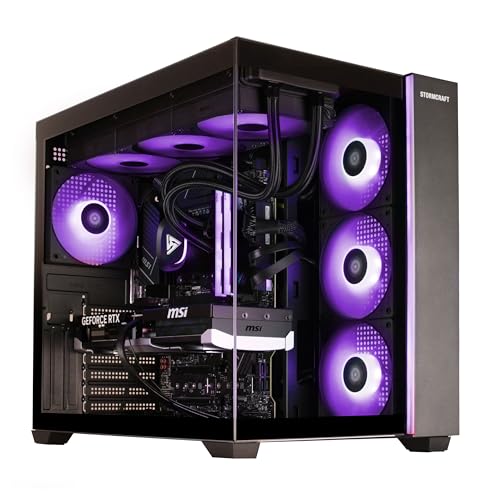
STORMCRAFT Falcon Ryzen 7 7800X3D Gaming PC
- Strong specification for high-refresh 1440p and 4K gaming
- Gaming-focused Ryzen 7 7800X3D with 3D V-Cache
- Generous 32GB of fast DDR5 6000MHz RAM
- Large 360mm AIO cooler and 850W Gold-rated power supply
- Pre-installed Windows 11 Home
- The 1TB SSD may require expansion for a large modern game library.
- Wi-Fi and Bluetooth support are not specified in the listing.
- Monitor, keyboard, mouse, and other peripherals are not listed as included.

Skytech Prism II Ryzen 7 RTX 3080 Ti PC
- High-end RTX 3080 Ti graphics with 12GB GDDR6X memory
- Eight-core Ryzen 7 processor for gaming and multitasking
- Extensive listed cooling with a 360mm AIO and six RGB fans
- Fast PCIe Gen4 NVMe storage
- Keyboard, mouse, Wi-Fi, and Windows 11 Home included
- 16GB of RAM may be limiting for heavy content creation or extensive multitasking
- The graphics card brand may vary between units
- 802.11ac Wi-Fi is included rather than a newer Wi-Fi standard
What Escape from Tarkov Needs From a Gaming PC
Escape from Tarkov is a demanding simulation that places substantial pressure on the processor as well as the graphics card. A fast CPU helps the system process complex activity, while a strong GPU renders detailed environments at the resolution selected. Plenty of memory also matters when the game, background applications, voice chat, and system processes are running together. If you are unsure how to balance these parts, our guide to gaming PC specs covers the broader decision.
Fast storage cannot replace CPU or GPU performance, but an NVMe SSD makes a modern gaming computer feel more responsive and provides suitable storage for large installations. Display choice also changes the hardware target. Higher resolutions require more graphics power, while wide or multi-display arrangements increase the number of pixels being rendered. VR can add its own demanding workload. These configurations may also increase processor pressure because the computer must prepare more information while maintaining smooth, consistent delivery to the connected displays.
Heads up: Triple monitors or a VR headset multiply the rendering work. Plan your GPU around the display setup you intend to use rather than choosing it in isolation.
Key Parts for Escape from Tarkov
Focus on balanced specifications rather than choosing a computer from one headline component.
| Part | What to prioritize |
|---|---|
| CPU | A fast processor with strong single-core performance helps simulations process demanding game activity efficiently. |
| GPU | A strong graphics card handles high resolutions and provides additional capacity for triple screens or VR. |
| RAM | 32GB provides useful headroom for the game, Windows, communication software, and other background applications. |
| Storage | A fast NVMe SSD offers responsive access to large scenery files, game installations, updates, and other applications. |
The same GPU can appear in listings paired with very different processors, memory capacities, storage drives, cooling systems, and power supplies. Compare the entire specification before deciding which computer offers the right balance. Component quality and upgrade access can matter over time, too. Our prebuilt upgrade guide explains what to check if you expect to replace parts later.
How to Choose a Prebuilt for Escape from Tarkov
Start with your intended display setup, then compare the processor, graphics card, memory, storage, cooling, and support package together.
Strong CPU Performance
Simulation-heavy games often rely heavily on the processor because many events, calculations, and background systems must be handled at once. A fast CPU with strong single-core performance can help maintain consistent play when scenes become complicated. Core count remains useful for multitasking, streaming, and background applications, but it should not distract from gaming performance. This is why a well-balanced processor may be a smarter choice than spending nearly the entire budget on the graphics card.
Several of these systems pair high-end processors with current graphics hardware. The STORMCRAFT Skyhawk Pro uses an i9 14900KF with 24 cores and 32 threads, while the Skytech King 95 uses an AMD Ryzen 7 7800X3D. The STORMCRAFT Falcon also includes the AMD Ryzen 7 7800X3D. These details come directly from their listings and show why checking the exact CPU is necessary, even when two computers appear to occupy a similar GPU class.
GPU for Your Displays
Your monitor resolution and display count determine how much graphics power makes sense. A single conventional monitor is easier to drive than a triple-screen arrangement because the GPU renders far fewer pixels. VR can also require considerable graphics capacity and consistent frame delivery. If you plan to increase resolution or add displays later, choosing a stronger GPU now may prevent an early replacement, although it can also move the computer into a more expensive product tier.
Among the table systems, the Skytech King 95 has an NVIDIA Geforce RTX 5070 Ti 16GB GDDR7 Graphics Card, while the STORMCRAFT Skyhawk Pro uses an RTX 5070 12GB GDDR7 GPU. The STORMCRAFT Falcon takes a different route with an AMD Radeon RX 9070 16GB GDDR6 graphics card. The older Skytech Prism II includes a GeForce RTX 3080 Ti 12GB GDDR6X Graphics Card, making careful whole-system comparison especially important.
Enough RAM
Memory capacity affects how comfortably the computer handles Escape from Tarkov alongside Windows and background applications. A 32GB configuration gives useful headroom for a large simulation, communication tools, browser tabs, recording software, and ordinary multitasking. It also reduces the chance that a new prebuilt will need an immediate memory upgrade. Capacity is not the only consideration, however. Check the listed memory generation and speed so you understand what is included rather than assuming every 32GB configuration is identical.
The STORMCRAFT Skyhawk Pro, Skytech King 95, and STORMCRAFT Falcon each list 32GB DDR5 6000MHz memory. The Skytech Prism II instead has 16GB DDR4 3200MHz memory, which is a more modest configuration. That does not automatically make it unsuitable, but buyers who frequently keep several applications open may prefer more headroom. When comparing value, account for any memory upgrade you may want rather than looking only at the computer’s initial position in the range.
Fast Large Storage
Modern game installations can be very large, and additional space is needed for updates, Windows, applications, recordings, and other files. An NVMe SSD is the sensible baseline because it provides fast access and avoids the slow response associated with using a mechanical drive as primary storage. Capacity deserves attention as well. A drive that looks adequate for one installation can fill quickly once a broader library and everyday files are added.
The STORMCRAFT Skyhawk Pro includes a 2TB NVMe SSD, giving it more listed storage than the 1TB drives in the Skytech King 95, Lenovo Legion Tower 5-2026, STORMCRAFT Falcon, and Skytech Prism II. Expansion options may influence the decision if you expect storage needs to grow. Our comparison of prebuilt versus custom systems provides additional context about convenience, component selection, and later changes.
Who Should Buy Which System
- Best overall: STORMCRAFT Skyhawk Pro combines an i9 14900KF, RTX 5070, 32GB DDR5, and 2TB SSD.
- Strongest table GPU: Skytech King 95 pairs its RTX 5070 Ti with 32GB DDR5.
- Best value: Skytech Prism II offers an RTX 3080 Ti, Ryzen 7 5800X, and 16GB DDR4.
- Alternative brand: Lenovo RTX 5070 TI combines a Ryzen 7 9800X3D, RTX 5070 Ti, and 32GB memory.
- Runner-up: STORMCRAFT Falcon offers an RX 9070 and 32GB DDR5.
Final Thoughts
The STORMCRAFT Skyhawk Pro is the most balanced overall recommendation thanks to its powerful processor, capable graphics card, generous memory, and larger SSD. It suits players who want a strong, complete configuration without planning immediate upgrades.
Choose the Skytech King 95 when graphics performance is the higher priority, especially for demanding display arrangements. Whichever system you select, match its CPU and GPU to your resolution, display count, and multitasking needs.
More Options to Consider
- MAINGEAR RTX 5080 offers an RTX 5080, AMD Ryzen 7 9850X3D, 32GB DDR5, and 2TB SSD. It suits buyers seeking more CPU and GPU power with standard ATX hardware for later upgrades.
- ZOTAC MEK pairs an AMD Ryzen 7 9800X3D with an RTX 5080, 32GB DDR5, and a 2TB SSD. Its white Apocalypse-themed chassis suits buyers who want distinctive styling with high-end hardware.
- Gigatech Omega 3 combines an Intel Core Ultra 7 265K, RTX 5070, 32GB DDR5, and 1TB SSD. It is an alternative for buyers who prefer a current Intel processor.
FAQs
1. What PC specs do I need for Escape from Tarkov?
Prioritize a fast processor with strong single-core performance, a capable graphics card suited to your monitor resolution, and an NVMe SSD. A 32GB memory configuration provides comfortable headroom for the game, Windows, and background applications. More GPU power is appropriate for high-resolution monitors, triple-screen setups, or VR. Compare cooling, power supply information, storage capacity, connectivity, and warranty coverage before choosing between otherwise similar systems.
2. Is a prebuilt gaming PC good for Escape from Tarkov?
Yes, a properly configured prebuilt can run Escape from Tarkov well without requiring you to select and assemble every component. The main benefit is convenience, since Windows and the core hardware arrive as a complete system. You should still verify the exact processor, graphics card, memory, storage, cooling, and power supply listed. Our discussion of prebuilt PC value explains the wider advantages and tradeoffs.
3. Is the CPU or GPU more important for Escape from Tarkov?
Both matter, but Escape from Tarkov can place significant demands on the CPU because it is a complex simulation. Strong single-core processor performance helps with game calculations, while the GPU handles resolution, visual settings, and additional displays. A powerful graphics card paired with a much weaker processor can create an unbalanced system. Start with a capable modern CPU, then select the GPU tier according to your monitor resolution, display count, and interest in VR.
4. How much RAM does a gaming PC need for Escape from Tarkov?
A 32GB configuration is a sensible target because it leaves headroom for Escape from Tarkov, Windows, browser tabs, voice chat, recording tools, and other background tasks. A system with less memory may still be usable, but multitasking capacity will be tighter. Check whether the listing uses DDR4 or DDR5 and whether the motherboard offers accessible upgrade slots. Capacity usually matters more than decorative lighting or other cosmetic memory features.
5. How much should I spend on a PC for Escape from Tarkov?
The right budget depends on your resolution, display arrangement, desired graphics settings, and whether the computer will also handle streaming or creative work. A balanced mid-range or upper-mid-range system is generally more sensible than paying for the strongest available GPU while compromising on the processor, memory, or storage. Triple monitors, VR, and high-resolution play justify moving into a higher performance tier. Also account for monitor and peripheral costs when setting the complete budget.









