

Sim racing setups multiply the load with triple screens or a VR headset, so the graphics card is the part to plan around. Among the best prebuilt gaming PCs for sim racing, the MAINGEAR MG-1 Elite pairs an RTX 5080 with a 9850X3D, and the Skytech Azure 3 is the lower-cost pick with an RTX 5060 Ti 16GB.
Recommended by Us

Skytech King 95 RTX 5070 Ti Gaming PC
- High-end RTX 5070 Ti 16GB graphics card
- Gaming-focused Ryzen 7 7800X3D processor
- Generous 32GB DDR5-6000 RGB memory
- 360mm AIO liquid cooling with ARGB fans
- Fast Gen4 NVMe storage and included peripherals
- Wi-Fi 5 is older than newer Wi-Fi 6 and Wi-Fi 7 standards.
- A 1TB SSD may fill quickly with a large modern game library.
- The graphics card brand and additional display ports may vary.

HELLOLAND Ocean Park RTX 5070 Ti Gaming PC
- High-end Ryzen 7 9800X3D and RTX 5070 Ti configuration
- Generous 16GB of graphics memory and 32GB of DDR5 RAM
- Two SSDs provide 2TB of combined storage
- 360mm AIO cooling backed by nine ARGB PWM fans
- 850W 80 Plus Gold power supply is listed
- Only half of the storage uses the faster NVMe interface; the second 1TB drive is SATA.
- Wi-Fi and Bluetooth capabilities are not specified in the listing.
- Motherboard model, RAM speed, and individual component brands are not provided.
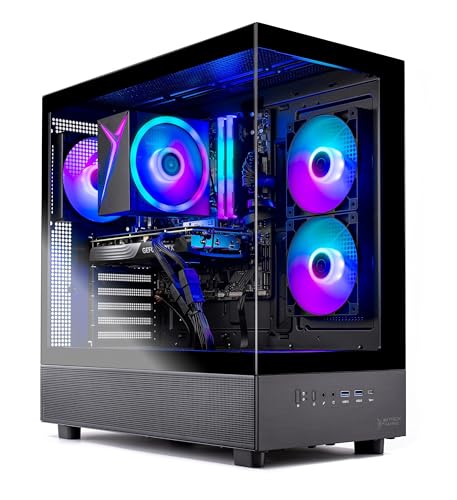
Skytech Azure 3 RTX 5060 Ti Gaming PC
- 16GB RTX 5060 Ti configuration is positioned for high-detail 1440p gaming.
- Ryzen 7 7700 and 32GB of DDR5 memory provide capable core hardware.
- Fast Gen4 NVMe storage is included.
- Tempered-glass case and ARGB fans give the desktop a gaming-focused appearance.
- Keyboard and mouse are supplied in the package.
- Wi-Fi 5 is older than Wi-Fi 6 and Wi-Fi 6E standards.
- The graphics card brand and some additional port details may vary.
- A 1TB drive may require expansion for users with especially large software libraries.

CyberPowerPC RTX 5060 Ti Gaming PC
- RTX 5060 Ti includes a generous 16GB of graphics memory.
- 32GB DDR5 and a 2TB NVMe SSD form a capable gaming and multitasking configuration.
- Liquid CPU cooling is included.
- Strong wired and wireless connectivity, including Wi-Fi 6 and Bluetooth 5.3.
- Keyboard and mouse are supplied with the PC.
- Power supply wattage and efficiency rating are not specified.
- The listing does not identify RAM speed or the installed memory configuration.
- Graphics outputs are limited to one HDMI and two DisplayPort connections.

MAINGEAR MG-1 Elite RTX 5080 Gaming PC
- High-end RTX 5080 graphics with DLSS 4 and advanced ray tracing support
- Gaming-focused Ryzen 7 9850X3D processor with AMD 3D V-Cache
- Fast DDR5-6000 memory and Gen4 NVMe storage
- Standard ATX components provide a practical upgrade path
- Reinforced chassis includes extensive airflow and a custom GPU support bracket
- The 2TB SSD may require expansion for especially large media or game libraries
- 32GB of RAM may be limiting for some intensive professional creation workloads
- Large 18.7 x 19.6 x 9.05-inch chassis requires substantial desk or floor space
What sim racing Needs From a Gaming PC
Sim racing places sustained demands on several parts of a gaming PC. A fast processor helps manage simulation calculations, input, other vehicles, and background tasks, while a strong graphics card renders the track, cockpit, lighting, and surrounding detail. Plenty of memory helps the system avoid unnecessary slowdowns when the simulation, launchers, voice chat, and supporting software are open together. Fast storage also reduces waiting during startup and loading. Our gaming PC overview covers the broader decisions involved.
The display arrangement has a major effect on the hardware you need. A conventional single monitor is less demanding than a high-resolution ultrawide, a triple-monitor layout, or a VR headset. Increasing the visible area makes the graphics card render substantially more information, while complex simulation workloads can also put additional pressure on the processor. This is why a balanced system is usually better than a machine with one impressive component paired with weaker supporting hardware. Cooling matters as well because long racing sessions can keep the CPU and GPU busy.
Heads up: Triple monitors or a VR headset multiply the rendering work. Plan the GPU around the display setup you intend to use rather than the monitor currently on your desk.
Key Parts for sim racing
Focus on these core components before comparing case styling, lighting, or bundled accessories.
| CPU | A fast processor with strong single-core performance helps simulations process physics, input, opponents, and other calculations without unnecessary delays. |
| GPU | A strong graphics card handles higher resolutions, detailed visuals, triple-screen layouts, and VR more comfortably than an entry-level option. |
| RAM | 32GB gives useful headroom for large simulations, supporting applications, voice chat, telemetry software, and normal background tasks. |
| Storage | A fast NVMe SSD provides responsive loading and practical space for large scenery files, updates, recordings, and additional installations. |
The same GPU can appear in prebuilts with very different processors, memory configurations, storage capacities, coolers, and power supplies. Compare the complete specification instead of choosing from the graphics card name alone. Expansion options and standard components can also affect how easily the machine can be upgraded later. Our prebuilt comparison explains the wider tradeoffs between ready-made and custom systems.
How to Choose a Prebuilt for sim racing
Start with your display plans, then compare the processor, graphics card, memory, storage, cooling, and upgrade options as a complete package.
Strong CPU Performance
Simulations lean heavily on the processor because they calculate vehicle behavior, input, track activity, and other systems in real time. Strong single-core performance is especially useful, although a modern processor with several capable cores also has room for background software. A weak CPU can limit responsiveness even when the graphics card is powerful. That makes processor selection more important here than it is for less simulation-heavy gaming, particularly when the system must also run telemetry tools or streaming software.
The Ryzen 7 and Core i9 systems listed on this page occupy different performance and value positions, so the fastest chip is not automatically the right purchase. Match the processor to the rest of the configuration and avoid paying for CPU capability that your display setup will not use. Cooling should also suit the processor because long sessions can produce sustained heat. A larger cooler is not mandatory for every chip, but the cooling specification should not be ignored when comparing complete systems.
GPU for Your Displays
The graphics card should be selected around resolution, image quality, and the number of displays. A single conventional monitor places a lighter load on the GPU than triple monitors or VR. More demanding layouts benefit from a higher graphics tier and additional graphics memory. The RTX 5060 Ti 16GB systems provide a sensible starting point in this group, while the RTX 5070 Ti 16GB and RTX 5080 16GB machines offer more graphics capability for demanding configurations.
A powerful graphics card cannot compensate for every weak component, so check the CPU, power supply, cooling, and case airflow at the same time. Also confirm that the outputs listed by the seller suit the monitors you plan to connect. Port availability can vary between graphics card versions, and adapters may not be ideal for every headset or display. Our PC lifespan guide discusses how component choices affect useful ownership time.
Enough RAM
Memory capacity affects how comfortably a PC can keep the simulation and supporting programs open. While the racing software may be the main workload, many drivers also use voice chat, launchers, browser windows, telemetry utilities, recording applications, or wheel-management software. Having 32GB provides useful headroom for that combination. Every table system here includes 32GB DDR5, so none starts with an obvious memory-capacity disadvantage for this type of use.
Capacity is generally the first memory specification to check, followed by memory generation and speed. Faster memory can help in some processor-limited situations, but it should not take priority over a suitable CPU and GPU. Also check whether the motherboard leaves a practical upgrade path if you expect your software needs to grow. A balanced 32GB configuration is preferable to an excessive memory capacity paired with a noticeably weaker graphics card, especially for high-resolution or multi-display racing.
Fast Large Storage
Modern installations, downloadable content, scenery, replays, recordings, and other games can consume storage quickly. An NVMe SSD keeps the operating system and frequently used software responsive while cutting down routine loading delays. A 1TB drive can work when the library is managed carefully, but a 2TB drive provides more breathing room. Storage capacity is particularly worth checking because it is easy to overlook beside prominent CPU and GPU specifications.
Storage is one of the easier components to expand later, provided the motherboard and case offer suitable connections and space. That means a smaller drive should not automatically disqualify an otherwise well-balanced system. However, buying enough capacity initially avoids moving files or adding another drive soon after purchase. Compare whether a listing includes one NVMe SSD, multiple drives, or a mix of NVMe and SATA storage, since those arrangements offer different combinations of speed and total space.
Who Should Buy Which System
- Best overall: Skytech Azure 3 pairs an RTX 5060 Ti 16GB with 32GB DDR5.
- Best for the strongest GPU: Skytech King 95 combines an RTX 5070 Ti 16GB and Ryzen 7 7800X3D.
- Best value: CyberPowerPC 8700F RTX 5060 TI includes an RTX 5060 Ti 16GB, 32GB DDR5, and 2TB NVMe SSD.
- Best alternative brand: Ocean Park White offers a Ryzen 7 9800X3D and RTX 5070 Ti 16GB.
- Best runner-up: MAINGEAR MG-1 Elite has the strongest GPU among the table systems.
Final Thoughts
The Skytech Azure 3 is the most balanced choice for a typical sim racing setup, combining an RTX 5060 Ti 16GB, Ryzen 7 7700, and 32GB DDR5. It leaves room in the budget for displays and racing controls.
Choose the Skytech King 95 if you want more graphics power for a demanding display arrangement. Its RTX 5070 Ti 16GB and Ryzen 7 7800X3D make it the stronger performance-focused option.
More Options to Consider
- Velztorm White Praetix 3D combines a Ryzen 7 9800X3D with an RTX 5080 16GB. Its 2TB NVMe SSD, 1000W PSU, Wi-Fi 7, and white liquid-cooled design suit buyers seeking a premium alternative with strong CPU and GPU hardware.
- STORMCRAFT Skyhawk Pro uses a Core i9 14900KF and RTX 5070 12GB. It stands out from the Falcon through its 2TB SSD, Z790 motherboard, 360mm AIO, and 850W Gold power supply.
- STORMCRAFT Falcon i9 provides the same Core i9 14900KF and RTX 5070 12GB pairing with a 1TB NVMe SSD and 32GB DDR5. It suits buyers who prefer this processor and GPU combination without needing the Skyhawk Pro’s larger drive.
FAQs
1. What PC specs do I need for sim racing?
A suitable sim racing PC needs a fast modern processor, a capable graphics card, enough memory, and solid-state storage. A 32GB memory configuration gives useful room for the simulation and supporting programs, while an NVMe SSD keeps routine loading responsive. Choose the GPU tier according to your display resolution and whether you use one monitor, triple screens, or VR. Cooling and a suitable power supply also matter during long sessions.
2. Is a prebuilt gaming PC good for sim racing?
Yes, a well-specified prebuilt can be a practical sim racing machine. It arrives as a complete system, which avoids selecting every component and assembling the computer yourself. You still need to inspect the full specification because prebuilts with the same graphics card can use different processors, storage drives, coolers, and power supplies. Our prebuilt PC value article covers the main benefits and compromises.
3. Is the CPU or GPU more important for sim racing?
Both components matter, but their relative importance changes with the setup. The CPU processes simulation work and can affect responsiveness in processor-heavy situations. The GPU becomes increasingly important as resolution rises or when the system drives triple monitors or a VR headset. A balanced pairing is therefore safer than spending almost the entire budget on one component. Choose the display setup first, then select a CPU and GPU that make sense together.
4. How much RAM does a gaming PC need for sim racing?
For a new sim racing prebuilt, 32GB is a sensible target. It provides headroom for the simulation, Windows, voice chat, launchers, telemetry tools, recording software, and browser tabs without making memory management a constant concern. More memory may help with specialized workloads, but it should not come at the expense of a suitable processor or graphics card. All the systems in the comparison table include 32GB DDR5 memory.
5. How much should I spend on a PC for sim racing?
The right spending level depends mainly on the display setup and the amount of performance headroom you want. A mid-range system with a balanced CPU and GPU is appropriate for many single-monitor setups, while triple screens and VR often justify a stronger graphics card. Reserve part of the total budget for the monitor, wheel, pedals, and other controls. Avoid paying extra for appearance if that requires accepting weaker core components.









