

Starfield is a heavy game that likes a strong CPU as well as a strong GPU, so a balanced high end build pays off. Among the best prebuilt gaming PCs for Starfield, the STORMCRAFT Phantom pairs an RTX 5080 with a Ryzen 7 9800X3D, and the Panaroma RTX 5060 TI is the lower-cost pick.
Recommended by Us

Skytech King 95 RTX 5070 Ti Gaming PC
- High-end RTX 5070 Ti 16GB graphics card
- Gaming-focused Ryzen 7 7800X3D processor
- Generous 32GB DDR5-6000 RGB memory
- 360mm AIO liquid cooling with ARGB fans
- Fast Gen4 NVMe storage and included peripherals
- Wi-Fi 5 is older than newer Wi-Fi 6 and Wi-Fi 7 standards.
- A 1TB SSD may fill quickly with a large modern game library.
- The graphics card brand and additional display ports may vary.

HELLOLAND Ocean Park RTX 5070 Ti Gaming PC
- High-end Ryzen 7 9800X3D and RTX 5070 Ti configuration
- Generous 16GB of graphics memory and 32GB of DDR5 RAM
- Two SSDs provide 2TB of combined storage
- 360mm AIO cooling backed by nine ARGB PWM fans
- 850W 80 Plus Gold power supply is listed
- Only half of the storage uses the faster NVMe interface; the second 1TB drive is SATA.
- Wi-Fi and Bluetooth capabilities are not specified in the listing.
- Motherboard model, RAM speed, and individual component brands are not provided.
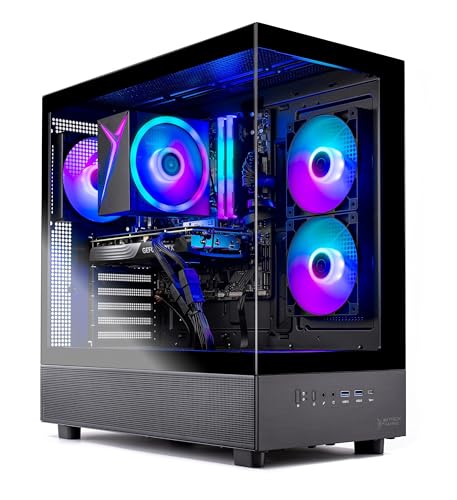
Skytech Azure 3 RTX 5060 Ti Gaming PC
- 16GB RTX 5060 Ti configuration is positioned for high-detail 1440p gaming.
- Ryzen 7 7700 and 32GB of DDR5 memory provide capable core hardware.
- Fast Gen4 NVMe storage is included.
- Tempered-glass case and ARGB fans give the desktop a gaming-focused appearance.
- Keyboard and mouse are supplied in the package.
- Wi-Fi 5 is older than Wi-Fi 6 and Wi-Fi 6E standards.
- The graphics card brand and some additional port details may vary.
- A 1TB drive may require expansion for users with especially large software libraries.

HELLOLAND Panorama RTX 5060 Ti Gaming PC
- Capable RTX 5060 Ti graphics for high-detail 1080p gaming
- Eight-core Ryzen 7 processor and 32GB RAM support demanding multitasking
- Generous 2TB combined SSD capacity
- 240mm liquid cooling and speed-controlled ARGB fans
- Wi-Fi, Bluetooth, and Windows 11 are included
- The RTX 5060 Ti is listed with 8G of graphics memory, which may be limiting for some demanding high-resolution workloads.
- DDR4 memory and the AM4 processor platform are from an older generation.
- The listing does not specify the power supply wattage, motherboard model, or the graphics card brand.

STORMCRAFT Phantom RTX 5080 Gaming PC
- High-end RTX 5080 graphics with 16GB of GDDR7
- Gaming-focused Ryzen 7 9800X3D processor
- Fast 32GB DDR5-6000 memory and 2TB Gen4 NVMe storage
- Comprehensive cooling with a 360mm AIO and seven ARGB fans
- 850W Gold-certified power supply
- Wireless networking and Bluetooth support are not specified in the listing
- Motherboard ports and expansion slots are not detailed
- Comes with Windows 11 Home rather than Windows 11 Pro
What Starfield Needs From a Gaming PC
Starfield is a demanding modern game with detailed environments, large areas, complex lighting, and plenty of data to move while you play. A strong graphics card matters because it handles visual detail, resolution, lighting effects, and image quality. Video memory is also relevant, especially when you increase texture quality or play above standard Full HD. Higher resolutions place substantially more work on the GPU, so a system intended for 1440p or 4K should devote a larger share of its hardware budget to graphics performance.
The rest of the system still needs to support the graphics card. A modern processor helps manage busy scenes, background calculations, and steady delivery of work to the GPU. Adequate system memory prevents unnecessary slowdowns when Starfield, Windows, launchers, and voice or streaming applications are open together. Fast solid-state storage helps with startup and loading, while also making the computer feel more responsive outside the game. Our gaming PC advice covers broader hardware choices for anyone comparing complete systems.
Heads up: Demanding games such as Starfield can use a lot of VRAM at high settings, so 12GB or 16GB cards give you more room than 8GB cards.
Key Parts for Starfield
Focus on a balanced specification rather than choosing a computer from its appearance or processor name alone.
| Part | What to Look For |
|---|---|
| GPU | A strong graphics card with plenty of VRAM matters most for resolution, visual detail, and demanding effects. |
| CPU | A modern six- to eight-core processor helps keep the graphics card supplied with work and supports consistent performance. |
| RAM | 16GB is the practical minimum, while 32GB provides more headroom for background applications, streaming, and multitasking. |
| Storage | A fast NVMe SSD shortens load times in large games and keeps Windows and everyday applications responsive. |
The same graphics card can appear in several listings with different processors, memory capacities, storage configurations, coolers, and power supplies. Compare the entire specification instead of assuming every system built around one GPU will provide the same ownership experience. Expansion room, warranty coverage, and included connectivity can also separate otherwise similar computers. Our prebuilt comparison explains the wider trade-offs between a complete desktop and selecting every component yourself.
How to Choose a Prebuilt for Starfield
Work through the major components in order, starting with the hardware that has the greatest effect on your intended resolution and settings.
Start With the GPU
The graphics card usually has the largest influence on how high you can set the resolution and visual options. An entry-level card may be suitable if you are comfortable reducing demanding settings, while a stronger mid-range or upper-tier GPU gives you more flexibility. Avoid choosing a desktop only because it has a premium processor. For a gaming-focused purchase, an unnecessarily powerful CPU paired with a weaker GPU can be less useful than a more balanced combination.
Match the graphics tier to your monitor rather than purchasing specifications with no clear goal. Full HD is less demanding than 1440p, while 4K asks considerably more of the graphics processor. Upscaling technologies can reduce the rendering load, but they do not eliminate the need for suitable hardware. If you expect to keep the PC for several years, allowing some graphics headroom can help as updates, expansions, and higher settings place more pressure on the system.
Watch the VRAM
Video memory stores textures, frame data, and other graphical resources needed by the GPU. When settings and resolution increase, those resources can require more capacity. An 8GB card can still be a reasonable option when paired with sensible settings, but it offers less room than a 12GB or 16GB model. Capacity is not the only measure of GPU performance, so do not assume that more VRAM automatically makes one graphics card faster than another.
Look at the GPU model and its memory capacity together. These systems include cards with different performance tiers and VRAM amounts, making them suitable for different priorities. A 16GB card is attractive for high-resolution textures and extra memory headroom, while a less expensive 8GB configuration may suit someone willing to adjust settings. This distinction becomes particularly useful when two computers appear similar but target different resolutions, visual presets, or long-term expectations.
Pair It With a Good CPU
A good processor prepares game data and keeps the graphics card supplied with work. A modern six-core or eight-core CPU is a sensible starting point for a balanced Starfield computer, although architecture and clock behavior also matter. Higher core counts can benefit streaming, rendering, and heavy multitasking, but they should not come at the expense of the graphics card when gaming is the main purpose. Balance is more valuable than chasing the largest model number.
Processor choice becomes more noticeable when the GPU is very powerful, when you use lower resolutions that let the graphics card produce frames quickly, or when many background tasks are running. Gaming-focused processors with additional cache can be appealing in premium configurations, but capable mainstream CPUs remain practical for many buyers. Consider everything you do with the PC, including work and content creation, before paying more for CPU resources that Starfield may not fully use.
Fast Storage Helps
An NVMe SSD is the preferred primary drive for Starfield because solid-state storage offers quick access to large game files. It also improves Windows startup, application launches, updates, and file transfers. A one-terabyte drive provides a useful starting capacity, but available space falls after Windows, applications, and a game library are added. Buyers with several large titles may prefer a larger drive or a system that makes future storage expansion straightforward.
Storage capacity does not replace graphics or processor performance, so avoid sacrificing the core gaming components merely to obtain a larger drive. Adding storage later is often easier than replacing a graphics card immediately after purchase. Some prebuilts combine a fast NVMe system drive with a second solid-state drive for additional capacity. If total cost is difficult to judge, our PC spending guide explains how to set priorities without overspending on secondary features.
Who Should Buy Which System
- Best overall: Skytech Azure 3 pairs an RTX 5060 Ti 16GB with 32GB DDR5.
- Best for the strongest GPU: Skytech King 95 combines RTX 5070 Ti 16GB graphics with a Ryzen 7 7800X3D.
- Best value: Panaroma RTX 5060 TI supplies RTX 5060 Ti 8GB graphics, 32GB DDR4, and two solid-state drives.
- Best alternative brand: Ocean Park White includes a Ryzen 7 9800X3D, RTX 5070 Ti 16GB, and 32GB DDR5.
- Best runner-up: STORMCRAFT Phantom offers RTX 5080 16GB graphics, a Ryzen 7 9800X3D, and a 2TB NVMe SSD.
Final Thoughts
The Skytech Azure 3 is the most balanced starting point for Starfield, with 16GB of graphics memory, 32GB of DDR5, and fast NVMe storage. It suits buyers seeking capable hardware without moving directly to the highest graphics tier.
For higher resolutions and more demanding visual settings, the Skytech King 95 is the stronger choice. Its RTX 5070 Ti 16GB and Ryzen 7 7800X3D create a more powerful gaming combination.
More Options to Consider
- STORMCRAFT Falcon 270K combines an Intel Core Ultra 7 270K Plus with RTX 5070 12GB graphics and 32GB DDR5. It suits buyers wanting more CPU cores, Wi-Fi 7, and a longer listed labor warranty.
- CyberPowerPC Ryzen 9 9900X RTX 5070 uses a 12-core Ryzen 9 9900X and RTX 5070 12GB. It is an alternative for gaming, content creation, and heavier CPU workloads.
- HOENGAGER Ryzen 5 9600X RTX 5060 pairs a six-core Ryzen 5 9600X with RTX 5060 8GB graphics and 16GB DDR5. It fits buyers prioritizing a modern platform and a lower graphics tier.
FAQs
1. What PC specs do I need for Starfield?
Start with a strong dedicated graphics card, a modern six-core or eight-core processor, and a fast NVMe SSD. A system with 16GB of RAM is a practical baseline, while 32GB gives more space for launchers, voice chat, browsers, and streaming tools. The right GPU tier depends on your monitor resolution and preferred settings. Higher resolutions and richer visual options call for substantially more graphics power and usually benefit from additional video memory.
2. Is a prebuilt gaming PC good for Starfield?
Yes, a well-balanced prebuilt can be a good way to play Starfield without selecting and assembling every component. Check the exact GPU, processor, RAM, storage, cooling, power supply, connectivity, and warranty before ordering. Listings that feature similar graphics cards can differ significantly elsewhere. A prebuilt is particularly convenient when Windows, wireless connectivity, and technical support are included, although the details and warranty periods vary between manufacturers and individual configurations.
3. Is the CPU or GPU more important for Starfield?
The graphics card generally deserves the greatest attention because resolution, texture quality, lighting, and demanding visual settings rely heavily on it. The processor remains important because it manages game logic and prepares work for the GPU. A weak CPU can limit an otherwise powerful graphics card, so balance still matters. For a gaming-first system, choose an appropriate GPU tier and pair it with a capable modern processor instead of maximizing one component while neglecting the other.
4. How much RAM does a gaming PC need for Starfield?
Consider 16GB the practical starting point for a dedicated Starfield gaming PC. It can accommodate the game and normal background activity, but available memory becomes tighter when many browser tabs, communication apps, recording tools, or creative programs remain open. A 32GB configuration provides more headroom and is common in stronger prebuilts. Memory speed and platform generation also differ, so compare capacity alongside the processor, motherboard platform, and overall system specification.
5. How much should I spend on a PC for Starfield?
Spend according to your target resolution, desired settings, and whether the computer will handle streaming or creative work. A value-focused system can be suitable when you are willing to adjust visual options, while a mid-range or premium build provides more graphics headroom. Prioritize the GPU first, then confirm that the CPU, RAM, storage, cooling, and power supply are appropriate. Our prebuilt value guide discusses when a complete system makes financial sense.









