

Intel Core i9 chips sit at the top of the range, so pair them with a graphics card and cooling to match. Among the best Intel Core i9 prebuilt gaming PCs, the Velztorm Aciex pairs Intel Core i9-14900K with GeForce RTX 5070 Ti 16GB, and the Centaurus RTX 5060 is the lower-cost pick.
Recommended by Us
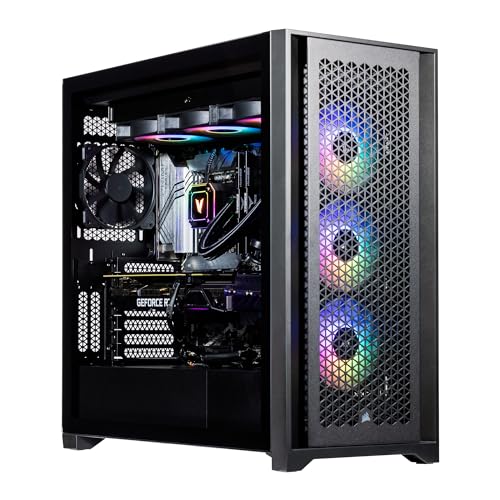
Velztorm Aciex RTX 5070 Ti Gaming PC
- High-end RTX 5070 Ti graphics with 16GB GDDR7
- Core i9-14900K and 64GB DDR5 support demanding workloads
- Spacious 2TB PCIe NVMe SSD
- Includes 360mm AIO cooling, Wi-Fi 6, and Bluetooth 5.2
- The 38.1-pound tower may be cumbersome to move
- Its 20 x 9.45 x 20.45-inch dimensions require substantial placement space
- The listing identifies only one DisplayPort and does not clearly detail the complete video-output selection

ArsenalPC 110R RTX 5070 Ti Gaming PC
- High-end RTX 5070 Ti GPU with 16GB of video memory
- Powerful 24-core Intel i9-14900KF processor
- Generous 64GB DDR5 dual-module configuration
- Large combination of NVMe SSD and HDD storage
- Includes 240mm liquid cooling and an 850W power supply
- The listing does not identify the motherboard model or memory speed
- The i9-14900KF does not include integrated graphics
- Only Windows 11 Home is listed rather than Windows 11 Pro

Thermaltake LCGS Versa i570S RTX 5070
- High-end Intel Core i9-14900KF processor
- Modern NVIDIA GeForce RTX 5070 graphics
- Generous 32GB DDR5 RGB memory running at 6000MT/s
- 240mm closed-loop liquid cooling included
- Wi-Fi and Windows 11 are included
- The 1TB drive may require additional storage for a large game or media library
- Only one USB 3.0 port and two USB 2.0 ports are listed
- The listing does not specify the power supply wattage or GPU memory capacity

Thermaltake LCGS Reactor i1470 RTX 5070
- High-end Intel Core i9-14900KF processor
- Upper-tier NVIDIA GeForce RTX 5070 graphics
- Generous 32GB DDR5 6000MT/s RGB memory
- Large 360mm closed-loop liquid cooling system
- Useful front connectivity including USB-C
- The 1TB drive may require expansion for a large game library
- Power supply wattage and model are not specified
- The listing does not state the graphics card's VRAM capacity

Centaurus Andromeda 2.4 RTX 5060 Desktop
- High-end 24-core Intel processor
- Modern RTX 5060 graphics with GDDR7 memory
- Generous 32GB DDR5 RAM and 2TB NVMe storage
- Windows 11 Pro installed with no listed bloatware
- Strong selection of display, network, audio, and USB connections
- The 8GB graphics memory may be limiting for some demanding high-resolution workloads
- The 500W power supply could restrict headroom for major future graphics upgrades
- The graphics card brand may vary between systems
Understanding Core i9 Gaming PCs
Intel Core i9 processors sit near the top of Intel’s consumer desktop range. Their high core and thread counts suit gaming, streaming, video editing, rendering, and heavy multitasking. For someone who plays while running background applications or also uses the computer for creative work, that extra processing capacity can be genuinely useful.
The processor is only one part of gaming performance. In visually demanding games, the graphics card usually has the greater effect on resolution, image settings, ray tracing, and overall smoothness. A Core i9 paired with an entry-level GPU may therefore perform worse in games than a less expensive processor paired with a stronger graphics card.
A sensible configuration pairs Core i9 with a midrange or high-end GPU, sufficient DDR5 memory, fast solid-state storage, and capable cooling. Consider the complete specification instead of buying by processor badge alone. Our prebuilt value guide explains the broader tradeoffs.
Note: Intel Core i9 works best with a graphics card that matches its level, since a weak GPU or CPU on either side can hold the other component back.
First-Day Setup and Checks
After connecting the desktop, monitor, keyboard, mouse, and network, run Windows Update before installing a large game library. Check for current graphics drivers from NVIDIA or AMD, depending on the installed card. Restart when prompted, confirm that Wi-Fi or Ethernet works correctly, and make sure Windows recognizes the advertised memory and storage.
A Core i9 is a high-end processor with many cores for gaming, creative applications, and multitasking, but it still needs appropriate cooling. Watch temperatures and fan behavior during the first demanding workload. Confirm that case vents are unobstructed, remove any internal shipping material, and place the tower where it can draw in fresh air.
Finally, connect the display cable to the graphics card rather than an available motherboard video output. Set the monitor to its intended refresh rate in Windows, then check that games are using the dedicated GPU. These simple steps help the Core i9 and graphics card operate as the balanced gaming combination you paid for.
Four Checks Before Ordering
Does the exact processor model matter?
Yes. Processors within the Intel Core i9 line can differ in generation, core configuration, clock behavior, integrated graphics, and power demands. Read the full CPU model instead of relying only on the Core i9 label.
How should the graphics card match the processor?
Choose the GPU around your preferred resolution, graphics settings, and game types. A high-end Core i9 makes the most sense when paired with graphics hardware powerful enough to avoid becoming the obvious gaming limitation.
Why should the motherboard and memory platform be checked?
The chipset, motherboard layout, memory type, available slots, and power connections affect later upgrades. Standardized components generally make changes easier. Our proprietary parts guide explains what can restrict expansion.
How much attention does cooling deserve?
A powerful processor can produce substantial heat during sustained workloads. Check whether the listing identifies the CPU cooler and case airflow. Larger liquid coolers are not automatically required, but the cooling system must suit the processor.
Comparing the Listed Systems
The Velztorm Aciex 14th Gen Gaming Desktop PC and ArsenalPC 110R – RTX 5070 Ti Gaming Desktop PC use GeForce RTX 5070 Ti graphics with 16GB GDDR7 and 64GB DDR5. Both also include 2TB NVMe storage. The Velztorm has an Intel Core i9-14900K, 360mm AIO, and 1000W PSU, while the ArsenalPC uses an Intel i9-14900KF, 240mm liquid cooler, and 850W power supply.
The Thermaltake LCGS Versa i570S Gaming Desktop and Thermaltake LCGS Reactor i1470 Gaming Desktop each combine an Intel Core i9-14900KF with a GeForce RTX 5070, 32GB DDR5 6000MT/s memory, and a 1TB NVMe M.2 drive. Their clearest difference is cooling: the Versa has a 240mm radiator, while the Reactor uses a 360mm radiator and a chassis with tempered-glass front panels and perforated side panels.
The Centaurus Andromeda 2.4 has an Intel Core i9-14900K, GeForce RTX 5060 8GB GDDR7, 32GB DDR5 6000MHz memory, 2TB NVMe storage, and a 240mm liquid cooler. It supplies more storage than either Thermaltake system but has a lower graphics tier. For this category, GPU level is the most important difference because every listed processor already provides substantial gaming and multitasking capability.
Core i9 Purchase Questions
1. Is a Core i9 actually necessary for gaming?
Not for every player. Many games work well with less expensive processors, especially when the graphics card is the main performance limit. Core i9 becomes more compelling for high-refresh gaming, streaming, simulation-heavy titles, content creation, and people who want to run demanding applications alongside their games.
2. Is an RTX 5060 too weak for Core i9?
It creates a less graphics-focused configuration than an RTX 5070 or GeForce RTX 5070 Ti pairing. That can still suit processor-heavy work, mainstream gaming, or someone planning a later GPU upgrade. Buyers focused primarily on demanding visual settings should generally prioritize the stronger graphics card before paying for extra memory or decorative features.
3. Is the GeForce RTX 5070 Ti worth choosing over the RTX 5070?
The GeForce RTX 5070 Ti is the higher graphics tier and is the more natural choice for buyers prioritizing demanding games and higher resolutions. The RTX 5070 systems can offer a better overall balance when their other specifications and cost suit your needs. Compare the entire desktop rather than treating the GPU name as the only deciding factor.
4. Do I need 64GB of memory in a gaming PC?
For gaming alone, 32GB is already a comfortable capacity for most users. Moving to 64GB makes more sense for video editing, large creative projects, virtual machines, extensive modding, or unusually heavy multitasking. It is useful headroom, but it should not come at the expense of a graphics card better suited to your games.
5. Are Core i9 prebuilts overpriced compared with custom PCs?
They can carry a premium for assembly, Windows, support, and warranty coverage, while custom building gives you tighter control over every component. Value depends on whether the prebuilt has a balanced GPU, adequate cooling, and standard upgradeable parts. Our build comparison covers the practical differences.
6. Should I choose Core i9-14900K or Core i9-14900KF?
Both are high-end processor options in these systems. The key practical distinction is that the KF model lacks integrated graphics, so it depends on the dedicated graphics card for display output. For a gaming desktop that already includes an NVIDIA GPU, your decision should focus more heavily on the GPU, cooling, storage, and total configuration.
Listing Terms Worth Knowing
- Core i9-14900K: An unlocked Intel desktop processor with integrated graphics, although a gaming PC should normally use its dedicated graphics card.
- Core i9-14900KF: An unlocked Intel processor without integrated graphics, making the installed dedicated GPU necessary for display output.
- DDR5: The memory generation used by all these systems, with capacity and speed stated separately in each listing.
- NVMe SSD: Fast solid-state storage used for Windows, applications, and games, with larger drives reducing the need for an immediate storage upgrade.
- AIO liquid cooler: A closed-loop CPU cooling system that combines a pump, radiator, tubing, and fans in one preassembled unit.
- Upgrade options: A general listing phrase that still requires checking the case, motherboard, power supply, connectors, and warranty terms. Our prebuilt upgrade guide explains what to inspect.
Alternative Core i9 Configurations
Centaurus RX 9070 XT pairs an Intel Core i9-14900K with a Radeon RX 9070 XT 16GB, 64GB DDR5, a 2TB NVMe SSD, and a 240mm liquid cooler. It suits buyers who prefer an AMD graphics card and want an 850W 80+ Gold certified power supply.
Velztorm Praetix also uses an Intel i9-14900K and Radeon RX 9070 XT, but combines them with 32GB DDR5, a 360mm AIO, and a 1000W PSU. It is the more suitable alternative for someone prioritizing the larger listed cooler and higher-capacity power supply.
Centaurus RTX 5070 includes an Intel i9-14900K, GeForce RTX 5070 12GB GDDR7, 64GB DDR5, and 2TB NVMe SSD. It fits buyers wanting NVIDIA graphics, Windows 11 PRO, WiFi6e, and more memory than the two Thermaltake RTX 5070 configurations.
The Strongest Overall Choices
The Thermaltake LCGS is the strongest overall choice because its Core i9-14900KF and GeForce RTX 5070 form a sensible gaming combination without loading the specification with excessive memory. Choose the Velztorm Aciex instead if graphics performance is the priority and you specifically want a GeForce RTX 5070 Ti, 64GB DDR5, and a larger liquid cooler.









