

Most of the mid range comes down to one choice: RTX 5060 or RTX 5070. Among the best mid range prebuilt gaming PCs, the msi Codex R2 is the RTX 5060 pick with 16GB of DDR5, and the Skytech i5 14400F RTX 5070 is the step up.
Recommended by Us

HELLOLAND RTX 5060 Ti Gaming PC
- Capable midrange RTX 5060 Ti graphics card with 8GB GDDR7
- Eight-core Ryzen 7 processor and generous 32GB RAM configuration
- Fast 1TB PCIe solid-state storage
- Includes a 240mm AIO liquid cooler, Wi-Fi, Bluetooth, and Windows 11
- Adjustable RGB lighting complements the white case
- The motherboard and power supply specifications are not listed
- Graphics card brand may vary between units
- 8GB of VRAM may require adjusted settings in especially memory-intensive high-resolution workloads
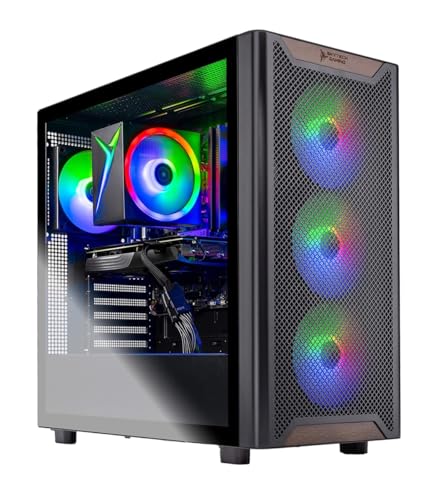
Skytech Chronos 3 RTX 5060 Ti Gaming PC
- RTX 5060 Ti graphics target high-quality 1080p gaming.
- Ryzen 7 processor and 16GB of RAM support gaming alongside everyday multitasking.
- Fast 1TB NVMe M.2 storage is included.
- Mesh-front case includes ARGB fans and air cooling.
- Keyboard, mouse, Wi-Fi, Windows 11 Home, and common display outputs are provided.
- The graphics card manufacturer may vary between units.
- Wi-Fi is limited to Wi-Fi 5 rather than a newer Wi-Fi standard.
- The listing promises only one HDMI and one DisplayPort output, with additional ports varying.

Skytech Azure RTX 5070 Gaming PC
- Strong RTX 5070 graphics configuration for 1440p gaming
- Fast 1TB Gen4 NVMe M.2 storage
- Air cooler and ARGB case fans are included
- Bluetooth, Wi-Fi, keyboard, and mouse are provided
- Assembled in the USA with no listed bloatware
- Uses 16GB of DDR4-3200 rather than newer DDR5 memory
- Wi-Fi 5 is older than current Wi-Fi 6 and Wi-Fi 7 standards
- Graphics card brand and some available display ports may vary

LXZ Ryzen 7 8700F RTX 5060 Gaming PC
- Capable CPU and GPU configuration for 1080p and 1440p gaming
- Modern DDR5 memory and 1TB NVMe storage
- Six included RGB cooling fans
- Extensive display and USB connectivity
- 650W power supply provides the listed system with an upgrade-ready base
- 16GB of RAM may be limiting for particularly demanding multitasking workloads
- The SSD uses NVMe 3.0 rather than a newer-generation interface
- Wi-Fi and Bluetooth support are not specified in the listing

MSI Codex R2 RTX 5060 Gaming Desktop
- Modern RTX 5060 graphics card
- Current-generation DDR5 memory
- Useful 1TB SSD capacity
- Four-fan airflow configuration
- Customizable RGB lighting
- The listing does not state the RAM speed.
- SSD interface and drive performance are not specified.
- Power supply wattage and connectivity details are not listed.
What Mid Range Means for Gaming PCs
A current mid-range gaming PC usually combines an NVIDIA GeForce RTX 5060, RTX 5060 Ti, RTX 5070, or a comparable Radeon graphics card with a modern six-core or eight-core processor. Most suitable systems also include 16GB to 32GB of RAM and a 1TB SSD. This level of hardware is primarily aimed at smooth 1080p and 1440p gaming, with settings adjusted according to the game, graphics card, monitor resolution, and available VRAM. Our PC spending guide provides more budget context.
This category often provides the strongest gaming value because it directs enough of the budget toward the graphics card without adding expensive flagship components that many players will not fully use. Cheaper systems may require greater compromises in demanding games, particularly at 1440p or high visual settings. Flagship desktops offer more performance, but their higher cost can produce smaller practical gains for someone using a mainstream monitor. A balanced mid-range build leaves room for useful memory, solid-state storage, cooling, and a processor that will not unnecessarily restrict the GPU.
Mid Range Specs at a Glance
These are the core specifications to prioritize when comparing balanced gaming desktops.
| Component | What to Look For |
|---|---|
| GPU | An RTX 5060, RTX 5060 Ti, or RTX 5070 class card, since the GPU is the main driver of gaming performance |
| CPU | A modern six-core to eight-core processor is enough for a balanced mid-range system |
| RAM | 16GB of DDR4 or DDR5 as a minimum, while 32GB provides additional headroom |
| Storage | A 1TB NVMe SSD for the operating system, applications, and a practical starting game library |
The same GPU can appear in computers with different processors, memory capacities, storage drives, cooling systems, and power supplies. Compare the entire specification list rather than choosing from the graphics card name alone. Upgrade access can matter as well, especially if you expect to add RAM or storage later. Our prebuilt upgrade guide explains what to check.
How to Choose a Mid Range Prebuilt
Start with the parts that directly affect your games, then compare supporting hardware and ownership details.
Match the GPU to Your Monitor
A mid-range graphics card is generally a good match for 1080p and 1440p monitors, but the right tier depends on the screen you already own. At 1080p, an RTX 5060 class card may provide the balance you want without directing too much of the system budget toward graphics. A faster RTX 5060 Ti or RTX 5070 class option gives more breathing room for 1440p, demanding visual settings, and monitors with higher refresh rates.
Resolution is not the only consideration. The games you prefer, your tolerance for lowering settings, and whether you use ray tracing can all change the amount of graphics performance you need. Avoid paying for a much faster GPU if you plan to keep a basic 1080p display for years. Conversely, pairing a higher-resolution monitor with an entry-level card may force more compromises than expected. Choose the system around your actual display rather than an upgrade you may never make.
Watch the VRAM
Video memory stores textures and other graphics data used while a game is running. An 8GB graphics card remains useful for 1080p and can also serve 1440p players who are willing to adjust demanding settings. However, newer games with detailed texture packs can put more pressure on that capacity. When VRAM is exceeded, performance may become less consistent, so the memory amount deserves attention alongside the graphics processor itself.
A card with 12GB or 16GB gives more room for higher-resolution textures and growing game requirements. That does not automatically make it faster than every 8GB card, because GPU architecture and processing performance still matter. Treat VRAM as one part of the graphics package rather than the only deciding factor. It is especially worth prioritizing if you expect to keep the computer for several years or prefer high texture settings at 1440p.
Heads up: An 8GB graphics card can run into limits in newer games at higher settings. A 12GB or 16GB card provides more room as game requirements grow.
Do Not Overspend on the CPU
Gaming desktops need a capable processor, but the most expensive CPU is rarely necessary for a balanced mid-range build. A modern six-core or eight-core chip is generally enough to support mainstream gaming, everyday applications, and background tasks. Once the processor meets those needs, allocating more of the budget to the graphics card often produces a more noticeable improvement, particularly when playing at 1440p with visually demanding settings.
Extra CPU cores can still be useful for streaming, video work, rendering, or frequent heavy multitasking. For gaming-first use, compare the entire system rather than assuming a higher product number always creates a better experience. A fast processor paired with a weaker graphics card can be less suitable than a balanced combination. Our build comparison covers the tradeoffs between component selection and preconfigured convenience.
Check the Extras
Cooling, the power supply, connectivity, and case airflow affect how practical a prebuilt feels after purchase. Read the listing for the cooler type, fan arrangement, PSU wattage, Wi-Fi standard, Bluetooth support, display outputs, and USB ports. Do not assume these details from the case design or model name. A tempered-glass panel and RGB fans may improve appearance, but clear specifications are more useful when judging reliability, compatibility, and upgrade potential.
Warranty terms also deserve attention because prebuilts combine parts and system-level support in one purchase. Check the stated coverage period, whether labor is included, and how technical support is provided. Some listings give detailed support information, while others say little about warranty service. Keep a copy of the product description and order documents after buying. Our warranty overview explains common coverage details and questions to ask.
Who Should Buy Which System
- Best overall: Skytech i5 14400F RTX 5070 pairs an NVIDIA GeForce RTX 5070 12GB with a 1TB Gen4 NVMe SSD.
- Best for the strongest GPU focus: HELLOLAND RTX 5060 TI combines an NVIDIA GeForce RTX 5060 TI 8GB with 32GB DDR4 memory.
- Best value: Skytech Chronos 3 includes an NVIDIA GeForce RTX 5060 Ti 8GB and a 1TB NVMe SSD.
- Best alternative brand: LXZ RTX 5060 offers DDR5 memory, six RGB fans, and extensive display connectivity.
- Best runner-up: msi Codex R2 combines an NVIDIA GeForce RTX 5060, 16GB DDR5, and a 1TB SSD.
Final Thoughts
The Skytech i5 14400F RTX 5070 is the strongest overall fit for buyers seeking a capable 1440p system with a 12GB graphics card. Its component balance suits the middle of the gaming PC market without moving to flagship hardware.
For a more value-oriented alternative, the Skytech Chronos 3 combines an RTX 5060 Ti with practical storage and a Ryzen 7 processor.
More Options to Consider
- The msi Codex Z2 adds an NVIDIA GeForce RTX 5070, 32GB DDR5, and a 2TB SSD. It suits buyers who want more memory and storage from the start.
- The HOENGAGER RX 9060 XT uses an AMD Radeon RX 9060 XT 16GB, 32GB DDR5, and liquid cooling. It is an option for buyers who prefer Radeon graphics and a white panoramic case.
- The Olialia RTX 3060 TI pairs an NVIDIA GeForce RTX 3060 Ti 8GB with 64GB DDR4 and a 1TB PCIe SSD. It suits heavier multitasking needs where extra system memory is valuable.
FAQs
1. What is a mid range gaming PC?
A mid-range gaming PC sits between basic gaming desktops and premium systems built around flagship components. It normally combines a current mainstream graphics card, a modern six-core or eight-core processor, at least 16GB of RAM, and solid-state storage. The goal is strong 1080p and 1440p performance without paying for hardware intended for the most demanding enthusiast setups. Balance matters more than choosing the fastest individual component.
2. Is a mid range prebuilt gaming PC good enough for 1440p?
Yes, a well-balanced mid-range prebuilt can be a good choice for 1440p gaming. Graphics cards in the RTX 5060 Ti or RTX 5070 class are particularly relevant, although results vary with game demands and selected graphics settings. An RTX 5060 class system can also suit 1440p players who are comfortable adjusting demanding options. Check the GPU, VRAM, processor, and memory together rather than relying on the marketing description.
3. Is 8GB of VRAM enough for a mid range gaming PC?
Eight gigabytes of VRAM can still be enough for 1080p gaming and adjusted 1440p settings, depending on the software and texture quality. It may become restrictive in newer games when high-resolution textures, ray tracing, or demanding visual settings are enabled. A 12GB or 16GB card offers more flexibility and may age more comfortably. VRAM is not the only performance factor, so also consider the underlying GPU class and overall system balance.
4. Should I choose 16GB or 32GB of RAM in a mid range PC?
Sixteen gigabytes is a practical minimum for a gaming-focused mid-range computer and can handle typical play alongside ordinary background applications. Thirty-two gigabytes provides extra room for heavier multitasking, content creation, streaming tools, and games with growing memory demands. If the price difference is reasonable, 32GB can reduce the need for an early upgrade. Otherwise, confirm that the motherboard has accessible memory slots so capacity can be expanded later.
5. How long will a mid range gaming PC last?
A mid-range gaming PC can remain useful for several years, but its practical lifespan depends on resolution, preferred settings, game requirements, component quality, and upgrade options. The graphics card will usually determine when visual compromises become necessary. Adding memory or storage can extend usability, while a GPU upgrade may provide a larger gaming improvement if the power supply and case support it. Our PC lifespan guide explores these factors further.









