

NVIDIA systems bring features like DLSS and a hardware video encoder, which matter if you stream or record. Among the best NVIDIA powered prebuilt gaming PCs, the Skytech RTX 5070 TI pairs AMD Ryzen 7 9800X3D with NVIDIA GeForce RTX 5070 Ti 16GB, and the CyberpowerPC RTX 5060 is the lower-cost pick.
Recommended by Us

Skytech Gaming Ryzen 7 9800X3D RTX 5070 Ti
- High-end Ryzen 7 9800X3D and RTX 5070 Ti configuration
- Generous 32GB DDR5-5600 memory capacity
- Fast Gen4 NVMe M.2 storage
- Large 360mm AIO liquid CPU cooler
- Keyboard and mouse are included
- The 1TB SSD may require expansion for a large game or media collection
- Only 802.11ac Wi-Fi is listed rather than a newer Wi-Fi standard
- The power supply model and wattage are not specified

Skytech Rampage RTX 5060 Ti Gaming PC
- Capable RTX 5060 Ti graphics configuration for 1080p gaming
- Generous 32GB DDR5 memory capacity
- Fast 1TB Gen4 NVMe M.2 storage
- Large 360mm AIO liquid CPU cooler
- Keyboard and mouse are included
- The graphics card brand may vary between systems
- 802.11ac Wi-Fi is older than newer Wi-Fi standards
- Only one HDMI and one DisplayPort output are explicitly promised, while additional ports may vary
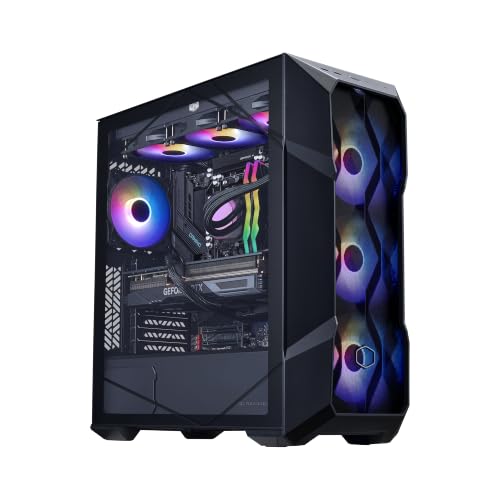
Cooler Master TD5 Pro RTX 5080 Gaming PC
- High-end RTX 5080 16GB graphics configuration
- Gaming-focused Ryzen 7 9800X3D processor
- Generous 32GB DDR5 6000MHz memory and 2TB Gen4 storage
- Includes liquid cooling, Wi-Fi, Type-C, and an 850W 80+ Gold power supply
- The operating system is not specified in the listing
- The 19.7 x 8.3 x 19.7-inch chassis requires a meaningful amount of desk or floor space
- High-end components may be more than casual or light-duty users need

CyberpowerPC Gamer Xtreme RTX 5060
- Modern RTX 5060 graphics with 8GB of dedicated video memory
- Generous 32GB DDR5 configuration
- Spacious 2TB PCIe 4.0 NVMe SSD
- Strong selection of wireless, USB, audio, and display connections
- The listing does not identify the power supply wattage or model.
- Cooling hardware and fan configuration are not specified.
- The GPU's 8GB of VRAM may require reduced texture settings in especially memory-heavy workloads.

Dell Tower Desktop with GeForce RTX 5060
- Modern RTX 5060 graphics with 8GB GDDR7 dedicated memory
- High-capacity 32GB DDR5 memory
- Fast 1TB PCIe NVMe storage
- Strong selection of wired, wireless, and display connections
- Well equipped for gaming, productivity, editing, and streaming
- Power supply specifications are not provided in the listing
- Cooling hardware and acoustic performance are not described
- The operating system is not identified in the supplied product data
Understanding NVIDIA Gaming PCs
An NVIDIA-powered gaming PC uses a dedicated GeForce RTX graphics card rather than relying only on graphics built into the processor. That card handles most of the visual work in games and supports features such as ray tracing, DLSS upscaling, frame generation on compatible hardware, and hardware video encoding for recording or streaming. The NVIDIA label alone does not tell you how fast a machine will be, because an entry-level GeForce card and a high-end model serve very different displays and settings. Pair the GPU with a capable CPU, enough memory, suitable cooling, and an SSD large enough for your library. A fast graphics card can be held back by a poorly balanced system. Our prebuilt comparison explains the broader trade-offs between ready-made and self-built machines.
Hardware That Shapes Performance
Choose the GeForce Tier
The graphics card usually has the greatest effect on gaming resolution, visual settings, ray tracing quality, and how effectively demanding games use a high-refresh display. GeForce RTX cards also provide DLSS features that can improve perceived smoothness in supported titles. Do not treat every RTX badge as equivalent. An RTX 5050 system targets a different buyer from an RTX 5080 machine, even though both belong to NVIDIA’s GeForce family and support modern graphics features.
Balance the Processor Pairing
The CPU manages game logic, simulation, background software, and the work needed to keep the graphics card supplied with data. Competitive games and CPU-heavy simulations can expose a weak processor even when the GPU is capable. Conversely, spending heavily on a premium processor while choosing a modest GPU may not improve visually demanding games much. Our prebuilt PC costs overview helps put these component trade-offs in context.
Note: NVIDIA graphics work best when the graphics card matches the level of the rest of the system. A weak GPU or CPU on either side can hold the other component back.
Check Cooling and Power
Faster hardware produces more heat and places greater demands on the power supply, so cooling and PSU details deserve attention. Look for a ventilated case, a sensible CPU cooler, and a power supply whose capacity and efficiency suit the components. Unfortunately, listings are not always complete. If a seller omits the PSU model, motherboard details, or fan arrangement, regard that as missing information rather than assuming premium parts are hidden inside the case.
NVIDIA Listing Terms Decoded
- GeForce RTX: This is NVIDIA’s consumer graphics family for gaming and creative applications, but the number following RTX matters because it identifies the card’s generation and relative product tier.
- VRAM: Dedicated video memory stores textures, frame data, and other graphics resources, with higher resolutions and detailed settings generally placing greater pressure on the available capacity.
- DLSS: Deep Learning Super Sampling uses NVIDIA’s AI-assisted rendering technology to improve performance or image quality in supported games, although the available modes and features depend on the GPU generation.
- Frame generation: Compatible RTX hardware can create additional displayed frames in supported games, which may make motion appear smoother but does not replace strong underlying CPU and GPU performance.
- Hardware encoding: A dedicated encoder lets the GeForce card assist with recording, streaming, and video work without assigning the entire task to the processor, making it useful for creators and game streamers.
- DisplayPort and HDMI: These outputs connect the graphics card to monitors or televisions, but buyers should confirm that the listed ports and their supported standards match the intended display setup.
Terms such as upgradeable and standard parts also deserve scrutiny because some ready-made desktops are easier to modify than others. Our proprietary parts explainer covers the restrictions that unusual cases, motherboards, connectors, and power supplies can create.
Rules for a Balanced Choice
Choose the graphics card for your actual monitor rather than the most impressive model number. A mainstream RTX card can make sense for conventional 1080p gaming, while demanding 1440p or 4K play generally gives stronger GPUs more room to justify their cost.
Give priority to component balance over decorative extras. RGB lighting and tempered glass can look good, but they do not compensate for limited storage, inadequate memory, a mismatched CPU, or unclear cooling. The useful specifications should be visible before the cosmetic details take over.
Check upgrade access before assuming every tower follows standard desktop conventions. Case space, motherboard connectors, power capacity, and cooler clearance can affect later changes. Our prebuilt upgrades guide explains what to inspect before planning a replacement GPU or other major component.
Read the warranty terms as closely as the performance claims. Coverage length, technical support, shipping responsibility, and whether individual components receive separate protection can matter when something fails. Our warranty overview outlines the questions worth asking before ordering.
Matching Systems to Gamers
| Reader | Pick | Why |
|---|---|---|
| Best overall | CoolerMaster TD5 Pro | Combines an RTX 5080, Ryzen 7 9800X3D, 32GB DDR5, 2TB SSD, liquid cooling, and an 850W Gold PSU. |
| Performance-focused gamer | Skytech RTX 5070 TI | Pairs an RTX 5070 Ti with a Ryzen 7 9800X3D, 32GB DDR5, and a 360mm liquid cooler. |
| Value-minded buyer | CyberpowerPC RTX 5060 | Provides an RTX 5060, 32GB DDR5, a roomy 2TB SSD, Wi-Fi 6, and included peripherals. |
| Alternative-brand shopper | Skytech Rampage | Offers RTX 5060 Ti graphics, 32GB DDR5, a 360mm liquid cooler, and a front-mesh case. |
| Versatile runner-up | Dell RTX 5060 | Balances RTX 5060 graphics with a Core Ultra 7 265F, 32GB DDR5, Wi-Fi 6, and Bluetooth 5.4. |
The Bottom Line
The CoolerMaster TD5 Pro is the clearest overall choice for a high-end NVIDIA gaming system because its RTX 5080 is paired with a Ryzen 7 9800X3D, substantial memory, fast storage, liquid cooling, and a named Gold-rated power supply. The Skytech RTX 5070 TI is the better alternative for buyers who want RTX 5070 Ti graphics and the same gaming-focused processor in a showcase-style build.
Other NVIDIA Systems Worth Considering
| Product | What Is Different | Suits Whom |
|---|---|---|
| Corsair Vengeance | This premium configuration pairs an RTX 5080 with a liquid-cooled Intel Core i9-14900KF, 32GB Vengeance RGB DDR5, and a 2TB M.2 SSD. Its wraparound tempered-glass case emphasizes component visibility and extensive fan mounting. | It suits buyers who prefer Corsair memory, cooling, and case components in one coordinated system. It also fits gaming and creative workloads that can use high-end NVIDIA graphics. |
| ZOTAC MEK | The ZOTAC uses an RTX 5050 with a Ryzen 5 5500, 16GB DDR4, a 1TB SSD, and a 650W Gold power supply. Its compact case includes a built-in display for system information and ambient temperature. | This model suits 1080p players seeking an accessible NVIDIA configuration without jumping to a higher graphics tier. The separate three-year GPU warranty also distinguishes it from many complete-system warranties. |
| CyberpowerPC RTX 5070 | This configuration combines an RTX 5070 with a twelve-core AMD Ryzen 9 9900X, 32GB DDR5, and a 1TB PCIe 4.0 SSD. It also includes liquid CPU cooling, Wi-Fi 6, Bluetooth 5.3, and several display outputs. | It suits gamers who also run processor-heavy creative or productivity workloads and want more CPU cores than the mainstream options provide. Buyers should decide whether the smaller SSD is adequate for their software and game library. |









