


A gaming PC for around $400 means older parts, so the useful question is which ones still play well. Among the best prebuilt gaming PCs under $400, the STGAubron RX 580 is the best all-round pick and the STGAubron RX 590 has the strongest GPU.
Recommended by Us
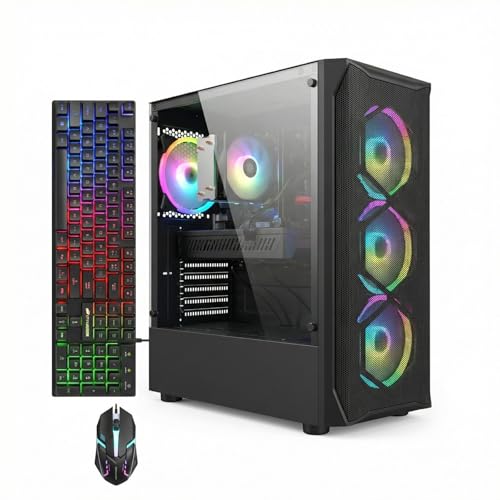
STGAubron Core i7 RX 580 Gaming PC
- Dedicated Radeon RX 580 graphics with 8G of video memory
- Useful 16GB memory and 512GB SSD configuration
- Modern Wi-Fi 6 and Bluetooth 5.0 connectivity
- HDMI and DisplayPort connections are both listed
- RGB keyboard and mouse are included
- The exact Intel Core i7 generation and model are not specified
- The listing does not identify the RAM type or speed
- A 512GB SSD may fill quickly with a large collection of games or video files

STGAubron Gaming PC Dual Xeon E5
- Bundled RGB peripherals and four RGB fans reduce initial setup costs
- Dual Xeon E5 processors excel at multithreaded tasks beyond gaming
- Multiple connectivity options: HDMI, DisplayPort, RJ-45, Wi-Fi, Bluetooth 5.0
- Lifetime technical support for ongoing assistance
- RX 590 is an older generation GPU; newer titles at higher settings may require lower frame rates
- PSU wattage, case type, and detailed cooling specs are not listed
- No mention of upgradeable components or future expansion options

VRA i7-4790 RX 580 Gaming PC Bundle
- RX 580 includes 8GB of graphics memory.
- Remote-controlled lighting can be customized or turned off.
- Six cooling components are pre-installed.
- Multiple desktop accessories are included in the bundle.
- Case and power supply support future parts expansion.
- RAM capacity and type are not specified.
- Storage capacity and drive type are not listed.
- The i7-4790 and RX 580 belong to older hardware generations.

Dell OptiPlex i7 GTX 1050 Ti Gaming PC
- Dedicated GeForce GTX 1050 Ti graphics
- 16GB of RAM for practical multitasking
- 512GB SSD rather than mechanical-only storage
- Built-in Wi-Fi and included RGB peripherals
- Windows 11 Pro included
- The 6th-generation processor and DDR3L memory are based on an older platform.
- GTX 1050 Ti graphics are best viewed as entry-level by current standards.
- Ports, power-supply specifications, and cooling hardware are not listed.

Dell OptiPlex i7 GT 1030 Gaming Bundle
- Includes a complete set of monitor and input peripherals.
- SSD storage supports faster startup than a traditional hard drive.
- 16GB of RAM is useful for everyday multitasking.
- Dedicated GeForce graphics provide more gaming capability than basic integrated graphics.
- Customizable RGB front lighting adds visual personality.
- The GT 1030 is an entry-level graphics card with only 2GB of video memory.
- The listing does not identify the Intel Core i7 processor generation or exact model.
- As a renewed system, it may arrive in a generic box.
What a Gaming PC Around $400 Can Do
A prebuilt gaming PC in this price bracket relies on older hardware to keep costs down. You’ll find processors like the Intel Core i5, Core i7, or Xeon E5 series paired with entry-level dedicated graphics cards such as the RX 580, RX 590, GTX 1050 Ti, or GT 1030. This combination handles esports titles, competitive shooters, and older AAA games at 1080p resolution with comfortable frame rates, though you’ll need to lower settings for newer demanding releases.
The trade-off at this price point means compromising on the latest technology. These systems excel when you prioritize specific games over cutting-edge graphics or when you plan to upgrade components later. A dedicated GPU makes a dramatic difference compared to integrated graphics, transforming these machines from basic office computers into capable entry-level gaming rigs. Check the specs you actually need for gaming to understand where these systems fit your gaming habits.
What to Expect at This Price
Budget prebuilts at this price level follow a predictable formula in their core components:
| Component | What You Get |
|---|---|
| CPU | Older quad-core Intel Core i5, Core i7, or Xeon E5 series |
| GPU | Entry-level RX 580, RX 590, GTX 1050 Ti, or GT 1030 class |
| RAM | Usually 16GB DDR4 or DDR3 |
| Storage | 256GB to 512GB SSD |
These are often older or refurbished stock rather than newly manufactured systems. Condition varies between listings, so read the product description carefully to understand whether you’re getting a renewed unit, open-box item, or older inventory. Check the seller’s return window and warranty terms before committing to a purchase, especially with budget options where margins are tight.
Worth knowing: Systems in this price range are mostly older or refurbished hardware, so check the seller’s return window and warranty terms before buying.
How to Choose a Budget Prebuilt
Shopping for a budget prebuilt requires different priorities than mid-range or high-end systems. Focus on these factors to make sure you’re getting real gaming capability rather than just a discounted office PC:
Check the Graphics Card
A dedicated GPU is non-negotiable at this price. Systems without a dedicated graphics card aren’t gaming PCs, regardless of how fast the processor is. The RX 580, RX 590, GTX 1050 Ti, and GT 1030 all represent entry-level gaming capability, but each tier handles different workloads. Avoid listings that mention only integrated graphics unless the CPU is unusually powerful, which is rare in this budget range.
The graphics card matters far more than CPU generation when you’re playing older games or esports titles. An older processor paired with a dedicated mid-range GPU delivers better gaming results than a newer processor with only integrated graphics. Look for the GPU name in the product title or specifications, and cross-reference it against the systems listed below to ensure you’re comparing similar tiers.
Older Parts and Condition
Budget prebuilts frequently use older components or refurbished stock to hit price targets. This isn’t necessarily bad, but you need to know what you’re buying. Check the product listing carefully for words like “refurbished,” “renewed,” “open-box,” or “previous generation” to understand the system’s history before purchase.
A refurbished system from a reputable seller works fine, but you should verify the seller’s return window, warranty coverage, and any condition caveats. Budget systems often have tighter margins for the seller, which sometimes means reduced flexibility on returns or support. Read customer reviews for feedback on actual condition and whether items arrived as described, since this matters more for budget purchases than premium ones.
Power Supply and Upgrades
Older office-style cases often include smaller power supplies designed for modest power draw. A 300W or 400W unit works fine for the GPUs in these systems, but it limits your upgrade options later. If you’re considering swapping in a faster graphics card in the future, check the power supply wattage in the product specs to ensure you’ll have room to grow.
The case design also affects upgrade potential. Prebuilts designed for commercial office use sometimes have cramped interiors or proprietary parts that make upgrades awkward. Read the full product description and look for mentions of the case type, power supply wattage, and motherboard form factor to understand your future upgrade ceiling. You can also reference our guide on upgrading prebuilt PCs to see what to look for.
Included Extras
Some listings bundle a monitor, keyboard, mouse, or other peripherals alongside the tower. These accessories can add real value, especially if the monitor is 24 inches or larger. A bundled monitor can be worth more than a slightly faster part than a slightly faster processor in a tower-only configuration.
Compare the complete package rather than just the internal specs. A system bundled with a decent 1080p monitor and peripherals might offer more practical value than a tower-only system with a marginally better GPU. Check product photos and the full description to see exactly what’s included, and factor that into your decision against another option with faster parts but no extras.
Who Should Buy Which System
- STGAubron RX 580: Best overall for balanced gaming and everyday use with a solid Core i7 processor and dedicated RX 580 GPU.
- STGAubron RX 590: Best for the strongest GPU in this budget, with dual Xeon E5 processors and an RX 590 for maximum gaming performance.
- VRA RX 580: Best value RX 580 configuration featuring a Core i7-4790 processor with thorough testing and tech support included.
- Dell RGB Gaming Tower: Best for RGB customization with a GTX 1050 Ti and complete RGB lighting control via remote.
- Dell GT 1030 RGB: Best Dell entry pick for buyers who value the Dell brand and prefer a more compact, office-style system with included 24-inch monitor.
Final Thoughts
At $400 you are buying older hardware, and the RX 580 class is where it starts to feel worthwhile. Go with the STGAubron RX 580 for the best balance, or the STGAubron RX 590 if you want the most GPU. Whichever you pick, read the condition and return terms in the listing first.
More Options to Consider
- STGAubron Core i5 RX 560: A lower-cost alternative with a Core i5 and RX 560 GPU, suitable for esports titles and lighter gaming at lower settings.
- Gaming PC Computer Desktop Intel Core I5: Features an Intel Core i5 with RX 560 graphics in a system emphasizing energy efficiency and low noise operation for home office use alongside casual gaming.
- Tisukisu Prebuilt Gaming PC Core i5 Tower: Offers a Core i5 with RX 550 graphics and extensive RGB lighting options for builders prioritizing aesthetic customization over maximum performance.
FAQs
1. Can you get a gaming PC for under $400?
Yes, you can find prebuilt gaming PCs in this price range, though they typically use older processors and entry-level graphics cards. Systems at this price point focus on value over cutting-edge performance, making them suitable for esports titles, competitive games, and older AAA releases. The key is ensuring you get a dedicated GPU rather than integrated graphics, which makes the difference between a gaming PC and a basic office computer.
2. Are cheap prebuilt gaming PCs with older parts worth buying?
Older prebuilt systems are worth buying if you understand their limitations and match them to your actual gaming needs. A refurbished system with a dedicated RX 580 or GTX 1050 Ti handles esports titles and 1080p gaming well. Budget prebuilts make sense for casual gamers, esports competitors, or anyone upgrading from an older system. Read reviews and verify the seller’s warranty before committing.
3. What games can a RX 580 or GTX 1050 Ti run?
These GPUs handle many esports titles well, as well as older AAA games at 1080p with adjusted settings. Newer demanding games require lower settings or reduced resolution to maintain playable performance. The RX 590 pushes a bit higher than the RX 580, while the GTX 1050 Ti falls between the RX 560 and RX 580 in capability. Your actual frame rate depends on the specific game, resolution, and settings you choose.
4. Is it better to build a PC for this budget?
Building a PC at this budget is difficult because component prices don’t scale down proportionally. A prebuilt system offers convenience, warranty coverage, and sometimes bundled peripherals that make sense at this price. However, comparing prebuilt vs custom builds shows that building your own gives you part selection flexibility and avoids proprietary components. Either approach works; choose based on whether you value convenience or customization more.
5. Can I upgrade a cheap prebuilt gaming PC later?
Many budget prebuilts use older office-style cases with limited upgrade potential due to smaller power supplies and cramped interiors. Check the power supply wattage in the product specs before buying; a 300W unit limits GPU upgrades significantly. RAM and storage upgrades are usually straightforward, but swapping the graphics card requires verifying the case design and power supply capacity first. Refer to our guide on prebuilt PC warranties to understand your specific system’s upgrade options.









