


Windows 11 comes ready on most new prebuilts, so the real question is what hardware sits under it. Among the best Windows 11 prebuilt gaming PCs, the Dell RTX 5070 pairs Intel Core Ultra 9 285 with NVIDIA GeForce RTX 5070 12GB, and the Evounic RTX 2080 TI is the lower-cost pick.
Recommended by Us
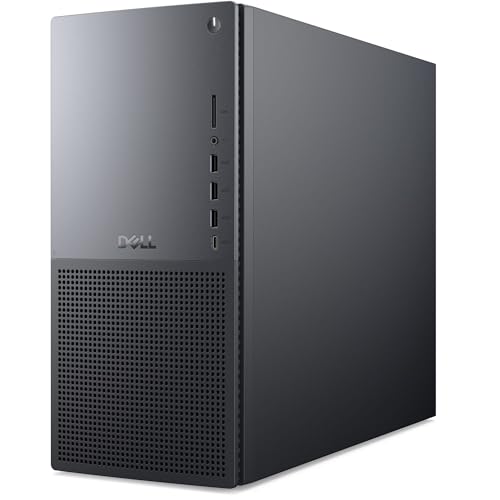
Dell Tower Plus EBT2250 RTX 5070 Desktop
- High-end RTX 5070 graphics with 12GB GDDR7
- Generous 64GB DDR5 memory configuration
- Large 2TB solid-state drive
- Wi-Fi 7, Bluetooth, keyboard, and mouse are included
- Windows 11 Pro supports professional and business use
- The listing does not specify the power supply, cooling system, or available ports
- CPU naming is inconsistent: the title states Core Ultra 9 285K, while the feature text states Core Ultra 9 285
- Only wired keyboard and mouse accessories are listed

Empowered PC HP Omen Max 45L RTX 5060
- Capable mainstream RTX 5060 graphics with 8GB of GDDR7 memory
- Eight-core Ryzen 7 processor
- Fast Gen4 NVMe storage
- Modern Wi-Fi 6E and Bluetooth 5.3 connectivity
- Front and rear USB-C ports
- Only 16GB of RAM is included, which may be limiting for heavier creative workloads or extensive multitasking.
- Keyboard and mouse are not included.
- The listing is inconsistent about the graphics card: the title and features state RTX 5060, while the size field states RTX 5060 Ti 8GB.
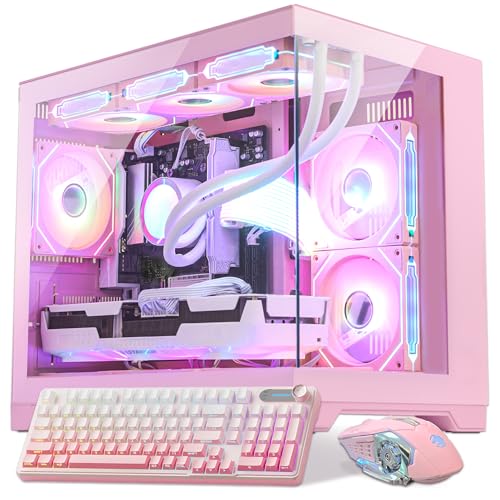
HELLOLAND Pink RX 9070 XT Gaming PC
- High-end Ryzen 7 9800X3D and Radeon RX 9070 XT configuration
- Generous 32GB DDR5 memory and 2TB of combined SSD storage
- 16GB of GDDR6 graphics memory
- Extensive cooling setup with a 360AIO and nine ARGB PWM fans
- Keyboard, mouse, and Windows 11 are included
- The secondary 1TB SATA SSD is slower than an NVMe drive
- The listing states that the graphics card brand may vary
- Wi-Fi capability and motherboard model are not specified
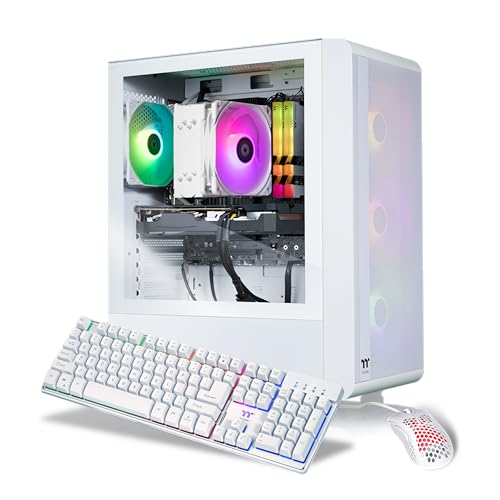
Thermaltake LCGS Quartz R66 Gaming PC
- Capable mainstream CPU and GPU configuration
- Fast 16GB DDR4 3600MHz memory
- Spacious 1TB NVMe M.2 storage
- Wi-Fi and Windows 11 Home included
- Keyboard and mouse supplied
- DDR4 memory is an older platform than DDR5
- Radeon RX 6600 targets mainstream gaming rather than high-end graphics demands
- Power supply wattage is not specified in the listing

Evounic RTX 2080 Ti Gaming PC
- RTX 2080 Ti includes 11GB of GDDR6 video memory
- Combines fast M.2 storage with a larger secondary hard drive
- Includes Wi-Fi 6, Bluetooth 5.4, HDMI, and DisplayPort
- Ships with Windows 11 Pro
- 800W power supply is explicitly listed
- The listing does not identify the exact Xeon or i7 E5 processor model
- Only 16GB of system RAM is included
- Cooling configuration and internal expansion options are not specified
Windows 11 Gaming Essentials
A suitable desktop needs more than a Windows 11 label. Look for a current Windows 11 installation, ready drivers, and hardware supporting the TPM and Secure Boot requirements Windows 11 depends on. Most gaming PCs can handle the operating system easily when the CPU, GPU, memory, and storage are reasonably balanced. Extra spending usually helps most when it improves the graphics card, although more RAM and SSD capacity matter if you stream, create content, or keep a large game library. Our gaming PC specs guide covers the broader choices.
- Choose Windows 11 Home for ordinary gaming, or Pro when you specifically need its business-oriented features.
- Prioritize the GPU for demanding graphics, but avoid pairing it with an obviously weak or outdated supporting platform.
- Check memory capacity, SSD space, cooling, connectivity, and upgrade access rather than judging a desktop by its case.
Worth knowing: Check that the listing says Windows 11 Home or Pro is included and activated. Do not assume every prebuilt includes a usable license merely because Windows appears in product photos.
How These Systems Differ
The Ocean Park Pink Gaming PC Gamer Desktop W/ KB pairs an AMD Ryzen 7 9800X3D with an AMD Radeon RX 9070 XT 16GB, 32GB DDR5, and two separate one-terabyte SSDs. Its cooling setup includes a 360AIO and nine ARGB PWM fans. The Dell Tower Plus EBT2250 instead combines an Intel Core Ultra 9 285K 24-core processor, NVIDIA GeForce RTX 5070 12GB GDDR7, 64GB DDR5, and a two-terabyte NVMe SSD. Dell does not specify the cooling configuration in the supplied listing.
The HP 0men Max 45L RTX 5060, AMD Ryzen 7 7700 CPU uses an eight-core, 16-thread AMD Ryzen 7 7700, an NVIDIA GeForce RTX 5060 with 8GB GDDR7, 16GB DDR5, and a one-terabyte Gen4 NVMe SSD. It is liquid-cooled and includes a 1200W Platinum power supply, Wi-Fi 6E, Bluetooth 5.3, and Windows 11 Pro. The Thermaltake LCGS Quartz R66 is more modest, with an AMD Ryzen 5 5600, AMD Radeon RX 6600, 16GB DDR4-3600 memory, a one-terabyte NVMe drive, and an ARGB tower air cooler.
The Gaming PC Desktop, Intel Xeon E5 up to 3.2GHz takes a different approach. It combines a Xeon or i7 E5 processor with an NVIDIA RTX 2080 Ti 11GB, 16GB DDR4, a 512GB M.2 SSD, and a one-terabyte hard drive. It also lists Wi-Fi 6, Bluetooth 5.4, an 800W power supply, and Windows 11 Pro. For this topic, the GPU tier matters most for gaming, but RAM, storage type, and CPU balance determine how pleasant the whole Windows 11 experience feels.
Windows 11 Ownership Answers
1. What hardware is enough for Windows 11 gaming?
A practical gaming system needs supported Windows 11 security hardware, ready drivers, and components suited to the games and monitor you plan to use. Six or eight modern CPU cores are comfortable for many buyers, while the graphics card usually has the largest effect on gaming quality. Memory and SSD capacity should also leave room for background applications and a growing library.
2. Is Windows 11 Pro worth paying more for?
Windows 11 Pro is not automatically better for game performance. It mainly makes sense when you need its added management, security, or professional-use features. Home is generally sufficient for a dedicated gaming desktop, so compare the hardware before paying more merely because a listing includes Pro.
3. Should I choose 16GB or 32GB of RAM?
Sixteen gigabytes can handle straightforward gaming and everyday Windows use, provided you do not keep many demanding programs open. Thirty-two gigabytes gives more breathing room for streaming tools, creative applications, browser tabs, and newer games. Memory generation also matters, but capacity and the complete platform should guide the decision. Our DDR4 versus DDR5 comparison explains the distinction.
4. How much SSD storage should a gaming PC have?
A one-terabyte SSD is a sensible starting point, but large game libraries can fill it quickly once Windows and other applications are included. Two terabytes is more comfortable for buyers who dislike uninstalling games. A secondary hard drive adds inexpensive capacity, though games and active projects generally benefit from SSD storage.
5. Will an expensive GPU be limited by the CPU?
It can be, especially when a powerful graphics card is paired with an older or substantially slower processor. Resolution, game behavior, background tasks, and display goals all affect the balance. A bottleneck does not mean the computer is unusable, but it can prevent an expensive component from delivering its full practical value.
6. How long should a Windows 11 gaming desktop last?
Useful life depends on the games you play, the settings you accept, cooling, component quality, and whether parts can be upgraded. A well-balanced desktop can remain useful for years, although graphics expectations often rise faster than ordinary Windows requirements. Our PC lifespan guide discusses the main ownership factors.
When Gaming Power Is Excessive
Skip a gaming prebuilt if your workload is mainly web browsing, office documents, video calls, and media playback. A mainstream Windows 11 desktop with integrated graphics can cost less, consume less power, and produce less heat. It still needs a current Windows 11 installation with ready drivers, along with TPM and Secure Boot support required by the operating system.
Likewise, avoid overspending on a flagship GPU if you use a modest monitor and play undemanding titles. A balanced entry-level or mid-range gaming system is usually more sensible. Put additional money toward the GPU for demanding games, toward RAM for heavy multitasking, and toward SSD capacity when you store many games or project files. Our PC spending guide provides more budgeting context.
A Practical Hardware Checklist
- Match CPU cores and clock speed to your workload. More cores help with rendering and heavy multitasking, while strong per-core speed remains valuable in games.
- Choose enough memory for everything running together. Thirty-two gigabytes provides useful headroom for gaming, chat, browsers, streaming, and creative applications.
- Buy a GPU for both gaming and accelerated creative work. A stronger card helps with demanding graphics and supported rendering workloads.
- Allow enough fast storage for Windows, applications, games, and project files. NVMe SSD storage keeps booting and loading responsive.
- Check cooling, power delivery, and component balance before focusing on appearance. Our bottleneck overview explains why mismatched parts can waste money.
Simple Windows 11 Rules
- Confirm the exact Windows 11 edition and license status before ordering any prebuilt gaming desktop.
- Prefer an SSD as the main drive, reserving hard drives for less speed-sensitive files.
- Choose 32GB of memory when gaming regularly overlaps with streaming, editing, or heavy browser use.
- Check TPM and Secure Boot support when considering older platforms sold with Windows 11.
- Compare cooling, power supply details, wireless support, and upgrade access instead of judging exterior lighting.
Matching Systems to Buyers
| Reader | Pick | Why |
|---|---|---|
| Best overall | Ocean Park | Ryzen 7 9800X3D, RX 9070 XT 16GB, 32GB DDR5, dual SSDs, and a 360AIO. |
| Strongest GPU-focused choice | Dell RTX 5070 | RTX 5070 graphics accompany a 24-core processor, 64GB DDR5, and a two-terabyte NVMe SSD. |
| Best value | Evounic RTX 2080 TI | RTX 2080 Ti 11GB graphics, mixed SSD and hard-drive storage, Wi-Fi 6, and Windows 11 Pro. |
| Alternative brand | HP RTX 5060 | Ryzen 7 7700, RTX 5060, liquid cooling, Wi-Fi 6E, and a 1200W Platinum power supply. |
| Runner-up | Thermaltake LCGS | Ryzen 5 5600 and RX 6600 provide a simpler configuration with a one-terabyte NVMe drive. |
Other Windows 11 Contenders
HP OMEN 45L combines an Intel Core Ultra 7 265K, NVIDIA GeForce RTX 5080, 32GB DDR5, and a two-terabyte SSD. Tool-free access and the OMEN Cryo Chamber make it attractive to buyers wanting powerful graphics and easier component access.
HP Ryzen 7 8700F RTX 5060 is the compact option. Its AMD Ryzen 7 8700F, NVIDIA GeForce RTX 5060, 32GB DDR5, one-terabyte SSD, and Windows 11 Pro suit smaller gaming spaces.
HOENGAGER RTX 5070 TI pairs an AMD Ryzen 7 7800X3D with an RTX 5070 Ti 16GB and 32GB DDR5. A 240mm water cooler, seven RGB fans, and an 850W power supply target buyers seeking a white, high-performance tower.
The Bottom Line
The Ocean Park is the most balanced choice here for demanding gaming, multitasking, and roomy solid-state storage. Choose the Dell RTX 5070 instead if a 24-core processor, 64GB DDR5, and Windows 11 Pro better match your combination of gaming and heavier productivity work.









