

Core Ultra 7 sits in the upper middle of Intel’s newer range, aimed at gaming with headroom for other work. Among the best prebuilt gaming PCs with Intel Core Ultra 7, the Skytech RTX 5070 TI pairs Intel Core Ultra 7 265K with NVIDIA GeForce RTX 5070 Ti 16GB GDDR7, and the msi Codex R2 is the lower-cost pick.
Recommended by Us

Skytech Legacy 4 RTX 5070 Ti Gaming PC
- High-end RTX 5070 Ti graphics with 16GB GDDR7
- Generous 4TB Gen4 NVMe SSD
- 32GB of fast DDR5 memory
- 360mm AIO liquid CPU cooling
- Modern Wi-Fi 7 connectivity
- The graphics card brand may vary between units
- Only one HDMI and one DisplayPort connection are specifically promised
- Power supply specifications are not provided in the listing
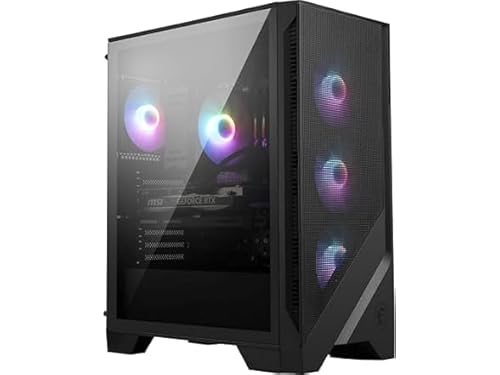
MSI Codex R2 AI RTX 5060 Ti Gaming Desktop
- Modern Intel Ultra 7 processor and RTX 5060 Ti graphics
- Generous 32GB DDR5 memory configuration
- Fast 1TB M.2 NVMe storage
- Four system fans plus an RGB CPU air cooler
- Wi-Fi 7 and customizable RGB lighting included
- The listing does not state the power supply wattage
- The RTX 5060 Ti VRAM capacity is not specified
- A 1TB drive may require expansion for especially large media or software libraries

Centaurus Berserk GX2W RTX 5060 Ti PC
- RTX 5060 Ti includes 16GB of video memory.
- Powerful 20-core Intel Core Ultra 7 processor.
- Generous 32GB DDR5-6000 dual-channel memory.
- Front USB Type-C and support for up to four monitors.
- Includes both Wi-Fi and 1Gbps Ethernet.
- The 1TB SSD may fill quickly with large games and video projects.
- The listed 802.11ac Wi-Fi adapter is older than newer Wi-Fi standards.
- The 500W 80+ Bronze power supply is relatively modest for a performance-focused desktop.

Lenovo Legion T7 RTX 5080 Gaming Desktop
- High-end RTX 5080 graphics with ray tracing and DLSS 4 support
- Unlocked Intel Core Ultra 7 265K processor
- Generous 32GB RAM and 2TB combined SSD capacity
- Broad selection of USB and display connections
- Wi-Fi 6E and included wired peripherals
- Power supply wattage and cooling configuration are not specified
- At 35.27 pounds, the tower may be cumbersome to move
- Included keyboard and mouse use wired connections

HP OMEN 45L RTX 5070 Gaming Desktop
- RTX 5070 graphics target upper-midrange gaming and GPU-accelerated creation.
- Core Ultra 7 265K processor supports gaming, creative, and AI workloads.
- Tool-less access and a standard-form-factor chassis support easier upgrades.
- Advanced CPU cooling includes a 360 mm liquid cooler and OMEN Cryo Chamber.
- Fast PCIe Gen4 NVMe storage and DDR5 memory are included.
- The included 16 GB of RAM may be modest for heavier multitasking or demanding creative workflows.
- A 1 TB drive can fill quickly with large applications and modern game libraries.
- At 49.82 pounds, the desktop may be difficult to move frequently.
Understanding Core Ultra 7
Intel Core Ultra 7 identifies current-generation upper mid-range Intel processors intended for demanding desktops, including gaming systems that also handle streaming, editing, and everyday productivity. These processors provide plenty of CPU performance for modern games, but the graphics card usually has a greater effect on visual settings and resolution. An expensive Core Ultra 7 desktop with an entry-level GPU can therefore be slower in games than a more balanced machine with a less costly processor and stronger graphics. For mainstream gaming, GeForce RTX 5060 Ti or similar graphics can make sense, while RTX 5070-class cards are better suited to higher settings and more demanding displays. Memory and cooling still matter, particularly for multitasking and sustained workloads. Our CPU and GPU comparison explains how each component affects gaming.
Note: Intel Core Ultra 7 works best with a graphics card that matches its level, since a weak GPU or CPU on either side can hold the other back.
Listing Terms Made Simple
- Core Ultra 7 265: A locked desktop processor intended for strong gaming, productivity, and multitasking without CPU overclocking as the main focus.
- Core Ultra 7 265K: An unlocked processor that allows compatible systems and experienced users to adjust performance settings beyond standard operation.
- Core Ultra 7 265KF: An unlocked version identified by the KF suffix, commonly paired with a dedicated graphics card in gaming desktops.
- DDR5 memory: The current memory generation used by these systems, offering higher bandwidth than older DDR4 platforms. Our DDR memory comparison covers the practical differences.
- NVMe SSD: Fast solid-state storage used for Windows, applications, and games, with capacity determining how soon you may need another drive.
- Liquid cooling: A cooling arrangement that moves CPU heat through liquid to a radiator, although radiator size and case airflow still affect results.
When Another Platform Fits
Skip an Intel Core Ultra 7 prebuilt if you mainly play lightweight competitive or older games on a modest monitor. A less expensive current processor paired with a suitable mid-range graphics card can provide a better use of your budget. Core Ultra 7 is an upper mid-range desktop processor line, so paying extra for it makes less sense when your games place limited demands on the CPU.
You should also look elsewhere if your priority is maximum graphics performance and the Core Ultra 7 configuration forces you into a weaker GPU. For visually demanding gaming, direct more of the budget toward the graphics card. Conversely, buyers doing heavy professional CPU work may want a higher processor tier, while casual users can choose a lower tier and pair it with graphics appropriate for their display.
Priorities for Different Players
High-Resolution Single-Player Gaming
Prioritize the graphics card first because detailed single-player games at higher resolutions are commonly limited by GPU performance. Core Ultra 7 is already a capable upper mid-range foundation, so a GeForce RTX 5070-class card or stronger option creates a more sensible balance than spending heavily on the processor while settling for weaker graphics.
Storage capacity also deserves attention because large game libraries can fill a small system drive quickly. A larger SSD can delay an upgrade, although storage is generally easier to expand later than the graphics card.
Competitive Gaming and Streaming
A strong CPU helps with high-refresh gaming, background software, voice chat, and streaming tasks. Core Ultra 7 suits this workload well, but it should still be matched with a GPU capable of driving the chosen resolution and visual settings. Avoid judging a system by the processor name alone.
Memory capacity and cooling become more relevant when several applications run together. For help spotting an uneven configuration, our prebuilt bottleneck guide explains the warning signs.
Gaming With Creative Work
Buyers who edit video, render projects, or handle large media files alongside gaming should prioritize memory, storage, and sustained cooling as well as graphics. Core Ultra 7 is positioned for capable gaming and productive multitasking, making it a sensible middle ground for a desktop that serves more than one role.
A system with ample DDR5 memory reduces the need for an immediate upgrade, while a larger NVMe SSD leaves more room for games and project files. GPU choice should reflect both the games and the creative applications you expect to use.
How the Main Systems Compare
The Centaurus RTX 5060 TI combines an Intel Core Ultra 7 265K with a GeForce RTX 5060 Ti 16GB, 32GB DDR5-6000 memory, and a 1TB NVMe SSD. Its listing identifies an Intel B860 motherboard, a 500W 80+ Bronze or higher power supply, and a white tempered-glass case. The msi Codex R2 uses the locked Intel Ultra 7 265 and NVIDIA GeForce RTX 5060Ti, along with 32GB DDR5, a 1TB M.2 NVMe SSD, Wi-Fi 7, and air cooling.
Moving up in graphics and storage, the Skytech RTX 5070 TI pairs an Intel Core Ultra 7 265K with an NVIDIA Geforce RTX 5070 Ti 16GB GDDR7. It includes 32GB DDR5-6000 memory, a 4TB Gen4 NVMe M.2 SSD, Wi-Fi 7, and a 360mm AIO liquid cooler. The HP OMEN 45L also uses the Intel Core Ultra 7 265K, but pairs it with an NVIDIA GeForce RTX 5070, 16GB DDR5, and a 1TB PCIe Gen4 NVMe M.2 SSD. HP lists an OMEN Cryo Chamber and a 360mm LCD liquid cooler.
The Lenovo Legion T7 stands apart with an RTX 5080 32GB GDDR7, 32GB RAM, and two 1TB PCIe M.2 solid-state drives. Its listing also specifies Wi-Fi 6E and extensive USB connectivity, although it does not provide cooling details. Across these systems, CPU differences mostly concern locked versus unlocked variants. The GPU is the most important difference for this topic because it has the largest influence on gaming resolution, visual quality, and overall graphics performance.
Matching Systems to Buyers
| Reader | Pick | Why |
|---|---|---|
| Best overall | Centaurus RTX 5060 TI | Core Ultra 7 265K, GeForce RTX 5060 Ti 16GB, and 32GB DDR5 create a balanced configuration. |
| Strongest GPU focus | Skytech RTX 5070 TI | Combines RTX 5070 Ti graphics with 32GB DDR5, a 4TB SSD, and 360mm liquid cooling. |
| Best value | msi Codex R2 | Offers RTX 5060Ti graphics, 32GB DDR5, Wi-Fi 7, and a 1TB NVMe SSD. |
| Alternative brand | Lenovo Legion T7 | Features RTX 5080 32GB GDDR7 graphics, 32GB RAM, and two 1TB solid-state drives. |
| Runner-up | HP OMEN 45L | Pairs RTX 5070 graphics with a 360mm liquid cooler and tool-less component access. |
Other Core Ultra 7 Choices
msi RTX 5070 combines an Intel Ultra 7 265K, NVIDIA GeForce RTX 5070, 32GB DDR5, and a 1TB M.2 NVMe SSD. Its 360mm CPU liquid cooler and standardized MSI components suit buyers who value cooling and easier component management.
Delca RTX 5060 uses an Intel 20-core Ultra 7 265KF and NVIDIA GeForce RTX 5060 8GB GDDR7. It suits buyers interested in the ROG chassis and liquid cooling, but the listing notes that the computer is resealed for memory or storage upgrades performed by Delca.
CyberpowerPC RX 9070 XT is the AMD graphics alternative, pairing its processor with a Radeon RX 9070 XT 16GB. It also includes 32GB DDR5, a 2TB PCIe 4.0 NVMe SSD, liquid CPU cooling, Wi-Fi 6, and lifetime technical support.
Core Ultra 7 Questions
1. Is Intel Core Ultra 7 powerful enough for modern gaming?
Yes. Intel Core Ultra 7 is a current-generation upper mid-range processor line with enough CPU performance for demanding gaming and multitasking. The graphics card will usually determine the resolution and visual settings the system handles comfortably, so compare the complete configuration rather than choosing by processor name alone.
2. Which graphics card should beginners pair with Core Ultra 7?
A GeForce RTX 5060 Ti-class GPU creates a sensible mainstream pairing, while RTX 5070-class graphics are more appropriate for higher settings or demanding displays. More powerful GPUs can also make sense when graphics performance is the main priority. Your monitor resolution and game preferences should determine how much of the budget goes toward the GPU.
3. Is 16GB of RAM enough for a Core Ultra 7 PC?
It can be enough for gaming and ordinary background applications, but 32GB offers more room for streaming, creative software, and heavier multitasking. Most systems compared here use 32GB, while the HP OMEN 45L listing specifies 16GB. Consider upgrade access if you expect your memory needs to grow.
4. Does paying more for Core Ultra 7 improve gaming value?
Not automatically. Gaming value depends on the graphics card, memory, storage, cooling, warranty, and build configuration as well as the CPU. A less expensive processor paired with stronger graphics may perform better in GPU-heavy games. Our gaming PC budget overview can help you divide spending sensibly.
5. How long can a Core Ultra 7 prebuilt remain useful?
Its useful life depends on your performance expectations, display resolution, game selection, and ability to upgrade parts. Core Ultra 7 provides a strong current platform, but the graphics card will often become the first major gaming limitation. Choosing adequate memory, enough storage, and standard upgrade access can make ownership easier over time.
The Core Ultra 7 Verdict
The Centaurus RTX 5060 TI is the most balanced choice for shoppers who want Core Ultra 7 performance, 32GB of memory, and capable mainstream graphics. Choose the Skytech RTX 5070 TI instead when stronger graphics, substantially more built-in storage, and a 360mm liquid cooler matter more. Both pair the processor with sensible gaming hardware, but the Skytech configuration is better suited to buyers placing greater emphasis on GPU performance and storage capacity.









