


Skipping RGB keeps a build understated, and the photos and title usually show whether a system has lighting. Among the best prebuilt gaming PCs without RGB, the CoolerMaster NR2 Pro pairs AMD Ryzen 7 9800X3D with NVIDIA GeForce RTX 5070 Ti 16GB, and the CyberpowerPC RTX 5060 is the lower-cost pick.
Recommended by Us

VIPRTECH Overlord 3.0 RTX 5070 Ti PC
- High-end RTX 5070 Ti 16GB graphics configuration
- Powerful 12-core Ryzen 9 processor
- Generous 32GB DDR5 memory and 2TB NVMe storage
- Includes a 1000W Gold-rated power supply and Windows 11 Pro
- Wireless connectivity and the specific port selection are not listed
- The 18.5 x 8.5 x 19.5-inch case requires a reasonable amount of desk or floor space
- The high-end hardware may be more than casual users need
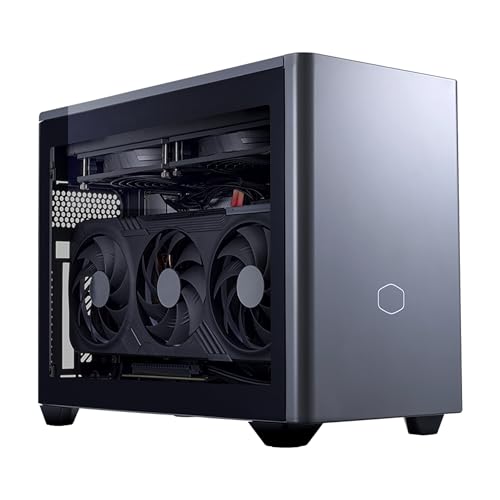
Cooler Master NR2 Pro 9800X3D RTX 5070 Ti
- Powerful CPU-GPU combo in a genuinely compact chassis, ideal for space-constrained setups
- Generous 32GB RAM and 2TB storage eliminate upgrade needs for years
- Includes both glass and mesh panels for customizable thermals and looks
- High-speed DDR5 RAM and Gen4 NVMe storage support demanding creative workflows
- Modern connectivity suite with USB 3.2 Gen 2 Type-C and wireless options
- Mini ITX form factor limits future upgrade options compared to standard ATX builds
- No reviews available yet, so real-world reliability and customer experience are unverified
- Premium pricing typical of pre-built systems with high-end components

Velztorm Praetix Y60 RTX 5080 Gaming PC
- High-end RTX 5080 graphics with 16GB GDDR7
- Gaming-focused Ryzen 7 9800X3D processor
- Generous 32GB DDR5 and 2TB NVMe SSD configuration
- 360mm liquid cooling and a 1000W power supply
- Modern Wi-Fi 7 and Bluetooth 5.4 connectivity
- Large 35.8-pound tower may be cumbersome to move
- The listing does not state the RAM speed or SSD performance ratings
- Specific motherboard and power supply models are not identified

Lenovo Legion Tower 5 RTX 5070
- High-tier NVIDIA GeForce RTX 5070 graphics
- Gaming-focused Ryzen 7 7800X3D processor
- Generous 32GB memory capacity
- Includes Windows 11 Home and three months of PC Game Pass
- The listing does not identify the 1TB drive type
- Cooling, wireless connectivity, and port selection are not specified
- The GPU memory capacity and system memory type are not listed

CyberPowerPC Gamer Xtreme RTX 5060 Desktop
- Modern RTX 5060 8GB graphics card
- 10-core Intel Core i5 processor
- Fast 1TB PCIe 4.0 NVMe storage
- Wi-Fi 6, Bluetooth 5.3, and USB-C connectivity
- Keyboard and mouse included
- 16GB of RAM may become restrictive for especially demanding multitasking or content creation.
- A 1TB drive can fill quickly when storing many large applications and games.
- The listing does not specify the power supply wattage or cooling configuration.
Myths About without RGB Worth Ignoring
Lighting affects presentation, but it should not distract you from the components, cooling, and construction that determine how a gaming desktop works.
A Plain Case Means Lower Performance
A restrained exterior does not indicate a slow computer. The graphics card has the largest influence on gaming performance in many situations, while the processor matters for frame delivery, simulation, multitasking, and CPU-heavy workloads. Case color and decorative lighting do not make either component faster. Start by comparing the named GPU and CPU, then consider memory and storage. Our guide to gaming PC specs covers this.
Glass Panels Always Provide Good Airflow
A glass side panel lets you see the hardware, but it does not guarantee efficient cooling. A closed front can restrict incoming air, especially when vents are narrow or fans have little space to draw from. Look for mesh sections, intake openings, exhaust paths, and clearly listed fans. Liquid cooling can help manage CPU heat, but the radiator still needs airflow. Temperatures depend on the complete case layout rather than one visible panel or cooler.
Note: Many listings do not explicitly say “no RGB.” Check the product photos and description for illuminated fans, memory, coolers, logos, and case strips before ordering.
Visible Cables Make No Practical Difference
Cable appearance does not directly increase gaming performance, but cable routing still matters. Tidy wiring can keep the interior easier to clean, reduce clutter around fans, and make later upgrades less frustrating. If a system contains lighting, check whether it has software controls or a physical case button. A dark lighting setting, neatly routed cables, and a simple desktop position can produce a cleaner appearance even when the case has a transparent panel.
RGB Systems Are Always More Expensive
Decorative fans, controllers, and illuminated cases can add a small premium, but pricing is rarely determined by RGB alone. The graphics card, processor, storage capacity, memory, power supply, cooling hardware, and warranty can create much larger differences. Compare complete specifications rather than assuming the plainest desktop is automatically the best value. Our overview of prebuilt PC costs provides useful context.
How the Parts Fit Together
An RGB-free prebuilt gaming PC usually means a desktop with no colored lighting, creating a plain and visually quiet setup. Some shoppers also accept a system with lighting that can be switched off, although that ability must be confirmed rather than assumed. Examine whether the fans, memory, CPU cooler, graphics card, logo, and case edges contain LEDs. Also check whether the side panel is solid, mesh, or glass because a transparent panel makes any internal lighting and cable routing much more visible.
Appearance choices do not determine gaming speed. The GPU and CPU establish the system’s core performance level, while memory capacity, storage, cooling, and power delivery support those components. A solid panel can conceal the interior, but it still needs suitable vents. A glass panel can look restrained when the lights are dark and the cables are organized. Upgradability may also depend on standard components. Our article about proprietary PC parts explains what to watch for.
Match a System to Your Needs
- Best overall: Velztorm Praetix combines a GeForce RTX 5080, AMD Ryzen 7 9800X3D, and 32GB DDR5.
- Best for a high-end GPU: VIPRTECH RTX 5070 TI pairs a GeForce RTX 5070 Ti with 32GB DDR5 and a 2TB NVMe SSD.
- Best value: CyberpowerPC RTX 5060 offers an Intel Core i5-13400F, GeForce RTX 5060, and 16GB DDR5.
- Best alternative brand: CoolerMaster NR2 Pro uses an 18.25-liter case, 280mm AIO, and GeForce RTX 5070 Ti.
- Best runner-up: Lenovo Legion Tower 5 combines an NVIDIA GeForce RTX 5070, Ryzen 7 7800X3D, and 32GB memory.
These categories are starting points rather than substitutes for checking the listing. Several systems above include RGB hardware, so buyers seeking a completely dark computer should confirm whether the lighting can be disabled or whether non-lit parts are available. Support coverage matters as well. Our prebuilt PC warranty overview explains common terms and limitations.
Final Thoughts
Prioritize the GPU, CPU, cooling, airflow, and component details before judging a desktop by its lighting. The Velztorm Praetix is the leading performance option here, while the CoolerMaster NR2 Pro offers powerful hardware in a compact format. Confirm every lighting source and its controls before buying.
More Options to Consider
- Skytech Aurora uses non-RGB memory but includes ARGB fans and a pink mesh-front case. It suits buyers who want midrange components and do not mind checking the fan-lighting controls.
- Skytech Chronos 3 pairs non-RGB DDR4 memory with ARGB fans in a white mesh-front case. Consider it for a more modest configuration built around the GeForce RTX 5060 Ti.
- Alienware Aurora offers an NVIDIA GeForce RTX 5080 and Intel Core Ultra 9 processor. Its customizable AlienFX zones suit buyers willing to manage lighting through Alienware Command Center.
FAQs
1. Are RGB-free gaming PCs slower than others?
No. Colored lighting is decorative and does not increase CPU or GPU performance. Two systems with comparable core components can provide similar gaming capability even if one has illuminated fans and the other has a plain case. Cooling design, component power limits, memory, and storage are more relevant than exterior styling. Compare the actual hardware and airflow instead of treating RGB as a performance feature.
2. Do RGB-free prebuilt gaming PCs cost more?
Not necessarily. A plain case may avoid the expense of illuminated fans or a separate lighting controller, but the final cost depends much more on the graphics card, processor, memory, storage, cooling system, power supply, and support coverage. Some understated computers use premium components and therefore cost more than brightly lit alternatives. Compare the complete configuration rather than using lighting as a shortcut for value.
3. How do I keep a RGB-free gaming PC cool?
Choose a case with clear intake and exhaust paths, then keep its vents and filters free from dust. Check that fans can draw air through the front or side and push warm air out through the rear or top. A solid panel is not automatically a problem if the case has adequate vents. Avoid placing the tower inside a tightly enclosed cabinet or directly against a wall that blocks exhaust airflow.
4. Can I change the look of a prebuilt later?
Often, but the available changes depend on the case and components. Standard fans, memory, panels, and coolers may be replaceable, while proprietary connectors or unusual dimensions can limit your choices. You can also simplify the setup by disabling controllable lighting, moving the tower below the desk, or replacing illuminated parts. Our prebuilt upgrade guide covers the main compatibility checks.
5. What should I check before buying a RGB-free prebuilt?
Inspect listing photos for illuminated fans, RAM, liquid-cooler pumps, graphics card logos, and case strips. Read the specifications for terms such as RGB, ARGB, lighting controller, or lighting zones. If lights are present, confirm whether software or a physical button controls them and whether they can be turned off completely. Also compare the CPU, GPU, memory, storage, cooling layout, ports, wireless connectivity, power supply information, and warranty.
6. Is it better to build or buy at this level?
A prebuilt is convenient when you want one complete system, Windows included, and a single support path. Building gives you direct control over every case, fan, cable, and lighting choice, which can make a genuinely RGB-free result easier to plan. The better route depends on your comfort with assembly, troubleshooting, warranties, and component selection. Compare both approaches before deciding which trade-offs matter most to you.









