

Hybrid meetings and collaborative conference rooms often turn chaotic when half the participants sit off-camera. Finding the best 360 webcams solves this headache by providing panoramic coverage or flexible swivel mounts that keep everyone visible during team calls without rearranging furniture or passing around a standard laptop.
Recommended by Us

j5create JVCU360 360 All Around Webcam
- Full 360-degree coverage eliminates the need to crowd around a single lens
- Touch bar controls provide tactile adjustments without separate software
- Multiple display modes offer great flexibility for different meeting types
- Built-in omnidirectional audio captures voices from all directions
- Video refresh rate is limited to 30fps rather than 60fps
- May require a firmware upgrade to unlock optimized resolution and features

- Wireless video transmission allows creative room positioning up to 65 feet away
- Generous 92-degree field of view suits group meetings and wide setups
- Full physical adjustability with 360-degree rotation and 90-degree tilt
- Plug-and-play compatibility across Windows, macOS, and Chrome OS
- Requires a constant USB power connection due to having no built-in battery
- Maximum frame rate is limited to 30fps

- Native Windows Hello 4.1 biometric facial recognition support
- Generous 95-degree wide viewing angle with full 360-degree articulation
- Dual stereo microphones with effective 2-meter pickup range
- Built-in sliding privacy shutter and tripod mounting compatibility
- Operating frame rate is not stated in the manufacturer specifications
- Uses a fixed USB 2.0 cable rather than a modern detachable USB-C interface

EMEET SmartCam S800 4K Webcam
- Large 1/2-inch Sony optical sensor delivers crisp, detailed video
- Fast hybrid PDAF and TOF autofocus reduces focus breathing and hunting
- Generous package includes an extendable tripod with a standard 1/4-inch screw mount
- EMEETLINK software provides firmware updates and manual HDR calibration
- 4K recording is limited to 30fps rather than 60fps
- HDR must be manually enabled through the desktop software
- Smartphone holder for the included tripod is not provided
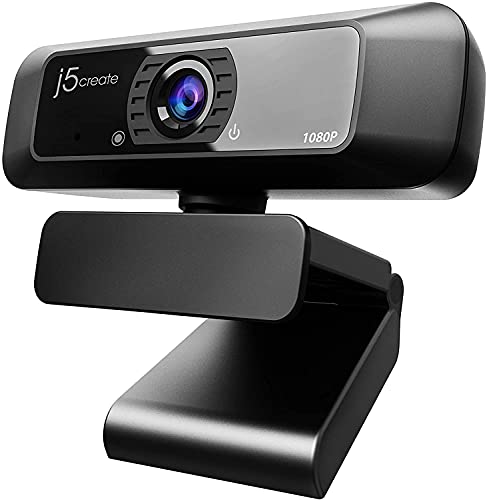
j5create JVCU100 1080p HD Webcam
- Crisp 1080p resolution with wide-angle coverage
- Full 360-degree swivel provides versatile positioning
- Built-in low-light enhancement with an f/2.4 aperture
- Effortless USB plug-and-play installation
- Not compatible with PlayStation 5 consoles
- Built-in microphone does not work with Discord on Chrome OS
- Frame rate is limited to 30 FPS rather than 60 FPS

- All-in-one audio and video bundle eliminates the need to source separate meeting peripherals.
- Intelligent AI gallery framing gives remote participants a clear view of up to four individual faces.
- True 3x optical zoom provides crisp image quality over standard digital crops.
- Wireless speakerphone with a ten-hour battery allows flexible placement anywhere in the room.
- Operating frame rates are not explicitly listed in the official specifications.
- Heavier footprint at over four pounds makes it best suited for fixed meeting spaces rather than travel.
- Feature set is tailored toward small-to-medium meeting rooms rather than single-user desk setups.

Toucan SC360 Video Conference Camera
- All-in-one conference station with camera, 4-mic array, and speaker
- 360-degree field of view ensures no participant is left out of the frame
- AI tracking automatically adapts to who is speaking in the room
- Hassle-free setup requiring no special software installation
- Video frame rate is not specified in the manufacturer listing
- Conflicting product notes mention both 1080p and 4K capability
- Large 11.4-inch upright form factor is not ideal for portable travel
Matching the Right Camera to Your Meeting Space
If you host group sessions around a conference table, I would go with the j5create 360 Degree All Around Meeting Webcam. It provides six distinct display modes alongside a physical touch bar to highlight participants, recording in 1080p at 30 Hz with an integrated omnidirectional microphone. For solo workspaces where manual flexibility is what you need, I would point you toward the Lenovo HD 1080p Webcam (510 FHD). It features a 95-degree wide-angle lens, full 360-degree manual pan and tilt rotation, and dual stereo microphones. It also supports facial recognition via Microsoft Windows Hello, making daily PC logins effortless.
Meanwhile, larger meeting rooms benefit heavily from the TOUCAN 360-Degree Video Conference Camera. With its 360-degree omnidirectional video capture, four noise-reducing microphones, and integrated speaker, it covers open conference layouts without requiring extra audio gear. Before deploying any unit in a professional environment, you can learn how to test your webcam properly to verify microphone clarity and framing.
FAQs
1. What is the difference between a 360-degree lens and a 360-degree swivel webcam?
A true panoramic conference camera captures a complete 360-degree circle of the room using specialized optical sensors. In contrast, a swivel webcam uses a standard front-facing lens mounted on a base that manually rotates 360 degrees. Both provide flexible viewing, but full-circle models are built specifically for table groups.
2. Do high-resolution webcams require USB 3.0 ports?
Most 1080p and panoramic models utilize standard USB 2.0 connections without encountering video transfer issues. If you wonder does a webcam need USB 3.0 for daily conferencing, standard bandwidth over UVC protocols is generally sufficient for 1080p video at 30 frames per second.
3. Can you use a conference webcam for home security?
Yes, standard USB video devices work with surveillance software on personal computers. Exploring how to use your webcam as a security camera allows you to repurpose wide-angle optics and motion-detection utilities to monitor rooms while you are away from home.
4. Are integrated microphones adequate for multi-person meetings?
Specialized group units feature omnidirectional microphone arrays or noise-reducing quad microphones designed to capture speech evenly from several feet away across a table. For solo desktop callers, dual stereo microphones capture voices clearly within normal desk distance without requiring separate boom mics.
Editor’s Verdict
For huddle rooms and collaborative offices, the j5create 360 Degree All Around Meeting Webcam is my primary pick among the best 360 webcams thanks to its versatile six-mode display and touch controls. Solo users needing reliable manual positioning will appreciate the Lenovo HD 1080p Webcam (510 FHD) for its smooth mount rotation and secure facial login support.




