

Cluttered desks packed with tangled wires make fast mouse movements frustrating during competitive matches, which pushes many PC players toward clean cord-free gear. Finding the best wireless gaming keyboard and mouse eliminates that cable drag entirely while keeping input latency low enough for quick reflexes, giving your battlestation a cleaner look without sacrificing responsive key inputs.
Recommended by Us

Redragon S101M-KS Wireless Combo
- Single 2-in-1 wireless receiver connects both peripheral devices
- Flexible tri-mode connectivity covering Bluetooth, 2.4G, and wired modes
- Generous battery capacity delivering up to 300 hours with RGB off
- Dedicated row of 10 independent multimedia keys for fast system controls
- Key switch type is not specified in the official product specifications
- Exact keyboard form factor and profile dimensions are not stated
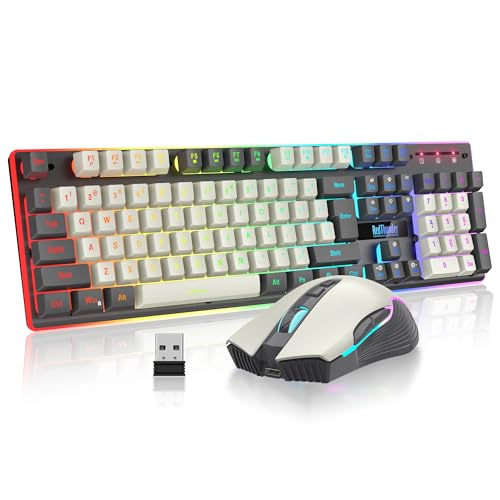
RedThunder K10 Pro Wireless Combo
- Single shared 2.4G USB receiver saves port space on your PC
- Rechargeable design eliminates the hassle of buying disposable batteries
- Extensive backlighting illuminates key legends, gaps, and outer edges
- Mouse features dedicated 7D buttons with sensitivity reaching 3200 DPI
- Continuous battery life is limited to around 8 hours when lights remain on
- Uses membrane-based mechanical feel switches instead of true mechanical switches
- Scroll wheel illumination only activates while the mouse is plugged in and charging

CHONCHOW Wireless Gaming Keyboard and Mouse
- Shared wireless USB receiver saves valuable ports on laptops and consoles
- Rechargeable Type-C ports support charging while actively typing or gaming
- Quiet key response makes it suitable for late-night gaming and office tasks
- Broad compatibility with Windows, Mac, PS4, PS5, and Xbox One
- Continuous battery runtime is limited to approximately eight hours when backlights remain active
- Uses membrane switches engineered for mechanical feel rather than true modular mechanical switches
- Does not offer dedicated software for macro recording or custom key remapping

CHONCHOW 60% Wireless Keyboard and Mouse
- Compact 68-key footprint provides essential keys without taking up desk space
- Internal rechargeable batteries eliminate the hassle of buying disposable cells
- Shared 2.4GHz dongle stores neatly inside the mouse for easy transport
- Works out of the box with major gaming consoles and desktop platforms
- Key switch type is not specified in the product listing
- 19-key conflict-free capability requires wired USB mode
- Single shared dongle means both peripherals must share wireless bandwidth
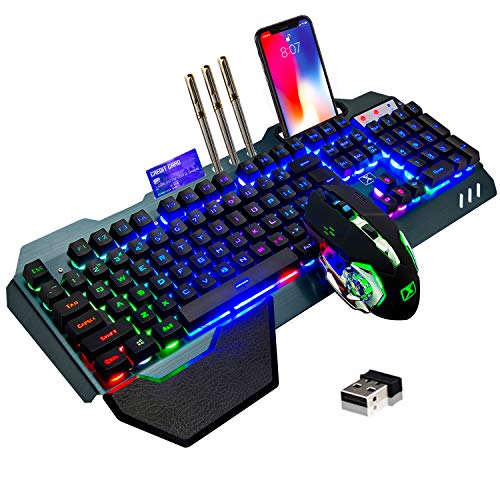
LexonElec Wireless Gaming Keyboard & Mouse
- Unified 2.4GHz receiver operates both mouse and keyboard from one USB port
- Built-in rechargeable batteries remove the need for disposable AA or AAA cells
- Brushed metal top panel provides rigidity and a clean look
- Convenient built-in phone slot and removable wrist rest
- Uses mechanical-feel membrane actuation rather than individual mechanical switches
- Backlighting is limited to fixed rainbow patterns rather than per-key RGB
- Configuration software is not included or specified in the product details

RedThunder K10 Wireless Gaming Combo
- Rechargeable internal batteries eliminate the need for disposable alkaline cells
- Single 2.4G USB receiver links both peripherals to save computer ports
- Multiple backlight modes illuminate key legends, gaps, and surrounding chassis
- Companion 7D mouse features 3200 DPI tracking and smooth 7-color cycling lights
- Continuous battery life caps at 8 hours with lights on, requiring regular charging
- Relies on mechanical-feel membrane actuation rather than genuine mechanical switches
- Mouse scroll wheel illumination only activates while charging

CHONCHOW Wireless Gaming Combo
- Shared single USB receiver keeps setup tidy and conserves ports
- Internal rechargeable batteries eliminate the hassle of buying disposable cells
- Full 104-key layout retains the numeric keypad and foldable tilt feet
- Even character backlighting makes keys easy to read in dim settings
- Continuous battery run time averages around ten hours when backlighting is active
- Volcano key structure mimics mechanical resistance rather than using true mechanical switches
- Shared 2.4GHz dongle requires both units to remain on the same machine
Selecting the Right Wireless Combo for Your Battlestation
If you want total connectivity flexibility across several devices, I would point you toward the Redragon S101M-KS Gaming Keyboard and Mouse. It features tri-mode connectivity covering Bluetooth, 2.4GHz wireless, and wired modes, alongside a mouse offering up to 4800 DPI and ten dedicated multimedia keys for quick adjustments during play.
For gamers who need to maximize space for wide mouse sweeps, I would go with the 60% Wireless Gaming Keyboard and Mouse Combo. Its 68-key compact footprint clears substantial room on your desk, and it connects both peripherals through a single shared 2.4GHz USB dongle. If you instead prefer a full-sized build with a frosted metal cover and mechanical feel switches, the RedThunder K10 Pro Wireless Gaming Keyboard is a sturdy option that pairs a 3000 mAh keyboard battery with a 3200 DPI mouse. Understanding how a mechanical keyboard works helps clarify why membrane keyboards with mechanical tactile feel remain popular for quiet gaming. As editorial coverage on PC Gamer highlights, input stability and physical comfort matter just as much as raw polling specs.
FAQs
1. Do wireless gaming keyboards and mice suffer from noticeable input lag?
Modern 2.4GHz wireless connections deliver rapid transmission speeds that feel indistinguishable from wired setups for typical gaming. While older Bluetooth connections can introduce slight delays, dedicated USB nano receivers maintain stable polling rates that prevent perceptible input stutter during fast-paced rounds.
2. How long do rechargeable wireless gaming keyboards usually last on a charge?
Battery longevity varies depending on backlight intensity, ranging from around eight hours with dynamic illumination active to hundreds of hours with lights turned off. Knowing how long a mechanical keyboard lasts makes it easy to appreciate hardware with durable internal cells and automatic power-saving sleep modes.
3. Can a wireless keyboard and mouse combo share a single USB receiver?
Many wireless combos use a 2-in-1 nano dongle stored inside the base of the mouse to operate both devices simultaneously. This shared design frees up USB ports on your gaming rig while ensuring both peripherals pair automatically as soon as you switch them on.
4. How do I maintain key switches and keycaps on a wireless gaming keyboard?
Dust and debris naturally gather between keycaps over time, which can hinder key travel if neglected. Learning how to clean a mechanical keyboard keeps keycaps free from grime, preserving smooth actuation and clear backlighting throughout long gaming sessions.
Editor’s Verdict
For players seeking the best wireless gaming keyboard and mouse pairing with versatile tri-mode connectivity, I recommend the Redragon S101M-KS Gaming Keyboard and Mouse for its balanced features and endurance. If your primary goal is saving desk space, the compact 60% Wireless Gaming Keyboard and Mouse Combo delivers an agile, wire-free setup for fast mouse sweeps.





