Nearly every gaming PC at this price makes the same trade: a modest graphics card next to a capable CPU. Among the best prebuilt gaming PCs under $700, the LXZ RTX 3050 has the stronger graphics and a Ryzen 7, while the WIWB RX 6500XT is the lower-cost pick.
Recommended by Us

LXZ Ryzen 7 RTX 3050 Gaming Desktop
- RTX 3050 includes 8GB of dedicated GDDR6 graphics memory.
- Ryzen 7 processor provides eight cores and 16 threads.
- NVMe storage supports responsive boot and loading times.
- Wi-Fi 6, Gigabit LAN, RGB cooling, and multiple display connections are included.
- The 512GB SSD may fill quickly when storing a large game or media library.
- DDR4 memory runs at a relatively modest 2666MHz speed.
- The listing does not specify the motherboard, power supply, or expansion options.

SKYESEV Ryzen 5 5500 RX 6500 XT Gaming PC
- Six-core-class Ryzen 5 5500 platform is capable of gaming and general multitasking.
- Dedicated Radeon RX 6500 XT graphics are appropriate for entry-level gaming.
- 16GB of DDR4 3200MHz RAM is a useful starting capacity for gaming and streaming.
- Includes NVMe storage, built-in Wi-Fi, Bluetooth, and a Windows operating system.
- Five ARGB fans and a tempered glass panel create a customizable desktop appearance.
- The RX 6500 XT has 4GB of graphics memory, which can limit demanding visual settings and higher-resolution workloads.
- A 512GB SSD may fill quickly after installing several large applications or media projects.
- The listing identifies an MSI A520M-A PRO motherboard, an entry-level chipset platform with fewer premium features than higher-tier boards.
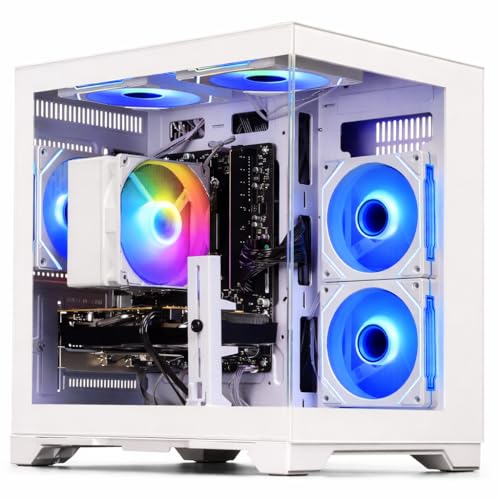
WIWB Ryzen 5 4500 RX 6500 XT Gaming PC
- Capable entry-level configuration for 1080p gaming
- Six-core Ryzen processor can handle gaming and general multitasking
- 16GB DDR4 RAM is a useful capacity for current everyday workloads
- NVMe storage is faster than traditional hard drives and SATA SSDs
- Operating system comes pre-installed
- The graphics card has 4GB of VRAM, which may limit settings in more demanding modern games
- A 512GB drive can fill quickly after installing several large games
- The listing does not specify connectivity, cooling hardware, or power supply details
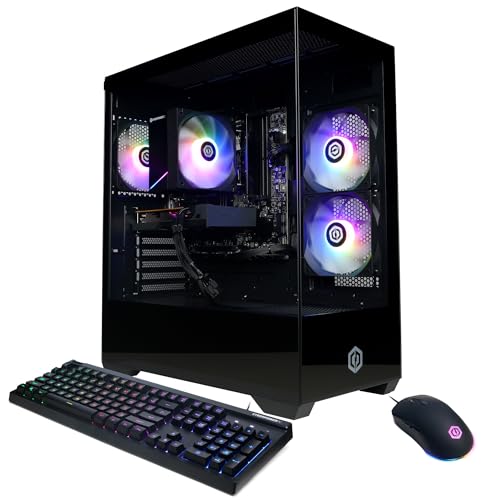
CyberPowerPC Ryzen 5 5500 RX 6500 XT Gaming PC
- Solid 6-core processor handles gaming and multitasking at this price point
- Dedicated 4GB graphics card enables 1080p gaming in most titles
- Fast NVMe SSD storage reduces load times compared to traditional hard drives
- Modern case design with tempered glass and RGB lighting
- Includes peripherals, so no additional keyboard or mouse purchase needed
- 4GB VRAM on the GPU is modest for demanding AAA titles at higher settings
- 8GB RAM may require upgrade for smooth multitasking with heavy applications
- Storage capacity is limited; users may need additional drives for large game libraries

NINGMEI Ryzen 5 5500 GTX 1660 Super PC
- Capable CPU and GPU combination for mainstream 1080p gaming
- 16GB of DDR4-3200 RAM included
- Spacious 1TB NVMe M.2 SSD
- Six adjustable ARGB fans
- Wide selection of front and rear USB ports
- GTX 1660 Super is an older graphics generation without newer RTX-class features
- Wi-Fi and Bluetooth are not specified in the listing
- Display outputs are limited to one HDMI and one DVI connection according to the listed details
What a Gaming PC Around $700 Can Do
A gaming desktop in this budget usually combines mainstream dedicated graphics with a modern multi-core processor. These systems feature options such as the GeForce RTX 3050 8GB, Radeon RX 6500XT 4GB, and Radeon RX 6500 XT 4GB. These GPUs are primarily aimed at 1080p gaming with sensible quality settings. They are also suitable for everyday work, media, voice chat, and light streaming when paired with enough memory. Our prebuilt PC value article explains the broader advantages and compromises.
This hardware tier is best approached with realistic expectations. Competitive and less demanding releases should feel responsive at 1080p, while graphically intensive games may require reduced textures, effects, or other settings. Consistently demanding 1440p gaming, high-quality ray tracing, and uncompromised 4K play remain outside the intended scope. Most buyers should prioritize a balanced configuration instead of chasing one impressive specification. A capable GPU matters, but adequate RAM, SSD capacity, cooling, and a suitable power supply all contribute to a better ownership experience.
Worth knowing: A stronger graphics card only pays off when your monitor’s resolution and refresh rate can use its performance. Choose the GPU for the screen you own or plan to buy.
What to Expect at This Price
Current listings generally combine entry-level gaming graphics with practical mainstream components.
| Component | What You Get |
|---|---|
| CPU | A modern six-core processor is common, although some listings include an eight-core chip intended to provide more multitasking capacity. |
| GPU | Typical choices include GeForce RTX 3050 8GB, Radeon RX 6500XT 4GB, and Radeon RX 6500 XT 4GB dedicated graphics. |
| RAM | Most configurations provide 16GB DDR4 memory, which is a sensible starting point for current gaming and everyday multitasking. |
| Storage | NVMe SSD storage is standard among these listings, with capacities ranging from a compact game drive to a roomier primary drive. |
The same graphics card can appear alongside different processors, memory capacities, SSD sizes, motherboards, and power supplies. Compare the complete specification rather than assuming two systems with matching GPUs will offer the same experience. Connectivity and warranty coverage can also differ. Our prebuilt PC warranty overview explains what coverage details deserve attention before ordering.
How to Choose a Prebuilt at This Budget

Start with the parts that affect your games, then check the supporting components and upgrade path.
Start With the Graphics Card
The graphics card has the largest direct influence on gaming visuals at this level. A GeForce RTX 3050 8GB gives you more video memory than the Radeon RX 6500XT 4GB and Radeon RX 6500 XT 4GB options listed here. It also supports NVIDIA features such as DLSS and ray tracing. That does not mean every buyer needs it, especially if the computer will be connected to a standard 1080p monitor and used with moderate settings.
Match the GPU to your monitor, the types of games you play, and the visual settings you expect to use. An expensive graphics upgrade offers little benefit if your display cannot show the additional detail or responsiveness. Conversely, a demanding high-resolution monitor can expose the limits of entry-level graphics quickly. Check the card’s video outputs as well, because the monitor must connect through an available HDMI, DisplayPort, or another specifically listed port without relying on assumptions about the case.
Balance the CPU and RAM
A balanced PC avoids pairing one strong component with a clearly limited supporting part. The six-core AMD Ryzen 5 4500 and AMD Ryzen 5 5500 processors included in several systems are positioned for gaming, ordinary multitasking, and general desktop use. The eight-core AMD Ryzen 7 4700LE configurations add more cores and threads for workloads that can use them. CPU model alone should not decide the purchase, since the GPU remains central to gaming performance.
Treat 16GB of system memory as the practical floor for a new gaming computer in this category. It provides enough room for a current game, Windows, a browser, chat software, and background utilities without immediately creating a memory shortage. A 32GB configuration would add headroom for heavier multitasking, content creation, or long-term use, but none of the listed systems provides that amount. Check whether the motherboard has accessible memory slots if a later capacity upgrade matters.
Storage, Power and Cooling
An NVMe SSD keeps startup, application launches, file access, and game loading responsive. A 512GB drive is usable but can fill quickly once several large applications are installed. A 1TB SSD gives a growing library more breathing room. Capacity is not the only detail worth checking, however. Confirm that the listing identifies the storage type rather than merely describing it as fast, and consider whether the motherboard or case can accommodate another drive later.
Power and cooling affect stability, noise, and long-term reliability. Look for a clearly stated power-supply wattage and efficiency rating rather than assuming the unit is suitable from the computer’s appearance. Some systems here specify an 80 Plus Bronze power supply and multiple case fans, while others provide fewer power details. Case airflow, fan placement, and component temperatures still matter. Our proprietary PC parts article covers another factor that can affect later replacements.
Condition and Upgrades
Read the listing carefully to confirm the computer’s stated condition, included operating system, accessories, and support arrangements. Also review the retailer’s current return window before ordering, because a return policy is separate from the manufacturer’s warranty. Product ratings with little or no review history should not carry the same weight as detailed specifications. Photographs can help with appearance, but they do not replace written confirmation of the motherboard, power supply, network hardware, ports, and included components.
Upgrade room determines whether the desktop can adapt after purchase. Check whether the case provides physical clearance for a longer graphics card, open storage mounts, and reasonable access to memory slots. Power-supply capacity and available connectors can limit a future GPU replacement even when the card fits inside the chassis. Standardized parts are generally easier to replace, but confirm what the seller actually states. A glass panel and RGB fans may look appealing, yet neither guarantees straightforward component access or broad compatibility.
Who Should Buy Which System
- Best overall: WIWB Gaming PC Desktop Computer – Ryzen 5 4500 combines Radeon RX 6500XT 4GB graphics, 16GB RAM, and a 512GB NVMe SSD.
- Strongest GPU: LXZ Gaming Desktop PC, Ryzen 7 4700LE pairs GeForce RTX 3050 8GB graphics with an eight-core processor.
- Best value: WIWB Gaming PC Desktop Computer – Ryzen 5 4500 suits buyers seeking dedicated 1080p graphics and 16GB memory.
- Alternative brand: SKYESEV Prebuilt Gaming Desktop PC includes Radeon RX6500XT 4GB graphics, 16GB RAM, Wi-Fi, Bluetooth, and five ARGB fans.
- Runner-up: CyberPowerPC Gaming PC, AMD Ryzen 5 5500 offers Radeon RX 6500 XT 4GB graphics, WiFi 5, Bluetooth 5.0, and included peripherals.
Final Thoughts
The WIWB RX 6500XT is the most balanced choice for shoppers prioritizing value, 16GB memory, and mainstream 1080p graphics. Its component mix covers the essentials without placing too much emphasis on cosmetic extras.
Choose the LXZ RTX 3050 instead if the stronger graphics option and eight-core processor matter more. Whichever system you prefer, verify the complete listing, connectivity, warranty, and return terms before ordering.
More Options to Consider
- Evounic RX 580 combines AMD Ryzen 5 5500 processing with Radeon RX 580 8GB graphics, 16GB RAM, and a 1TB NVMe SSD. It suits buyers who value additional storage and clearly stated support coverage.
- Qehi RTX 3050 offers an AMD Ryzen 7 4700LE, GeForce RTX 3050 8GB graphics, WiFi 6, and six RGB fans. Consider it for gaming, streaming, and broader multitasking.
- HELLOLAND King White pairs an AMD Ryzen 5 5500 with Radeon RX 6500 XT 4GB graphics, 16GB RAM, and a 1TB PCIe NVMe SSD. Its white case and adjustable RGB lighting suit a coordinated desk setup.
FAQs
1. Can you get a good gaming PC for under $700?
Yes, provided your expectations match the hardware tier. A system with dedicated Radeon RX 6500 XT 4GB or similar graphics, a six-core processor, 16GB RAM, and an NVMe SSD can provide an enjoyable 1080p experience at sensible settings. More demanding visual features may need to be reduced. Check the entire component list because storage, memory, networking, cooling, and power-supply information can vary considerably between otherwise similar listings.
2. Is a prebuilt gaming PC around $700 worth it?
A prebuilt can be worthwhile when convenience, a ready-to-use operating system, and single-system support matter more than selecting every component yourself. You avoid the assembly process and can begin setup shortly after delivery. The tradeoff is less control over component brands, motherboard features, case layout, and power-supply selection. Our prebuilt versus custom comparison can help you decide which route better matches your priorities and technical confidence.
3. Which graphics card is best around $700?
Among these listings, the GeForce RTX 3050 8GB is the strongest graphics option and provides more video memory than the Radeon RX 6500XT 4GB systems. It also supports DLSS and ray tracing, although demanding effects can still require restrained settings at this performance level. The Radeon alternatives remain reasonable for a budget-focused 1080p computer. Choose according to your monitor, preferred settings, system balance, and whether the complete configuration justifies emphasizing the graphics card.
4. How much RAM does a gaming PC at this budget need?
For a current budget gaming desktop, 16GB of RAM is a sensible starting capacity. It leaves room for gaming alongside Windows, communication software, a browser, and ordinary background applications. Buyers who stream heavily, edit large media projects, or keep many demanding programs open may eventually benefit from 32GB. Before planning an upgrade, confirm the number of memory slots, the installed module arrangement, supported memory specifications, and whether opening the case affects any support terms.
5. Can I upgrade a prebuilt gaming PC later?
Many prebuilt gaming computers can be upgraded, but the options depend on the case, motherboard, power supply, and component layout. Memory and storage are often the simplest areas to expand, while a graphics-card replacement may require more physical clearance, suitable power connectors, and additional wattage. Do not assume every desktop uses fully standardized parts. Check the listing, product documentation, warranty conditions, and internal layout before buying components or opening the chassis for modifications.