

Rust servers can get busy, and the game leans on the CPU and on memory more than on the graphics card. Among the best prebuilt gaming PCs for Rust, the STORMCRAFT Falcon U7 pairs an RTX 5060 Ti 16GB with 32GB of DDR5, and the NINGMEI Ryzen 7 5700X RTX 5060 TI is the lower-cost pick.
Recommended by Us

NINGMEI Ryzen 7 RTX 5060 Ti Gaming PC
- Capable RTX 5060 Ti 8GB GDDR7 graphics card
- Generous 32GB dual-channel DDR4 memory configuration
- Ryzen 7 5700X offers up to 4.6GHz maximum boost
- Fast NVMe storage and Windows 11 Home are included
- Removable magnetic dust screen simplifies case maintenance
- The listing does not identify the graphics card manufacturer.
- Motherboard model and power supply wattage are not specified.
- Port selection and wireless connectivity are not listed.
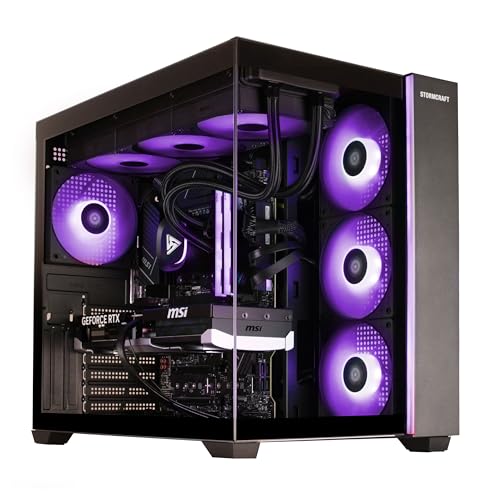
STORMCRAFT Falcon U7 RTX 5060 Ti Gaming PC
- RTX 5060 Ti includes a generous 16GB of GDDR7 video memory.
- Strong combination of a 24-core processor and 32GB of fast DDR5 RAM.
- Extensive cooling setup with a 360mm liquid cooler and ten RGB fans.
- Modern Wi-Fi 7 and Bluetooth 5.4 wireless connectivity.
- Windows 11 Home, keyboard, and mouse are included.
- A 1TB SSD may fill quickly when storing a large collection of modern games.
- The listing does not identify the motherboard, power supply wattage, or SSD interface.
- Ten RGB fans and extensive lighting may be excessive for buyers who prefer understated desktops.

Skytech Azure i7 RTX 5070 Gaming PC
- Strong RTX 5070 configuration for detailed 1440p gaming.
- High-performance Intel Core i7 processor with up to 5.3GHz Turbo Boost.
- Generous 32GB RAM and fast 1TB Gen4 NVMe storage.
- 360mm AIO liquid cooler with ARGB fans.
- Keyboard, mouse, Wi-Fi, and Bluetooth are included.
- Uses DDR4-3200 memory rather than newer DDR5.
- Wi-Fi 5 is older than Wi-Fi 6 and Wi-Fi 7 standards.
- Graphics card brand and additional display ports may vary.

Alienware Aurora RTX 5070 Gaming Desktop
- Current-generation NVIDIA GeForce RTX 5070 graphics
- Capable Intel Core Ultra 7 265F processor
- Customizable AlienFX lighting and gaming profiles
- Command Center software includes performance monitoring and power modes
- 1TB of listed storage capacity
- RAM capacity, type, and speed are not listed
- The listing does not identify whether the 1TB drive is an SSD or HDD
- A weight of 33.894 pounds may make the tower cumbersome to reposition
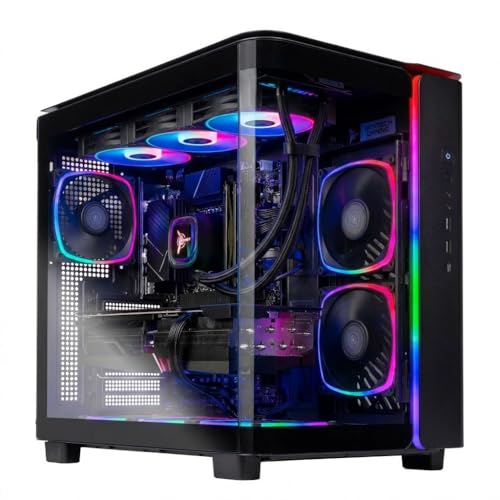
Skytech King 95 Ryzen 7 Gaming PC
- High-end Radeon RX 9070 XT graphics with 16GB of GDDR6
- Gaming-focused Ryzen 7 7800X3D processor
- Fast DDR5 6000 memory and Gen4 NVMe storage
- Large 360mm AIO liquid CPU cooler
- Keyboard and mouse included
- Wi-Fi 5 is older than the Wi-Fi 6 and Wi-Fi 7 standards available on newer systems
- The specific graphics card brand and additional display ports may vary
- A 1TB drive may require additional storage for a large game library
What Rust Needs From a Gaming PC
Rust can place substantial demands on a system, especially when the game is heavily modded. A processor with fast single-core performance helps it manage simulation work, busy areas, and mod-related scripts without making the system feel sluggish. RAM capacity also matters because large mod packs, custom maps, background applications, and community-server content can consume considerable memory. A fast SSD shortens loading and file-access delays. Our overview of gaming PC specs explains how these components work together in a balanced computer.
The graphics card still matters, particularly if you want to use shaders, raise visual settings, or play at a higher resolution. However, spending most of the budget on a premium GPU while accepting a weak processor, limited memory, or slow storage can produce an unbalanced Rust machine. Sixteen gigabytes of system memory should be treated as a practical floor for a modern prebuilt. Thirty-two gigabytes offers more breathing room for extensive mods, browser tabs, voice chat, recording tools, and other software running alongside the game.
Note: Modded games often need extra RAM, so 32GB of system memory gives you more room than 16GB when loading large maps, shaders, and extensive mod collections.
Key Parts for Rust
Prioritize a balanced specification rather than choosing a system from its graphics card alone.
| Part | What to Look For |
|---|---|
| CPU | Fast single-core performance helps heavily modded games process scripts, simulation work, and busy scenes. |
| RAM | 32GB gives useful headroom for big mod packs, background applications, and demanding community content. |
| GPU | A mid-range graphics card handles shaders, while stronger models provide more flexibility for higher visual settings and resolutions. |
| Storage | A fast SSD helps load large mod packs, maps, and game files without the delays associated with a mechanical drive. |
The same GPU can appear in listings with very different processors, memory capacities, storage configurations, cooling systems, and power supplies. Compare the complete specification rather than assuming two desktops will perform or age identically. Our prebuilt comparison covers the broader tradeoffs between a ready-made computer and selecting every component yourself.
How to Choose a Prebuilt for Rust
Start with the components that affect heavily modded play, then consider appearance and secondary conveniences.
CPU First
Mods often increase the amount of work handled by the processor. Scripts, simulation tasks, player activity, and custom server features can all make CPU performance more noticeable than it would be in a simpler workload. Look for a recent processor with strong single-core speed instead of focusing only on its total core count. Additional cores remain useful for streaming and multitasking, but they do not automatically compensate for slower performance on the main game threads.
These systems use processors from several generations and product families, including Intel Core, Intel Core Ultra, and AMD Ryzen chips. Compare the exact CPU rather than relying on a broad label such as Core i7 or Ryzen 7. Cooling also deserves attention because a processor needs to maintain stable operating speeds during long sessions. The listed systems include liquid-cooling configurations, but radiator size, case airflow, and fan arrangement vary from one model to another.
Plenty of RAM
Sixteen gigabytes is a reasonable floor, but it leaves less space for a heavily modded Rust setup and background programs. Thirty-two gigabytes is the more comfortable target for players who plan to use large mod packs, keep multiple applications open, stream, or record gameplay. Capacity should take priority over decorative lighting. Memory generation and speed matter too, although a well-balanced capacity is usually the first specification to check when comparing complete systems.
Some prebuilts include DDR4 memory, while others use DDR5. Either can be part of a capable Rust computer when paired with the right processor and sufficient capacity. Check whether the advertised total uses multiple modules, since a matched pair can provide the intended memory-channel configuration. Upgrade access is also worth investigating before purchase. Our article about prebuilt PC upgrades explains common limitations involving cases, motherboards, power supplies, and replacement parts.
A Capable GPU for Shaders
Shaders increase graphics demand, so the GPU becomes more important as you raise resolution and image-quality settings. A modern mid-range card is a sensible starting point for most players, while a higher-tier model gives you additional room for demanding shaders and sharper output. Video memory capacity can also matter when visual modifications use detailed textures. Still, an expensive graphics card cannot remove processor or system-memory limitations caused by a heavily modded installation.
Choose the GPU tier around your monitor and intended settings rather than purchasing the highest model available without considering the rest of the machine. The table includes GeForce RTX 5060 Ti, GeForce RTX 5070, and AMD Radeon RX 9070 XT configurations, giving buyers several performance classes to consider. Pay attention to the exact listed memory capacity because similarly named cards may have different configurations. Balance remains the goal, especially when Rust is paired with extensive server modifications.
Fast SSD
A fast solid-state drive helps the system retrieve maps, mod files, textures, and other game data more quickly. NVMe storage is particularly attractive because it uses a high-speed PCIe connection and avoids the mechanical delays of a hard drive. Capacity matters alongside speed. A drive can fill quickly once Windows, Rust, mod collections, recordings, and other applications share the same space, so consider both your current library and likely future storage needs.
Most systems in this comparison include a 1TB NVMe or PCIe SSD, while certain alternatives combine a fast primary drive with a second SATA SSD. That second drive can be useful for recordings, media, or a larger game library, although it does not replace the value of a fast primary drive. Check whether the case and motherboard provide practical expansion options if you expect to add storage later, and confirm what connections are available before ordering another drive.
Who Should Buy Which System
- Best overall: Skytech i7 14700F RTX 5070 pairs an Intel Core i7 14700F with GeForce RTX 5070 graphics and 32GB of RAM.
- Best for the strongest GPU: NINGMEI Ryzen 7 5700X RTX 5060 TI suits buyers seeking GeForce RTX 5060 Ti graphics with 32GB of RAM.
- Best value: STORMCRAFT Falcon U7 combines an Intel Core Ultra 7 270K Plus with 16GB GeForce RTX 5060 Ti graphics.
- Best alternative brand: Alienware Aurora offers GeForce RTX 5070 graphics, customizable AlienFX lighting, and onsite service coverage.
- Best runner-up: Skytech King 95 combines an AMD Ryzen 7 7800X3D with Radeon RX 9070 XT graphics.
Final Thoughts
The Skytech i7 14700F RTX 5070 is the strongest all-around recommendation, pairing capable graphics with 32GB of memory and a powerful Intel processor. It is well suited to players who want a balanced Rust system without planning an immediate upgrade.
The Skytech King 95 is the runner-up for buyers prioritizing a powerful AMD graphics card and a gaming-focused processor. Whichever system you choose, balance CPU performance, memory, graphics, and SSD capacity around your mods and display.
More Options to Consider
- HELLOLAND Poseidon White combines an AMD Ryzen 5 9600X, GeForce RTX 5060, 32GB of DDR5 memory, and two SSDs. It suits buyers who want a white panoramic case and generous storage.
- HOENGAGER Panorama uses an AMD Ryzen 7 5700X, GeForce RTX 5060, 32GB of DDR4 memory, and a two-drive storage setup. It is an alternative for players who prioritize storage capacity and panoramic styling.
- Ocean Park Black AI pairs an AMD Ryzen 7 9700X with Radeon RX 9070 graphics and 16GB of DDR5 memory. It suits buyers prioritizing the newer processor platform and a 16GB graphics card.
FAQs
1. What PC specs do I need for Rust?
Start with a recent processor that offers strong single-core performance, at least 16GB of system memory, a modern mid-range graphics card, and a fast SSD. For a heavily modded setup, 32GB of RAM provides more comfortable headroom. An NVMe SSD is preferable for large maps and mod collections. Choose a stronger GPU if you plan to use demanding shaders, higher resolutions, or elevated graphics settings.
2. Is a prebuilt gaming PC good for Rust?
A well-balanced prebuilt gaming PC can be a good choice for Rust, particularly if you want a ready-to-use system with Windows and manufacturer support. Check the exact processor, RAM capacity, GPU, storage, cooling, and warranty rather than judging the computer by its product name. Upgrade access also varies considerably. Our article about prebuilt PC value discusses the convenience and potential drawbacks in more detail.
3. Is the CPU or GPU more important for Rust?
The CPU often deserves first priority for heavily modded Rust because scripts, simulation work, and busy servers can place a substantial load on the processor. The GPU becomes increasingly important when you use shaders, higher resolutions, or demanding visual settings. Neither component should be considered in isolation. A balanced computer with a fast processor, capable graphics card, enough RAM, and SSD storage will generally provide a better overall experience than an uneven configuration.
4. How much RAM does a gaming PC need for Rust?
Sixteen gigabytes should be considered the practical floor for a current gaming PC intended for Rust. It can be sufficient for lighter use, but available memory becomes tighter when you add large mod packs, custom maps, browser tabs, voice chat, recording software, or other background tools. Thirty-two gigabytes is a more comfortable target for modded play and multitasking. It also reduces the likelihood that background applications will compete with the game for limited memory.
5. How much should I spend on a PC for Rust?
A mid-range system is a sensible starting point if you play at mainstream resolutions without demanding shader collections. Spending more becomes worthwhile when you want a stronger processor for heavy mods, a higher-tier GPU for advanced visuals, or additional memory and storage. Do not pay extra for appearance while accepting weak core components. Compare the complete specification, warranty, upgrade options, and included storage to determine whether a prebuilt offers reasonable value for your particular setup.









