

Picking an RTX 4070 system comes down to what else is in the box: the CPU, the memory and the cooling. Among the best prebuilt gaming PCs with RTX 4070, the MXZ Ryzen 7 9700X RTX 4070 pairs AMD Ryzen 7 9700X with GeForce RTX 4070, and the MXZ Ryzen 5 5600X RTX 4070 is the lower-cost pick.
Recommended by Us
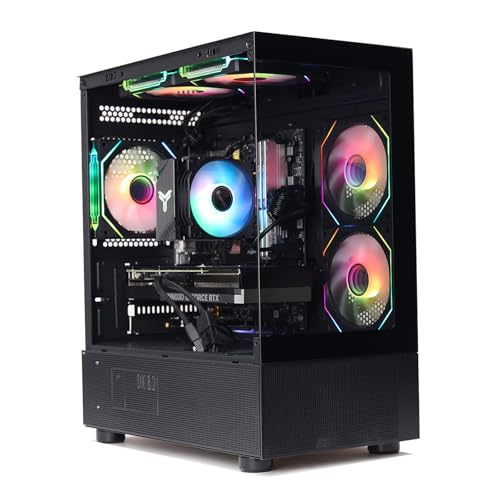
MXZ Core i7-12700F RTX 4070 Gaming PC
- Strong RTX 4070 graphics tier for demanding gaming
- Capable Core i7-12700F processor
- Fast 1TB NVMe storage
- Six RGB fans and a windowed side panel
- Windows 11 Pro included
- 16GB of RAM may be restrictive for heavier creation workloads or extensive multitasking
- Uses DDR4 rather than the newer DDR5 standard
- Wireless connectivity and the available port selection are not specified
MXZ Core i7-13700F RTX 4070 Gaming PC
- Strong RTX 4070 graphics tier for high-setting gaming
- High-core-count Intel Core i7-13700F processor
- Fast 1T NVMe solid-state storage
- Multiple RGB fans and a windowed side panel
- 16GB of DDR4 RAM may be limiting for heavier multitasking compared with higher-capacity configurations
- The listing does not specify Wi-Fi, Bluetooth, or available ports
- Case dimensions and detailed component brands are not provided

MXZ Ryzen 7 7700 RTX 4070 Gaming PC
- Strong Ryzen 7 7700 and GeForce RTX 4070 component combination
- Modern DDR5 memory and NVMe storage
- Eight CPU cores and 16 threads for demanding multitasking
- Windowed case with multiple RGB fans
- Windows 11 Pro is already installed
- 16GB of RAM may be limiting for heavier creative workloads or extensive multitasking
- The listing does not specify memory speed or the exact SSD model
- Wi-Fi, Bluetooth, motherboard ports, and case dimensions are not listed
MXZ Ryzen 7 9700X RTX 4070 Gaming PC
- Strong Ryzen 7 9700X and GeForce RTX 4070 configuration
- Modern DDR5 memory platform
- Fast NVMe solid-state storage
- 800W 80+ power supply is included
- RGB fans and a windowed side panel add visual appeal
- 16GB of RAM may feel limited during heavier multitasking or memory-intensive workloads
- Wi-Fi support and available ports are not specified
- The listing does not provide the SSD generation or performance ratings

MXZ Ryzen 5 5600X RTX 4070 Gaming PC
- RTX 4070 is a capable graphics card for high-detail gaming.
- Ryzen 5 5600X offers six cores and 12 threads.
- Includes a 1TB NVMe SSD rather than a mechanical hard drive.
- Six RGB fans and a windowed side panel create a gaming-focused presentation.
- Broad connectivity includes PCIe Wi-Fi, Gigabit Ethernet, and multiple USB ports.
- 16GB of RAM may be limiting for heavier multitasking or memory-intensive workloads.
- The DDR4 platform is older than current DDR5-based alternatives.
- The listing does not identify the motherboard model or the specific RTX 4070 manufacturer.
Myths About RTX 4070 Worth Ignoring
These common assumptions can make comparing RTX 4070 desktops more confusing than it needs to be.
Every RTX 4070 Listing Describes the Same Card
A product title alone is not enough to confirm the graphics hardware. Similar names can refer to related cards, revised models, or configurations with different amounts of video memory. Read the complete specification list and verify that it explicitly names the GeForce RTX 4070. Check the memory capacity as well, especially when comparing listings from different sellers. That simple step helps prevent an attractive title from hiding a materially different GPU configuration.
Worth knowing: Check the RTX 4070 version in the listing before ordering, since some cards come in more than one memory size. The GPU name and stated memory should both match what you expect.
Any Processor Is Good Enough
The graphics card does much of the visual work, but the processor still handles game logic, background applications, and other system tasks. A weak CPU can limit consistency, particularly at lower resolutions or in processor-heavy workloads. These systems pair the RTX 4070 with Ryzen 5, Ryzen 7, or Core i7 processors. Consider gaming, streaming, and productivity together rather than choosing by the GPU alone. Our CPU and GPU overview explains the balance.
Power and Cooling Do Not Affect the Choice
A capable graphics card needs suitable power delivery and airflow to operate reliably under sustained loads. The listed MXZ configurations include multiple RGB fans, while their specified power supplies range from 700W to 800W depending on the system. Wattage is not the only quality indicator, but it provides useful context. Check the complete listing for the power supply specification, case ventilation, fan arrangement, and available support before deciding between otherwise similar computers.
The Graphics Card Alone Determines Value
Two desktops with the same GPU can offer different overall value because the processor, memory generation, storage, connectivity, operating system, warranty, and upgrade path also matter. A newer CPU and DDR5 memory may appeal to long-term upgraders, while a DDR4 configuration can suit someone prioritizing initial value. Compare the complete machine against your actual workload. Our prebuilt PC costs article provides additional context for comparing complete systems.
How the Parts Fit Together
The GeForce RTX 4070 is a strong 1440p graphics card positioned above more mainstream options and below higher-end enthusiast cards. It is aimed at players who want detailed visuals, high settings, and access to modern ray-tracing and upscaling features without moving to the most expensive GPU tier. Cards immediately below it generally require more compromises with demanding settings, while cards above it provide additional headroom for higher resolutions and heavier visual effects. Our gaming PC specs guide explains how to match components to your intended use.
The CPU supplies data to the GPU and handles tasks that are not primarily graphical, so it should be chosen alongside the target resolution and workload. Six capable cores can be enough for a value-oriented gaming system, while Ryzen 7 and Core i7 options provide more resources for multitasking, streaming, and creative applications. Memory matters too: 16GB is a practical starting point, though heavier multitasking may justify an eventual upgrade. Our gaming PC memory article covers capacity choices. A fast NVMe SSD also keeps startup, application, and loading times responsive.
Which One Fits You
- Best overall: MXZ Ryzen 7 7700 RTX 4070 combines Ryzen 7 7700 processing, 16GB DDR5, a 1TB NVMe SSD, and a 750W power supply.
- Best for the strongest GPU-focused configuration: MXZ RTX 4070 pairs the card with a Core i7-12700F and 1TB NVMe SSD.
- Best value: MXZ Ryzen 5 5600X RTX 4070 offers the RTX 4070 with 16GB DDR4 and a Ryzen 5 5600X.
- Best alternative configuration: MXZ i7 13700F RTX 4070 includes a Core i7-13700F, 16GB DDR4, and a 1TB NVMe SSD.
- Best runner-up: MXZ Ryzen 7 9700X RTX 4070 combines a Ryzen 7 9700X, 16GB DDR5, 1TB NVMe storage, and an 800W power supply.
Final Thoughts
The MXZ Ryzen 7 7700 RTX 4070 is the most balanced choice here, pairing the RTX 4070 with DDR5 memory and a capable Ryzen 7 processor. It suits buyers who want strong gaming performance and useful multitasking capacity.
For a more value-conscious configuration, the MXZ Ryzen 5 5600X RTX 4070 retains the same GPU while using a modest six-core processor and DDR4 memory.
More Options to Consider
- WIWB RTX 4070 is the alternative-brand option, pairing a Core i7-14700KF with an RTX 4070 12GB, 16GB DDR5, a 1TB SSD, and WiFi 6. It suits gaming, streaming, and creative workloads that can benefit from added CPU resources.
FAQs
1. Is the RTX 4070 good for gaming?
Yes. The RTX 4070 is a strong gaming GPU designed primarily for high-quality 1440p play. It supports modern features such as hardware ray tracing and AI-assisted upscaling, although the best settings depend on the software, resolution, and visual effects being used. It can also approach 4K gaming when settings are adjusted, but buyers focused mainly on uncompromised 4K performance may prefer a higher graphics tier.
2. What CPU pairs well with a RTX 4070?
A modern Ryzen 5, Ryzen 7, or Core i7 can pair well with an RTX 4070, depending on the workload and budget. A Ryzen 5 configuration can prioritize value, while Ryzen 7 and Core i7 options offer more processing resources for multitasking, streaming, content creation, and other demanding tasks. Avoid judging processors by clock speed alone because architecture, core count, platform, cooling, and workload all influence performance.
3. How much RAM does a RTX 4070 gaming PC need?
For most gaming-focused systems, 16GB is a sensible starting capacity and is included with every computer discussed here. Users who keep many applications open, create content, run virtual machines, or work with large project files may benefit from more. Capacity is only part of the decision, since DDR generation, speed, available memory slots, and upgrade support also matter. Confirm the motherboard layout before planning a later expansion.
4. What resolution is the RTX 4070 best for?
The RTX 4070 is best suited to 1440p, where it offers a strong balance of image quality and graphics performance. It can be used at 1080p, but that resolution may place more emphasis on CPU performance, particularly when targeting very high refresh rates. It can also run at 4K with sensible compromises, such as adjusted detail settings or upscaling, though higher-tier cards provide more headroom for that resolution.
5. Is a prebuilt RTX 4070 PC worth buying?
It can be worthwhile if you want a complete system with Windows, storage, memory, power delivery, and seller support already included. Compare the entire specification rather than treating every RTX 4070 desktop as equivalent. Pay attention to the CPU, memory type, SSD capacity, power supply, cooling information, connectivity, and warranty terms. Our prebuilt PC warranty overview explains what to check before ordering.
6. Is it better to build or buy at this level?
Building gives you direct control over every component, including the motherboard, power supply, case, memory kit, and cooling. A prebuilt is more convenient because the main components and operating system arrive as one system with a stated support arrangement. The better option depends on your confidence, available time, component preferences, and willingness to troubleshoot. Before buying, also confirm whether standard replacement parts can be used for later upgrades.









