Choosing the best open-air PC cases means balancing component access, motherboard support, cooling options, and structural stability. The cases below suit builders who frequently swap hardware, maintain workstations, or want an exposed display build. If enclosed cooling is your priority, our overview of PC cases for airflow covers more conventional designs.
Recommended by Us

JOYJOM Stackable Open-Air PC Test Bench
- Broad motherboard compatibility from ITX through EATX
- Extensive fan and liquid-cooling support
- Flexible horizontal, vertical, and stackable placement
- Generous storage and power-supply capacity
- Includes a power button, spacer wrench, and mounting screws
- Open construction does not provide the dust, impact, or noise containment of an enclosed case
- Maximum graphics-card clearance depends on mounting the fans externally
- Front connectivity beyond the included power button is not listed

ALAMENGDA AL01 ATX Open-Frame Test Bench
- Open-air structure promotes heat dissipation and easy hardware access
- Compatible with three common motherboard form factors
- No listed graphics card length or width restriction beyond motherboard layout
- Reinforced SPCC steel construction
- Useful for DIY assembly, maintenance, and hardware verification
- Dedicated fan mounting support is not specified
- Open components receive less physical protection than in an enclosed case
- No conventional front panel or enclosed dust barrier

- Broad ATX, Micro ATX, and ITX motherboard compatibility
- Easy access to installed components
- Supports long standard ATX power supplies
- Includes storage mounting for both an HDD and an SSD
- Steel construction with a coated black finish
- Dedicated fan mounting support is not specified
- Open components receive less protection from dust and accidental contact than an enclosed case
- Only one HDD and one SSD are supported

- Broad motherboard compatibility
- Multiple supported power supply formats
- Open layout makes components easy to reach
- Supports both air and water CPU cooling
- Designed without a stated graphics card length restriction
- Fan mounting sizes and quantities are not specified
- No measured GPU clearance is provided
- Open components receive less physical protection than in an enclosed case
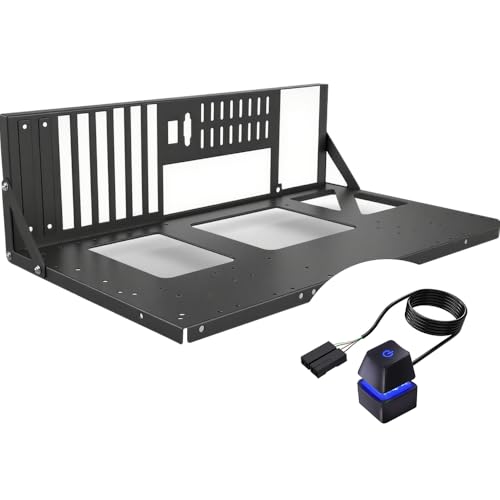
- Broad motherboard compatibility includes ATX, MATX, and ITX
- Open construction promotes unrestricted airflow around installed hardware
- Easy component access is useful for frequent upgrades and troubleshooting
- Can serve as either a test bench or a permanent open-air case
- Relatively light at 1.76 pounds
- Fan mounting support is not specified
- Maximum GPU clearance is not listed
- Open components receive less physical protection than they would in an enclosed case

JOYJOM Stackable Open-Air ATX Test Bench
- Wide motherboard compatibility, including boards up to 330 x 330mm
- Strong cooling potential from the open-air structure and extensive fan support
- Stackable design is practical for multi-system workspaces
- Supports graphics cards up to 335mm with external fan mounting
- SPCC construction includes 1.5mm panels and brackets
- Open construction provides no enclosed-case protection from dust or accidental contact
- Maximum GPU clearance drops to 310mm when fans are installed internally
- No front I/O ports are listed in the product data

- Supports four common motherboard form factors, including E-ATX
- Open design makes components easier to reach
- GPU length and CPU cooler height are listed as unrestricted
- Supports up to two SSDs and two HDDs
- Uses a standard ATX power supply
- Fan support and mounting locations are not specified
- Open components receive less physical protection than they would in an enclosed case
- Chassis materials and included accessories are not listed
Which Open-Frame Case Fits Your Build
I would start with the ALAMENGDA AL01 for a straightforward ATX, Micro ATX, or ITX setup. Its 0.8mm SPCC steel construction includes folded edges and triangular reinforcement, while unrestricted graphics card dimensions make it practical for frequently changing components. Rear cable-routing openings also give builders a way to keep wiring from spreading across the work area.
For a larger workstation or server-oriented build, I would choose the JOYJOM Stackable Techbench. It accepts motherboards up to 330 by 330mm, can sit horizontally or vertically, and supports extensive fan or radiator configurations. Its stackable frame, multiple drive mounts, and thicker side panels make it the more structured option. Builders focused specifically on liquid cooling can also compare layouts in our water-cooling case overview.
The DALAIBUKESI DIY Aluminium is the flexible choice when power-supply compatibility matters. It supports ATX, SFX, and 1U units, along with air and water cooling and unrestricted graphics card length. I would point experienced builders toward it when customization matters more than a conventional enclosure. Tom’s Hardware also covers broader PC cooling and component-selection topics.
FAQs
1. Are open-air PC cases suitable for everyday use?
Yes, but they require a different approach from enclosed cases. Direct component access makes upgrades and maintenance easier, while the lack of protective panels leaves hardware more exposed to dust, spills, pets, and accidental contact. They work best in a clean, stable location with enough room around the frame.
2. Do open-frame cases need case fans?
An open frame allows heat to disperse without relying on a closed airflow path, but fans can still help cool radiators, storage devices, motherboard components, and other targeted areas. Fan needs depend on the installed hardware and cooler arrangement. For general layout principles, see our explanation of PC case sizes and categories.
3. How do I check motherboard compatibility?
Match the board’s form factor and physical dimensions against the frame specifications. Several options here support ATX, Micro ATX, and ITX, while selected models also accept E-ATX boards. For oversized or server motherboards, check the stated maximum dimensions rather than relying only on the form-factor label.
4. Is graphics card clearance still important in an open case?
Yes. Some open frames advertise unrestricted card length, but brackets, power supplies, fans, radiators, and cables can still affect the usable space. Other designs state a fixed clearance based on fan placement. Check card length, slot thickness, support method, and power-connector space before choosing a frame.
5. What are the main drawbacks of an open-air case?
The primary compromises are reduced physical protection and greater exposure to airborne dust. An open frame also does little to contain sound from fans, pumps, or storage drives. Careful placement and routine cleaning are therefore more important than with a fully enclosed chassis, especially in busy rooms or homes with pets.
Editor’s Verdict
Among the best open-air PC cases, the ALAMENGDA AL01 is my choice for a simple, accessible build with broad mainstream motherboard support. For larger boards, more cooling hardware, or a stackable workstation layout, I would move up to the JOYJOM Stackable Techbench.