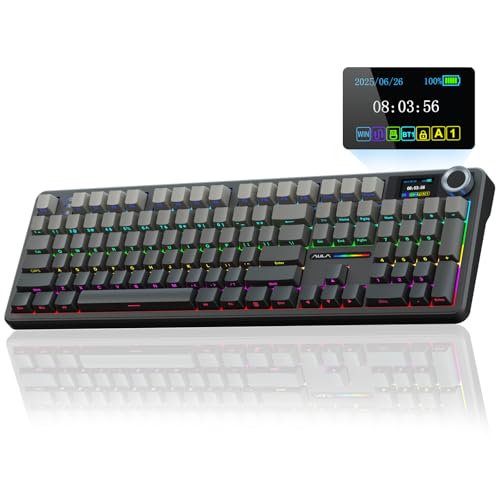
Desk space disappears quickly when low-sensitivity mouse swiping demands wide sweeps across a mouse pad. Full-sized decks crowd your hands into awkward angles during long matches, pushing many players toward the best small gaming keyboards to regain posture and control. Learning how does a mechanical keyboard work shows why compact layouts sacrifice zero performance despite losing number pads.
Recommended by Us

AULA F75 Pro Wireless Keyboard
- Rich five-layer acoustic dampening creates a pleasant, deep sound profile
- Universal 3-pin and 5-pin hot-swappable PCB allows easy customization
- Flexible tri-mode connectivity links up to five systems across various platforms
- Generous 4000mAh rechargeable battery offers dependable wireless endurance
- Factory-lubed switches and stabilizers eliminate harsh scratchiness immediately
- Side-printed keycap legends can take time to get used to in dim environments
- Substantial 2.25-pound weight makes it less ideal for frequent travel

AULA WIN68 HE Gaming Keyboard
- Ultra-fast 8,000Hz polling rate and 0.3ms response time
- Adjustable magnetic switch actuation ranging from 0.02mm to 3.44mm
- No-install web driver configuration for Windows systems
- Compact 60% layout preserves valuable desk space
- Web configuration driver does not support macOS
- Wired connection only, with no wireless connectivity options

- Convenient dedicated one-touch button for quick backlight toggling
- Wide compatibility across modern Windows, macOS, and gaming consoles
- Full 104-key layout provides dedicated arrows and a full numpad
- 19-key anti-ghosting supports rapid simultaneous key combinations
- Employs mechanical-feeling keys rather than authentic mechanical switches
- Fixed rainbow color scheme without per-key RGB customization
- Wired-only connection offers no detachable cable or wireless modes

- Space-saving 68-key layout preserves separate arrow keys
- Quiet keystrokes suitable for shared workspaces and late-night sessions
- Convenient detachable Type-C cable simplifies transport and cable management
- Transparent shine-through key legends enhance visibility in dim lighting
- Features membrane dome actuation rather than true modular mechanical switches
- Lighting customization is limited to built-in static and breathing modes
- No wireless or Bluetooth connectivity options available

Aula WIN60 HE 60% Gaming Keyboard
- Ultra-low 0.02mm rapid trigger step distance for competitive shooters
- 8000Hz polling rate provides rapid input responsiveness
- Contact-free magnetic switches reduce mechanical wear over time
- Compact 60% form factor frees up considerable desk space
- Hot-swappable PCB supports straightforward switch maintenance
- Compact 60% layout lacks dedicated arrow and function keys
- Wired-only configuration provides no wireless flexibility

Redragon K671 Mechanical Keyboard
- Hot-swappable switch design makes replacement straightforward without soldering
- Smooth linear switch feel reduces finger fatigue during long gaming sessions
- Comes with spare switches and extra accent keycaps out of the box
- Full key anti-ghosting ensures accurate registration of complex combinations
- Backlight color is fixed and cannot be changed despite multiple motion modes
- Product description notes conflicting information regarding ABS versus PBT keycap material

SteelSeries Apex 3 Gaming Keyboard
- IP32 spill resistance provides protection against desk liquid accidents
- Whisper-quiet switches prevent noisy typing in shared spaces
- Included magnetic wrist rest supports ergonomic comfort
- Wide compatibility across modern gaming consoles and PC platforms
- Convenient dedicated multimedia controls for immediate adjustments
- 10-zone backlighting lacks individual per-key RGB customization
- Switch feel may be too soft for gamers who prefer clicky mechanical feedback
- Product data does not specify connection cable type or detachability
Matching Compact Decks to Playstyles
Choosing the right compact keyboard comes down to whether you prioritize switch technology or daily typing comfort. For twitch shooters like tactical FPS games, I would point competitive players toward the AULA WIN68 HE. Its magnetic Hall Effect switches support rapid trigger functionality and an 8000Hz polling rate. This setup lets you adjust key actuation down to tiny increments, giving you quick counter-strafing without waiting for a mechanical stem to reset. Hardware outlets like PC Gamer regularly highlight magnetic switches for these rapid reset advantages.
If you prefer a balanced option that retains arrow keys, I would go with the AULA F75 Pro. The 75 percent form factor keeps dedicated navigation keys while freeing up room for your mouse. It offers tri-mode connectivity across Bluetooth, 2.4GHz wireless, and USB-C, alongside hot-swappable sockets and pre-lubed Reaper switches for smooth typing. Wondering about durability? Knowing how long does a mechanical keyboard last makes hot-swap sockets valuable, since you can easily swap out failing switches down the road.
FAQs
Q: Why do competitive gamers prefer smaller keyboards?
A: Small form factors remove the number pad and navigation cluster, leaving more desk surface for wide mouse swipes. This setup is crucial for low-DPI aiming in tactical shooters. A smaller board also brings your mouse closer to your center of mass, reducing shoulder strain during long sessions.
Q: What is the main difference between 60 percent and 75 percent boards?
A: A 60 percent board removes dedicated arrow keys, function rows, and the number pad, relying on secondary key layers for those inputs. A 75 percent board retains dedicated arrow keys and the top function row in a tightly packed layout, making it far more practical for everyday typing and productivity.
Q: How do magnetic Hall Effect switches compare to standard mechanical switches?
A: Magnetic switches use sensors to register movement rather than physical metal contacts. This design enables rapid trigger mode, resetting the key the instant your finger lifts upward. It also avoids physical wear over time. If dirt ever builds up around the stems, checking how to clean a mechanical keyboard keeps the sensors working smoothly.
Q: Are wired connections better than wireless for small gaming boards?
A: Detachable USB cables eliminate interference and battery management, ensuring consistent signal transmission during tournaments. Many modern boards use detachable Type-C cables, which make packing up your peripheral easy while delivering rock-solid connections during intense matches.
Editor’s Verdict
For players hunting down the best small gaming keyboards, the AULA WIN68 HE delivers exceptional magnetic responsiveness for FPS titles, while the AULA F75 Pro remains my favorite wireless pick for blended work and gaming.