Hollow pinging and rattly spacebars can ruin an otherwise great desktop gaming session. Modern mechanical boards increasingly prioritize internal dampening layers, pre-lubed switches, and flexible mounting styles to produce deep, satisfying keystrokes. Upgrading to the best sounding gaming keyboards transforms everyday typing into an enjoyable tactile experience without sacrificing the quick actuation needed for fast-paced competitive titles.
Recommended by Us

Redragon S101-3 PRO Keyboard and Mouse
- Inclusive keyboard and mouse combo covers all peripheral essentials at once
- Quiet membrane keystrokes make it ideal for noise-sensitive environments
- Five dedicated macro keys simplify command execution in games and productivity apps
- Hardware memory preserves custom lighting and DPI adjustments across reboots
- Built-in wrist rest provides extra palm comfort during extended use
- Membrane key response lacks the crisp tactile actuation of mechanical switches
- Tethered wired connection cannot be used wirelessly
- Full-size dimensions demand substantial desk space

- Striking translucent exoskeleton design that stands out on any desk
- Flexible tri-mode connectivity compatible with Windows and Mac
- Lightweight 40gf GravaStar x BSUN linear switches offer snappy inputs
- Gasket mount structure dampens harsh bottom-outs for a creamy sound
- Hot-swappable sockets allow easy switch swapping
- Transparent finish and clear keycaps show fingerprints and dust readily
- Futuristic exoskeleton aesthetic may clash with understated setups
- Lacks dedicated macro keys or an onboard volume roller

Redragon K671 Mechanical Keyboard
- Hot-swappable switch design makes replacement straightforward without soldering
- Smooth linear switch feel reduces finger fatigue during long gaming sessions
- Comes with spare switches and extra accent keycaps out of the box
- Full key anti-ghosting ensures accurate registration of complex combinations
- Backlight color is fixed and cannot be changed despite multiple motion modes
- Product description notes conflicting information regarding ABS versus PBT keycap material

- IP53-rated spill and dust resistance adds substantial real-world durability
- Low-noise key response ensures quiet gaming without annoying roomates or coworkers
- Convenient physical media dial allows instant volume tweaks
- Detachable rubber-surfaced palm rest reduces wrist fatigue during long sessions
- Features 10-zone illumination rather than individual per-key RGB control
- Wired-only configuration does not support wireless desktop setups
- Key actuation details and internal switch mechanisms are not specified in the listing

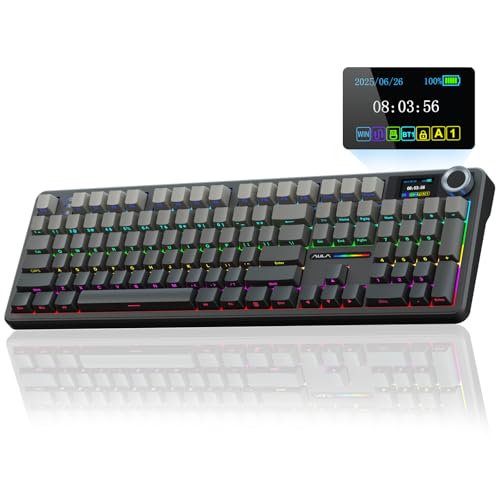
AULA F75 Pro Wireless Keyboard
- Rich five-layer acoustic dampening creates a pleasant, deep sound profile
- Universal 3-pin and 5-pin hot-swappable PCB allows easy customization
- Flexible tri-mode connectivity links up to five systems across various platforms
- Generous 4000mAh rechargeable battery offers dependable wireless endurance
- Factory-lubed switches and stabilizers eliminate harsh scratchiness immediately
- Side-printed keycap legends can take time to get used to in dim environments
- Substantial 2.25-pound weight makes it less ideal for frequent travel

Womier SK80 75% Mechanical Keyboard
- Vibrant angled mini display supports custom GIF uploads and real-time status readouts
- Gasket mount with dual EVA foam layers creates a pleasant, dampened acoustic profile
- Universal 3-pin and 5-pin hot-swappable switch sockets for easy modding
- South-facing LEDs ensure bright backlighting without keycap interference
- Restricted to a wired connection without wireless or Bluetooth functionality
- Specific brand or model of the included linear switches is not specified

Corsair K55 RGB PRO Gaming Keyboard
- IP42 dust and spill resistance guards against daily accidents
- Six onboard macro keys integrate seamlessly with Elgato Stream Deck
- Dedicated media and volume controls for quick audio adjustments
- Detachable rubber palm rest provides ergonomic wrist comfort
- Quiet membrane actuation suitable for shared environments
- Membrane keys lack the tactile feedback of mechanical switches
- Zoned RGB illumination rather than per-key backlighting
Matching Keyboards to Your Acoustic Preferences
Finding a board that sounds pleasant right out of the box used to require custom building, but factory options have improved dramatically. Gamers who want a deep, muted keystroke profile will appreciate how internal silicone layers and switch plates alter keypress acoustics, much like understanding how does a mechanical keyboard work helps you evaluate overall chassis resonance. When reviewing the keyboards below, I look closely at dampening layers and switch smoothness.
- If you want a creamy sound profile with zero setup hassle, the AULA F75 Pro is the one I would go with because its five layers of internal sound-absorbing foam, single-key slotted PCB, and pre-lubed LEOBOG Reaper switches deliver an exceptionally clean bottom-out.
- For players who appreciate a futuristic aesthetic alongside pleasant acoustics, I would point toward the GravaStar Mercury K1 Lite, which pairs custom linear switches with a gasket-mounted structure and five foam dampening layers inside an eye-catching transparent frame.
- If you want visual feedback and customizable media controls alongside a cushioned keystroke, the Womier SK80 offers pre-lubed linear switches, an EVA plate, and a built-in multimedia screen for custom graphics.
FAQs
1. What makes a mechanical keyboard sound thocky or creamy?
A deep, creamy acoustic profile usually comes from internal foam layers, gasket mounting, and factory lubrication on switch stems and stabilizers. These dampening components absorb high-frequency vibrations and case resonance, preventing sharp plastic clatter. Hardware publications like PC Gamer often highlight how multi-layer dampening elevates mainstream typing acoustics.
2. Do linear switches sound better than tactile or clicky switches for gaming?
Linear switches generally produce smoother acoustics because they lack the sharp internal clicking mechanism found in clicky stems. For gaming, linear switches bottom out cleanly against padded switch plates, making them quieter over voice microphones. Knowing how long does a mechanical keyboard last also helps buyers realize that quality mechanical switches outlast traditional rubber domes.
3. Why are gasket-mounted keyboards quieter?
Gasket-mounted designs suspend the switch plate between silicone or poron strips rather than screwing it directly into a rigid tray. This slight flex absorbs the impact shock of aggressive key presses. The result is a softer bottom-out feel that eliminates hollow metallic reverberation across the entire keyboard frame during intense matches.
4. Does keeping a keyboard clean change how it sounds over time?
Dust, crumbs, and debris gathering between keycaps can degrade acoustic clarity and introduce friction into switch stems. Following proper guidelines on how to clean a mechanical keyboard prevents dirt buildup from stiffening stabilizers and ruining the smooth, consistent sound of your favorite board.
Editor’s Verdict
For an acoustic profile that sounds balanced without manual modifications, the AULA F75 Pro and GravaStar Mercury K1 Lite stand out among the best sounding gaming keyboards available. Their multi-layer foam dampening and smooth factory-lubed switches provide quiet, satisfying feedback that will elevate any desktop setup.