


On a tight budget, RAM is the easy win: one system here comes with 32GB, which is rare in the cheapest tier. Among the best budget prebuilt gaming PCs, the STGAubron RX 560 is that one, and the GPVHOSO i7-4770 GTX 1050 Ti has the strongest graphics in this table.
Recommended by Us
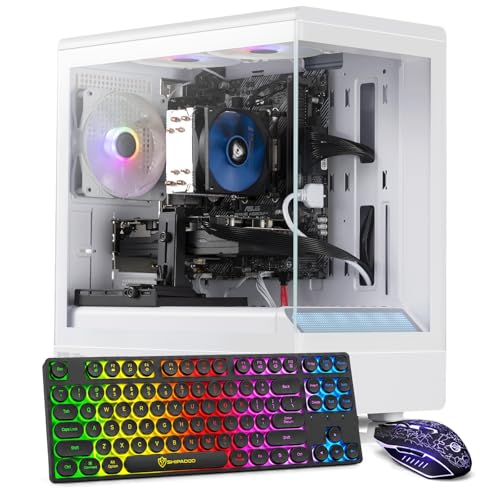
GPVHOSO i7-4770 GTX 1050 Ti Gaming PC
- Dedicated GTX 1050 Ti 4GB graphics
- 16GB RAM supports routine multitasking
- Includes a 512GB SSD instead of mechanical-only storage
- Windows 11 Home comes preinstalled
- Slim, minimalist white tower
- Older processor and entry-level graphics are better for casual use than demanding modern gaming
- The listing does not specify the power supply or available upgrade connections
- Port selection and wireless connectivity are not listed

GPVHOSO Gaming PC with GTX 1050 Ti
- Dedicated GTX 1050 Ti graphics rather than integrated graphics
- 16GB RAM and a 512GB SSD are included
- Windows 11 Home comes pre-installed
- Includes an RGB keyboard and mouse
- Three RGB fans add lighting to the black chassis
- The 4th Gen Intel Core i7 and GTX 1050 Ti are older, entry-level gaming hardware.
- Wi-Fi support, port selection, power supply details, and RAM type are not specified.
- The listed 10 x 2 x 50-inch dimensions are unusual for a tower and should be verified before purchase.

STGAubron Core i7 RX 560 Gaming PC
- 32GB of RAM is generous for multitasking and mixed home or office use.
- Wi-Fi 6, Bluetooth 5.0, and wired Ethernet are all included.
- HDMI and DisplayPort support common monitor connections.
- Includes an RGB keyboard, RGB mouse, and three RGB fans.
- The RX 560 4G is an entry-level graphics card and may require reduced settings in demanding modern games.
- The listing does not identify the Intel Core i7 generation or exact processor model.
- The 512GB SSD may feel limited for users maintaining a large collection of games or media.

ZER-LON Core i5 RX 550 Gaming PC
- Dedicated Radeon RX 550 4GB GDDR5 graphics
- 16GB of memory and 512GB SSD storage
- HDMI, DisplayPort, and DVI monitor connections
- Built-in Wi-Fi plus multiple USB ports
- Includes gaming peripherals and five RGB fans
- RX 550 graphics are best viewed as entry-level rather than intended for demanding high-setting gaming
- The exact Intel Core i5 generation and model are not specified
- Power supply details and memory speed are not listed
STGAubron Xeon E5 RX 550 Gaming PC
- Includes dedicated Radeon RX 550 4G graphics
- 16GB of memory is useful for general multitasking
- Fast 512GB SSD rather than mechanical-only storage
- Built-in Wi-Fi and Bluetooth 5.0
- RGB keyboard, mouse, and three RGB fans are included
- The RX 550 is an entry-level graphics card and may require reduced settings in demanding modern games
- The listing does not identify the exact Xeon E5 model or generation
- RAM type, memory speed, power supply details, and upgrade options are not specified
What You Give Up With a Budget Gaming PC
A limited budget usually means accepting a smaller SSD, less memory headroom, a simpler case, and an older or entry-level processor. Those compromises are reasonable when the system still includes a dedicated graphics card. Integrated graphics can be adequate for ordinary desktop work, but choosing them instead of a discrete GPU substantially changes the machine’s gaming capability. Cosmetic lighting and elaborate case styling should also rank below core components. Our guide to gaming PC specs explains how the major parts affect everyday use.
Storage and memory are generally the easiest limitations to address after purchase. An additional SSD can provide more room, while compatible RAM can improve capacity for multitasking. Replacing an old processor is more complicated because the motherboard and memory platform may limit compatible upgrades. A graphics card replacement can also demand more physical space, stronger cooling, and suitable power connectors. For that reason, buyers should examine the complete configuration rather than judging a computer by its processor label, RGB fans, or bundled accessories.
Worth knowing: RAM and storage are usually simple to add later, but a weak power supply or cramped case can block a future graphics card upgrade. Confirm available space, connectors, and component compatibility before buying.
Safe Cuts and Costly Ones
Some compromises reduce appearance or convenience, while others directly weaken gaming performance.
| Component | How to Approach It |
|---|---|
| Case and RGB | A safe place to save because appearance matters less than the components inside. |
| Storage size | Starting with a 512GB SSD is reasonable, and another compatible drive can be added later. |
| RAM | 16GB is the practical floor for a budget gaming desktop and is usually inexpensive to expand. |
| GPU | This is not a safe place to cut because the graphics card drives gaming performance. |
The same graphics card can appear in systems with different processors, memory capacities, storage configurations, and power supplies. Compare the complete specification list, not just the GPU name in the title. Power delivery, case space, and platform age can affect how useful a computer remains after an upgrade. Our gaming PC RAM overview can help you decide whether the included capacity is enough.
How to Choose a Budget Prebuilt
Start with the parts that affect performance and reliability, then consider appearance and bundled accessories.
Keep the Dedicated GPU
A dedicated graphics card should remain one of your main requirements. Do not trade it away for additional RGB lighting, a more decorative case, or peripherals that can be replaced cheaply. The GPU handles the demanding visual workload in games, so reducing it often has a greater effect than accepting a smaller SSD or simpler chassis. Compare the exact GPU listed for each computer, and be cautious when a product page focuses heavily on processor labels while giving graphics details little attention.
Entry-level and older graphics cards require realistic expectations. They are better suited to modest settings and lighter workloads than demanding visual settings. That can still make sense for a first gaming desktop, a secondary system, or a computer shared between gaming, school, and office tasks. Check the outputs against your monitor and verify that the listing clearly identifies a discrete card. Vague phrases such as gaming graphics are less useful than a specific GPU model and stated memory capacity.
Check the Power Supply
A quality power supply protects the system and can leave room for later component changes. Unfortunately, budget listings do not always provide its manufacturer, wattage, efficiency rating, connectors, or physical format. Read the specification page carefully and ask the seller when essential details are missing. Do not assume that a gaming case or several RGB fans means the internal power supply is suitable for a larger graphics card. The case and cooling must also accommodate the additional heat and physical size.
If the listing provides power supply details, compare them with the requirements of any graphics card you might install later. Pay attention to available power connectors rather than considering wattage alone. A proprietary unit, unusual motherboard connector, or compact format may make replacement harder. Our article on proprietary PC parts explains why some prebuilts accept standard upgrades more easily than others. When information is unavailable, treat upgrade potential as uncertain rather than guaranteed.
Count the Extras
Bundled accessories can improve the value of a starter setup when you genuinely need them. A keyboard and mouse save an immediate separate purchase, while an included monitor would represent an even larger part of a complete setup. However, accessories should not distract you from the processor, GPU, RAM, storage, and connectivity. A small core specification improvement may matter more over time than basic peripherals, especially if you already own compatible equipment that you like using.
Examine what the package actually includes and avoid assuming that accessories shown in promotional images come in the box. Among these systems, several listings explicitly include a keyboard and mouse, while included fan counts and lighting arrangements vary. Treat those extras as secondary benefits rather than proof of gaming performance. Also check whether the computer provides the display connection your monitor needs. An adapter is possible in some situations, but a direct compatible connection is usually more convenient.
Compare Return Terms
Budget computer listings can vary in seller support, warranty coverage, return windows, and acceptable return condition. Confirm the current terms on the retailer page before ordering because those policies can change. Keep the original packaging until you have checked that the system starts correctly, recognizes its listed memory and storage, connects to your network, and produces an image through the graphics card. Clear photographs of the package and computer can also be useful if it arrives with visible damage.
Do not treat a high displayed rating as conclusive when a listing has little or no review history. Product specifications, seller information, return eligibility, and written support terms offer more useful context. Determine who handles repairs, whether labor and parts are covered, and who pays shipping if service is required. Our prebuilt PC warranty article covers the details worth checking. Written terms are more dependable than broad support language in marketing copy.
Who Should Buy Which System
- Best overall: STGAubron RX 560 pairs Radeon RX 560 4G graphics with 32GB memory and a 512GB SSD.
- Best for the strongest GPU: GPVHOSO i7-4770 GTX 1050 Ti uses GTX 1050 Ti 4G graphics and an Intel i7-4770.
- Best value: ZER-LON RX 550 combines Radeon RX 550 4GB graphics, 16GB memory, and a 512GB SSD.
- Best alternative brand: GPVHOSO 4th Gen GTX 1050 Ti offers GTX 1050 Ti 4GB graphics in a compact black chassis.
- Best runner-up: STGAubron RX 550 includes RX 550 4G graphics, 16GB memory, and Wi-Fi.
Final Thoughts
Spend first on the dedicated GPU, adequate memory, and a configuration that clearly documents its essential parts. Storage capacity, basic peripherals, RGB lighting, and case styling should come later.
The STGAubron RX 560 is the strongest all-around recommendation here, while the ZER-LON RX 550 is the better value-oriented choice for buyers who can accept more modest graphics hardware.
More Options to Consider
- Core i5 GTX 960 Build uses an Intel Core I5 8th processor and GeForce GTX 960 4G GDDR5 graphics. It suits casual players who also want a 512GB SSD, built-in Wi-Fi, and bundled input devices.
- Tisukisu RX 590 stands out with AMD Radeon RX 590 8G GDDR5 graphics, 16GB of RAM, and a 512GB SSD. It is worth considering when graphics memory and broad display connectivity are priorities.
- Tisukisu RX 560 includes AMD Radeon RX 550 4G GDDR4 graphics, 16GB of RAM, and a 512GB SSD. Its bundled keyboard, mouse, mouse pad, and RGB case lighting suit someone starting without accessories.
FAQs
1. How cheap can a good gaming PC be?
The lowest sensible cost depends on the games, settings, and display resolution you expect to use. A very inexpensive desktop can be worthwhile if it includes a clearly identified dedicated GPU, sufficient memory, and an SSD. Older processors may be acceptable for modest needs, but they can limit upgrades and performance in processor-heavy work. Avoid judging value from the case design, RGB lighting, or an impressive-sounding processor family alone.
2. Is a budget prebuilt gaming PC worth buying?
Yes, a budget prebuilt can be worthwhile for someone who wants a ready-to-use computer without selecting and assembling every component. It can also include Windows, Wi-Fi, and basic peripherals, depending on the listing. The tradeoff is that component details and upgrade flexibility may be less transparent than with a carefully planned custom build. Compare the full specification sheet, support terms, seller information, and return policy before deciding.
3. What should I never cut on a budget gaming PC?
Do not remove the dedicated graphics card merely to gain a flashier case, more lighting, or extra accessories. You should also avoid an inadequately documented power supply when upgrades matter, since power capacity and connectors affect compatible graphics cards. Memory and storage are easier to expand in many standard desktops, although compatibility still needs checking. Prioritize the GPU, safe power delivery, adequate cooling, and a platform that meets your actual workload.
4. Is it cheaper to build or buy a budget gaming PC?
Either approach can cost less depending on component sales, operating system needs, shipping, and included accessories. Building offers more control over part quality and upgrade compatibility, while a prebuilt saves assembly time and provides one complete purchase. Very inexpensive prebuilts may use older platforms or provide limited internal details. Our prebuilt versus custom comparison explains the practical tradeoffs between convenience, component choice, support, and upgrade flexibility.
5. Can I upgrade a budget prebuilt later?
Many budget prebuilts allow memory and storage upgrades, but compatibility depends on the motherboard, available slots, drive connections, and case layout. A graphics card upgrade may also require a stronger power supply, suitable connectors, enough chassis space, and adequate cooling. Processor upgrades are often more restricted because socket and motherboard support can be limited. Check the documentation and internal layout before purchasing parts, and never assume every component uses a standard format.









